
Self-host ScreenTinker
v3.0.3Open-source digital signage CMS for self-hosted screens
- Stars
- 239
- CPU
- 1 vCPU (up to 25 displays)
- RAM
- 1 GB RAM (up to 25 displays)
- Storage
- 20 GB disk (up to 25 displays)
- Ports
- 3001 (HTTP server), 3443 (HTTPS server (when SSL certs present))
- Requires
- SQLite
ghcr.io/screentinker/screentinker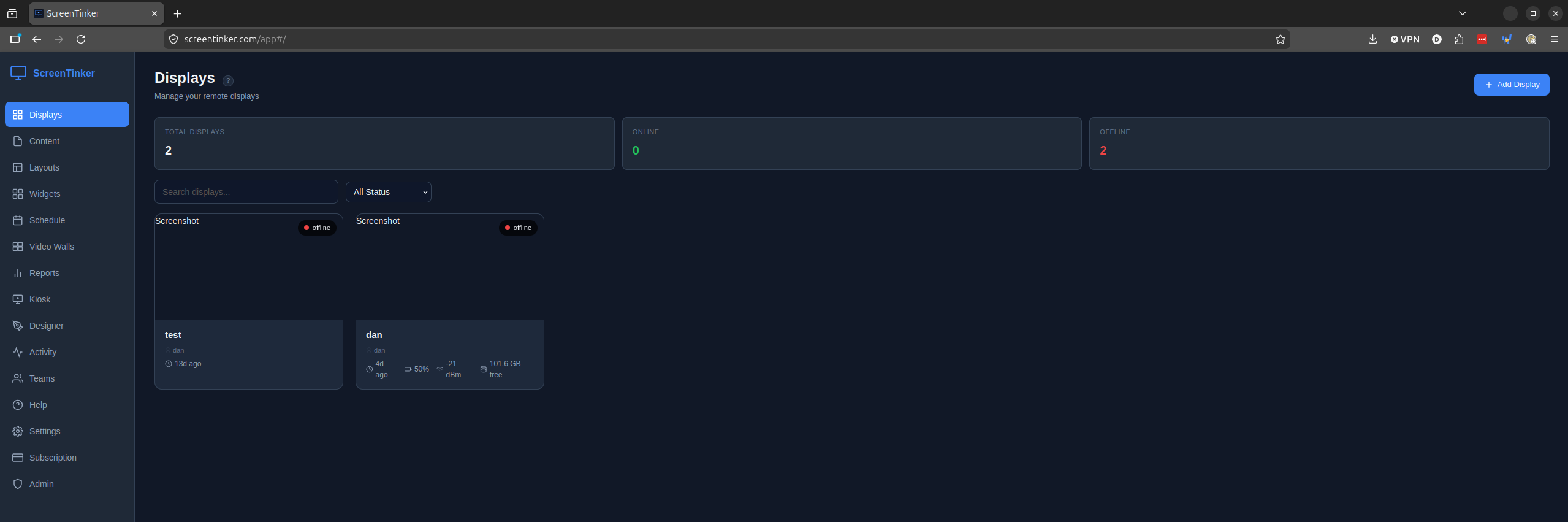
What is ScreenTinker?
A free, open-source digital signage platform for centrally managing displays across multiple locations from a web dashboard. It runs on over a dozen platforms including Raspberry Pi, Windows, ChromeOS, and various smart TV operating systems plus any modern browser. Features include playlists with draft/publish workflow, a slide editor with templates and animations, device groups for bulk commands, multi-zone layouts with seven templates, video walls with bezel compensation, remote control with live view and touch injection, optional WebRTC live video and intercom/PA via a go2rtc sidecar, live TV/IPTV and camera feeds (HLS, RTSP), visual scheduling with recurrence, resumable chunked uploads, device-side REST for LAN HTTP calls, display power schedules, widgets (clocks, weather, RSS, social walls, directory boards), data sources binding live external data (iCal, JSON APIs), meeting room signs, kiosk mode, proof-of-play analytics, device telemetry, offline resilience via local caching, multi-tenant workspaces with six role levels, approval workflows with version history, email alerts via Microsoft Graph or SMTP, white-label customization, content management with folders and remote URLs, PDF-to-playlist conversion, flexible storage (local, S3-compatible, Azure Blob), export/import, per-device auth tokens, JWT/bcrypt security, optional Stripe billing, OTA updates, a public REST API with scoped tokens (OpenAPI 3.1), and Node Mesh for linking servers. The server requires Node.js 22.14+ with SQLite (better-sqlite3) and optional ffmpeg. Self-hosting docs cover quick start, systemd, nginx/Caddy, and backup/upgrade scripts. A hosted SaaS version offers a free tier and 14-day Pro trial.
Should you self-host ScreenTinker?
ScreenTinker scores 53/100 on selfhost.directory (how scoring works) and ranks #4 of 7 in Digital Signage. It has 239 GitHub stars.
It shipped 10 stable releases in the past year. The latest, v3.0.3, came out on 25 October 2026. New versions land roughly every 2 days.
Setup is moderate: expect some configuration beyond a single command. An official Docker image is available. It is MIT-licensed and written mostly in JavaScript.
Its closest alternative on selfhost.directory is anthias (67/100, 3 706 stars). It scores higher overall, so compare the two before you pick. See ScreenTinker vs anthias side by side.
Features
- Device groups
- Meeting Room Signs
- Multi-Zone Layouts
- Playlist Management
- Remote Control
- Slide Editor
- Video Walls
ScreenTinker README
FAQ
Do my displays keep playing if the internet goes down?
Yes. ScreenTinker players cache their content locally and keep playing during an internet or server outage, then sync automatically once the connection returns.
Are there ready-made templates?
Yes. The template library installs slide and code templates from a catalog where every template is cryptographically signed so the server can verify it hasn't been tampered with.
Can I show live data from Google Sheets or an API?
Yes, on every plan including Free. Connect a Google Sheet by pasting its share link, or point at any REST/JSON API with a bearer token, API key or basic auth.
What can I put on my screens?
Images, video, PDFs, slides and templates, live data from Google Sheets and APIs, playlists, multi-zone layouts, and live widgets like clocks, weather, RSS tickers, countdowns, QR codes, web pages, and scrolling directories.
What's the difference between self-hosted and cloud digital signage?
With cloud, the vendor hosts everything and you just sign in. With self-hosting, you deploy on your own server so your content and device data never leave your network, with no recurring SaaS fees.
Does ScreenTinker run on BrightSign players?
Yes. A BrightSign runs the same web player the browser does, so it gets the same playlists, layouts, scheduling and remote control as every other screen.
Does ScreenTinker work on Android TV and Fire TV?
Yes. Install the free APK on any Android TV box or Amazon Fire TV Stick to turn it into a managed signage display with kiosk mode and live remote control.
Can I run digital signage on a Raspberry Pi?
Yes. A Raspberry Pi 4 or newer makes an excellent low-cost signage player. The one-line installer sets up kiosk mode, auto-start, and pairing.
Does audience counting record people?
No. The player counts faces turned toward the screen and discards each frame immediately. No image or video is stored or sent, nobody is recognized.
Can I show a Power BI dashboard on a TV screen?
Yes. An organization admin adds your Power BI service principal once, and editors pick a report. Screens get a view-only embed token that expires within the hour.
Can digital signage show emergency alerts?
Yes. Subscribe to public CAP feeds like US National Weather Service or MeteoAlarm, or connect Alertus, InformaCast or any CAP 1.2 system. Alerts take over screens instantly.
Does ScreenTinker support single sign-on with SAML or OIDC?
Yes. Each organization can connect its own identity provider over SAML 2.0 or OpenID Connect, including Entra ID, Okta, Google Workspace, ADFS and OneLogin.
How long is the free trial, and what does it include?
14 days of the Pro plan on the hosted service: up to 15 screens and 20 GB of storage, with every integration. No credit card needed.
Is there free digital signage software?
Yes. ScreenTinker is free and open source (MIT licensed). The free cloud plan runs 1 display with 500 MB of storage, and if you self-host there's no per-screen fee at all.
More in Digital Signage
 spacepadSelf-hosted, open-source meeting room display turning tablets into availability panels with real-time calendar sync for Google, Microsoft 365, and CalDAV.
 XiboXibo is a self-hosted, open-source digital signage platform for managing content across displays via a web CMS and multi-platform players, deployed with Docker.
 Xibo CMSSelf-hosted open-source digital signage software with a web-based CMS for managing screen content, schedules, and player devices. Deployed via Docker Compose.
 anthiasFree open-source digital signage platform for Raspberry Pi and x86 PCs. Schedule images, videos, web pages with no subscriptions or per-screen fees.
 garlic-hubSelf-hosted open-source digital signage CMS using SMIL for playlists, managing devices and content with multi-zone layouts, REST API, and player-agnostic compatibility.
 home-screensSelf-hosted, open-source smart display turning a Raspberry Pi into a customizable family dashboard with 45 modules, visual editor, and zero cloud dependency.
 magic-frameSelf-hosted, open-source dashboard for home displays with drag-and-drop editor, Home Assistant integration, Immich wallpapers, and live sync across screens.
 open-signageSelf-hosted digital signage platform built with Laravel that manages PDF-based presentations across monitors, groups, and schedules with LDAP authentication.
 screenliteSelf-hosted open-source digital signage CMS with web UI. Built with Fastify, React, PostgreSQL, Redis. Has TOTP 2FA, sandboxed FFmpeg. Early alpha.
0 comments