
Self-host Readur
v3.1.2OCR document management platform with modern UI
- Stars
- 814
- CPU
- 2 cores
- RAM
- 2GB
- Storage
- 10GB
- Port
- 8000 (HTTP web interface and API)
- Requires
- PostgreSQL, Tesseract-ocr
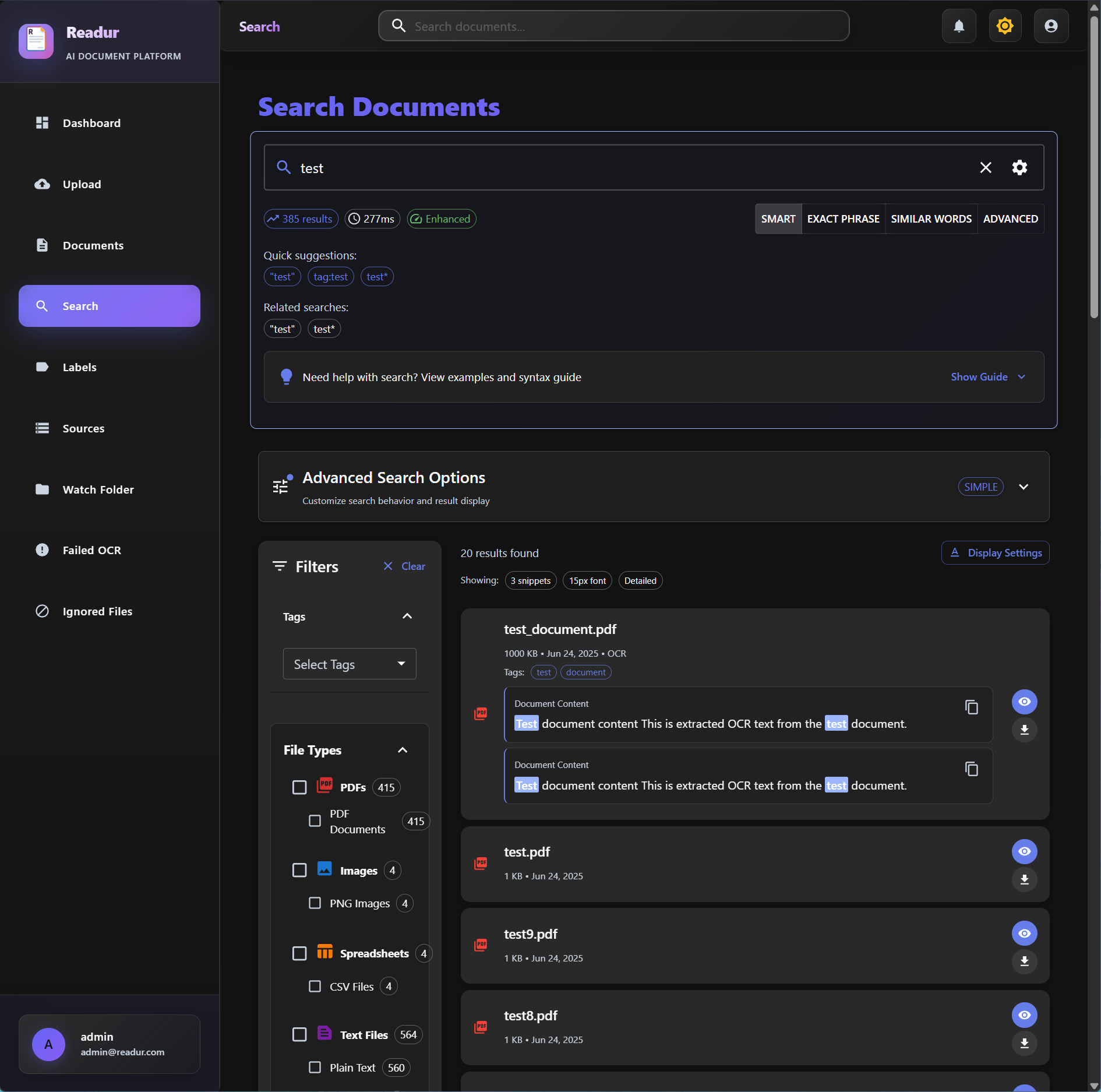
What is Readur?
Readur is a document management system that combines a Rust backend with a React frontend to provide OCR-powered document processing. It extracts text from PDFs, images, and Office documents using Tesseract with multi-language support, and offers PostgreSQL full-text search with multiple query modes. Documents can be ingested via drag-and-drop upload, watched folders, WebDAV, or S3-compatible storage. Features include role-based access control, OIDC/SSO authentication, hierarchical labels, real-time notifications, an analytics dashboard, and a built-in Swagger UI for API exploration. It runs via Docker Compose (with PostgreSQL) or manual installation on Linux/macOS/Windows. The project is MIT-licensed and actively developed.
Readur alternatives
 PapermergeOpen-source self-hosted app for organizing scanned files using OCR, search, tags, folders, and a desktop-style web interface.ComparePapermerge with Readur
 OpenReaderA self-hosted open-source document reader that speaks EPUB, PDF, DOCX, text, and Markdown files aloud with word-level highlighting and audiobook export.CompareOpenReader with Readur
 PaddleOCR LocalSelf-hosted document parsing workbench that converts PDF, images, and Office documents to Markdown using five OCR models with a WebUI, CLI, and Apple Silicon support.ComparePaddleOCR Local with Readur
 DocspellDocspell is a self-hosted, open-source DMS that organizes scanned documents and emails using OCR, full-text search, and ML-powered metadata extraction.CompareDocspell with Readur
 Paperless-AIAI extension for Paperless-ngx providing automatic document classification and semantic search using OpenAI-compatible APIs and Ollama for natural language queries.ComparePaperless-AI with Readur
 DocusealOpen-source, self-hosted DocuSign alternative for creating fillable PDF forms and collecting digital signatures via a mobile-friendly web tool.CompareDocuseal with Readur
 drivebaseDrivebase is a self-hosted, open-source file manager unifying Google Drive, S3, Dropbox, and local files into a desktop-like web UI with real-time transfers.Comparedrivebase with Readur
 Paperless-ngxSelf-hosted open-source document management system that turns paper documents into a searchable digital archive with OCR, AI features, and multi-user supportComparePaperless-ngx with Readur
Should you self-host Readur?
Readur scores 57/100 on selfhost.directory (how scoring works) and ranks #19 of 47 in Document Management. It has 814 GitHub stars, +20 in the last 30 days.
It shipped 15 stable releases in the past year. The latest, v3.1.2, came out on 4 November 2026. New versions land roughly every 2 weeks.
Setup is moderate: expect some configuration beyond a single command. It is MIT-licensed and written mostly in Rust.
Its closest alternative on selfhost.directory is Stirling-PDF (87/100, 96 207 stars). It scores higher overall, so compare the two before you pick. See Readur vs Stirling-PDF side by side.
Features
- Analytics Dashboard
- Document labels & organization
- Folder Monitoring
- Full-Text Search
- Health Monitoring
- Multi-Language OCR
- OCR text extraction
- OIDC/SSO Authentication
- Real-time notifications
- REST API
- Role-based Access Control
- Smart file upload
- Swagger UI
- WebDAV sync
Readur README
Readur is a powerful and modern document management system designed to help individuals and teams efficiently organize, process, and access their digital documents. It combines a high-performance backend with a sleek and intuitive web interface to deliver a smooth and reliable user experience.
You can check our our docs at docs.readur.app.

How to install Readur
Install Readur with Docker Compose
DATABASE_URL, JWT_SECRET, SERVER_ADDRESS, UPLOAD_PATH, WATCH_FOLDER, OCR_LANGUAGE, CONCURRENT_OCR_JOBS, OCR_TIMEOUT_SECONDS, MAX_FILE_SIZE_MB, MEMORY_LIMIT_MB, CPU_PRIORITY, ALLOWED_FILE_TYPES, WATCH_INTERVAL_SECONDS, FILE_STABILITY_CHECK_MS, MAX_FILE_AGE_HOURS, ADMIN_USERNAME, ADMIN_PASSWORD, ADMIN_EMAILClone the repository
git clone https://github.com/perfectra1n/readur cd readur
Optional: JWT_SECRET signs session tokens. When unset, a key is generated on
first start and stored in the database. To manage it yourself:
echo "JWT_SECRET=$(openssl rand -hex 32)" > .env
Start all services
docker compose up --build -d
Access the application
Includes PostgreSQL database, Readur app, and optional Nginx reverse proxy
Install Readur with Build from Source
DATABASE_URL or POSTGRES_HOST/PORT/DB/USER/PASSWORD, JWT_SECRET, SERVER_ADDRESS, UPLOAD_PATH, WATCH_FOLDER, ALLOWED_FILE_TYPESUbuntu/Debian
sudo apt-get update
sudo apt-get install -y
tesseract-ocr tesseract-ocr-eng
libtesseract-dev libleptonica-dev
postgresql postgresql-contrib
pkg-config libclang-dev
macOS (requires Homebrew)
brew install tesseract leptonica postgresql rust nodejs npm
Install Rust (if not already installed)
curl --proto '=https' --tlsv1.2 -sSf https://sh.rustup.rs | sh
Configure Database
sudo -u postgres psql CREATE DATABASE readur; CREATE USER readur_user WITH ENCRYPTED PASSWORD 'your_password'; GRANT ALL PRIVILEGES ON DATABASE readur TO readur_user; \q
Environment Configuration
cp .env.example .env nano .env
Build and Run Backend
cargo build --release cargo run
Frontend Setup
cd frontend npm install npm run build
Built files in frontend/dist/
Requires PostgreSQL, Tesseract OCR, Rust, Node.js/npm
How to configure Readur
DATABASE_URL=postgresql://readur:readur@localhost/readurPostgreSQL connection stringJWT_SECRETSecret used to sign JWT tokens. When unset, a random key is generated on first start and stored in the databasevalues: at least 32 bytes, generated with openssl rand -hex 32
SERVER_HOST=0.0.0.0Server host (used if SERVER_ADDRESS not set)SERVER_PORT=8080Server port (used if SERVER_ADDRESS not set)UPLOAD_PATH=./uploadsDirectory for file uploads
Readur releases & version history
3.1.1 (2026-11-03)
Bug Fixes
- ci: build leptonica-sys bindings against leptonica 1.86 on ubuntu-26.04 (83ac6e6)
- ci: get main green again (file-length ratchet, stale TS bindings) (0f1047f)
- ci: get main green again (file-length ratchet, stale TS bindings) (e69b09a)
- ci: keep formatters off generated TS bindings; restore ts-rs Label.ts (013944d)
- db: strip U+0000 from every text/JSON bind in one place (64e8a38)
- db: strip U+0000 from every text/JSON bind in one place (bcee4a6), closes #901
- docs: unblock the docs build (MkDocs-2 notice, pip cache poisoning) (3762904)
- docs: unblock the docs build (MkDocs-2 notice, pip cache poisoning) (e2df3a3)
- ocr: honour CONCURRENT_OCR_JOBS for the OCR worker (3c52429)
- ocr: honour CONCURRENT_OCR_JOBS for the OCR worker (3142619)
- ocr: sanitize the OCR queue's error and processed-image binds (e3323e9), closes #901
- ocr: stop skipping pages 1-9 when OCRing PDFs with 10+ pages (f53861e)
- ocr: stop skipping pages 1-9 when OCRing PDFs with 10+ pages (3e5c9e4), closes #980
- render multipage PDF thumbnails without padded suffixes (e63a660)
- render multipage PDF thumbnails without padded suffixes (de37446)
- renovate: follow home-operations preset repo rename; inline local policy (ee988ce)
- renovate: follow home-operations preset repo rename; inline local policy (4fdc5ee), closes #986
- security: resolve open CodeQL alerts in workflows and OCR retry stats (33a2d2c)
- security: resolve open CodeQL alerts in workflows and OCR retry stats (5a4a364)
Documentation
- point dev guides at the paths that exist now (74a4abe)
Styles
- ocr: rustfmt the touched ocr modules (format on touch) (655e12a)
Tests
- postgres:18 and per-test databases cloned from a migrated template (fed7f60)
- postgres:18 and per-test databases cloned from a migrated template (08fe6b4)
- test_helpers' database helpers also clone the template (ef1fe5b)
- webdav: expect U+0000 stripped from stored etags (18482c8), closes #901
Build System
- deps: testcontainers 0.27 and testcontainers-modules 0.15 (349f1b9)
Continuous Integration
- docs: skip the Cloudflare preview deploy on fork PRs (3466ad0)
- docs: skip the Cloudflare preview deploy on fork PRs (5c8b341)
Miscellaneous Chores
- container: Update image sigoden/dufs (v0.46.0 ➔ v0.47.0) (#996) (d969e71)
- db: remove uncompiled src/db_guardrails.rs (8336434), closes #901
- deps: Lock file maintenance (npm) (#883) (77cc810)
- github-action: Update github-actions (#862) (6c237f4)
- github-action: Update github-actions (#960) (401fdd4)
- helm: Update chart common (4.6.2 ➔ 5.3.0) (#675) (39cc346)
- mise: Update mise tools (#968) (0115b14)
- mise: Update tool node (24.21.0 ➔ v24.22.2) (#919) (058368a)
- mise: Update tool node (24.22.2 ➔ v26.13.0) (#985) (3bba8bd)
- mise: Update tool rust (e66a20a)
- mise: Update tool rust (aa26a98)
- npm: Update dependency @playwright/test (1.64.0 ➔ 1.64.1) (#974) (e984510)
- npm: Update dependency @testing-library/jest-dom (6.9.1 ➔ 7.0.1) (#791) (63f6454)
- npm: Update dependency @testing-library/user-event (14.6.7 ➔ 14.6.8) (#969) (01dbf4c)
- npm: Update dependency @vitejs/plugin-react (5.2.0 ➔ 6.2.1) (#588) (887a5c8)
- npm: Update dependency axios (1.15.0 ➔ 1.21.0) (#847) (120c989)
- npm: Update dependency i18next (25.10.10 ➔ 26.7.1) (#618) (6b89462)
- npm: Update dependency i18next-browser-languagedetector (8.2.1 ➔ 8.2.4) (#983) (a81c0cf)
- npm: Update dependency i18next-http-backend (3.0.6 ➔ 4.0.9) (#674) (e3d6df4)
- npm: Update dependency jsdom (29.1.1 ➔ 30.1.3) (#807) (024e951)
- npm: Update dependency lucide-react (1.55.0 ➔ 1.65.0) (#971) (a16abfe)
- npm: Update dependency lucide-react (1.66.0 ➔ 1.66.0) (#1013) (203ded9)
- npm: Update dependency react-aria-components (1.21.1 ➔ 1.22.1) (#950) (0049692)
- npm: Update dependency react-dropzone (15.0.0 ➔ 20.1.4) (#815) (c45cd56)
- npm: Update dependency react-i18next (16.6.6 ➔ 17.1.11) (#617) (a78f5a0)
- npm: Update dependency react-router-dom (7.18.4 ➔ 7.18.5) (#995) (709bcac)
- npm: Update dependency typescript (5.9.3 ➔ 7.0.2) (#757) (fe9c94e)
- npm: Update dependency uuid (13.0.2 ➔ 14.0.3) (#652) (e4fd93f)
- npm: Update dependency vite (7.3.7 ➔ 8.3.5) (#589) (b61dc15)
- npm: Update react monorepo (19.3.0 ➔ 19.3.1) (#976) (c13d3ea)
- npm: Update vitest monorepo (3.2.7 ➔ 5.1.0) (#16) (ed7fe11)
- renovate: group testcontainers with testcontainers-modules (fc00821)
- renovate: group testcontainers with testcontainers-modules (728ee7b)
- rust: Update aws-sdk-rust monorepo (#981) (94b5e38)
- rust: Update crate imageproc (0.25.1 ➔ 0.27.0) (#997) (7cadb16)
- rust: Update crate jsonwebtoken (9.3.1 ➔ 11.1.0) (#804) (91a2a6c)
- rust: Update crate libc (0.2.189 ➔ 0.2.191) (#1009) (a45c225)
- rust: Update crate notify (8.2.0 ➔ 8.2.1) (#984) (3586079)
- rust: Update crate quick-xml (0.37.5 ➔ 0.42.0) (#998) (0d3a049)
- rust: Update crate rand (0.9.5 ➔ 0.10.3) (#999) (3167e40)
- rust: Update crate reqwest (0.12.28 ➔ 0.13.5) (#1000) (a1030f2)
- rust: Update crate rust_xlsxwriter (0.99.1 ➔ 0.102.0) (#1001) (ecda56b)
- rust: Update crate serde_json (1.0.152 ➔ 1.0.154) (#965) (7b68647)
- rust: Update crate sha2 (0.10.9 ➔ 0.11.1) (#1002) (179c785)
- rust: Update crate sha2 (0.11.0 ➔ 0.11.1) (#1007) (b1b2393)
- rust: Update crate sqlx (0.8.6 ➔ 0.9.0) (#1003) (92ca0be)
- rust: Update crate sysinfo (0.39.6 ➔ 0.40.1) (#1004) (ca4f7d6)
- rust: Update crate tokio (1.53.2 ➔ 1.54.1) (#972) (4f70820)
- rust: Update crate uuid (1.28.0 ➔ 1.29.0) (#982) (5381a23)
- rust: Update crate zip (8.6.0 ➔ 9.2.2) (#946) (84cb6be)
- rust: Update utoipa monorepo (#908) (e7146e5)
AI summary Image drawer now opens images full size in new tab
3.1.0 (2026-10-13)
Features
- container: update image rust (1.98 → 1.99) (#923) (eb29c1f)
- dev: primitive gallery at /dev/ui; fix SourceBadge tile class collision (78d6af0)
- document: clicking an image in the drawer opens it full size in a new tab (32eebad)
- document: document drawer — head, labels saved at once, preview on top, Text/Details/Comments/Share tabs (7bc02ca)
- document: drag the dotted handle between the file and the tabs to resize them (remembered) (9a1a275)
- document: drawer context — list registration, ?document= opener, change event (ccca3c5)
- document: remove a label straight from its chip (5d2699c)
- document: the drawer's actions sit in a bar along its bottom (9fcf152)
- every document link opens the drawer over the current page (75a73a9)
- home: mockup layout — pipeline, needs attention, sources, just arrived (220fb08)
- intake: failed-OCR and import-failure details follow ?failure= and ?import= (8f527a5)
- labels: every account owns its default labels; no more system labels (86ba225)
- labels: one kind of label in the UI; every label can be edited, deleted and detached (f18c97a)
- library: clicking the preview in the detail drawer opens the document (4a9cc78)
- library: Library and Search open documents in the global drawer (d3d35a6)
- library: thumbnail-first document cards with metadata, live OCR status (120755d)
- lib: useDrawerParam keeps an open drawer in the URL (6286457)
- npm: update dependency @playwright/test (1.63.0 → 1.64.0) (#949) (70f15bc)
- npm: update dependency lucide-react (1.48.0 → 1.49.0) (#925) (dca6c9d)
- npm: update dependency lucide-react (1.49.0 → 1.48.0) (#918) (6cb8e68)
- npm: update dependency lucide-react (1.49.0 → 1.50.0) (#932) (645ae6f)
- npm: update dependency lucide-react (1.50.0 → 1.51.0) (#935) (e4fea08)
- npm: update dependency lucide-react (1.51.0 → 1.52.0) (#939) (8570ff3)
- npm: update dependency lucide-react (1.52.0 → 1.53.0) (#951) (75e3556)
- npm: update dependency lucide-react (1.53.0 → 1.54.0) (#954) (1a9d26b)
- npm: update dependency lucide-react (1.54.0 → 1.55.0) (#957) (df56160)
- pwa: installable app — manifest, iOS home-screen tags, square icons, safe areas (d5e9d3e)
- routes: /documents/:id redirects to the drawer; remove the document page (dd08ae1)
- rust: update aws-sdk-rust monorepo (#926) (7d5b7ec)
- rust: update crate aws-sdk-s3 (1.151.0 → 1.152.0) (#930) (7b06b0b)
- rust: update crate dav-server (0.10.0 → 0.11.0) (#849) (14603af)
- rust: update crate hyper (1.11.1 → 1.12.0) (#947) (7f49c23)
- rust: update crate infer (0.19.0 → 0.22.0) (#851) (f9ab240)
- rust: update crate rust_xlsxwriter (0.94.1 → 0.99.1) (#855) (5682e4e)
- rust: update crate uuid (1.26.1 → 1.27.0) (#934) (cad3f73)
- rust: update crate uuid (1.27.0 → 1.28.0) (#956) (e2dd3a5)
- shell: a progress toast follows every running sync (4ea59aa)
- shell: document drawer opens over any page from ?document= (4f99862)
- shell: drag the phone menu open with a sideways swipe anywhere; it follows the finger (ecfb7d6)
- shell: library count in the nav, source icon tiles, roomier user row (2435487)
- shell: the Search destination is now "Advanced search" (nav and page title) (e022561)
- sources: connection details follow ?source= — rows write it, Back closes, unknown ids drop (65a83eb)
- sources: give connections and the watch folder their own Sources page (5811a7b)
- theme: Indigo & Amber scheme; warning moves to orange, src-1/src-8 clear the new accent (c81f7f3)
- ui: bigger grab areas for the drawer's resize handles, same look (f974bee)
- ui: ChoiceTile/ChoiceGroup, M3 switch, Studio checkbox (918496e)
- ui: complete rebuild (aba6a41)
- ui: contained BoardTable with zebra and accent selection edge (502f1fb)
- ui: DocumentCard primitive (thumbnail-first) (d6fdc83)
- ui: dot/spinner StatusMark, quiet ChangeTag and Kbd (ac6b709)
- ui: floating slide-over, spotlight palette with preview, surface bulk bar (69273f7)
- ui: illustrated empty state, shimmer skeleton, numbered pagination (aee7616)
- ui: one Notice primitive (stripe card); striped toasts with timer (d270be2)
- ui: outlined Studio fields and tinted-selection listbox (225a37d)
- ui: ProgressBar and OutcomeBar primitives (eaa6f97)
- ui: promote Facts into ui as definition-list card; restyle Pass (e2aea6d)
- ui: promote label chip to ui as dot pill; Studio filter chips (7b72301)
- ui: promote Segmented to ui; underline tabs (8dac50a)
- ui: promote SourceBadge to ui as hue icon tile (e550d0a)
- ui: React Aria links carry router state (67f2d0f)
- ui: resizable drawers open at half the window and grow to 85% (f1fd2a0)
- ui: resizable slide-over with a grab handle; panels animate out (e39300e)
- ui: row errors live in a status tooltip, rows stay one line (1d2dbb0)
- ui: SlideOver fill layout, opening share, arrow-key opt-out (3c91d07)
- ui: Spinner, Card and Avatar primitives (b7eceae)
- ui: Studio buttons, soft-square icon buttons, tooltip arrow (5ff4d1e)
- ui: Studio tokens, teal accent, Plus Jakarta Sans + JetBrains Mono (c817985)
- ui: top-anchored dialog with icon tile, grouped menus (05ab51a)
Bug Fixes
- deps: resolve the font packages from the public npm registry (18600bb)
- dev: stop cargo-watch restart loop in dev compose (fda8c33)
- document: an older failed label save no longer restores labels on the list row (bd5c74d)
- drawers: a second close() before the URL changes no longer goes back twice (3274f28)
- library: a slow OCR poll can't bring back older rows or undo a drawer change (8a814e4)
- library: URL updates keep params that are not the Library's (5f55b41)
- mobile: 16px text fields on touch screens so iOS stops zooming the page in (be45f9c)
- npm: update dependency @types/node (22.20.4 → 22.20.5) (#931) (bc6500a)
- npm: update dependency vite (7.3.6 → 7.3.7) (#945) (ca258e7)
- rust: update crate serde_json (1.0.151 → 1.0.152) (#958) (af2509f)
- rust: update crate tokio (1.53.1 → 1.53.2) (#936) (7c22d5e)
- rust: update crate tokio-util (0.7.19 → 0.7.20) (#955) (c7ceda8)
- seed: forward ADMIN_* through compose and treat a blank ADMIN_PASSWORD as unset (27226c0)
- shell: phone tab bar says "Search", icons line up and labels stay on one line (6f65163)
- sources: watched folders wrap one per line in the details panel; PassCell wrap (177da53)
- ui: drawer preview leaves room for the tabs at 900px; SlideOver grab handle hidden on phones (4ea9622)
- ui: IconButton passes the button to the caller's ref as well as its own (5309760)
- ui: New/Changed tag sits in the card's status row; the ring outlines the card (3cfb9a6)
- ui: previews fill the card well, status words keep descenders, 4-up Just arrived (5dd57e7)
- ui: review fixes — backend source types, dialog fits viewport, invalid label colours, quiet palette preview (02a4592)
- ui: scope Progress tones and source slots to their own components (871a24f)
- ui: system label detachment and deletion (2e0d187)
- ui: tab rows no longer show a stray vertical scrollbar; hairline is an inset line (9adf79f)
- ui: toasts pause while hovered, drain bar included (208e0c9)
Code Refactoring
- document: lift comment loading into useComments (count, polling only when shown) (bb1948e)
Documentation
- add Studio design system v3 spec (eea3db5)
- labels are per account; describe the five default labels (09dfb43)
- new screenshots of the redesigned UI and a gallery that matches them (6b59fd0)
- readur-design-system skill and Studio DESIGN.md (579656a)
- retake the phone screenshots with the aligned tab bar (310421e)
- skill: ButtonLink, SourceTile, StatusMark label, resizable SlideOver (af3ecd9)
- skill: drawers live in the URL; the document drawer; SlideOver fill/share/own-arrows (5eb4a1b)
- skill: row errors via StatusMark reason, disabledReason, progress toasts (cb0f78d)
Tests
- e2e: the document drawer replaces the document page (c19a0e7)
- e2e: theme colours from the current palette; folders live under Watched folders (ce2425f)
- intake: wait for the connection drawer to close after a delete (history step) (022a1a1)
- ui: enforce tokens-only primitive stylesheets (3aeccfa)
Continuous Integration
- auto-merge 0.x Renovate updates once CI passes (16a3271)
- keep major Renovate updates as open PRs (b1bd8b1)
- manage versions and releases with release-please (1356622)
- manage versions and releases with release-please (9207179)
- pass the tag to the version check through an env var (7927fd8)
- stop Renovate rebases and superseded runs from flooding the queue (04c982d)
- stop Renovate rebases and superseded runs from flooding the queue (a509a23)
Miscellaneous Chores
- github-action: update action dtolnay/rust-toolchain (6bed076 → 89b1218) (#922) (e548430)
- github-action: update action dtolnay/rust-toolchain (89b1218 → 686976e) (#944) (a13cde4)
- github-action: update action github/codeql-action (v4.38.2 → v4.38.3) (#953) (1021062)
- github-action: update action int128/diff-action (v2.40.0 → v2.41.0) (#933) (0492bd6)
- github-action: update action jdx/mise-action (v5.0.0 → v5.0.1) (#927) (195fe64)
- github-action: update action jdx/mise-action (v5.0.1 → v5.1.0) (#937) (e488366)
- github-action: update action jdx/mise-action (v5.1.0 → v5.1.1) (#938) (a4e619a)
- ignore Superpowers planning docs (docs/superpowers/) (b6b5871)
- mise: update tool lefthook (2.1.14 → 2.1.15) (#924) (f33f2fb)
- mise: update tool lefthook (2.1.15 → 2.1.16) (#929) (48caac0)
- mise: update tool lefthook (2.1.16 → 2.1.17) (#942) (2983477)
- mise: update tool lefthook (2.1.17 → 2.2.0) (#948) (e234882)
- mise: update tool lefthook (2.2.0 → 2.2.1) (#952) (8a27786)
- mise: update tool oxfmt (0.71.0 → 0.72.0) (#943) (661fad8)
- mise: update tool rust (1.98.1 → 1.99.0) (#928) (c54a49c)
Changes
Commits since v2.9.2:
- Merge pull request #920 from readur/fix/jwt-secret-upgrade-fallback (c5d2be3)
- feat(deps): update dependency ocrmypdf (17.12.1 → 17.13.0) (#921) (ec27f40)
- test: expect a weak JWT_SECRET to be ignored, not refused (a0063fb)
- chore(github-action): update github-actions (#886) (e797e99)
- config: read dev-mode flag only for a configured JWT_SECRET (3bf5f52)
- config: ignore a weak JWT_SECRET instead of refusing to start (2a4dba4)
- Merge pull request #916 from readur/feat/ui-departure-board (213d3c9)
- startup: print database status from fixed text (3a1fc8b)
- test: log cleanup progress from fixed text (025a5ab)
- test: use generated credentials in user route tests (a65e4d0)
- fix(rust): update crate ipnet (2.12.1 → 2.12.2) (#917) (3bec879)
- test(e2e): align specs with the v2 Library grid and sentence-case statuses (922f00f)
- fix(ui): drift fixes: UI face for non-numeric text, sentence-case headings, Add user, no duplicate type badge, token cleanup (7ab062f)
- docs(design): record the v2 "warm it up" design system from the shipped build (c4b9317)
- i18n: strings for the finish-review fixes (fb8613e)
- fix(ui): command palette without v1 boxes (6d660f5)
- feat(ui): Library slideout on the new system: real-case title, status pill and one facts line, letterboxed preview, filled Open; shared relative times (1692f6b)
- feat(intake,settings): plain-language connection advice, quieter Needs attention and Users, admin-only local-folder hint (e7f52bf)
- fix(metadata): stop counting the PDF page-tree node as a page (19cb214)
- feat(ui): Home fits the first screen: one row of 4:3 tiles, lanes by activity with guaranteed problem slots, soft-hue idle days (43295f5)
- test(e2e): align source and library specs with the hardened source checks (c0a0b6f)
- fix(ui): unread notifications get a coral dot, times use the shared formatter (04544de)
- refactor(ui): use the shared relative-time formatter on the document page (81e180c)
- fix(ui): keep source hues off the accent blue (93eae5e)
- feat(ui): one relative-time formatter for every screen (f8287fa)
- fix(ui): don't show the server's file page count (e9fe27d)
- test: paste values in label dialog submit tests so they finish under load (dc69d4c)
- i18n: Home summary line and lane strings; drop unused pipeline keys (4ff133d)
- feat(ui): Home leads with what arrived: summary line, Just arrived first, five most active sources (94e550e)
- fix(ui): keep search help inside its popover; border-box sizing everywhere (fd19d90)
- fix(api): limit arrival source lanes to the caller's own sources (7a01b34)
- test(ui): assert the sentence-case status, tag and label dialog strings (9e5e717)
- feat(ui): merge warm-up strings; sentence-case status and changed tags; collection wording (37f60b6)
- fix(ui): Color, matching the rest of the app (5356b3d)
- feat(ui): Search page with month timeline, grouped results and save as collection; Library grid, collection pages (6de8108)
- feat(ui): label chips tinted with their colour; shared colour picker and a labels-changed event (71b0d86)
- perf(api): keep source arrivals off full-table scans (6778fbb)
- test(e2e): sidebar shell, /home, /search and the drawer; source health in the sidebar (76a9776)
- test(e2e): document facts line, Details disclosure and view switch (208d562)
- feat(ui): reading-first document page (664679c)
- feat(ui): restyle primitives and sign-in on the warm tokens (3334d3b)
- feat(ui): Home idle lanes, word-friendly filename wraps, home e2e spec; failure advice text no longer read as the cause (fac4863)
- feat(api): add GET /api/sources/arrivals and GET /api/search/timeline (15ff5fe)
- feat(intake): show why a connection is unhealthy, with the health check's advice (b9baaae)
- feat(ui): sidebar shell with collections and sources; /home is home (274b70a)
- refactor(ui): Home uses the shared source colours, SourceDot and the arrivals client (71a0b86)
- feat(ui): Home replaces Board with source lanes, processing lines and page thumbnails (a3749ab)
- feat(api): add arrivals and search-timeline types and client (0125f98)
- feat(intake,settings): restyle onto new tokens, source colours, plain-language failures, ?source= panel (07151e6)
- feat(ui): warm tokens from the logo, source hues, SourceDot and filled button variants (e3dc7de)
- feat(ui): humanise failure reasons in one shared helper (6162316)
- Merge branch 'main' into feat/ui-departure-board (27672ba)
- Merge pull request #915 from readur/auth-session-rework (1c763d0)
- config: print startup settings from fixed text only (320ef54)
- docs: describe the optional JWT_SECRET and the stored signing key (aba8694)
- cli: add rotate-jwt-secret (a3702f3)
- auth: store a generated signing key when JWT_SECRET is unset (9a9c757)
- watch: check user directories on the blocking pool and only on cache misses (56f6f82)
- auth: scope the OIDC state cookie to the redirect URI's path (bbe0675)
- sources: skip syncing sources whose owner account is disabled (545ce7b)
- users: validate username and email only when they change (8de6b33)
- sources: accept the forwarded host as a WebSocket origin behind trusted proxies (c16e9ae)
- config: trust loopback and private proxies by default (8f6849a)
- auth: count password attempts before verifying them (b34af5b)
- sources: send complete configurations when testing a connection (5f7b7ff)
- sources: keep an unset secret as an empty string when merging configs (c9606b1)
- test: derive the seeded admin password from the environment (c376bff)
- config: count trusted proxy entries before parsing them (838cc68)
- fix(auth): public registration always creates standard users (b5514d7)
- fix(ocr): take OCR text from the OCR run's sidecar; report the effective watch interval; install poppler-utils in E2E CI (2255df9)
- refactor(ocr): remove unused OCR perform endpoint (b4e95f2)
- test: generate test account passwords instead of fixed literals (cddaeba)
- config: log trusted proxy count at startup (9cce003)
- fix(ui): draw the debug image preview on a canvas (f0a4b12)
- fix(security): resolve code-scanning findings in the debug preview, e2e helper, tests and unit workflow (6b052f7)
- fix(ui): no label above the shared page wordmark (drop the unused PageHeader kicker); one NEW/CHANGED tag style with 2px corners; Dialog backdrop uses --scrim; Board region renamed Recently added (5a6af1f)
- ci(e2e): run the verified Chromium projects only, with a TODO for Firefox and WebKit; longer timeout for the default-language retry test (336206c)
- fix(ui): View opens the document page; bulk and recommended actions report what the server did; admin-only requeue; delete confirmation holds while deleting; one-string user delete prompt; no per-message sync logging; steadier retry history test (eb417f2)
- fix(ui): theme set before first paint; sign-out clears per-browser activity state; latest-response guard in useResource; SSO callback replaces history; held Enter, / over dialogs, hidden-tab polling, one-string bulk count, focus after self-removing buttons, html lang; drop dead hooks (a461d91)
- fix(intake): add the labels chosen for an upload to each new document; say so when that fails (abfb440)
- fix(api): list filter validation reports INVALID_QUERY; basic search counts in simple mode like its list (a2ae55a)
- docs(design): record the shipped design system (e1ce860)
- fix(ui): 20px phone search icon, token sizes, title only when clipped, Popover off the z scale; tests query by role and text (817d4f9)
- fix(ui): bulk action dock sits above the phone tab bar (2ba656c)
- fix(document): shared page TYPE uses the shared type-code helper; drop fileTypeCode (f9e17d0)
- fix(board): every figure in the segmented strip at one size; plain wording in comments (358c2f6)
- fix(board): rank flagged rows by each item's own time, so paging a newest-first list keeps its newest failures flagged (679d51c)
- fix(ui): each page header states its number once (figure), the meta line carries only the other counts (01f840f)
- fix(ui): image thumbnails inset in the type-stub tile; Pass wraps odd and long cells cleanly; slideout dates and status fit on phones (1674a0e)
- test(e2e): library row names read the name span, not the type-code stub (e251e40)
- fix(board): phone pass strip stacks segments and lays cells out in two columns (1dc04ed)
- refactor: one shared file-type helper (src/lib/fileType.ts) for Library, Board and document views (983bcfa)
- fix(library): Mark all seen in the header; slideout dates use the shared stamp (50e8b8c)
- fix(document): long filenames wrap to two lines then ellipsis, full name in title and tooltip; PageHeader never overflows (067cace)
- feat(ui): one headline figure per page (Library total, Intake attention/connections, Board queue) (3a4ad8f)
- fix(ui): BulkActionBar dock sits above the shell bars and below overlays (--z-dock) (60d0e16)
- fix(document): name unpreviewable files by type code (DOCX), not raw MIME; locale strings for Mark all seen, bulk arrivals and source labels (db716a1)
- fix(library): lit rows use the shared shown cap and NEW/CHANGED vocabulary, and are acknowledged on leaving the Library (7b753fb)
- fix(ui): thumbnails as hairline type stubs or letterboxed previews, never flat squares (e49b841)
- fix(ui): stack board rows on phones: full-width name, one mono meta line, compact in-row controls (ea7560c)
- fix(board): an arrival that already failed reads CHANGED, matching Needs attention (55c31ca)
- fix(intake): tag words come from the stored reason and the shared NEW/CHANGED vocabulary; lit rows respect the shown cap (703b5f9)
- fix(document): pass cells show the real type, a readable source and a short stamp, sized to their values (72a1955)
- feat(board): changed rows mean something again: acknowledge on leave, capped lit set, bulk-arrival summary, one NEW/CHANGED vocabulary (44ab182)
- test(e2e): wait out the slide-in before hit-testing slideout actions (f1ee9fd)
- fix(ui): layer overlays above the shell, condensed display titles, header icons, page margins, single OCR label (42962aa)
- fix(intake): keep the selected tab in view in the scrolling tab row (a18c328)
- perf(intake): animate the progress bar with transform, not width (6df9b08)
- style(ui): replace decorative side stripes with full borders (5e440a2)
- fix(ui): fold columns dropped on phones into the row instead of hiding them (4cf54be)
- test: keep the process id segment in E2E account names (b17112d)
- fix(ui): keep toasts off an open SlideOver's footer (328820a)
- fix(ui): stop pages scrolling sideways at phone width (7a42b08)
- fix(ocr): send a JSON body with Retry OCR (b1d0911)
- fix(auth): honour the requested route when /login redirects a signed-in user (ff70342)
- test(e2e): cover redirects, command palette, library slideout, theme and mobile nav (7fa7b6f)
- test(e2e): migrate selectors and flows to the new UI (d417ad7)
- fix: let WebDAV source syncs retry hosts that do not resolve yet (b378192)
- build: enable base64ct alloc feature explicitly (5d356ba)
- frontend: reload AuthenticatedImage when the displayed resource changes (66a95d1)
- frontend: keep the session while a password change replaces its token (20c54f3)
- seed: keep the generated admin password file owner-only across restarts (faacbf2)
- s3: filter SDK DNS lookups and restore addressing-style auto-detection (c56c9ed)
- test: fix live-server source and OCR retry integration tests (6e9ad51)
- ci: ratchet coverage thresholds, fix intake test types, run bindings drift check last (122e942)
- ci: add file-length ratchet, locale parity and ts binding drift checks (f5c4f10)
- ci: enforce frontend coverage threshold and type-check tests (9811e29)
- chore(i18n): add intake strings (a66e29a)
- chore(deps): remove MUI, Emotion and Tailwind (9602592)
- refactor(ui): migrate remaining imports off legacy design layer (06e792a)
- chore: delete dead legacy components (496f11c)
- fix(ui): page import failures per stage on the server and honour refused retries (e4d9dba)
- fix(ui): match admin role checks to the API's role values (9441174)
- fix(ui): act on real document ids for failed OCR and report zero-count results (a553457)
- test: use crypto.randomUUID for E2E account name suffixes (de2bde8)
- ci: mount the stress-test Postgres tmpfs at the postgres:18 data root (addb6a3)
- refactor(api): export ignored-files service from the api barrel (c21d564)
- test(ui): settle async intake updates and keep count assertions locale-safe (8004d71)
- refactor(ui): remove legacy sources, upload, watch, ignored and management pages (48cd93f)
- feat(ui): add needs-attention, watch folder and ignored sections (db4ca8a)
- feat(ui): add intake with upload and connections board (57a84c2)
- chore(i18n): add library and label strings (3b8d5ae)
- fix(ui): throttle library thumbnails, map byte offsets in snippets, harden library actions (1d52189)
- chore(i18n): add settings strings (d942ac7)
- ci: freeze cognitive-complexity budget (4f60c94)
- feat(ui): add settings with section nav, search and fold-out groups (1e2d6a1)
- refactor(ui): move labels, debug and api keys under settings (3fc9395)
- chore(i18n): add document page strings (49aacea)
- refactor(api): export label service from the api barrel (0553caf)
- feat(ui): share documents from the library detail panel (0bdc6de)
- refactor(ui): remove legacy documents and search pages (d35682f)
- feat(ui): add library board with search, filters and detail slideout (044621e)
- refactor: move WebDAV service tests and source connectivity checks (2d0e427)
- ci: require the git cross-check in the file-length lint under CI (61ada9e)
- oidc: tighten ID token and claim handling (35eda37)
- config: reject unrecognized flag values and invalid CORS origins (6b55b46)
- refactor(ui): remove legacy document detail components (8740116)
- feat(ui): restyle shared document page (b7b2aae)
- feat(ui): add document reading page with text search and side panel (f2c7304)
- frontend: end the session only for rejections of the current token (69988e7)
- oidc: return callback failures to the web UI as fixed error codes (0f7b7c4)
- feat(ui): rebuild labels components on new primitives (3487895)
- chore(i18n): add board strings (f3e2879)
- chart: document credential settings for helm template and Argo CD (483c082)
- chore(i18n): add shell and sign-in strings (eea2bec)
- seed: keep the generated admin password inside the upload directory (227a103)
- fix(ui): key board dismissals on failure occurrence and persist last-seen arrivals (9436fc6)
- fix(ui): harden sign-in error mapping, callback errors and redirect (e0d14de)
- client-ip: stop at unparseable X-Forwarded-For entries and accept ports (a387905)
- auth: limit failed logins per account and client address (0ff73af)
- feat(ui): add board home with live arrivals, processing and attention (004b308)
- sources: reuse stored credentials only for the same server and account (abfa22c)
- feat(ui): restyle sign-in and SSO callback (23ff0b5)
- refactor(api): use ts-rs generated types for API contracts (33db238)
- sources: check outbound destinations when connecting (410a331)
- fix(api): stop exporting internal user model to TypeScript (f05f0c7)
- refactor(api): split services/api into per-domain modules (50cbcb4)
- docs(redesign): clarify change-store persistence (66c6a46)
- config: refuse JWT secrets committed to the repository (71d0069)
- feat(ui): add legacy route redirects and interim intake/settings containers (a55d9c3)
- feat(ui): add app shell with four destinations and command palette (8f554c9)
- oidc: match accounts stored under the configured issuer and verify discovered issuer (871d8bd)
- chore(frontend): add generated API types (319de8f)
- chore: add ts-rs binding generator and drift check (33b9244)
- feat(api): derive ts-rs bindings for API models (b0e5836)
- ci: refresh file-length baseline (37b7054)
- feat(ui): add shared change-tracking store (2363474)
- chore(i18n): add status and board primitive strings (1388935)
- frontend: reuse stored credentials when testing an existing source (f6cc8b4)
- test: provision live-server test users directly in the database (856818e)
- fix(ui): row press always opens, fresh-only palette results, scrim token and a11y fixes (1038f14)
- sources: let connection tests reuse stored credentials of an existing source (f41f5ce)
- feat(ui): add board primitives (table, pass, status, slideover, palette, bulk bar) (27f9246)
- docs: document required JWT secret and access-control settings (e707cfb)
- chore(i18n): add ui primitive strings for en, de, es, fr (464d8b0)
- test: cover source access control, credential redaction and user content headers (2dc75c3)
- fix(ui): expose toast tone as text and keep checkbox description out of its name (050f8fe)
- feat(ui): add react-aria primitives (buttons, fields, overlays, feedback) (e4bdb51)
- refactor(ui): move icon adapter to ui/icons with compat shim (0003398)
- test: check every API route rejects unauthenticated requests (aa946ac)
- test(api): cover document sort and filter (bc56c35)
- feat(api): add whitelisted sort and filters to document list and search (dd4076e)
- deploy: require explicit JWT secret and stop printing admin password (f05a27f)
- authz: use AdminUser for admin endpoints and scope cleanup and search (bb1558a)
- feat(ui): centralise theme mode in ThemeProvider (f4d2f45)
- feat(ui): add design tokens, base styles and self-hosted fonts (5ad89b2)
- http: harden headers on user content and bound shared link views (163f2bb)
- api: redact stored credentials and check outbound source endpoints (a0cf6bb)
- chore(test): upgrade vitest to v3 and unify unit config (187936d)
- sources: confine local folder sources to configured roots (9078f26)
- ocr: remove path-based OCR endpoint and require auth for OCR health (46c1829)
- test: record frontend coverage baseline before redesign (8d3f63b)
- docs(redesign): add product record, shared implementer brief and surface brief (b244297)
- e2e: provision test users through the admin API (b912f81)
- ci: configure test servers for explicit secrets and admin-provisioned users (c6f379f)
- test: update harness for account approval and OIDC flow (93c5a1c)
- auth: route websocket and admin endpoints through shared authentication (dea0990)
- frontend: move session and document-opening helpers out of large modules (fbb9473)
- build: scope complexity tasks to the complexity lint (ca2d06d)
- frontend: align auth flows with session and account-approval changes (480c5d7)
- ci: add file-length and complexity ratchets (d3929bd)
- build: add mise tasks and lefthook hooks (7e5c5c6)
- auth: add session versioning, account state and security config (a6d87fa)
- Merge remote-tracking branch 'origin/main' into feat/frontend-redo-take1 (a47e93f)
- feat(rust): update crate aws-sdk-s3 (1.149.0 → 1.150.0) (#913) (680db68)
- feat(npm): update dependency react-hook-form (7.88.0 → 7.89.0) (#914) (b4ce882)
- fix(rust): update crate tokio-test (0.4.5 → 0.4.6) (#912) (d076468)
- fix(rust): update crate hyper-util (0.1.20 → 0.1.21) (#911) (6be6384)
- fix(rust): update crate thiserror (2.0.20 → 2.0.21) (#910) (26dabca)
- feat(rust): update crate aws-sdk-s3 (1.148.0 → 1.149.0) (#909) (400bb8b)
- feat(rust): update crate aws-sdk-s3 (1.146.1 → 1.148.0) (#907) (5bd170a)
- feat(deps): update dependency ocrmypdf (17.11.0 → 17.12.1) (#906) (f01b17b)
- fix(npm): update dependency react-router-dom (7.18.3 → 7.18.4) (#904) (3de54da)
- fix(npm): update dependency autoprefixer (10.6.0 → 10.6.1) (#903) (84fc3da)
- fix(rust): update crate clap (4.6.6 → 4.6.7) (#902) (a3434a1)
- feat(npm): update dependency autoprefixer (10.5.6 → 10.6.0) (#900) (066a201)
- feat(npm): update dependency react-hook-form (7.87.0 → 7.88.0) (#899) (e242a17)
- fix(rust): update crate aws-sdk-s3 (1.146.0 → 1.146.1) (#898) (eb1a423)
- fix(npm): update dependency autoprefixer (10.5.5 → 10.5.6) (#897) (5d706bb)
- fix(rust): update crate uuid (1.26.0 → 1.26.1) (#896) (9908ad0)
- feat(npm): update react monorepo (19.2.18 → 19.3.0) (#895) (db12711)
- feat(rust): update crate aws-sdk-s3 (1.145.0 → 1.146.0) (#894) (2bdf352)
- feat(rust): update aws-sdk-rust monorepo (#892) (e493a61)
- feat(npm): update dependency @playwright/test (1.62.1 → 1.63.0) (#893) (63cf944)
- fix(npm): update dependency autoprefixer (10.5.4 → 10.5.5) (#891) (14e79fb)
- fix(npm): update dependency postcss (8.5.27 → 8.5.28) (#890) (f3873ba)
- fix(npm): update dependency @types/react-dom (19.2.5 → 19.2.7) (#889) (f87008b)
- fix(npm): update dependency postcss (8.5.26 → 8.5.27) (#888) (1bf610d)
- fix(npm): update dependency @testing-library/user-event (14.6.6 → 14.6.7) (#887) (4e5eea2)
- feat(npm): update dependency react-hook-form (7.86.0 → 7.87.0) (#885) (bca5c72)
- chore(rust): lock file maintenance crate (cargo) (#884) (e552a4a)
- feat(deps): update dependency ocrmypdf (17.10.0 → 17.11.0) (#882) (33c7f52)
- fix(npm): update dependency react-router-dom (7.18.2 → 7.18.3) (#881) (4d8e256)
- fix(rust): update crate hyper (1.11.0 → 1.11.1) (#880) (ccd1dc8)
- fix(npm): update dependency @testing-library/react (16.3.2 → 16.3.3) (#879) (783b54a)
- feat(rust): update crate uuid (1.25.0 → 1.26.0) (#878) (885fb4f)
- chore(github-action): update action github/codeql-action (v4.37.8 → v4.37.9) (#877) (b7c236d)
- feat(rust): update crate aws-sdk-s3 (1.143.0 → 1.144.0) (#876) (4183c95)
- feat(rust): update crate uuid (1.24.1 → 1.25.0) (#873) (af5ea24)
- feat(rust): update aws-sdk-rust monorepo (#868) (bcb69de)
- fix(npm): update dependency @types/react-dom (19.2.4 → 19.2.5) (#875) (7f94fe2)
- feat(npm): update dependency react-hook-form (7.85.0 → 7.86.0) (#872) (578cb50)
- chore(github-action): update action int128/diff-action (v2.35.0 → v2.36.0) (#874) (3429441)
- fix(npm): update dependency @testing-library/user-event (14.6.5 → 14.6.6) (#871) (331c4b8)
- fix(npm): update dependency @mui/x-date-pickers (8.29.2 → 8.29.3) (#870) (b41c3b6)
- chore(github-action): update github-actions (#869) (9070ab6)
- feat(container): update image rust (1.97 → 1.98) (#867) (e77fc12)
- Merge pull request #846 from readur/renovate/github-actions (f57d97b)
- chore(github-action): update github-actions (ae59d99)
- feat(rust): update crate aws-sdk-s3 (1.140.0 → 1.142.0) (#848) (bc7362a)
- feat(npm): update dependency react-hook-form (7.84.0 → 7.85.0) (#836) (0c23bb1)
- fix(npm): update dependency @testing-library/user-event (14.6.4 → 14.6.5) (#866) (773ef83)
- fix(rust): update rust-futures monorepo (0.3.32 → 0.3.34) (#777) (7ba28db)
- fix(rust): update crate uuid (1.24.0 → 1.24.1) (#865) (c4715df)
- fix(rust): update crate tokio-util (0.7.18 → 0.7.19) (#792) (8398244)
- fix(rust): update crate thiserror (2.0.19 → 2.0.20) (#864) (089d165)
- fix(rust): update crate http-body-util (0.1.3 → 0.1.5) (#768) (e8c84f8)
- fix(rust): update crate clap (4.6.5 → 4.6.6) (#823) (e0cf9e2)
- fix(rust): update crate chrono (0.4.44 → 0.4.45) (#720) (a6a5878)
- fix(rust): update crate bcrypt (0.19.0 → 0.19.3) (#678) (1f36bb6)
- fix(rust): update crate async-trait (0.1.89 → 0.1.92) (#782) (6af44c0)
- fix(npm): update testing-library monorepo (#845) (cda2166)
- fix(npm): update react monorepo (#844) (72339f9)
- fix(npm): update material-ui monorepo (#843) (1f2c4db)
- fix(npm): update dependency vite (7.3.6 → 7.3.6) (#842) (3123968)
- fix(npm): update dependency typescript (5.9.3 → 5.9.3) (#840) (d125d82)
- fix(npm): update dependency uuid (13.0.2 → 13.0.2) (#841) (402fd6c)
- fix(npm): update dependency tailwindcss (4.3.3 → 4.3.3) (#839) (a8173c5)
- fix(npm): update dependency react-router-dom (7.18.2 → 7.18.2) (#838) (6dc6a26)
- fix(npm): update dependency react-i18next (16.6.6 → 16.6.6) (#837) (f3122e8)
- fix(npm): update dependency postcss (8.5.26 → 8.5.26) (#835) (d741eff)
- fix(npm): update dependency jsdom (29.1.1 → 29.1.1) (#834) (8f7b159)
- fix(npm): update dependency i18next-http-backend (3.0.6 → 3.0.6) (#833) (3ae9640)
- fix(npm): update dependency i18next-browser-languagedetector (8.2.1 → 8.2.1) (#832) (dc43996)
- fix(npm): update dependency i18next (25.10.10 → 25.10.10) (#831) (b2443e2)
- fix(npm): update dependency eventemitter3 (5.0.4 → 5.0.4) (#830) (f44dcf9)
- fix(npm): update dependency date-fns (4.4.0 → 4.4.0) (#829) (fc02a33)
- fix(npm): update dependency autoprefixer (10.5.4 → 10.5.4) (#828) (019a006)
- fix(npm): update dependency @vitejs/plugin-react (5.2.0 → 5.2.0) (#827) (583bfa2)
- fix(npm): update dependency @playwright/test (1.62.1 → 1.62.1) (#826) (a4bc521)
- fix(npm): update dependency @heroicons/react (2.2.0 → 2.2.0) (#825) (604a398)
- fix(npm): update dependency @emotion/styled (11.14.1 → 11.14.1) (#824) (8a88ccb)
- feat(dev): update renovate config (6f87ce4)
- chore(deps): update dependency postcss to v8.5.26 (#822) (142c505)
- chore(deps): update dependency ocrmypdf to v17.10.0 (#821) (467d6a4)
- chore(deps): update dependency @testing-library/user-event to v14.6.3 (#820) (bcacc28)
- chore(deps): update dependency react-hook-form to v7.84.0 (#819) (a3a879a)
- chore(deps): update rust crate clap to v4.6.5 (#818) (1a72cef)
- chore(deps): update react monorepo to v19.2.18 (#817) (fc1940d)
- chore(deps): update dependency @playwright/test to v1.62.1 (#816) (8a90598)
- chore(deps): update dependency postcss to v8.5.25 (#814) (d97f275)
- chore(deps): update dependency react-router-dom to v7.18.2 (#813) (e9b8180)
- chore(deps): update dependency postcss to v8.5.24 (#812) (1c4e694)
- chore(deps): update dependency react-hook-form to v7.83.0 (#811) (be34a3a)
- chore(deps): update dependency @playwright/test to v1.62.0 (#810) (1b3a635)
- chore(deps): update dependency postcss to v8.5.23 (#809) (afbd983)
- chore(deps): update aws-sdk-rust monorepo (#808) (62885a9)
- chore(deps): update dependency postcss to v8.5.22 (#806) (aa7c845)
- chore(deps): update aws-sdk-rust monorepo (#803) (74da7c5)
- chore(deps): update rust crate clap to v4.6.4 (#805) (9ea3990)
- chore(deps): update react monorepo to v19.2.8 (#802) (dd4da2d)
- chore(deps): update dependency postcss to v8.5.21 (#801) (d33ad75)
- chore(deps): update rust crate hyper to v1.11.0 (#799) (4baa47b)
- chore(deps): update rust crate tokio to v1.53.1 (#800) (1f173c8)
- chore(deps): update rust crate clap to v4.6.3 (#798) (21352fd)
- chore(deps): update rust crate serde_json to v1.0.151 (#797) (ea54d1d)
- chore(deps): update dependency postcss to v8.5.20 (#796) (01833b3)
- chore(deps): update rust crate thiserror to v2.0.19 (#794) (475125a)
- chore(deps): update rust crate serde to v1.0.229 (#795) (c02fd25)
- chore(deps): update rust crate anyhow to v1.0.104 (#793) (581fdde)
- chore(deps): update dependency react-hook-form to v7.82.0 (#790) (806a0af)
- chore(deps): update rust crate tokio to v1.53.0 (#789) (9fa81a4)
- chore(deps): update rust crate aws-sdk-s3 to v1.138.1 (#787) (d7f70f5)
- chore(deps): update dependency ocrmypdf to v17.8.1 (#786) (3cbb28c)
- chore(deps): update rust crate tokio to v1.52.4 (#785) (cbd5d66)
- chore(deps): update dependency tailwindcss to v4.3.3 (#784) (1277ff5)
- chore(deps): update dependency autoprefixer to v10.5.4 (#783) (c3a9e57)
- chore(deps): update rust crate uuid to v1.24.0 (#781) (52b955f)
- chore(deps): update rust crate regex to v1.13.1 (#780) (df83b25)
- chore(deps): update rust crate clap to v4.6.2 (#779) (07aa562)
- chore(deps): update dependency autoprefixer to v10.5.3 (#775) (252b575)
- chore(deps): update dependency postcss to v8.5.19 (#774) (e2459d3)
- chore(deps): update rust crate uuid to v1.23.5 (#773) (c6c93e6)
- chore(deps): update dependency postcss to v8.5.18 (#772) (b254e2c)
- chore(deps): update dependency postcss to v8.5.17 (#770) (13327ec)
- chore(deps): update alpine/helm docker tag to v4.2.3 (#767) (37a1771)
- chore(deps): update rust docker tag to v1.97 (#765) (d90ae71)
- chore(deps): update rust crate regex to v1.13.0 (#763) (9001b1b)
- chore(deps): update rust crate aws-sdk-s3 to v1.138.0 (#761) (91a503a)
- chore(deps): update rust crate aws-config to v1.9.0 (#759) (f83f93e)
- chore(deps): update rust crate bytes to v1.12.1 (#758) (76efab4)
- fix(ui): implement suggestions from greptile (910c7f7)
- feat(ui): overhaul the look of the ui (bcc40ad)
Full Changelog: v2.9.2...v3.0.0
Changes
Commits since v2.9.1:
- chore(deps): update dependency react-hook-form to v7.81.0 (#756) (3d2344e)
- chore(deps): update dependency tailwindcss to v4.3.2 (#751) (3b27424)
- chore(deps): update dependency react-router-dom to v7.18.1 (#752) (69d3c3f)
- chore(deps): update dependency postcss to v8.5.16 (#750) (046e09f)
- chore(deps): update dependency @mui/x-date-pickers to v8.29.2 (#753) (116b963)
- Merge pull request #755 from readur/fix/s3-ocr-and-path-style-722-754 (8dbe2f2)
- ci: pin ocrmypdf to 17.8.0 and let Renovate manage the pin (8beaeeb)
- fix(tests): read ocrmypdf help/version output from stderr too (153c12e)
- fix(s3): bound addressing-style probes with a 3s timeout; polish S3 config logs and docs (refs #754) (c93ab49)
- docs: fix remaining S3 env var names that don't match the code (refs #754) (9cb0ba2)
- docs: reconcile S3 env var names with implementation (refs #754) (b26f37d)
- feat(ui): S3 addressing style selector for S3 sources (refs #754) (6c1cfc7)
- feat(s3): auto-detect path-style vs virtual-hosted addressing, honor force_path_style (fixes #754) (100ff25)
- chore(config): add trailing newline to config.rs (b9b1096)
- feat(config): support STORAGE_BACKEND=s3, S3_ENDPOINT and S3_FORCE_PATH_STYLE env vars (refs #754) (3dd7a66)
- fix(thumbnails): generate thumbnails for s3:// stored documents (refs #722) (1961d1f)
- fix(ocr): download s3:// documents to temp file before extraction (fixes #722) (4c55c22)
- chore(deps): update rust crate anyhow to v1.0.103 (#749) (ed18075)
- chore(deps): update dependency vite to v7.3.6 (#748) (b7a26d6)
- chore(deps): update rust crate uuid to v1.23.4 (#747) (fe3e353)
- chore(deps): update dependency autoprefixer to v10.5.2 (#746) (96961cf)
- chore(deps): update dependency autoprefixer to v10.5.1 (#745) (e0a0b57)
- chore(deps): update dependency @playwright/test to v1.61.1 (#744) (02e0b1f)
- chore(deps): update dependency react-hook-form to v7.80.0 (#742) (c89a04b)
- chore(deps): update rust crate bytes to v1.12.0 (#741) (6a2f51c)
- chore(deps): update alpine/helm docker tag to v4.2.2 (#740) (87e45df)
- chore(deps): update rust crate aws-sdk-s3 to v1.137.0 (#739) (f307595)
- chore(deps): update react-router monorepo to v7.18.0 (#738) (fc7aa61)
- chore(deps): update playwright monorepo to v1.61.0 (#736) (1ccd258)
- chore(deps): update rust crate aws-sdk-s3 to v1.136.0 (#732) (313a26a)
- chore(deps): update alpine/helm docker tag to v4.2.1 (#735) (0e49e49)
- chore(deps): update dependency react-hook-form to v7.79.0 (#734) (d27fe8f)
- chore(deps): update tailwindcss monorepo to v4.3.1 (#731) (1379cf1)
- chore(deps): update alpine docker tag to v3.24 (#730) (34a88d5)
- chore(deps): update rust crate regex to v1.12.4 (#729) (8a5f36f)
- chore(deps): update rust crate uuid to v1.23.3 (#728) (fe11d59)
- chore(deps): update dependency react-hook-form to v7.78.0 (#727) (38fba52)
- chore(deps): update react monorepo to v19.2.17 (#726) (684f0aa)
- chore(deps): update material-ui monorepo to v8.29.0 (#725) (7010d64)
- chore(deps): update react-router monorepo to v7.17.0 (#724) (ca99c55)
- chore(deps): update aws-sdk-rust monorepo (#723) (9c9ff7b)
- chore(deps): update react monorepo to v19.2.16 (#721) (3f37906)
- chore(deps): update dependency vite to v7.3.5 (#719) (6e5689c)
- chore(deps): update dependency react-hook-form to v7.77.0 (#718) (4c31db0)
- chore(deps): update rust docker tag to v1.96 (#714) (836a5b7)
- chore(deps): update dependency date-fns to v4.4.0 (#717) (69f3654)
- chore(deps): update rust crate uuid to v1.23.2 (#716) (8217358)
- chore(deps): update rust crate hyper to v1.10.1 (#715) (71b9b22)
- chore(deps): update rust crate aws-sdk-s3 to v1.134.0 (#713) (7fbe075)
- chore(deps): update dependency react-router-dom to v7.16.0 (#712) (2a5c274)
- chore(deps): update dependency react-hook-form to v7.76.1 (#710) (c8cf52d)
- chore(deps): update rust crate hyper to v1.10.0 (#711) (5812f1d)
- chore(deps): update dependency date-fns to v4.3.0 (#709) (663b5c8)
- chore(deps): update rust crate serde_json to v1.0.150 (#708) (906ba41)
- chore(deps): update dependency postcss to v8.5.15 (#704) (8a768df)
- chore(deps): update aws-sdk-rust monorepo (#707) (7b7f3d6)
- chore(deps): update dependency @mui/x-date-pickers to v8.28.7 (#706) (a69e6b4)
- chore(deps): update dependency @types/react to v19.2.15 (#703) (9f32cb7)
- chore(deps): update dependency date-fns to v4.2.1 (#702) (f802e7b)
- chore(deps): update nginx docker tag to v1.31 (#701) (675bf82)
- chore(deps): update dependency react-hook-form to v7.76.0 (#700) (e37e3d9)
- chore(deps): update dependency react-router-dom to v7.15.1 (#698) (9966a79)
- chore(deps): update alpine/helm docker tag to v4.2.0 (#697) (dd40f0e)
- chore(deps): update dependency @playwright/test to v1.60.0 (#696) (333aa15)
- chore(deps): update dependency tailwindcss to v4.3.0 (#694) (dea982f)
- chore(deps): update rust crate tokio to v1.52.3 (#693) (75f47c8)
- chore(deps): update dependency @mui/x-date-pickers to v8.28.5 (#692) (c66c03d)
- chore(deps): update sigoden/dufs docker tag to v0.46.0 (#690) (c5ef5aa)
- chore(deps): update dependency vite to v7.3.3 (#691) (6427630)
- chore(deps): update material-ui monorepo to v7.3.11 (#689) (f2f1900)
- chore(deps): update rust crate aws-sdk-s3 to v1.132.0 (#688) (e4377bd)
- chore(deps): update react monorepo to v19.2.6 (#686) (3bc59db)
- chore(deps): update dependency react-router-dom to v7.15.0 (#685) (c1258d8)
- chore(deps): update rust crate utoipa to v5.5.0 (#684) (2e786d9)
- chore(deps): update rust crate tokio to v1.52.2 (#681) (0d85875)
- chore(deps): update dependency postcss to v8.5.14 (#683) (5651825)
- chore(deps): update dependency uuid to v13.0.2 (#680) (b751e5d)
- chore(deps): update dependency react-hook-form to v7.75.0 (#676) (8a04b5c)
- chore(deps): update dependency postcss to v8.5.13 (#673) (c0ce973)
- chore(deps): update dependency jsdom to v29.1.1 (#672) (0430fe5)
- chore(deps): update dependency uuid to v13.0.1 (#671) (340f37f)
- chore(deps): update dependency @mui/x-date-pickers to v8.28.4 (#670) (855b75e)
- chore(deps): update dependency jsdom to v29.1.0 (#669) (83c446a)
- chore(deps): update dependency postcss to v8.5.12 (#668) (7b55668)
- chore(deps): update dependency react-hook-form to v7.74.0 (#667) (d206087)
- chore(deps): update rust crate zip to v8.6.0 (#666) (788a661)
- chore(deps): update dependency i18next-http-backend to v3.0.6 (#659) (76d0ca8)
- chore(deps): update rust crate aws-sdk-s3 to v1.131.0 (#665) (e7f5d69)
- chore(deps): update rust crate aws-sdk-s3 to v1.130.0 (#660) (252dda9)
- chore(deps): update dependency tailwindcss to v4.2.4 (#664) (b560c92)
- chore(deps): update dependency react-router-dom to v7.14.2 (#663) (dd4df7f)
- chore(deps): update dependency react-hook-form to v7.73.1 (#662) (e074b18)
- chore(deps): update dependency tailwindcss to v4.2.3 (#661) (2abc299)
Full Changelog: v2.9.1...v2.9.2
@ Every self-hosted release, weekly
One Monday email with the week's stable releases across the directory.
More in Document Management
 receipt-wranglerReceipt Wrangler is a self-hosted, open-source app for scanning, managing, and splitting receipts using OCR and AI extraction, with web, desktop, and mobile interfaces.
 ReubahSelf-hosted web tool for converting documents and processing images with support for multiple formats including JPG, PNG, WebP, PDF, DOCX, and more.
 scanservjsSelf-hosted web UI for SANE scanners with cropping, OCR, multipage scans, dark mode, and Docker support.
 SeafileOpen-source, self-hosted file sync and share platform: libraries sync separately, groups share files, and custom properties drive table, Kanban and gallery views.
 seafile-serverSeafile Server is a self-hosted open-source platform for file synchronization, sharing, and collaborative document editing with end-to-end encryption and team workspaces.
 SheetAbleSelf-hosted, open-source music sheet organizer: upload your scores into a shared library, tag and edit each file, and run it via Docker or a binary.
 Signature PDFWeb app for digital PDF signatures, organizing (merge, rotate), metadata editing, and compression. PHP Fat-Free with Bootstrap.
 simpledmsSimpleDMS is a self-hosted, open-source DMS for small businesses using metadata-driven tagging and workspaces. Includes OCR, full-text search, versioning, PWA.
 Stirling-PDFStirling PDF is a self-hosted, open-source PDF editor with 60+ tools for editing, signing, redacting, converting, and automating PDFs. Runs via Docker or JAR.
 StruInfoStruInfo is a self-hosted, open-source personal knowledge workspace that turns documents into a traceable, searchable knowledge graph with optional AI.
 surfsenseSelf-hosted, open-source NotebookLM alternative: an air-gapped desktop AI agent that researches, edits and transforms your documents with any local or hosted model.
 SuryaOCR, layout analysis, reading order, table recognition in 90+ languages
0 comments