
Self-host OrcaQ
v1.1.14Next-gen database editor for PostgreSQL, MySQL, Redis
- Stars
- 224
- Port
- 9432 (HTTP web interface)
cinny09/orcaq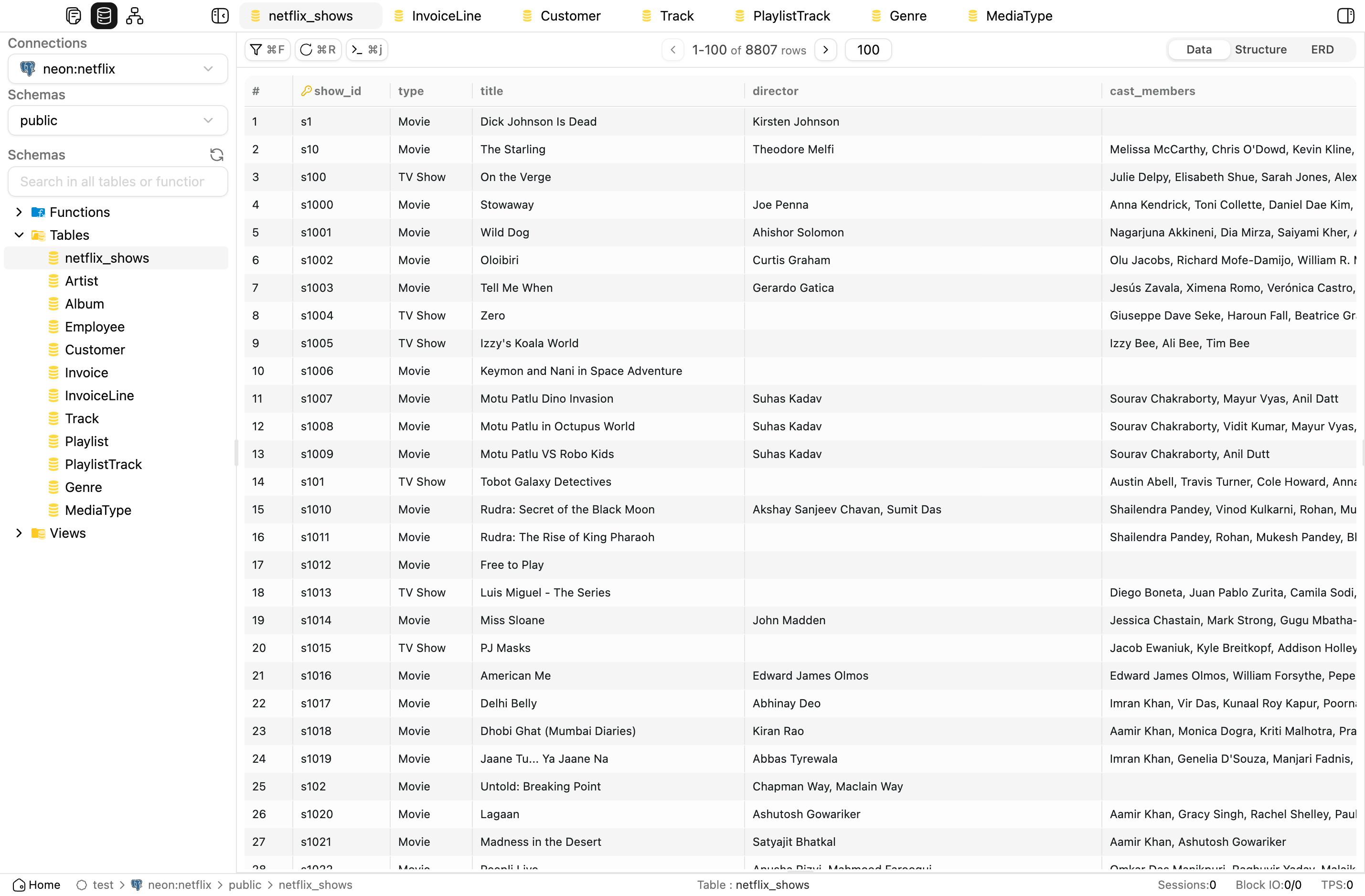
What is OrcaQ?
OrcaQ is a database editor that lets you manage and query PostgreSQL, MySQL, MariaDB, Oracle, SQLite, and Redis from a single interface. It includes workspaces for organizing connections, a schema browser, interactive ERD diagrams, a SQL editor with autocomplete and query analysis, Redis key exploration, user and permission management, PostgreSQL monitoring dashboards, schema comparison with migration scripts, backup and restore tools, and an AI assistant that can write SQL, explain queries, and create visualizations using GPT-4, Claude, or Gemini. The software runs as a desktop application on macOS and Linux, via NPX, in a Docker container, or in a web browser. All credentials stay on your machine. It is built with Tauri, Vue 3, and TypeScript and released under the MIT license.
Should you self-host OrcaQ?
OrcaQ scores 49/100 on selfhost.directory (how scoring works) and ranks #35 of 40 in Database Management. It has 224 GitHub stars.
It shipped 10 stable releases in the past year. The latest, v1.1.14, came out on 27 October 2026. New versions land roughly every 3 weeks.
Setup is easy: most people get it running in one sitting. An official Docker image is available. It is MIT-licensed and written mostly in Typescript.
Its closest alternative on selfhost.directory is supabase (92/100, 114 231 stars). It scores higher overall, so compare the two before you pick. See OrcaQ vs supabase side by side.
Features
- AI-assisted querying
- App data backup & restore
- Backup & Restore
- Command Palette
- Instance insights
- Multi-database Support
- Multi-tab workspace
- Quick query data grid
- Raw SQL editor
- Redis workspace
- Role & permission management
- Schema diff & migration
- Schema explorer
- Visual ERD diagrams
- Workspace & connection management
OrcaQ README
FAQ
Is there a keyboard-first workflow?
Yes, core navigation is built around quick open, connection switching, recent queries, and command palette actions.
Does OrcaQ store my credentials in the cloud?
No, OrcaQ is a local-first editor. Credentials and connection details stay machine-side unless you add your own sync layer.
Can I use OrcaQ with local and remote environments?
Yes, OrcaQ is designed around switching between local, staging, and production profiles without cluttering the workspace.
Which databases does OrcaQ support?
PostgreSQL is the native first-class workflow. MySQL, MariaDB, SQLite, OracleDB, Redis, Cloudflare D1, and Turso are available as beta connectors. MongoDB, SQL Server, and Snowflake are planned.
How do I open OrcaQ the first time on macOS?
If downloaded outside the App Store, macOS Gatekeeper may block the first launch. Move the app to Applications, right-click and choose Open, or go to System Settings > Privacy & Security and choose Open Anyway.
More in Database Management
 PeerDBSelf-hosted, open-source (AGPL-3.0) ETL tool streaming Postgres to ClickHouse and other warehouses via CDC, with a web UI and a Postgres-compatible SQL interface.
 Percona Monitoring and Management (PMM)Self-hosted open-source database observability platform with query analytics, dashboards, advisors, alerting, and backup for major databases.
 pgAdminpgAdmin is the most popular and feature rich Open Source administration and development platform for PostgreSQL, the most advanced Open Source database in the world.
 pgAdmin 4pgAdmin is the most popular and feature rich Open Source administration and development platform for PostgreSQL, the most advanced Open Source database in the world.
 pgbackwebSelf-hosted, open-source web interface for effortless PostgreSQL backups: scheduled jobs, local or S3 storage, PGP encryption, health checks and webhooks.
 PgHeroSelf-hosted, open-source performance dashboard for Postgres: slow queries, index suggestions, connection and space stats, shipped as a Docker image or Rails engine.
 PgStackPgStack is a self-hosted, open-source tool that creates search and audit read replicas of your Postgres database via logical replication.
 PgwebOpen-source, self-hosted PostgreSQL client: a single Go binary serves a browser UI for browsing tables, running and analyzing SQL, and exporting CSV, JSON or XML.
 phpMyAdminSelf-hosted, open-source (GPL-2.0) web interface for administering MySQL and MariaDB: run SQL, manage tables and users, import and export data.
 PowerSync ServiceSelf-hosted sync server that copies data from several backend databases into client-side SQLite with live streaming and offline-first support.
 pRESTOpen-source, self-hosted backend that turns a PostgreSQL or MySQL database into instant REST CRUD endpoints, custom SQL routes, JWT auth and a read-only MCP API.
 Redis CommanderSelf-hosted, open-source web app to view, edit and manage Redis databases across standalone, Sentinel and Cluster setups, with a browser Redis CLI and tree key view.
0 comments