
Self-host nutritrace
v1.4.0Self-hosted nutrition tracker with PWA
docker compose up -d- Stars
- 356
- Port
- 3001 (HTTP server)
- Requires
- SQLite
ghcr.io/traceapps/nutritrace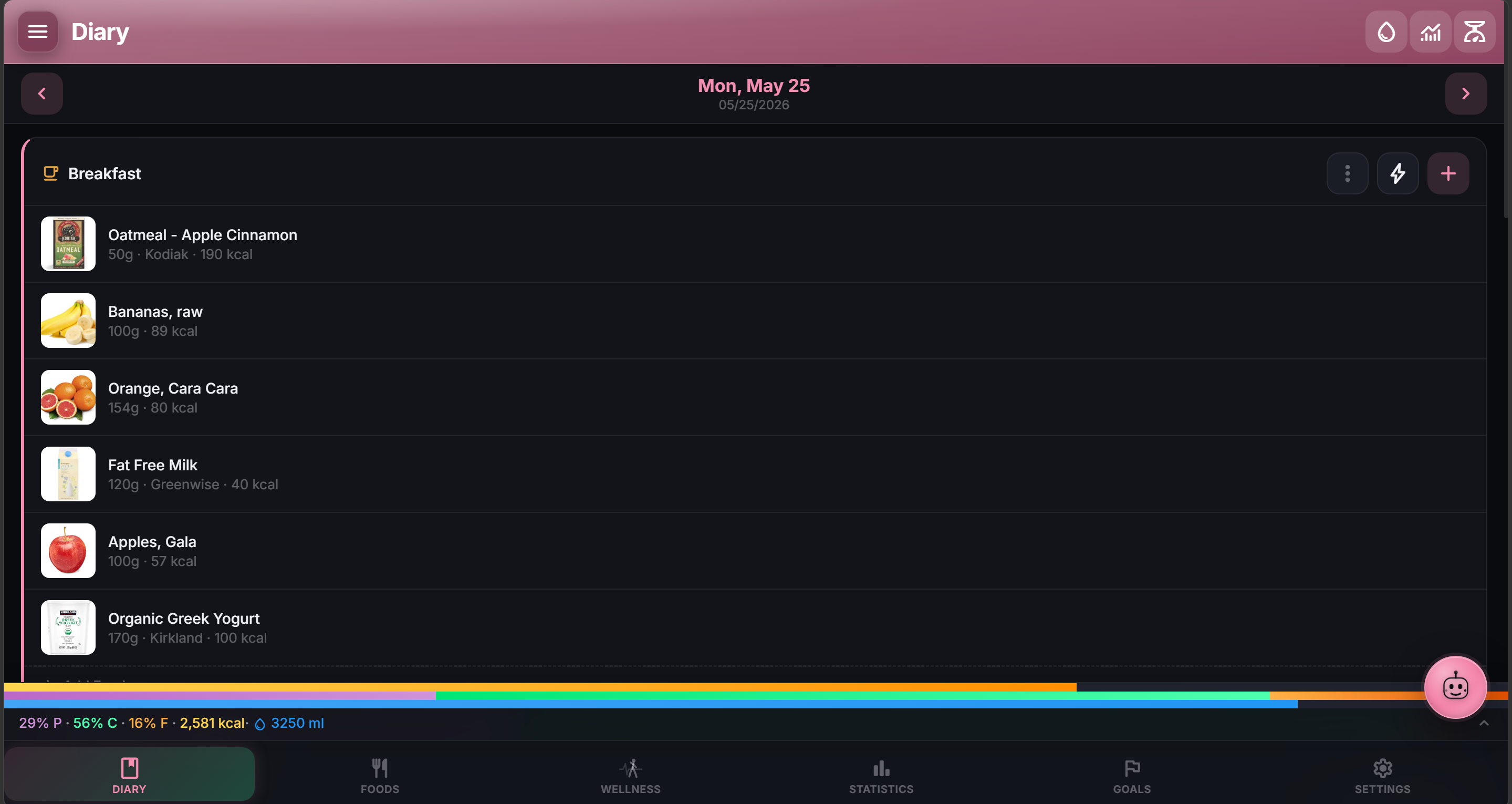
What is nutritrace?
A personal nutrition tracker you run on your own hardware. NutriTrace packages a web app, an Android client, and a Node.js backend into one Docker image. The web interface works offline as a progressive web app, while the Android build syncs with the server or runs standalone. You get a daily diary with configurable meals, water tracking, and fasting timers; a searchable food library that pulls from Open Food Facts and USDA; three calorie-goal modes including an adaptive algorithm that learns your maintenance calories from weight trends; and wellness dashboards fed by Fitbit, Withings, Garmin, or Android Health Connect. An embedded AI assistant can log entries from voice or photos, and a Model Context Protocol endpoint lets external agents like Claude Desktop query your data. Multi-user setups support OIDC single sign-on with providers such as Authentik and Keycloak. Data lives in SQLite with an optional DuckDB mirror for air-gapped food lookups. Deployment is a single docker-compose file; Unraid users can install from Community Applications. The project is AGPL-3.0 with no paid tiers or telemetry.
Should you self-host nutritrace?
nutritrace scores 51/100 on selfhost.directory (how scoring works) and ranks #11 of 31 in Health & Fitness. It has 356 GitHub stars.
It shipped 2 stable releases in the past year. The latest, v1.4.0, came out on 10 October 2026. New versions land roughly every 3 weeks.
Setup is moderate: expect some configuration beyond a single command. An official Docker image is available. It is AGPL-3.0-licensed and written mostly in JavaScript.
Its closest alternative on selfhost.directory is SparkyFitness (66/100, 6 498 stars). It scores higher overall, so compare the two before you pick. See nutritrace vs SparkyFitness side by side.
Features
- Activity and intermittent fasting tracking
- Adaptive TDEE goals
- Daily diary with meal logging
- Data migration from other trackers
- Federation API
- Model Context Protocol (MCP) serverOff by default; opt in with MCP_ENABLED=1
- Multi-user with OIDC SSO
- Native Android appSigned APK on releases page
- Offline mode in browserWorks on iPhone too
- Open Food Facts integration
- Personal food, meal, and recipe database
- Trace AI assistant
- USDA and Mealie integration
- Wellness integrations
nutritrace README
More in Health & Fitness
 OpenAthleteOpenAthlete is a self-hosted, open-source endurance training platform tracking workouts, CTL/ATL/TSB metrics, syncing with Strava, Garmin, Polar, Suunto.
 openGymOpen-source, self-hosted gym and body-weight tracker: plan weekly routines, log guided workouts over 5,600 exercises, sync devices via passkeys, one docker compose up.
 OpenHabitTrackerA free, open-source habit tracker that runs everywhere and lets you sync data to your own Docker server.
 open-wearablesOpen-source, self-hosted wearable data platform that unifies Garmin, Oura, Whoop and Apple Health behind one REST API, with webhooks, a portal and an MCP server.
 OvumcySelf-hosted menstrual cycle tracker with period logging, predictions, webhook/calendar reminders, OIDC/TOTP auth, CSV/JSON export — runs on your server.
 ownhealthrecordSelf-hosted PHP/MySQL personal health record app for storing medical records, doctor contacts, and medications with AES encryption.
 PerficePerfice is a self-hosted, open-source self-tracking platform for tracking anything, finding correlations, and setting goals with local-first privacy.
 polar-flow-serverSelf-hosted server syncing all Polar health data to PostgreSQL with personal baselines, anomaly detection, and a built-in MCP server for AI assistants.
 robipetRobiPet is a self-hosted pet health app tracking vaccinations, medical history, weight, and documents for multiple pets.
 SparkyFitnessSelf-hosted, privacy-first fitness tracking platform with nutrition, exercise, sleep, and cycle tracking plus AI coaching. Alternative to MyFitnessPal.
 sprout-trackSelf-hosted baby tracker for logging feeds, naps, diapers, and milestones with multi-caretaker PINs, dark mode, PWA, and webhook integrations.
 tempoSelf-hosted running tracker importing GPX, FIT, CSV from Garmin, Apple Watch, Strava. Workout analytics, maps, heart rate zones, shoe tracking, local data.
0 comments