Self-host openGym
v1.4.4Gym & body-weight tracker with passkey sign-in
$ docker compose up -d- Stars
- 21 268
- Ports
- 80 (Web UI inside the web container (nginx); published as WEB_PORT 8080 on the host), 3000 (Node API, reached through the web container's /api proxy)
ghcr.io/duartesantos8/opengym-web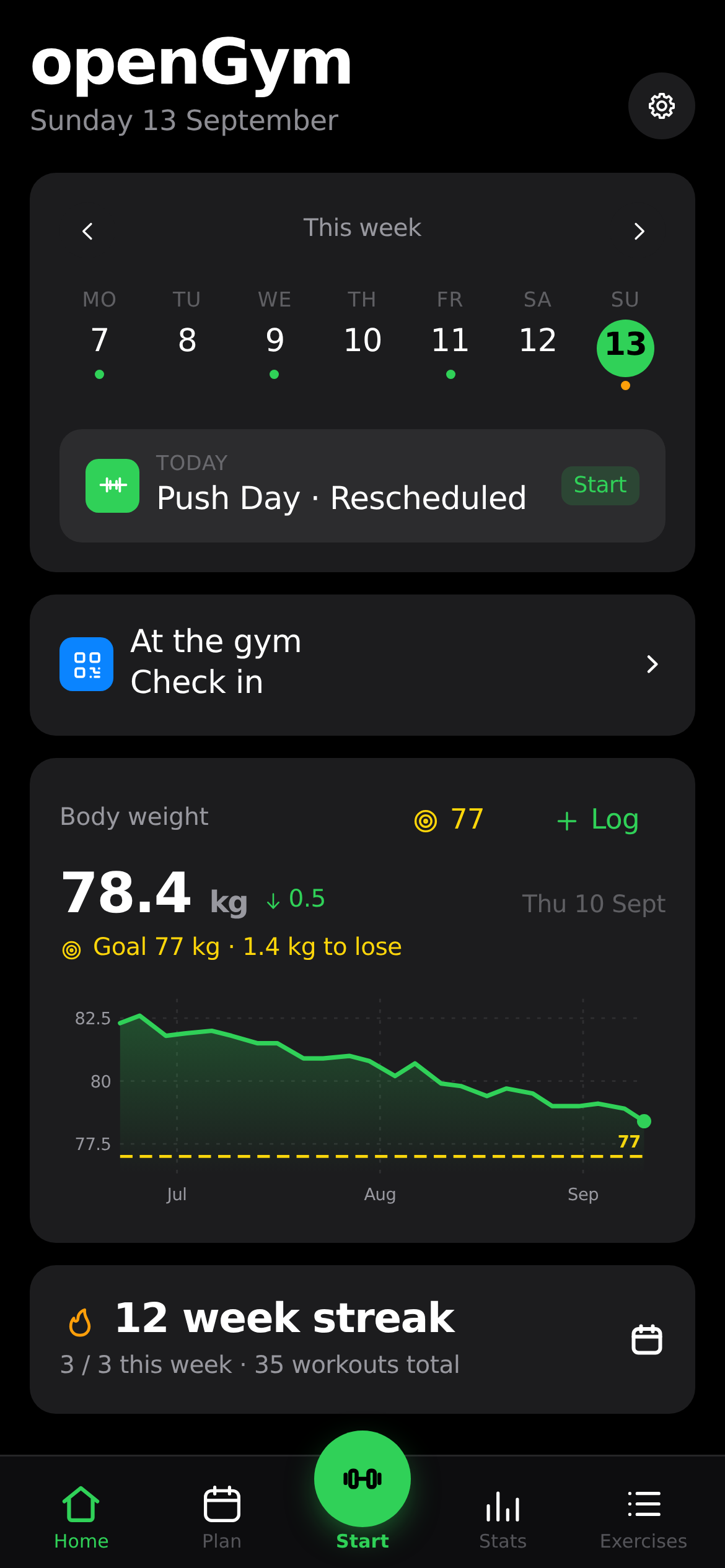
What is openGym?
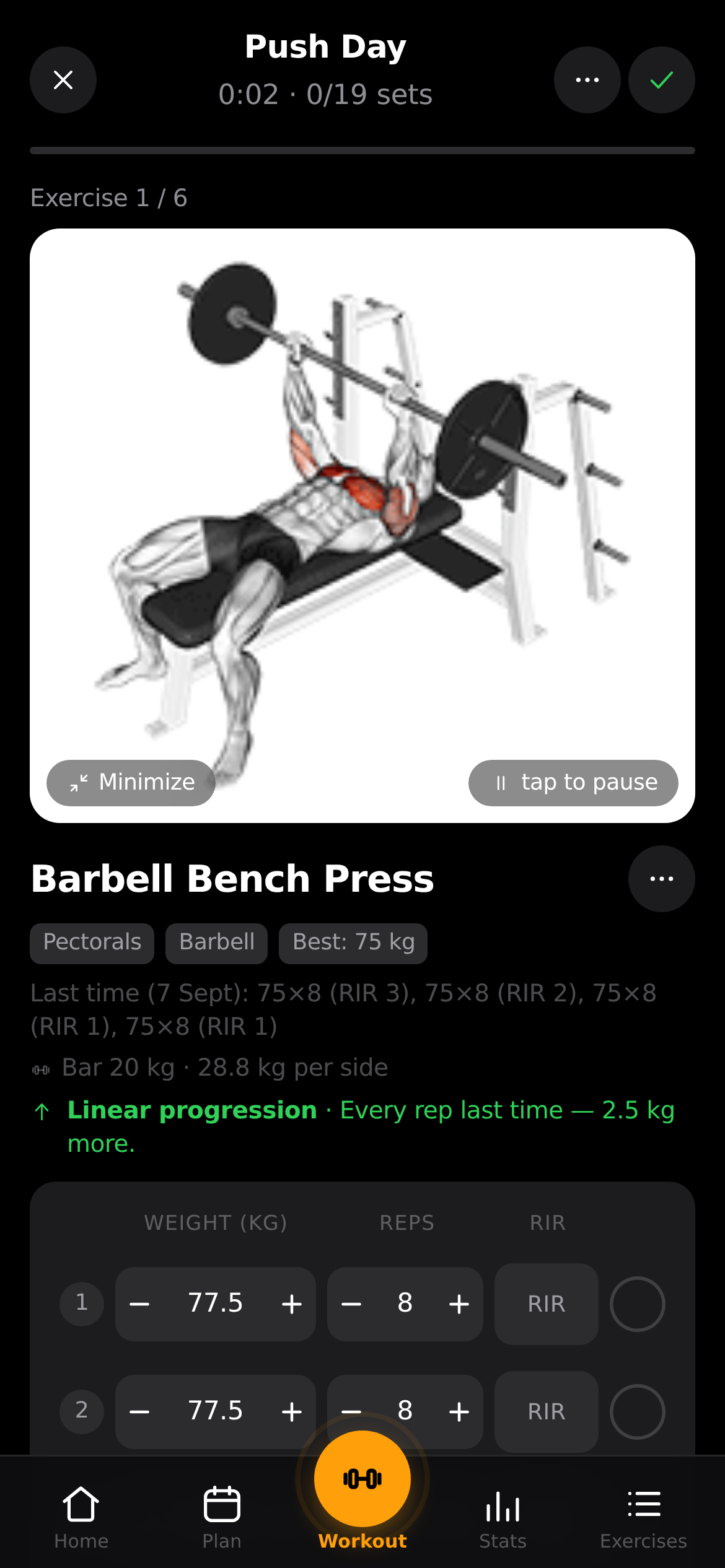
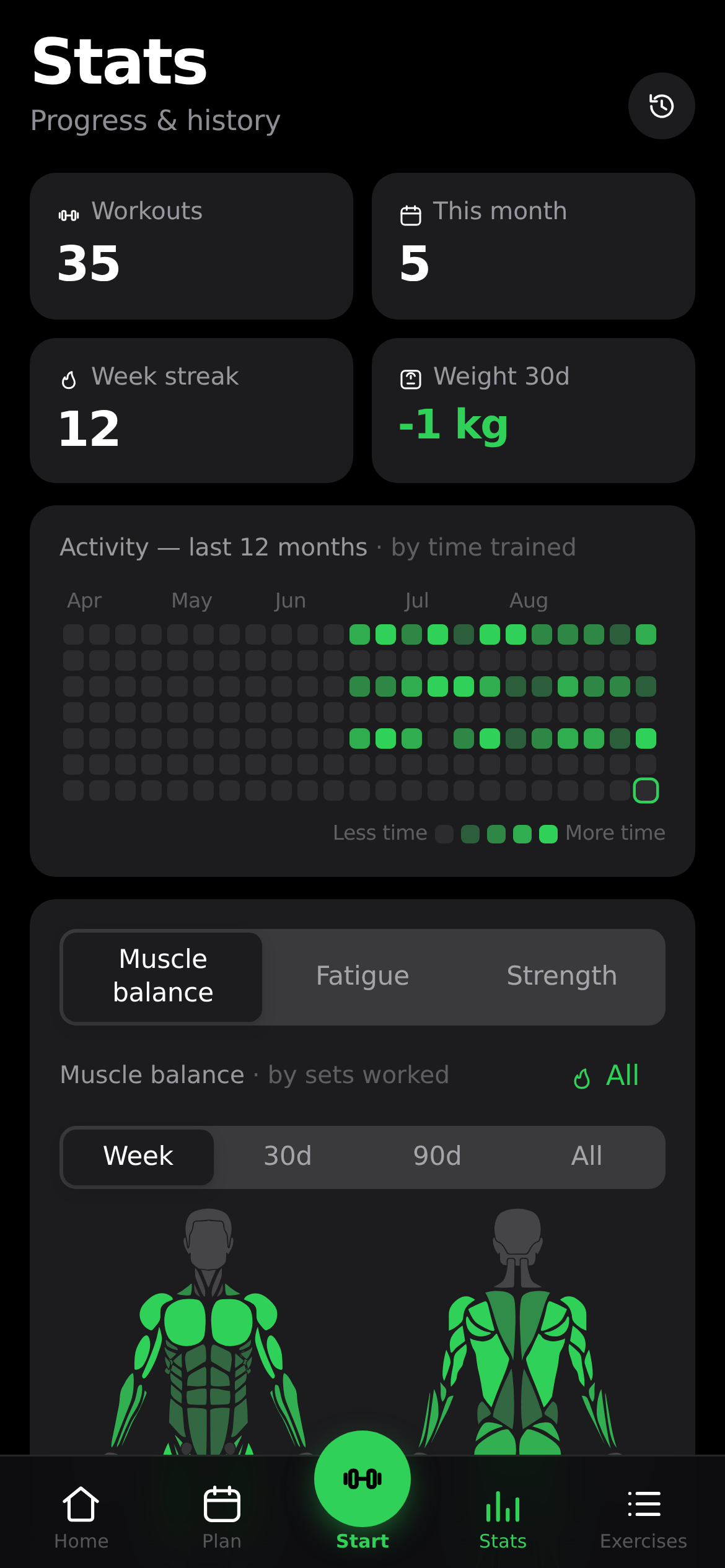
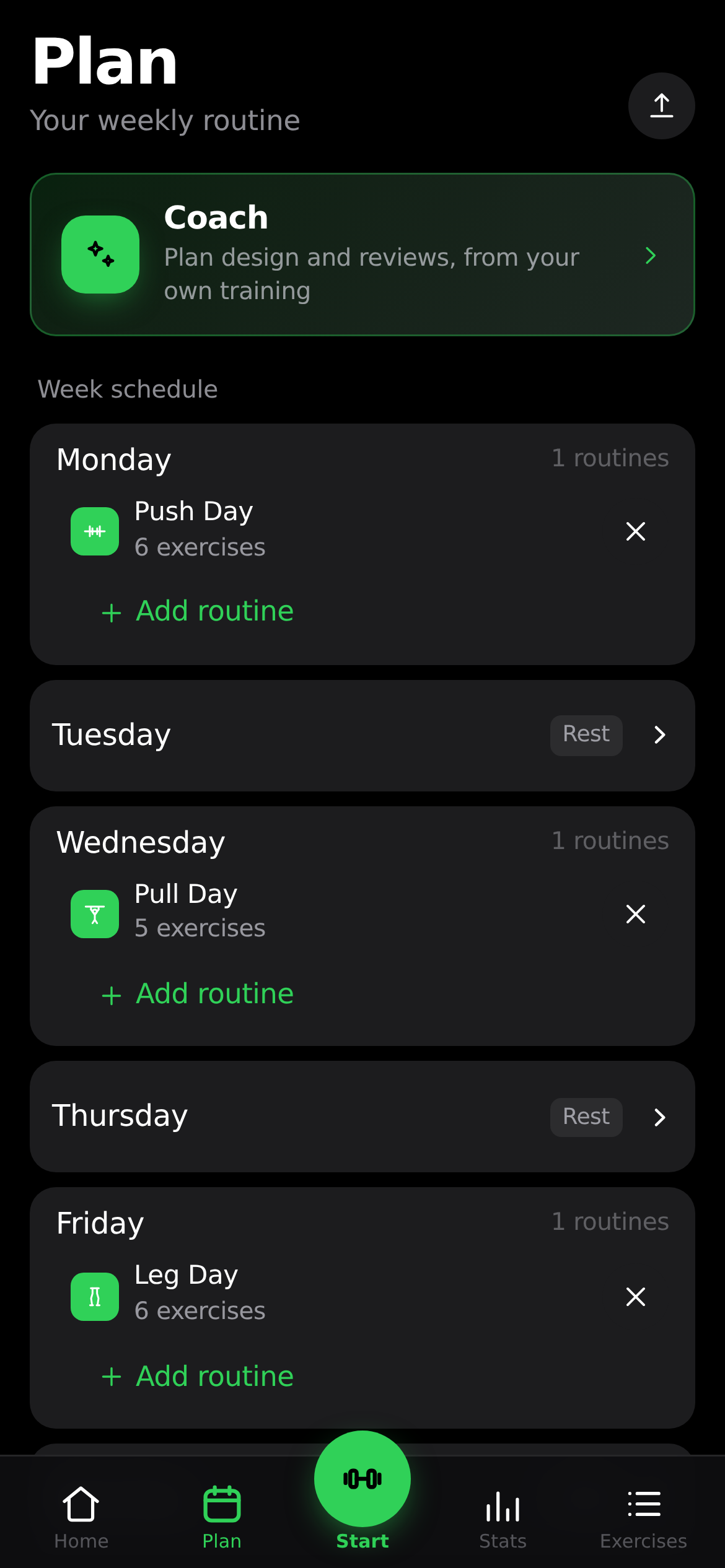
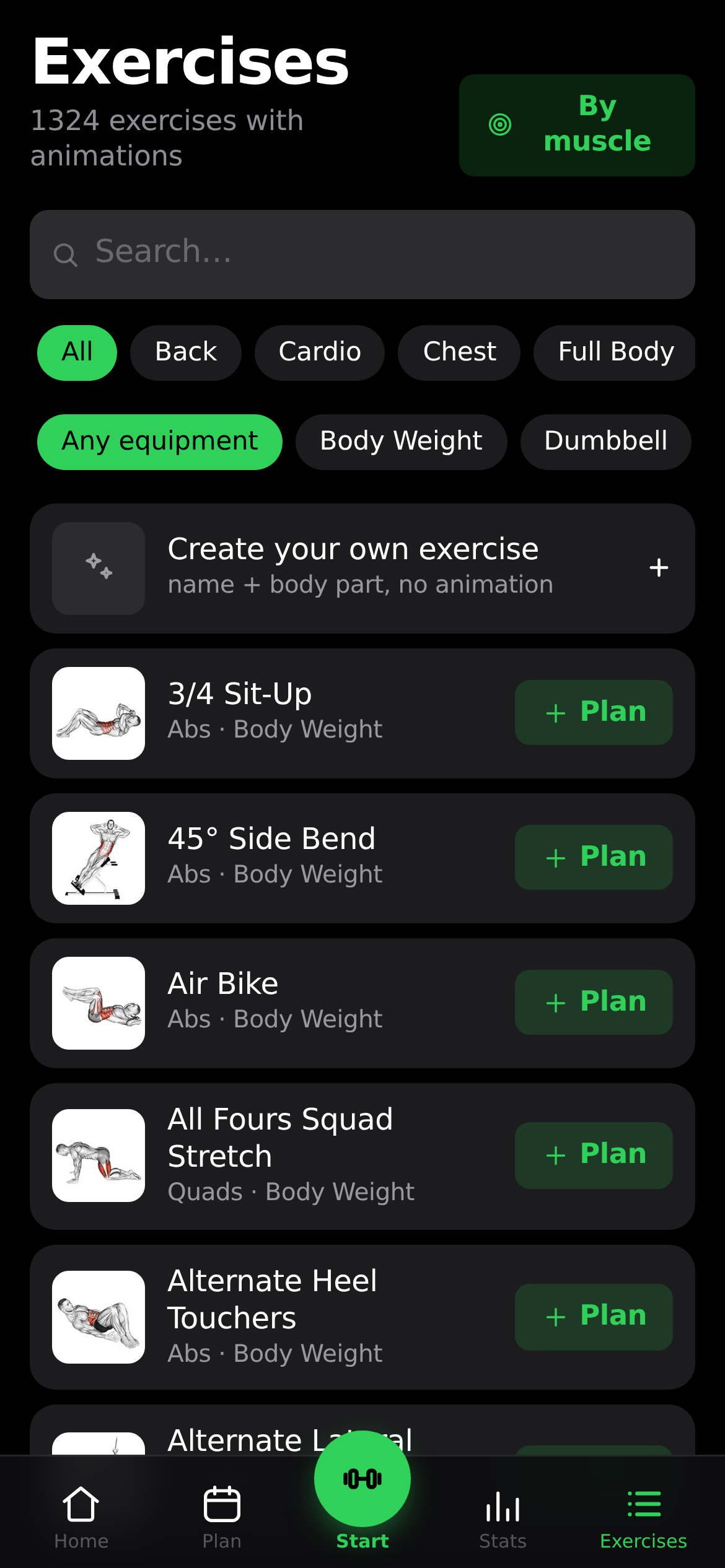
openGym is a strength-training and body-weight log you run yourself instead of trusting a subscription app with it. Two containers do the work — nginx serving the React front end and proxying /api to a small Node service — and all state lives as JSON files in one ./data folder, so a backup is just that directory copied elsewhere. Weeks are built as routines per day or as a simple A/B/C rotation, and sessions get logged from a guided screen that pre-fills last time's weights, runs the rest clock and flags new records; supersets, warm-up rows, drop sets, timed holds and cardio are all supported. The exercise catalogue runs to more than five thousand entries with looping demos, and progression logic (linear, Greyskull LP, double and triple progression) decides the next target while a body diagram reports volume spread, recovery debt and neglected muscles. Several people can share one instance with passkey profiles, field-level merging between devices, an optional admin area with invite codes, and history imports from FitNotes, Strong and Hevy plus Apple Health weight exports. Install it with a git clone, a copied .env.example and docker compose up on port 8080; passkeys from a phone demand HTTPS on a real hostname, which the guides cover for nginx, Caddy, Traefik and a Cloudflare Tunnel, and example Kubernetes manifests ship in kubernetes/. The same codebase also ships a server-free Android APK, the AI coach and the read-only MCP server are opt-in extras outside the default image, and the exercise artwork is licensed for openGym only, not for forks.
openGym alternatives
 OpenAthleteOpenAthlete is a self-hosted, open-source endurance training platform tracking workouts, CTL/ATL/TSB metrics, syncing with Strava, Garmin, Polar, Suunto.CompareOpenAthlete with openGym
 workout_challengeSelf-hosted webapp for fitness competitions with friends, supporting manual entry and Strava import, leaderboards, and weekly emails.Compareworkout_challenge with openGym
 WingfitSelf-hosted fitness app to plan workouts, track personal records, and integrate Whoop/Apple Watch data with OIDC auth and privacy-first approach.CompareWingfit with openGym
 HealthLogHealthLog is a self-hosted health tracker that aggregates vitals from wearables into one timeline on your server, with AI insights and medication tracking.CompareHealthLog with openGym
 nutritraceSelf-hosted nutrition tracker with diary, food database, barcode scanning, wearable sync, adaptive TDEE goals, and AI assistant. Docker, AGPL-3.0, no cloud.Comparenutritrace with openGym
 Beaver Habit TrackerOpen-source, self-hosted habit tracker for daily and periodic habits, with streaks, notes, categories, import/export and a REST API, run via a single Docker container.CompareBeaver Habit Tracker with openGym
 WeightTrackerSelf-hosted, open-source mobile-first app for tracking weight, hydration, activity, blood pressure, and medications with charts and Home Assistant integration.CompareWeightTracker with openGym
 open-wearablesOpen-source, self-hosted wearable data platform that unifies Garmin, Oura, Whoop and Apple Health behind one REST API, with webhooks, a portal and an MCP server.Compareopen-wearables with openGym
Should you self-host openGym?
openGym scores 80/100 on selfhost.directory (how scoring works) and ranks #1 of 11 in Fitness Tracker. It has 21 268 GitHub stars, +7 099 in the last 30 days.
It shipped 13 stable releases in the past year. The latest, v1.4.4, came out on 3 November 2026. New versions land roughly every 3 days.
Setup is easy: most people get it running in one sitting. An official Docker image is available. It is AGPL-3.0-licensed and written mostly in JavaScript.
Its closest alternative on selfhost.directory is SparkyFitness (66/100, 6 784 stars). openGym scores higher overall. See openGym vs SparkyFitness side by side.
Features
- AI coachOff by default; needs an admin toggle and, for in-container runtimes, the coach image target.
- Body-weight tracking
- Estimated 1RM and strength ratios
- Exercise library with animated demosMedia ships inside the web image; its licence covers use in openGym only.
- Guided workout logging
- Internationalization
- JSON export of all data
- MCP ServerOptional and not part of the Docker build.
- Multi-device Sync
- Multi-user instance with admin dashboard
- Muscle volume and fatigue map
- Offline Support
- Progression rules
- Push Notifications
- Weekly routine planning
openGym README






Most workout apps keep your data on their servers, push you towards a subscription, or vanish when the company does. openGym runs on your own box, keeps your data in a folder you control, and is yours to fork. It still behaves like a modern app: installable on the home screen, passkey sign-in, works offline, syncs between your phone and your laptop.
No account on someone else's server, no subscription, no ads, no telemetry. One
docker compose up and it's running.
How to install openGym
Install openGym with Docker Compose
RP_ID, ORIGIN, WEB_PORT, NGINX_PORT, PORT, BACKENDgit clone https://github.com/DuarteSantos8/openGym
cd openGym
cp .env.example .env
docker compose pull # prebuilt images, amd64 + arm64 (skip this to build from source)
docker compose up -d
Open http://localhost:8080 and create a profile; HTTPS on a real hostname is needed to use passkeys from a phone. The same images are also on GitLab's registry, or build locally with docker compose up -d --build.
How to configure openGym
RP_ID=localhostHostname passkeys are bound toORIGIN=http://localhost:8080Full URL the app is served fromWEB_PORT=8080Host port for the web UINGINX_PORT=80Port the web container listens on inside the containerBACKEND=apiName of the API service that `/api` is proxied to
openGym releases & version history
The biggest openGym yet: a fresh look, Modules to switch off what you don't use, every set against last time, and openGym is coming to Google Play (closed test, join below).
Google Play testers wanted: join https://groups.google.com/g/opengym-testers/about, then opt in at https://play.google.com/apps/testing/ch.duartesantos.opengym. Google lets us go public after 12 testers for 14 days.
Which APK? openGym-1.4.4.apk (Standard, 180 px animations), openGym-Plus-1.4.4.apk (240 px), openGym-HD-1.4.4.apk (360 px). Same app and key: each installs over another and keeps your data. Checksums in SHA256SUMS.
Modules: as much app as you want. Settings → Modules switches whole parts of openGym on and
off: Effort, Plates and warm-ups, Strength levels, Form videos, Watch, Gym check-in, Body, Health,
Motivation, the AI Coach, Integrations and Seasonal themes. Pick Just training, Training and body or
Everything, or flip them one by one. A module that's off is gone from Home, Stats, Settings and the
search, and stops its notifications; health sync, the watch, webhooks and Coach reviews pause until
it's back. Nothing is ever deleted, and everything stays on after the update. New profiles get the
choice on their first screen. The idea came from seals187 and Shadowbyte on Discord.
Integrations, all in one place. Settings → Integrations is a short list of what openGym can
talk to, each with whether it's on and the one thing to do next: Apple Health or Health Connect
(their switches moved here from Data & backup, which still has a way in), the Hevy and file imports,
the CSV export, the Coach and the MCP server. Nothing new talks to anything until you switch it on,
and a card only shows where it can do something. Garmin, COROS, Polar, Fitbit, Samsung Health, Oura,
Withings and Renpho get an honest "works with": they reach openGym through Apple Health or Health
Connect, no fake Connect button.
Webhooks (self-hosted, INTEGRATIONS=webhook). Tell Home Assistant, n8n, ntfy or Node-RED when
you finish a workout, set a record or weigh in, from whichever device you logged it on. Each message
is signed, retried for about an hour if the other side is down, never sent twice, and a test event
is one tap away. Home Assistant on your home network needs INTEGRATIONS_ALLOW_LAN=1 from your
admin. Payloads and a signature checker are in docs/INTEGRATIONS.md.
On its way to F-Droid. A new Android build without anything from Google, made to be built by
F-Droid from the source: the gym card scanner uses the camera in the app instead of Google's,
updates come from F-Droid, and Wear OS watches (they need Google Play services) are left out,
which the app says in Settings → About. Everything else is the same app.
openGym on Amazfit watches (Zepp OS 3 and later: Balance, GTR 4, GTS 4, Active, T-Rex, Cheetah,
Bip 5 and friends). Same deal as Wear OS: start a routine on the wrist, turn the crown (or tap + and
-) for weight and reps, Done, a rest ring that buzzes, heart rate on every set, a summary, and a
shortcut card with your streak. It talks to openGym through your own server, so pair it in
Settings → Zepp OS watch and type the code into the Zepp app. Works with the web app too.
A fresh coat of paint. The whole app got a proper look-and-feel pass, the kind where nobody
can point at what changed but everything sits better. Home's cards all introduce themselves the
same way now (a small line, a title, one button), so the screen stops sounding like five apps
talking at once. Stats is in four parts, Overview, Body, Lifts and Effort, with an index that
sticks to the top and jumps you there; #/stats?section=lifts links straight to one. The Library
keeps its filters in one row: Filters opens a sheet with the type and the equipment, and tapping
the chosen body part again shows them all. The end of a workout is one tidy list (Add exercise,
the session note) with Finish under it, the routine editor's Copy, Share and Print sit together
with Delete on its own and saying what it removes, and an exercise's Delete waits at the bottom
of its sheet instead of shouting next to Edit. Empty screens put their first button right where
your stuff will appear. Under the hood: one type scale in rem (your browser's text size and zoom
now grow the layout too), pinch zoom in the browser and the installed web app (the phone apps
stay as they were), lifted surfaces for things that float, a readable text shade for your own
accent colour, and one press feel per kind of control. Same app, better posture.
The new bits of this release got the same treatment: the set-vs-last arrows sit in a little
raised chip and stay readable on ticked sets, green and orange have proper light-mode shades,
the weekly sets and strength cards line up like every other Stats card, Merge into… lives at
the end of an exercise's sheet (Delete still last), and narrow phones no longer squash the
muscle names in the ranges sheet.
openGym on Garmin, almost. A Connect IQ app for Garmin watches is built and waiting for its
store listing: Forerunner, fēnix, epix, Venu, vívoactive, Instinct and friends, round or square,
colour or the sunlight-proof black and white. The same deal as the other watches: today's routine
with one press, big numbers you nudge with the buttons or a swipe, Done, a rest that buzzes, heart
rate on every set and a summary at the end. It can also save the workout to Garmin Connect as
strength training, so Garmin's own training load counts it too. It reaches the Connect IQ Store
and talks to the phone app in a later update; docs/GARMIN.md has the plan.
Every set against last time (#907, thanks @lodepav for the idea and the first version). A
finished set now wears a small ↑, = or ↓ on its number: the same set last time, weight first and
then reps, and when those pull apart (heavier but fewer) the estimated 1RM settles it. On an
assisted machine less help counts as more, holds go by seconds and cardio by minutes. Saved
workouts in History get the arrows too, held against the workout before them, never a later one.
Screen readers hear it in words ("2.5 kg more than last time"). Settings → Workout → Compare sets
with last time switches it off.
Workouts left this week (#753, thanks @unabomberlive). Home now counts the week down under the
week strip: "2 of 4 left this week", and "All done this week. Nice." once it is. A fixed week
counts its planned days, the same numbers as the streak card. A rotation has no week of its own,
so Settings → Plan & schedule → Workouts per week gives it a target to count against (off says
nothing). The widget snapshot carries it too, for the widgets to pick up.
Spoken cues. Settings → Timer alerts → Spoken cues (off until you want it) gives the timer a
voice, so the phone can stay on the bench: it says your next set as the rest starts ("Set 3, 80
kilos, 8 reps", with the exercise's name when it changes), "10 seconds" before a rest ends, "Rest
is over", and counts holds down, 3, 2, 1, go, the ones that start by themselves included. In the
app's language, slow, normal or fast, with a Try it button. The apps use the phone's own voice
and your music only turns down for a moment, it never stops; a browser uses its built-in voice.
Only while the app is on screen: a locked phone still gets the end tone and the notification.
Merge two exercises into one (#656, thanks @dbanno). Imported "Bench Press (Barbell)" from
FitNotes and now have two bench presses? An exercise's details have Merge into…: pick the one it
should be, see what moves ("38 workouts, 3 routines move"), confirm. Every logged set, note, form
video and record goes over, and so do routine slots (with their warm-ups and backups), programme
targets, the kept working weight, the standing note, aliases, the favourite star and its bar and
plate settings. Your own exercise is then deleted; a catalogue one is hidden from your lists, and
searching for its name finds the one you merged it into. Undo on the toast puts everything back.
Another device that still logged against the old one is brought in line when it syncs, and the
MCP bridge reads it the same way.
A note on any set. Tap a set's number and pick Note: "grip slipped", "a little twinge", "felt
easy". It shows as a quiet line under the row (tap it to change it), sticks with the set when the
workout is saved, and appears in History under that exercise's sets. It goes into the CSV export
(a new set_note column) and the MCP bridge's get_workout, and it reaches the Coach the way your
workout notes already do.
Weekly sets per muscle, against a target range. A new Stats card lists this week's working
sets for each main muscle next to the range it aims for, "Chest 14 / 10–20", with a bar that shows
the range: room for more, in range or above range, never a telling-off. A set counts fully for the
muscles it mainly trains and a bit under half for the ones that help (the same weights as the
muscle map and the fatigue model), warm-ups don't count. The ranges start from hypertrophy
research (roughly the minimum that grows a muscle to the most you can recover from) and each one
is yours to change under Settings → Plan & schedule → Weekly sets per muscle. Settings → Look &
Home → Weekly sets on Home adds one line under your streak: the muscle with the most room left.
Strength level per lift. Bench, squat, deadlift, overhead press, rows, curls and a few more
now say where you stand: Beginner, Novice, Intermediate, Advanced or Elite, from your best
estimated 1RM against your latest weigh-in, graded on published strength standards (bodyweight
ratios, dumbbells per bell). It sits in the exercise's details with what the next level takes,
and a Stats card lists every lift you have one for. Add your sex and year of birth under Settings
→ Units & language → About you for a fairer read (from 40 on, the masters age coefficients ease
the lines). Worked out on your device, and hidden until you have weighed in.
Your week, your month. When a new week starts (your first weekday) Home shows a small "Your
week" card about the one that just ended, and on the 1st a "Your month": workouts, volume, new
bests, the streak and the muscle that did the most work. Tap it for the numbers, share them as a
picture (story or square, dark or light) or save that stretch as the performance report PDF. A week
off gets no card, nobody needs a recap of the sofa. The × puts it away, and Settings → Look & Home →
Week and month recap switches it off.
openGym on your Wear OS watch, as a beta (thanks @vampireJSV for the idea and the first take in #673).
Galaxy Watch, Pixel Watch, TicWatch, OnePlus and friends now get what the Apple Watch has: the
workout follows you to the wrist, big numbers you turn with the crown, Done, a rest ring that buzzes
you back to the bar, heart rate on every set, a summary at the end, and a Tile with your streak and
today's plan. Start today's routine right from the watch. Your phone stays in charge, the watch just
saves you the walk to the bench where you left it. It's a beta: it shows up as "openGym Beta" on
the watch and hasn't met many real wrists yet, so tell us on Discord or GitHub what breaks.
Warm-ups that build themselves (#156, thanks @giulioleuci). Settings → Workout → Automatic
warm-ups: Off (the default, nothing changes), Compound lifts or Every loaded lift. The ramp comes
from your work weight, the way a coach would scribble it: a heavy squat gets the bar for ten and
then 40, 60 and 80 percent, a medium press two sets, a light curl one, a 6 kg raise none, and a
pull-up none until you hang weight on it. Every rung is rounded down to what this gym can load
(its plates, its dumbbells, the machine's stack), never under the bar. Bump the first work set
from 100 to 110 mid-workout and the warm-ups you have not done yet follow it. Rest between
warm-ups and per-side sets work as before.
Your own warm-ups, kept (#525, thanks @inchigor). Each exercise's settings have Warm-ups:
Default, Auto, My own, A number of ramp sets (the old stepper) or None. My own is a few rows as a
share of the work weight (or the bare bar), so 20 × 12, 30 × 8, 40 × 5 on a 60 kg bench stays
yours and grows when the bench does. Did them your way today? The exercise's ⋯ menu has Keep these
warm-ups, and Update routine offers it too. A routine's own warm-ups win over Your last session.
Ask the Coach mid-workout. The exercise's ⋯ menu has Ask the Coach: say it hurts, the machine
is taken, you are short on time, feeling great or running on empty, and the Coach suggests up to
six changes to what is left of the workout (swap, fewer or more sets, reps, a lighter or slightly
heavier weight, add, skip, do it next or last, rest), as cards you tick. Logged sets and your
routine are never touched, and the suggestion only applies to the workout you asked in. Works with
your server's Coach and with your own key on the phone.
The Coach does more. A review can now set an exercise's warm-ups and write or revise a
multi-week programme (saved under Plan → Programmes, it starts when you start it), and Undo takes
both back. It reads more of you too: weekly sets and recovery per muscle, the plates and dumbbells
of the gym you are at, this month's challenges and the weigh-in that stands for each day. Every
change to how something progresses now says what you will notice at the gym, in plain words,
next to the Coach's reason.
Film a set and check your form. Tap a set's number and pick Film this set (or Film a set under
More in the exercise's ⋯ menu) to record a short video with the phone's camera or pick one from
your videos. It sticks to that set: a little camera badge under the row plays it right there, muted
and looping, at 0.5x if you want to see the bottom of your squat, or full screen. Every exercise's
history and details now have Your form videos, newest first, and Compare two dates puts two
side by side (so, deeper than in August?). In local mode the videos stay on the phone. Signed in,
they go to your server like your workout photos, inside the same size, length and space limits,
unless you switch on Keep videos on this phone only. They are yours alone: never sent to the Coach
or MCP (it only learns how many), never in share cards, Wrapped or PDFs. Remove the set or the
workout and the video goes with it.
Each gym keeps its own equipment (#808, thanks @hoechstleistungshaartrockner). Plates, dumbbells,
your bars and machine weight stacks now belong to an equipment profile instead of being one list
for everywhere, so the home setup with one pair of 20s and the big gym down the street each get the
plate math, dumbbell steps, warm-ups and progression that fit. Settings → Equipment shows the active
gym at the top with a switcher, the Plates, Dumbbells and Your bars pages say which gym they are
for and can copy another gym's list. During a workout the gym sits small next to the clock: tap it
to switch, and the sets you have not done yet move onto that gym's plates and dumbbells. Saved
workouts remember where they were done. On the phone, a gym reminder place can say "Equipment
here": arrive, tap a check-in sticker or start a workout there and openGym switches by itself, with
a little "Using Home gym equipment" so you know (only with location already allowed, it never asks).
Nothing changes when you update: every profile starts with the lists you have today.
Christmas, with an advent calendar. From 1 December to the end of the year the app gets
cosy: a little snow drifting behind the cards when you open it, fairy lights along the top of Home
and Stats, a Santa hat on your streak flame, holly in a corner, a snowman and a gingerbread person
peeking around Stats, and once a day a sleigh flying past. There is a present hiding on the streak
card, tap it. On Home, from the 1st to the 24th, the advent calendar: 24 doors, today's one glows,
a door you missed waits for you, and the ones still to come stay shut (no peeking). Behind them: fun
facts, small challenges you tick off for a badge, training tips, a joke or two, a cosy stretch
routine to add, a number from your own year, and something special on the 24th. Opened doors sync
between your devices. It all works like Halloween: Settings → Look & Home → Seasonal themes has
Auto, On and Off, optional berry red colors, a switch for the workout screen (never on your sets),
and the calendar for all of December. Nothing moves with reduced motion, nothing shows during the
app tour, and none of it is downloaded outside the season. On the phones there is a festive app
icon too, the barbell in a Santa hat, and Home asks once whether you fancy it.
Weigh in as often as you like, with the time (#859, thanks @Borgna02). A day can now hold several weigh-ins, each with
its time: the weigh-in sheet has a time field (now for today, the day's first time or 08:00 for an
earlier day), All weigh-ins lists every one of them under its day, and a tap on one changes its
weight, time or day. Delete still has Undo. The chart, the trend, the goal, widgets, Your year and
the Coach use one value per day, and Settings → Units & language → Daily weigh-in value says which:
the morning one (the default, it is the one worth comparing), the day's average or the last.
Apple Health and Health Connect bring in every reading with its time, an Apple Health export keeps
all of its records instead of one a day, and the body CSV has a row per weigh-in. Your old weigh-ins
stay exactly as they were, and an older app on another device keeps the extra ones when it syncs.
Monthly challenges. Every month Home has three small goals for you, picked from how you have
trained the last few months and set a little above your usual: 14 workouts this month, lift 50 t,
train every week, hit 3 new PRs, 100 pull-ups (only if you do pull-ups), 60 minutes of cardio (only
if you do cardio), log your weight on 10 days, try 3 exercises you have never done, or every muscle
group at least once. The bars move as soon as you finish a workout, and each challenge you make
earns a badge with a small party (it stays put with reduced motion). All three is a gold month.
Stats → Challenges shows this month and a trophy shelf of every badge so far, and the widgets can
show them too. A challenge you do not make simply ends with its month: new month, new challenges.
The card folds away, its × hides it until next month, and Settings → Look & Home → Monthly
challenges turns it off. It is all worked out on your device from your own workouts, phone-only or
with a server, and nothing new is sent anywhere; the badges sync with your profile.
A kind word about recovery on Home. Now and then a small card tells you what has rested and what
has not, from the same recovery data as the muscle map: "Your legs are still recovering from
yesterday. Upper body today?", or that your back has had a week off. If today's plan leans on
something still recovering, it suggests going a bit lighter or swapping the session, never skipping
it, and a rest day only ever hears that the timing is good. One hint at a time, × hides it for the
day, and Settings → Look & Home → Recovery tips turns it off.
Your year in openGym. From 1 December to the end of January, Home has a card: your year is ready.
Tap it and your year plays as full-screen stories, tap or swipe through: how many workouts, the hours,
the tonnes you moved (in blue whales, pianos or house cats, whatever fits), your longest streak, your
signature move and the muscle it built, your records and the biggest one, your favourite day and time,
your best month, your body weight if you logged it (one tap leaves it out for good, and it never
judges), a training personality from your habits (Early bird, Leg-day loyalist, Night owl and friends)
and a summary. Every card shares as a picture, 9:16 for Stories or 1:1, dark or light, with a small
openGym logo. It is all worked out on your phone from your own data and nothing is sent anywhere.
Stats → Your year plays it for any year with workouts, the current one too. On 1 December there is
one notification at 18:00: the phone plans it for itself when you open the app in November (only if
notifications are already allowed, it never asks), and your server sends a web push to the browsers
that get notifications. Once per year, and Settings → Notifications has a switch for it.
Share a workout as a picture, right after it. The "Workout complete!" summary has Share next to
the way out: a card with the routine, date, duration, volume, sets, records, the muscle map and your
week streak, as a Story (9:16) or a square, dark or light. History's Share as image makes the same card.
Widgets you set up yourself, and a streak with backup. Long press the Home Screen, add the
openGym widget and pick what it shows: your week streak, the weight goal (how many kg or lb to go,
with a little curve of your last weigh-ins), this week, the next workout, records this month or this
week's volume against last week. The wide one shows two side by side. On the iPhone it also comes for
the Lock Screen, round, wide or as one line. A tap takes you where it makes sense: Stats, the weigh-in,
or straight into the next workout. Android gets it too, small or wide, light or dark with the phone.
The streak itself grew up: it remembers your best run, and every 4 weeks with a workout earn a
freeze (two at most). Miss a week for a holiday or a cold and a freeze covers it by itself, shown as a
snowflake, no switch to remember. Badges at 4, 12, 26, 52 and 104 weeks, a small party on Home when
you finish a week or reach one, and Stats shows it all. Points to the next level come later.
Share a routine with a friend. A routine's page and a past workout's options now have Share
with a friend: one link through your phone's share sheet ("Here's my Push Day on openGym 💪"). Your
friend taps it, sees the exercises and sets, and Add to my routines puts it next to theirs, never
over one they already have. A workout goes as a routine, so "do what I just did" is one tap. Your
weights and your name only go along if you switch them on. The routine rides inside the link
itself (the part after the #), so no server, not even opengym.ch, ever sees it. No openGym yet? The
link opens a page that shows the routine and where to get the app, or opens it in your own web app
or the demo. A really long routine goes as a plan file instead.
Watch on YouTube, for every exercise. An exercise's details (and the More group of its ⋯ in a
workout) have a quiet Watch on YouTube button that searches for the exercise plus "form" in the
YouTube app or your browser. Nothing goes to YouTube before you tap it, and a video link of your
own still comes first.
Tidier menus (thanks seals). An exercise's ⋯ now opens with the five things you reach for
mid-workout: note, swap, warm-up set, rest and history. Settings, plate loading, the how-to, moving
and supersets wait under one More row, Remove is still last. The set menu and the workout's ⋯ got
the same trim. A past workout in History shows the workout, the note, Edit and Repeat today; date
and time, duration, save as routine, sharing, export and Delete sit behind one Workout options row
instead of a long column of buttons.
Timed holds that run themselves. Planche, L-sit, front lever, plank: your hands are busy, so the
app now keeps going without them. Switch on Settings → Workout → Timed holds start by themselves and
the rest ends with a 3, 2, 1 (beeps and buzzes the way your timer alerts are set, also with the phone
locked), the hold starts, at zero the set is logged with the planned time, the rest starts, and round
again. Per-side holds still get their short switch pause, and supersets keep their order. Big buttons
under the clock let you pause for a breather, restart a hold that went wobbly, or stop auto for the
rest of the workout; +15 s and Skip still work on the rest. Tap Done early and it logs what you
actually held. It never starts a hold while a sheet is open, and an exercise can opt in or out in its
own settings. The Lock Screen counts the hold down with a Stop auto button, and the Apple Watch counts
in by itself too. Thanks Mirco for the idea and the perfect description, and to our calisthenics friend
on Discord who was tired of tapping play between every plank.
A 1-minute tour, and four tutorials. Right after the first setup, openGym asks if you want a quick
look around. Say yes and it points at the real thing, screen by screen: today's session, week or
rotation, the Library, a practice workout (tick a set, meet the rest timer, swipe, the ⋯ menu, Finish),
Stats and Settings. It never just teleports you: to get to the next screen it points at the real tab,
the gear or the back button and waits for your tap (or taps it for you with Show me), so you learn the
way. Scroll, turn the phone or open the keyboard and the spotlight sticks to what it's pointing at. The
practice session is pretend: never saved, never synced, gone when the tour moves on. At the end it
offers four short tutorials, each its own little guided run: Build your first plan (a real routine:
name it, add exercises, set sets, reps and weight, give it a day; quit before Save and nothing is left
behind), Create your own exercise (the real form, nothing made until you tap Create), Edit your
data (fixing workouts, weigh-ins and the rest, on a pretend copy so your own data stays untouched)
and Export & import (backups, spreadsheets, imports from other apps and syncing, pointed at, never
run for you). Back, Next and Skip whenever you like; close the app halfway through the tour and it
offers to pick up once. It works with a screen reader and reduced motion, and the Halloween guests
take a break while it runs. Settings → About & updates → Tutorials runs any of them again.
Pictures on the printed plan (#817, thanks @Teo230). Print / Save as PDF asks one thing first:
With pictures. On, every exercise gets a small picture next to its sets, rest and note, two to a
row, like the paper plan your gym hands out. It's on by default and this device remembers your
choice; off gives you the plain list. Your own exercises print their own photo, and one without a
picture simply prints as text.
Programmes (#159, thanks Giulio Leuci; #679, thanks @peteh and @Gthbacc). Plan → Programmes runs
your routines as a block of 1 to 16 weeks, and each week can say how hard: a %1RM per lift, an RPE for
the week, or a deload. Start one and its schedule takes over your plan (Home says "Week 2 of 6"), end it
and your old plan comes back as it was. A %1RM opens the session at that share of your best estimated
1RM, rounded to plates, dumbbells or a machine's stack you own, and beats your progression while it
runs. Pause it for a holiday, run it again a bit heavier when it's done, share it as a plan file. Three
starters to try: a 4-week strength block, 6 weeks of upper/lower by effort, and 12 weeks of 5×5-style
linear with a deload every fourth week. The MCP server can read it too (get_programme).
kg and lb in the same gym (#657, thanks @ifrankerem, and @connor-johnstone, @XinwangTao and
@youssmohmail-create for the use cases). Any exercise can have its own weight unit: lb dumbbells and
kg plates, or kg free weights next to the lb machines. Pick it under the exercise's settings, in a
workout or in the routine editor. That exercise is then shown and typed in its unit everywhere: the
rows, + and −, plates and bar, your dumbbell and stack lists, steps, warm-ups, last time, records,
history and its chart. Type 45 lb and you'll see 45 lb again, no 44.9 creeping in. Totals like
volume and Lifted in total stay in your profile's unit, and so do backups, the CSV, the Coach and
the MCP server. The Apple Watch shows and edits it in its unit too, and shared plans carry it.
Your own app icon on Android too. The picker from 1.4.3 leaves the iPhone: Settings → Look &
Home → App icon has all nine on Android, Halloween included. It's per phone, so your iPhone and
your Android can disagree. On Android the new icon moves in once you leave the app, and some
launchers need a second to notice. The Halloween one pulled its cobweb in from the corner, so round
launchers no longer snip the spider's home in half.
Back to the top, fast. Deep in Exercises and want the search again? Tap the tab you're on and
the page glides back up, and tap Exercises once more at the top to land in the search field. Every
tab does it, like on the iPhone. Long pages (Exercises, History and friends) also grow a small
arrow button once you're a few screens down: one tap and you're back at the top. It stays out of
your workout, and with Reduce Motion on it jumps instead of gliding.
Adding your gym works like a maps app now (#614). Tap Add a gym and you get a search, the
same field as everywhere else in openGym: start typing and gyms show up as you go, with their
address (and how far away they are, when the phone knows), or tap Current location if you're
standing in it. Pick one and a small map opens with the pin in the middle: drag the map, not the
pin, to nudge it onto the door, and pick Small, Medium or Large for the circle around it. Name,
notification text and an on/off switch are plain rows like the rest of Settings, with Remove at the
bottom. Your gyms are a simple list again. On the iPhone the search is Apple Maps, the one you
already know; on Android it's OpenStreetMap, dark in dark mode, with "Open in Google Maps" for a
second opinion. Your gyms still never leave the phone; only what you type goes to Apple or
OpenStreetMap, and the app says so right under the search field.
AI Coach works with picky OpenAI-compatible gateways (#804). Some endpoints answer the Coach
with a plain 400 "please check the request parameters" and no hint why. The Coach now tries a
simpler request on its own (a looser JSON mode, the other token-limit field, no temperature, and
as a last resort JSON asked for in the prompt only), remembers what that endpoint and model
accepted so the next run asks right away, and if nothing works shows you the endpoint's own words.
"Is that right?" before a likely typo (#811, thanks @lodepav). Tick a set at 300 kg when your
best is 30 and openGym asks first, because whatever you tick becomes last time, the next target and
maybe a shiny fake PR. Fix it leaves the set open, Log as typed means you really did. Only on a tick
by hand: never an untick, a hold's timer, the watch, a first time or an assisted lift's weight.
Dates pick like the rest of openGym (#809, thanks @lajawi). On iOS 27 the date in Log body weight
stuck out past the edge and the whole sheet scrolled sideways. Every date field (body weight,
measurements, progress photos, a workout's date, a past workout, the PDF report and CSV export) is
now openGym's own: it shows the date the way the app writes it and opens a month grid like the
calendar's, with Today one tap away, days after today greyed out, and a tap on the month to jump
years. Same look on every phone, light or dark, in your accent colour. And no sheet scrolls sideways
any more, whatever ends up in it.
The installed iPhone web app fills the screen (#810, thanks @kurktchiev). On iOS 26 a Home
Screen app could leave the tab bar floating a status bar's height above the bottom edge until you
dragged the page. WebKit's bug, our workaround. The App Store app and Safari tabs were never affected.
Tap the picture in a past workout for the how-to (#805, thanks @sg41). The thumbnail opens the
exercise's description, the rest of the row still opens its history.
Discarded means discarded, also in Apple Health (#776). A workout you discard on the iPhone or
the Apple Watch no longer shows up in Apple Health anyway. A watch that was away when you discarded
it drops it as soon as it hears, and takes out any copy it saved in the meantime.
Server dependencies patched (#806, thanks @lodepav). body-parser, fast-uri, qs and zod move to
their fixed versions in the API and the MCP server, nothing you'll notice except fewer CVEs.
How long each exercise takes (#812, thanks @lodepav). A past workout shows a little timer under
every exercise, and Stats has a Time per exercise card (1M, 3M, 1Y, All), longest first. It's read from
when you ticked the sets, rest and setup included, so it's what an exercise really costs you.
Imported history has no tick times, so it stays quiet there.
Pull-ups count your body weight, if you want (#794, thanks @theatosam). A session of pull-ups
read 0 kg of volume, however many you did. Settings → Units & language → "Count body weight in
bodyweight lifts" adds your nearest weigh-in to every rep: all of it for pull-ups, chin-ups and dips
(a belt goes on top), about two thirds for a push-up (less on your knees or hands raised, more with
feet up), and your weight minus the help on an assisted machine. It's off by default and only moves
volume and Lifted in total. Records, e1RM and progression stay as you logged them, so a weigh-in never
hands you a PR.
Every exercise under the muscle it's known for (#788, thanks @lodepav). The catalogue filed
every squat and leg press under glutes, a Romanian deadlift under glutes, a Russian twist under abs
and a tibialis raise under calves. 668 exercises now have the main muscle you'd expect: squats,
leg presses and hack squats → quads, lunges, step-ups and hip thrusts → glutes, Romanian and
stiff-leg deadlifts and leg curls → hamstrings, most rows → upper back, pulldowns and high rows →
lats, twists and side bends → obliques, knee raises → hip flexors, tibialis work → shins. No muscle
falls off an exercise's map (the old one stays as a secondary), but the full weight moves, so
your recovery, fatigue and muscle balance numbers will shift after the update, with your history
recounted the new way. Your quads will suddenly look a lot busier on squat day. That's the fix.
"Your last session" brings your warm-ups too (#525, #658, thanks @ifrankerem). With Settings →
During a workout → Planned sessions start from → Your last session, the warm-ups you set up yourself
(typed, stepped, added by hand, from the phone or the watch) come back next time just as you left
them. The ramp the routine builds for you stays automatic and follows today's work weight, so a
50 % rung from your 60 kg days doesn't stay stuck at 30 kg once you bench 100.
YouTube demos play right in the app (#613, thanks @Space-Hermes). A YouTube link on an exercise
you added, or in a routine's notes, becomes a "Watch video" card. Nothing talks to YouTube until you
tap it; then it plays in place from youtube-nocookie.com, YouTube's privacy-enhanced player, with
Close and Open link underneath. On the iPhone the tap opens YouTube instead, because Apple's web view
and YouTube's player don't get along there yet. Self-hosting with your own CONTENT_SECURITY_POLICY?
Add frame-src https://www.youtube-nocookie.com to it, or the card can only open the link.
Swap suggestions (#674, thanks @Space-Hermes). Swapping an exercise now leads with up to three
suggested substitutes that fit your equipment, right under your planned backups: the same movement
when there's a close match, else the same muscle and type, and it tells you when a pick is a
different kind of exercise. The list still opens on the same muscle. Got more than one gym set up?
A Gym row at the top filters the list for another one, just for this swap: your gym in Settings
stays put. A dead hang now needs a pull-up bar, as it always did in real life.
AirPods Pro 3 count your heart rate, no Apple Watch needed (#818, iPhone on iOS 26). With Apple
Health on and no Apple Watch taking the workout, the iPhone now runs the workout session itself, so
AirPods Pro 3 and Powerbeats Pro 2 measure along. Every set and rest gets its heart rate just like
with the watch, a little ♥ in the workout header shows the latest beat, and the workout lands in
Apple Health once, with its heart rate. Take the buds out and the readings simply pause; pop them
back in and they carry on. Wearing the watch? It keeps the job, so there's never a second workout.
No new switch: the Apple Health one covers it.
- Self-hosting: containers report healthy in half a minute, not after five. TrueNAS and friends
wait for that before they call openGym running (#844, thanks @andi242 for spotting it).
Tap your phone on a sticker (NFC, phone app and Chrome on Android). Settings → Look & Home → Set
up an NFC sticker writes a cheap blank NTAG sticker for your locker, bag or the gym door: tap it and
today's workout starts (or the one already running opens), or have it just show your membership code
at the turnstile. Stick one on a machine too (an exercise's details → Write NFC sticker): tapped during
a workout it jumps to that exercise, or offers to add it; outside a workout it opens the exercise. On
iPhone (XS and newer) a tap shows a banner that leads into the app. openGym only writes and reads its
own stickers: it never reads, copies or imitates your gym's access card.
Hey Siri, log my weight. On the iPhone (iOS 16 and up) say "Start my workout in openGym" and
today's plan starts (or the workout already running opens, never a second one), or "Log my weight
in openGym": Siri asks for the number, in your kg or lb, and logs it without opening the app. It
lands in openGym the next time you open it, with a small "logged by Siri" note, and syncs like any
weigh-in. "What's my workout today in openGym" and "How's my streak in openGym" get an answer
right there. All four are in the Shortcuts app and Spotlight too, ready for an automation or the
Action button, and Siri understands them in the app's languages. On Android, touch and hold the
openGym icon for Start workout, Log weight and Stats, and Google Assistant can open them by voice.
Settings → Look & Home → Siri & Shortcuts lists what to say.
Exercise names in European Portuguese and Swedish. All 5,632 exercises now have their own name in
Portuguese (Portugal) and Swedish, the way people say them in the gym: supino com barra and
elevação de gémeos, bänkpress, marklyft and chins. The search finds them with or without the
accents, and the English name still works too. Brazilian Portuguese keeps its own names.
Safer servers. Two hardening fixes for self-hosted servers, found in our own security review: push subscriptions are capped in size and checked before they are kept (an oversized one already saved is dropped once at start), and the workout nudge no longer stalls a server on a very large saved state. Update your server when you can; details follow in the security advisories.
Fixes
- The rest timer starts after the last set of an exercise again, also when the next exercise opens with warm-ups (#853).
- A per-side set with its own "Rest after this set" now takes that break between its sides too (#853).
- Ask the Coach for more core (or arms, legs, glutes...) and its review gets a real choice of those exercises, not the same four, plus room for new ones beside your plan (#829).
- iPhone app: the rest sound no longer pauses your music. It turns it down for a moment and lets it play on, also with Play even on silent.
- Searching a muscle shows the lifts people do: "chest" opens on the bench press, flyes and dips, "back" on rows and pulldowns. Stretches only lead when you search for a stretch.
- Apple Watch: the forgotten-workout check no longer ends a workout you are logging on the iPhone (#904, thanks @gkitayama). Ticks, edits and opening the app on the phone count as the workout going on, the watch asks the phone before it ends anything (and only asks "All done?" when it can't reach it), and the phone keeps a workout running when the watch's finish is older than its own sets.
- Freestyle tells the truth about progression (#910, thanks @soldsawn): adding an exercise says it repeats what you did last time instead of offering "Follow the routine (Linear progression)", and a freestyle exercise's settings mid-workout say No rule and keep your numbers instead of quietly adding a linear step. Pick a rule there and it applies to that workout.
- AI Coach with newer OpenAI models and Azure OpenAI: no more "400 Unsupported parameter: 'max_tokens'" (#869, thanks @tapanmeena). The OpenAI-compatible endpoint sends max_completion_tokens to OpenAI's reasoning models and Azure, switches field once if an endpoint says otherwise and remembers it, and an Azure Responses URL gets told the base URL that works.
- The phone's own Coach can talk plain http:// to a model on your home network (#913, thanks @pgavrilov): 192.168.x.x, 10.x, 172.16 to 31.x, Tailscale's 100.x, .local names, localhost and private IPv6. Anything on the internet still needs https://.
- Cards and rows with a button of their own (the × on Your week, Add to my plan in the exercise list, the picker's quick add) stop fighting it: a tap on or near the × only puts the card away, the rest of the card opens it, the card no longer squishes when you press the ×, and screen readers hear two clear buttons instead of one tucked inside the other.
Bring your history from more apps (#862, thanks @Gitoffomalawn). Import from another app now
reads Liftosaur (the history CSV, or the JSON export, whose programs arrive as routines with their
Liftoscript progression as a note), Liftoff (the JSON from the unofficial liftoff-export-cli),
StrongLifts 5×5, Fitbod and JEFIT. Warm-ups, RPE, notes, cardio and timed sets come along, each in
its own unit, on the day you trained, and importing a file twice still adds nothing twice. A file that
looks like one of these but doesn't read right is turned away with a message instead of half
imported. How to export from each app is in docs/DATA_IMPORTS.md.
- Done is right under the numbers when a workout ends, no scrolling past the body map and the photo corner to leave.
The community release. Most of what's below was asked for on GitHub and Discord or sent in as a
pull request, the Apple Watch learned a whole bag of tricks, and openGym starts again on iPhones
that 1.4.2 left staring at the logo. Sorry about that one.
openGym starts again on iOS 15.5 to 16.3 (P1). 1.4.2 and the web demo sat on the splash
forever there, because one tiny link check used regex syntax Safari only learned in 16.4.
Rewritten, the build now targets Safari 15 like the app does, and a test reads every built file
for syntax older iPhones can't handle. Should a browser still choke, openGym says so on screen
with the error and a Reload button instead of lifting the logo forever. Thanks h097327 for the
excellent report. Once it starts, iOS 15.5 to 16.1 also gets its missing tints back (the Coach's
header and error bubbles, the admin pills, the focus card's badges, the tinted buttons, the body
map's shades): plain stand-ins close enough that you'd need a colour picker to tell, and a test
makes sure every new tint brings one.
Gym reminder (#614, phone app). Walk into your gym and openGym nudges you to hit Start. Add
your gyms in Settings → Reminders → Gym reminder: "I'm at the gym right now" or a pin on an
OpenStreetMap map, each with its own radius and text. Once a day at most, never after you trained,
never mid-workout, optionally only between certain hours. Off by default, and your gyms stay on
the phone (not on your server, not in backups). Android uses the system's own proximity alerts,
so no Google services are needed. Android can be slow to notice you arrived (up to half an hour),
so near a gym the phone can take a short GPS look and nudge you at the door; that needs openGym's
battery use on Unrestricted (Settings shows it as "Quick arrival check"). And if you logged a
workout on your laptop that your phone hasn't synced yet, the phone asks your server first (3
seconds at most) instead of nagging you anyway.
See what a session hits before you start it. Every routine on the Plan page (the week, the
rotation and the routine list) and today's session on Home carry a tiny body, front and back,
with the muscles it works lit up. No more opening Leg Day to remember it is, in fact, legs. It
keeps going once you start: the exercise chips at the top of a workout end in the same tiny body,
faint where the session is headed and lit where you've already ticked sets, in every layout and
without moving a single set row (#670). Tap it for the big map and done/planned sets per muscle.
Settings → Workout → Fine-tuning turns it off.
Export as a spreadsheet (#647). Settings → Data & backup → Export as spreadsheet (CSV): your
workouts with one row per set (date, workout, exercise, set, weight, reps, RPE or RIR, warm-ups,
drops, supersets, cardio distance and time) and, as a second file, body weight and measurements.
Pick everything or a stretch of days. Opens in Excel or Sheets, makes your coach happy, and openGym
reads it straight back in without losing a set. The importer also learned GymMane's CSV.
Keep what you added (#592). Threw an extra exercise into a routine's workout? The finish
summary lists it under "New in this workout" with one button to add it to the routine, sets, reps
and weight as you did them. Ignore it and the routine stays exactly as it was.
Halloween. Until the end of October a small spider drops in whenever you open openGym (tap
it and it runs), bats cross the header now and then, cobwebs gather in a few corners and a shy
pumpkin hides somewhere on Home. Find it for a little surprise, once a day. Stats gets a skeleton
hanging off the activity card, spiders on threads, a moon with a tiny witch and two pumpkins
peeking out. Rarely, a bigger witch. Workouts get a quiet version that never sits on a set, a
button or a timer: a cobweb and a spider in the header's corner, two bats along the rest bar and
pumpkins on the finish screen (Also during workouts turns that off). Gone on 1 November by
itself, and Settings → Look & Home → Seasonal themes has Auto, On (all year, we won't judge) and
Off, plus Spooky colors for a pumpkin orange accent. Reduce motion gets a still version, and with
the theme off nothing of it is even loaded.
Pick your own app icon (iPhone). Settings → Look & Home → App icon swaps the icon on your
home screen: the original, Light, Mono, one in green, blue, orange, pink or purple, or Halloween,
a pumpkin orange dumbbell with jack-o'-lantern faces under a moon, with a spider in the corner. The
Halloween one stays all year, and while the theme is on, Seasonal themes has a shortcut to it. It's
per phone and iOS asks you to confirm. Android gets the picker in the next version.
In the workout
- Machine taken? One tap to your backup (#649). A routine exercise with planned backups lists
each one in its ⋯ menu during a workout. Tap it and the backup takes over with the slot's own
sets, reps, rest and warm-ups, and the exercise it replaced becomes its backup, so going back
when the bench frees up is one tap too. Your routine stays exactly as it was. - Machines with odd weight steps (#688). A machine or cable exercise has a Weight stack under
Plate loading: type in the weights its pin really picks (5, 11.3, 18.1, the LifeFitness special)
or fill an even stack and fix the odd ones. Progression, deloads, warm-ups, drops and the + and −
buttons then land only on those, and at the top of the stack it holds and says so. - Volume while you lift. The progress bar at the top of a workout ends in the session's volume,
adding up every set you tick, in all four layouts. Handy for deciding whether today was enough
or you've got one more in you (#774). - "No timer" for a single exercise. Rest for this exercise has the same three choices as the
warm-ups: your default, No timer, or a time of its own. Stretches and carries can finally skip
the countdown while your squats keep theirs. Saved in routines, shared plans and backups. - Rest after this set: tap a set's number and give just that set its own rest for today, a
long one before the top set or none after a light one (#609, thanks @Space-Hermes). - The rest wheel starts where your rest is. Pick a time opens on the rest that applies right
now (the exercise's, the warm-ups', or your default) instead of sitting at 0:00 (#735, thanks
@lodepav). - A timed per-side hold can drop its 10 second switch-sides pause without losing the set's rest
(Rest between sides → No timer), and changing an exercise's settings mid-set no longer forgets
a side you already ticked (#636, thanks @Space-Hermes). - Rate your cardio (Discord). A cardio set's menu (tap the set number) has How hard it felt,
in RPE whatever your sets use, worded for a run instead of reps left. An easy walk then loads
your fatigue map less than a hard run; unrated cardio counts as it always did. - Exercises start the way you do them. A plank, a wall sit or a dead hang starts as a timed
hold (#694, thanks @lodepav), a one-arm row or a single-leg press per side (#736, thanks
@lodepav). Jumping jacks, burpees, star jumps and tuck jumps start as sets × reps instead of
minutes and speed (#717, thanks @zykll18), and so does jump rope, double unders included (#796,
thanks @sc962). Only fresh picks: what's already in your routines and history stays as it is.
Those cardio moves can also be switched between Cardio, Reps and Time in their settings (#678). - "No automatic progression" remembers what you did (#217, thanks @iggaM23). With Settings →
Workout → Fine-tuning → Planned sessions start from → Your last session, an exercise with
progression off opens at last time's weight and reps, the way Strong does it, and the card says
so. "Your plan" (the default) still opens at the routine's own numbers, and deload routines keep
theirs. - "Last time" can mean any workout (#770). Bench on Monday and Thursday? Settings → Workout →
Fine-tuning → Last time means → Any workout lets Thursday start from Monday, for the rows, the
"last time" line and progression alike. The default stays per routine, so a heavy day and a
light day keep their own numbers. - Count warm-ups in volume, if you like (#719). A switch in Settings → Units & language adds
your done warm-ups to every volume the app shows: the workout, the summary, history, Stats, the
report and the Coach. Off by default, and records ignore warm-ups either way. - Discard workout is harder to hit by accident. It lived at the bottom of the workout's ⋯ menu
as a red trash, exactly where an exercise's ⋯ keeps Remove exercise. Now it's only in the Finish
sheet, next to Finish and save, still with its "are you sure" (#751). - Rest days in the rotation, and the same routine more than once (A → B → C → B → D): Add
offers a rest day and every routine, including the ones already in the loop (#536). - A treadmill's incline can be set in the routine, not only mid-workout. The session opens at it
unless last time had a grade of its own, and it travels in shared plans. - Focus mode: the exercise's ⋯ menu has Add set and Add warm-up set, and Focus stays on the screen
with lots of sets or a long exercise name (#655). - In the Compact and List layouts the exercise chips at the top follow along: the one you tap lights
up, and so does the one you scroll to (#323, thanks @Space-Hermes). - Collapse completed exercises: a finished exercise folds up and the ones after it move up with it,
no more black gap, the last one in the list included (#642, thanks @dpatrongomez). - Add exercise → By muscle has the Favourites chip too, for the muscle you picked (#669).
Apple Watch and the Lock Screen
- Next exercise and Skip rest on the Lock Screen (iPhone, Discord). The Live Activity and the
Dynamic Island get a small button next to the big one: Skip rest while you rest, Next exercise
the rest of the time, so a machine somebody grabbed no longer means unlocking the phone. Works
with openGym asleep. The big button now says Log set, because "Done" sounded a lot like "I'm
going home". - RPE and RIR on the watch. If you rate your sets, the set page has a little effort disc next
to Done. Tap it, turn the crown, and it goes in with the weight and reps. Leave it alone and
nothing is logged. - A 3-2-1 before a watch workout (#789, thanks @cubetes) while the heart-rate sensor warms up,
so set 1 has a heart rate too. Tap to skip the wait. - Forgot to hit Finish? (#790, thanks @cubetes). After 20 minutes without a set the watch taps
you and asks "All done?". No answer by 45 minutes and the workout ends on its own, at your last
set, so Apple Health doesn't count your drive home as a workout. - Discard, properly (#776, #783, thanks @cubetes). Finish workout? on the wrist offers Discard
workout, and discarding on the phone while the watch follows no longer saves it to Apple Health
anyway. Gone on both, nothing in Apple Health. - No more ghost sets in supersets (#791, thanks @cubetes). When the watch flips to the partner
exercise by itself, taps are ignored for a second, so a slow double tap on Done no longer logs a
set you never did. - Lock the watch mid-workout (Water Lock, like Apple's Workout), so a sleeve or a bent wrist
can't press the crown out of your workout. Turn the crown to unlock. - Bigger numbers and a calmer crown. Weight and reps are larger, Done is easier to spot, the
page dims properly with the wrist down, and the weigh-in crown turns whole kilos (or pounds):
tap the digit after the point for the tenth. - The watch keeps up. It could miss the phone right after launch, a fresh install could wait
for your next change before it got your routines, and one odd routine could hide all of them.
All fixed. Until the phone has sent anything the watch says "Not synced yet" and what to do, and
Settings → Apple Watch on the phone tells you when it last heard from the watch. - A set ticked on the phone while the watch runs the session gets its heart rate from the watch too.
- Exercise names on the Lock Screen, in the Dynamic Island, on the watch and in the widgets are
title-cased like in the app, instead of whispering "barbell bench press". - After a long run of Lock Screen taps with the app asleep, the Live Activity said "All sets done"
with sets still to go. It now says "Open openGym for the next set". - One "Rest's over" on iOS: the end of a rest could leave two identical banners stacked (#728,
thanks @2baek2).
Apple Health and Health Connect
- Your watch's heart rate and other apps' weigh-ins come in (#544, #127). Two new switches next
to Write to Apple Health / Health Connect: Heart rate from your watch fills in the heart rate of
every set from workouts of the last day, whatever watch recorded it, and Weigh-ins from other
apps brings in your scale's weigh-ins from the last 30 days. Both off until you turn them on,
read only while openGym is open, and they never overwrite a heart rate the Apple Watch already
logged or a weigh-in you typed. - A year of weigh-ins from Health Connect (Android, idea from #801, thanks @antoni-heredia).
Turning on Weigh-ins from other apps also asks for Health Connect's history permission where
your phone has it, so the last year comes in. Say no and it reads the 30 days as before. - A run is a run (#799, thanks @svillar). A workout that was only running used to land as
strength training. Now runs, walks, rows, rides, jump rope, HIIT, yoga and stretching each get
their own type, on the iPhone, the Apple Watch and in Health Connect. Lift anything at all and
it's strength training, as before. - Imported weigh-ins stay put. Weigh-ins you import (an Apple Health export, a Google Health or
Health Connect CSV, Strong, Hevy) are no longer written back to Apple Health or Health Connect,
where they landed a second time. Only weigh-ins you enter in openGym go out.
Your body and your stats
- Lifts against your body weight (#729, thanks @radu781). Exercise progress in Stats and an
exercise's History have a Bodyweight view: your estimated 1RM or heaviest set as a % of what you
weighed then, so the line only climbs when you got stronger for your size. Pull-ups and dips count
you plus the belt, assisted machines you minus the help. - Your weekly rate, with a corridor (#759). Under the body-weight chart on Home and in Stats:
the trend through the last three weeks of weigh-ins, in kg or lb and in % of body weight a week,
so one salty dinner can't fool it. Tap it to set what you aim for and the card tells you whether
you're on pace, too fast or too slow. - Fatigue, in numbers. Tap a muscle on Stats → Fatigue for its fatigue in percent on a little
Ready / Recovering / Fatigued bar, plus when it drops back to Recovering and to Ready if you
leave it alone (thanks @sg41). - Custom measurements get their own unit (#699, #718, thanks @zykll18): %, kg or lb, cm or in,
or none at all for a visceral fat score. The body CSV export names each field's unit, and
importing that file brings the measurements back too, not just the weigh-ins. - Lifted in total. A new Stats tile with everything you've ever lifted, imports included.
Spoiler: it's a lot. - Deleted a weigh-in by mistake? Undo, on the log sheet and in All weigh-ins (#756).
- Muscle balance: tap a muscle you haven't trained right on the map and its row offers the
exercises for it (#553). Stats' Week rows lose a stray line over each done/planned figure. - Chart dates say each day once over a short span, and months get their year once a chart covers
more than twelve of them (thanks @lodepav). A weight change too small to show reads 0, not "-0".
The Coach
- It answers questions. "How many sets of dips is that?" in the chat gets an answer in words
instead of a whole revised plan (#660, thanks @TheBlackSide243). - It remembers both devices (#779, thanks @Klein225). With the Coach open on two devices the
one that synced last could wipe the other's chat, log and Undo. Now they merge message by
message, and a plan applied on your phone no longer gets "nothing I would change" on your laptop. - A Coach plan goes into your rotation (#778, thanks @Klein225) instead of the weekly schedule
a rotation ignores. The rotation starts over with the Coach's routines, and Undo puts yours back. - Automatic reviews on a phone with its own key finally happen, while the app is open: right
after the workout that completes the count, or the first time you open it after your weekly
slot. And a phone connected to your server now hears about a suggestion the server's review left. - One tap away for admins (#683, thanks TheBlackSide243): an AI Coach row in Settings opens
the admin dashboard straight at the Coach card. - Gemini works with a fresh AI Studio key again: the default is Gemini 3.8 Flash, and a model your
key can't use any more is swapped once for one it lists. If nothing fits, the error names the
model (#758). - OpenRouter and other hosts that insist on strict JSON schemas stop failing with
"additionalProperties must be explicitly set to false" (#701, thanks @choksi2212; #577, thanks
@funkypenguin). - A phone with your own key gets Advanced: the daily runs (0 for no limit, handy with a model on
your own network), the output-token ceiling a reasoning model needs raised, and the message
length (#527, thanks @xueyang-dev). - Cardio the Coach prescribes on a non-cardio exercise (kettlebell swings for 15 minutes) stays 15
minutes (#640), and a review that adds a routine with an empty slot gets a second try instead of
failing (thanks @rudycelekli for both). - The questionnaire's weekdays follow the number of training days, and days you picked yourself
stay put (#620, thanks @Jul11us).
Exercises and equipment
- Call an exercise what you call it (#624, thanks Space-Hermes). "Add another name" gives it
other names, like OHP for the overhead press, and the search finds it by those too. They sync and
travel with your own exercises in shared plans. - "I own no dumbbells" (Discord). Settings → Equipment → Dumbbells has a switch for it, since
an empty list only ever meant "any weight". On, dumbbell lifts leave the library, the picker and
the Coach's plans, even if the Coach was once told you have some. Your list waits for the day
you buy a pair. - Equipment profiles know more: an inverted row needs a bar (unless it's the under-the-table kind),
a dumbbell fly or a pullover needs a bench, and the massage ball is no longer a foam roller.
Profiles you already had keep showing what they did. - Your lats show up as "Lats & upper back" in Stats, on the body map and in the muscle picker (#607,
thanks @Parth-Vasave). The kettlebell suitcase deadlift and the plate deadlift lunge press remember
your lower back (#693, #700, thanks @JeromeTDev and @choksi2212), and the knee-to-chest push-up
moved from cardio to chest. - German step-by-step instructions for 1,213 more exercises, so everything from before v1.4 explains
itself in German (#645, thanks @junkerderprovinz), and the lever leg curls say Beinbeugen, not
Beinstrecken (#631, thanks @AkashBhat14 and @choksi2212).
Getting around
- Back means back. A page's own back button returns you where you were scrolled, like the edge
swipe, Body measurements goes back to Stats, and the titles all sit the same distance from their
back buttons (#704, #763, #764, thanks @kurktchiev and @lajawi). - Android back stops touring your tabs. On a tab, Back goes straight to "press again to exit"
(#705, thanks @chang0022). - Settings slides like Settings: in from the right, back from the left. The tabs keep their fade.
- iPhone first start: the permission screens have one Continue that leads straight to the
iPhone's own question, so the yes or no is yours to give there, once. - Faster on long histories. Home and Stats do far less work per open (Stats about a third less
on 800 workouts), the main script is a quarter smaller, the installed web app stops asking the
server about every file on each launch, and other languages load their words in one go. - Increase Contrast and Reduce Transparency are honoured (#707, #708, thanks @olestrr): firmer
colours and hairlines (every button label at 4.5:1 or better), and solid bars instead of frosted. - "Where's my code?" (#551, thanks @Maximrabd). Signing a computer in with a code from your
phone needs the phone connected to your server. A phone app that keeps everything to itself now
says so under Settings → Account and on the sign-in screen. - Support openGym. Settings → About & updates has the coffee jar: Buy Me a Coffee, Ko-fi and
GitHub Sponsors, and on the iPhone a straight line to writing an App Store review. No pop-ups
asking for anything, promise. - The install tip in About on a Windows or Linux browser points at Chrome's install icon, not at an
iPhone's Share menu you don't have. Admin → AI Coach: the Remove button for the stored key is red,
like every other button that deletes something for good.
Languages
- Hej, Sverige! openGym speaks Swedish, from Settings → Units & language or straight from a
Swedish phone (#721, thanks @Grizzly163). Exercise names and instructions stay English for now. - Spanish that sounds like Spain (#786, thanks @cubetes): over 60 strings reworded, Objetivo
instead of Meta, Entrenador instead of Coach, and holds that no longer say "sostén". - Arabic exercise names keep their English brackets the right way round when they wrap (#780,
thanks @kurktchiev). - The plate hint says plates, not reps, in Chinese and Korean (#689, #698, thanks @xueyang-dev),
and the Korean exercise names got a native speaker's review (#500, thanks @ianlyoo).
Import and the MCP server
- Log a workout by telling your AI about it (#739, thanks @matthewjablack). The MCP server gets
log_workout: "curls, 12 kg, 12/12/10" lands in your history on every device, saved through your
own server like a paired phone. It asks back when a name could mean two exercises, never logs the
same thing twice, and takes 20 workouts an hour at most. - MCP:
sets_plannedcounts per-side sets likesets_done(102/102, not 102/54; #691, thanks
@davidjorgensen), and a profile whose data was deleted stops showing, also where the system can't
watch files (thanks @rudycelekli). - Hevy import: 55 built-in exercises (Seated Leg Curl, Plank, Air Bike, Triceps Dip and friends)
land on the right openGym exercise, 12 more titles find theirs (from Lu Raises to the Bayesian
curl), and Side Plank, Squat (Machine) and the cable rear delt fly stay themselves with your Hevy
API key too. The summary counts an exercise once (thanks @lodepav, and #784, #785, #793, thanks
@cubetes and @theatosam). - Imports keep converted weights to the hundredth (45 lb comes in as 20.41 kg and reads back as 45),
Hevy notes keep their line breaks (thanks @lodepav), and Strong's measurements export comes in as
body weight (#591, thanks @ConalMullan).
Android
- The update actually installs. Switch apps while the new APK comes down and Android quietly
refused to open the installer. Now the installer waits until you're back in openGym, a second tap
after a hiccup reuses the APK it already has instead of fetching 300 MB twice, and the leftover is
cleaned up once you're on the new version. (The fix lives in the updater itself, so it helps from
the update after 1.4.3 on: for this one, keep openGym open while it downloads.) - Which APK is this? Settings → About tells you whether you have Standard (180 px), Plus (240
px) or HD (360 px), no guessing from the file size.
From the community (thanks!)
- A superset in List and Compact scrolls to its next member, one-sided exercises included (#574,
@sgoendoer). - The workout summary uses the width of the phone and has a close button at the top (#597,
@dpatrongomez). - Pairing the app with a server under a sub-path such as
/gymkeeps the sub-path (#601,
@phaninderg). - One builder for an exercise added to or swapped into a running session (#608, @bbolinger).
- Tailscale Serve as an HTTPS option in the self-hosting docs (#615, @tanishvbuk).
- German exercise names and steps (#619, #623, @junkerderprovinz).
- Tests that pass east of UTC+6 (#732, @NaufalDzz).
Self-hosting
- Wrong address, clear answer. When your api service's ORIGIN isn't the address in your browser,
the app says which address the server expects and what to change, instead of a bare "cross-origin
request refused". The server log names the exactORIGIN=andRP_ID=to set (thanks tcmac, who
lost a morning to this one). - Set your own
CONTENT_SECURITY_POLICY? The inline start script changed (it now shows an error
instead of an endless splash), so its hash did too. If you copied the old hash, take the new one
fromweb/Dockerfile; with the old one the app still runs, but loses that message and the
first-paint right-to-left layout. - New docs for what Discord asked: from zero to a working AI Coach (it starts with making yourself
admin), nginx under/gymin both flavours with the three mistakes that break it, passkeys without
a fingerprint reader or on plain http, the iPhone web app, and moving your phone's data onto your
own server. A NAS section (Synology, QNAP, Unraid, TrueNAS, with a two-service compose to paste),
password sign-in (PASSWORD_LOGIN) and guest mode (ALLOW_GUEST) explained, including why a stack
without its api quietly turns you into a guest, and a Mac at home with Colima and Tailscale Serve
(#787, thanks @cubetes).
Security. Follow-ups to v1.4.2's audit. Self-hosters: please update.
- Pairing the phone app asks you to confirm it's you (passkey, or your password where that
counts), like adding another device does. A copied browser session can no longer mint a phone
sign-in that renews itself. - On iPhone the paired server's sign-in is no longer part of iCloud or computer backups. A restored
iPhone pairs again. - The Android updater (direct APK only) installs nothing without its checksum and only its own
download, and the backup folder is only written to while the app still has your permission. - Self-hosted images run on this month's patched Node (22.23.4) and nginx (1.30.6), and the server
and the MCP bridge pick up a fixedip-address. Thanks to MohamedAfrash and lodepav (#766, #769).
openGym comes to the App Store, with an Apple Watch app in tow. Plus everything you asked for
since v1.4.1, five reported security holes closed and a fresh look at the animations.
openGym on the iPhone. The App Store app is the same openGym: use it on the phone alone, or
connect it to your own server. Your data stays where it is (no account with us, nothing collected).
Get it on the App Store: https://apps.apple.com/app/id6822275400
- Apple Watch. Start a workout on the wrist, or on the phone and the watch app opens with it,
then tick off sets with a big Done button and the Digital Crown for reps and weight. Rest is a
full-screen countdown with +15 s and Skip, holds count down, sides say Left or Right, supersets
go in turns. Heart rate per set, a summary at the end, a Smart Stack widget and complications
for your watch face. It speaks the app's language, asks for a weigh-in at the start if you like,
makes weights quick to change, and you pick what the set screen shows. No phone in reach? Your
ticks wait on the watch and catch up later. - Widgets and a Live Activity. Today's workout on the Home Screen and the Lock Screen, your
streak too. A running workout sits on the Lock Screen and in the Dynamic Island, with a Done
button that logs the set and starts the rest without opening the app. - Apple Health. Finished workouts and weigh-ins go to Apple Health, the same switch Android
has for Health Connect, offered once at the start. Delete a workout in openGym (on any of your
devices) and it leaves Apple Health too. - Sharper animations, your choice. Settings → Workout → Animation quality: Still only, built in
(180 px), or 240, 360, 480, 720 and 1080 px, downloaded from the App Store when you pick them.
Auto takes 360 on a phone and 720 on an iPad, over Wi-Fi. Female and male figures download
separately, so you only get the one you use. - No more boxes. The animations in the app showed faint rectangles around the moving parts.
They are re-made from the original files, frame by frame, and look like the originals now. The
APKs get the same fix (180, 240 or 360 px built in, see Android below). - Swipe from the left edge to go back, with the page you came from sliding in underneath.
- Notifications are asked for at the start, not in the middle of your first rest.
- The Vibrate switch works on the iPhone, and a server or Coach on your home network works over
plain http, like on Android (#428). - A logo instead of a black screen while the app starts, loading its plates.
Android. The app now targets Android 16 and needs Android 7.0 or newer (6.0 is out). The APK
you know stays and updates itself, now in three sizes: Standard (openGym-1.4.2.apk,
animations built in at 180 px, the small one), Plus (openGym-Plus-1.4.2.apk, 240 px) and
HD (openGym-HD-1.4.2.apk, 360 px, sharp and hungry). Each one updates to its own kind, so
nobody gets a surprise download twice the size. Phones on v1.4.1 update to Standard; want Plus or
HD? Install it on top, your data stays (same goes for going back). A Google Play version is ready for the store too: it updates through Play and gets
the sharper animations as Play downloads, like the iPhone, and an APK phone can move to it later
without losing anything.
Your account, your call.
- Delete your account from Settings → Account. It offers your backup first, asks you to type
your name, and then a passkey or password (on the phone: Face ID, Touch ID or the passcode).
The server's last admin hears straight away why they can't, instead of after all that. - The Coach asks before anything leaves. The first time the Coach would send your training to
an AI service, it says which one and what goes there. You can take it back in the Coach menu.
A model on your home network doesn't ask; it's yours. - Sign in on a computer from the phone app (#551): Settings → Account → Add another device
makes the same one-time code a browser does.
Reminders that know you trained. Logged a workout on another device? Before the missed-day
nudge goes out, the phone checks with your server and keeps quiet. (On the iPhone, iOS decides
when the app may check in the background; opening the app always catches up.)
Your data, safer
- A running workout is saved the moment it changes and again when the app goes to the background,
so a crash or a dead battery costs you nothing. - Taps from the watch or the Lock Screen wait until your saved data is loaded, and offline changes
count as sent only once they're safely on disk. Saving swaps the file in one go, never half. - Importing a backup without an account now offers "Merge them in" instead of wiping what's there.
In the workout
- Backups for an exercise (Discord): in the routine editor, up to five exercises to do instead
when the machine is taken. A swap lists them first. - Rest between warm-ups (Discord): Settings → Workout sets it for every exercise (no timer,
or a time of its own). One exercise can still do its own thing, and get a rest between sides. - Your bars (Discord): Settings → Equipment sets your bar weight once per bar type, say the
15 kg women's Olympic bar, and every exercise on it loads plates from that. The plate editor
gets quick picks (20/15/10/7.5 kg, 45/35/25/15 lb). - Skip finished exercises in Cards and Focus, a new switch next to Collapse completed (#523).
- Timed exercises move on by themselves: when the last rest after a plank runs out, the next
exercise comes up (#532). - Per-side sets can be warm-ups and back again (#575).
- Bodyweight exercises stop asking for a weight step (#583).
- Change plates of 2, 1.5 and 1 kg, and 1 and 0.5 lb, for gyms that stock them (#510).
Small things
- Progress photos for any day, several at once, each on the day it was taken (#557), and a
photo can be removed from the gallery, with Undo (#558). - Muscle balance: tap an untrained muscle to see its exercises (#553), and the Week view lines
up. The status bar no longer covers the page on more Android phones (#573). - The Coach's questionnaire has a clearer days screen and the same time wheels for session length.
- The Coach's message box grows with your text and opens into a tall editor for long ones. A
reload on the intake no longer sends you home, and dates follow your day, not UTC's. - The Undo after a delete has an × to send it away, on the far side from Undo.
- Day notes (sick, travelling...) show icon and word on one line.
- The swipe hint no longer swallows a quick tap on the first set (found by the new iPhone tests).
- The pairing code field no longer hides behind the keyboard on iPhone.
From the community (thanks!)
- Body weight for an earlier day, like measurements (#570, @smist37).
- Warm-ups on assisted machines ramp down from more help (#581, @lntvan166).
- Effort stats average the whole training, and your logged RIR tunes the anchor (#539, @sg41).
- 15 rowing exercises stop counting as chest and triceps (#503, @sg41).
- German exercise texts (#578, @ThatsMeGIT).
- A shared plan keeps a superset's name and rest (#564, @pawell67).
- Push reminders show the routine's emoji (#548, @mzspicoli).
- The swap icon shows on picker rows (#579, @Totopo27).
.env.example: CF_CONNECTING_IP quoted so Compose keeps it (#565, @APN-Carmine).- Skip finished exercises, the change plates and the untrained-muscle shortcut were first sent as
pull requests by @anshuman83-40 (#526, #530) and @tfdmendes (#543). The CLA wasn't signed yet,
so we built our own take for this release, but the ideas are theirs. Thank you!
Security. Five private reports, all fixed, plus our own audit. Thanks to Boris Kurktchiev
for the reports, each with a patch and a test. Self-hosters: please update.
- A crafted link could send your sign-in to another server (GHSA-375x-wfvj-jf7q). A link to
your own instance with an odd path made the app talk to a host named in that path. It can't
leave your instance any more. - Another site could sign you into its account (GHSA-48ff-v63h-99xr). The passkey sign-in
routes now check where a request comes from like every other route, and the API only takes JSON. - Push notifications could be taken over by someone who knew your device's push address
(GHSA-568g-hg5j-h53q). The address now only moves to another account with its own keys. - The Coach's sandbox check was skipped on the admin's test button, the status card and jobs
queued before a provider switch (GHSA-w724-p4hx-jfv9). - One profile could slow the server down for everyone with a huge queue (GHSA-69j8-85pp-mf8j),
or with many accounts and large saved states. The reminder check now reads a state only when a
reminder could actually go out. - Rest timers and test pushes are limited per account, disabled accounts get no reminders and no
Coach reviews, and signing up with someone's e-mail as the name counts against your address
like the e-mail field does. - A browser's sign-in cookie can no longer be turned into a phone token that renews forever.
- Deleting your account from a paired phone only skips the passkey for a real phone sign-in, not
for a browser session sent along as one. - Push addresses that hide a private IPv4 address inside an IPv6 one are refused like the plain
ones. - The Coach forgets a stored API key when its server address moves to another host. Enter it again.
- Request paths the server would have to tidy up (
.., backslashes) are refused, nginx stops
naming its version, and Android backups no longer include the paired server's sign-in. - One owner, many admins. Any admin could delete every other admin and then clear the activity
log. Now one admin is the owner: only they make or remove admins, delete an admin, clear the log
or hand the role on (Admin, tap a user). Existing instances: the oldest admin is the owner. - The web container sends a real Content-Security-Policy. Scripts only run from your own
instance, so an injected one does nothing. If your proxy adds analytics, see
CONTENT_SECURITY_POLICYin docs/SELF_HOSTING.md.
Bug fixes for v1.4.0, mostly the things you told us about on Discord and GitHub.
- Smooth animations in the app. They lagged and stuttered on real phones (the phone's video
player stalled at every loop). The app now shows them as animated images, the way the old GIFs
worked, with the original timing. The web and self-hosted servers keep their clips. - The update check finds new versions again. It asked the GitLab mirror, which never got
v1.4.0. It asks GitHub now, and the 300 MB download goes straight to storage instead of into
memory, checked against its checksum before the installer opens. - The rest bell rings over music. With the app open, the end tone now plays like the
screen-off alarm does: your music turns down for a moment instead of drowning it. - The Coach has its own button on the Plan page, no more hunting in the share menu.
- Search: the exercises you have done come right after your favourites, and "leg press"
finds the plain 45° leg press first. - Add exercise gets the Type row the library has (#521).
- Exercise progress gets 1M / 3M / 1Y / All, like the body weight chart (#511).
- Imports: two workouts on the same day stay two (#505).
- Coach: an OpenAI-compatible server without /v1 in its address works, e.g. Open WebUI (#508).
Android: openGym-1.4.1.apk, check it with sha256sum -c openGym-1.4.1.apk.sha256.
AI summary New exercise database and animations
The biggest update openGym has had: a new exercise database with 5,632 exercises and new
animations, everything that was planned for v1.3.11 and v1.3.12, and the features you asked for
most. Forty-seven community pull requests from twenty contributors. Web bundle, APK and API image.
Nothing you logged changes. Every exercise that ever shipped keeps its id, name and muscles,
so workouts, routines, records and backups stay exactly as they are. A phone still on v1.3.x keeps
working with a v1.4.0 server, and shows the new exercises it doesn't know yet without losing them.
The new exercise database
- 5,632 exercises instead of 1,324: bands and kettlebells, suspension trainers and landmines,
machines of every kind, plus stretching, mobility, yoga and pilates. Each one with a short
description, steps, body part, equipment and muscles, and its name in every app language
(German names for the new exercises are machine-made and waiting for a review). - New animations, licensed from Gym visual: sharp 360 px loops inside the app, 180 px on the
web and on your own server, and a still for every exercise. - Male or female drawings: about 940 exercises are drawn on both figures. Settings, Look,
"Exercise drawings" picks which one you see. Only the picture changes, never your data. - A type filter in the library: strength, calisthenics, olympic, stretching, mobility, yoga
and more. - Search rebuilt (#192): best matches first, typos forgiven ("sqat", "dumbel curl"), gym
shorthand understood ("db", "rdl", "ohp"), plurals too ("pull ups"), and "Similar exercises"
under the results, so a search almost never ends on nothing. - Swap suggests the same muscle first (#473), same equipment at the top.
- The catalogue lives in the repository, one file per exercise, open to fixes and translations
by pull request (catalogue/README.md). "Suggest a fix for this exercise" in the app opens an
issue for that one exercise.
Training
- Sets to failure: mark any set as taken to failure from its set menu and it gets a little
purple "F". It counts as RIR 0 in your effort stats and the fatigue map (unless you rated it
yourself) and stays a normal work set for volume and records. "Last set to failure" in an
exercise's settings plans the final set as an all-out one. - Triple progression (#179): reps climb to the top of the range, then a set is added, up to
the most sets you allow; when every set sits at the top, the weight goes up and you start over. - Back-off sets (dennismstfc, #475): every set one step lighter than the one before.
- Per dumbbell or both together (#474): say what a dumbbell weight means, and volume and
records count it right. Your old entries stay as you typed them. - Your dumbbell rack (#376): list the dumbbells you own, and progression, deloads, warm-ups and
the + and − buttons only land on those. - Treadmill incline: an incline in % next to speed on walking, running and stair machines.
- A fairer fatigue map (sg41, #436): counted in hard sets with its own recovery time per
muscle, so a split no longer looks fatigued forever. - Pyramid sets with a weight per set (akram1089, #446, #445), 1RM from seven formulas with
your pick of one (giulioleuci, #195, #155), per-set progress lines (iamtechnoana, #450, #145).
During a workout
- Exercise chips (#323): a numbered dot per exercise at the top, filled as you go. Tap one to
jump there. - Collapse completed exercises (helgehelge123, #241; Discord): in the list view a finished
exercise folds into one line the moment you tick its last set, and a tap opens it again. Turn it
on for good in Settings, Workout. - Focus view (giulioleuci, #222): one exercise at a time, nothing else on screen.
- Pick your rest-end sound (#306): chime, classic, bell, beep-beep, whistle or soft, with a
preview, on Android with the screen off too. - Superset names and their own rest after each round.
After a workout and around it
- Last time and next time on the finish screen (#324): up, same or down, and what's next.
- Share a workout as an image (anihothur, #455, #453).
- Export to Garmin (#447): any finished workout as a .fit file, sets included.
- Body measurements (robertgeica, #82): waist, arms, body fat and anything else, each with its
own curve. - A note for a missed day (#261): sick, travelling, injured or your own words. The missed-day
reminder leaves that day alone. - Health Connect on Android (DrDamnation, #371, #200): finished workouts and weigh-ins go to
Health Connect.
Equipment and languages
- Bench and pull-up bar as equipment (pawell67, #464), starter plans fitted to your equipment
(#469), clubbell and macebell (akram1089, #425). - 🇧🇩 Bengali (mrjohndoel, #465), Polish exercise names and a full Polish review
(pawell67, #467), French says tu and Russian says вы throughout (kurktchiev, #413, #414), plainer
Turkish (iamtechnoana, #451).
Coach
- The Coach sticks to your equipment and never sneaks in a machine you don't have.
- A follow-up question in the chat no longer comes back as "something the app couldn't use" (#471).
- Extra headers and an adjustable output limit for OpenAI-compatible endpoints (janviernine, #386;
danifuuu, #390), bases that carry their own version (iamtechnoana, #449, #437), consent and intake
in your language (kurktchiev, #415).
The app and your server
- Cloudflare Access (EthanetXYZ, #439): pair with a server behind Zero Trust using a service
token, which only ever goes to that one server. - Plain
http://servers at home can be paired (#428); the "not connected" line is gone on a phone
kept local and can be closed by a guest (anshuman83-40, #462, #454). - The web image runs without root (mvanhorn, #466). Kubernetes and Helm now use port 8080.
- Self-hosting got simpler: the exercise media ship inside the web image, nothing is downloaded
on first start. An oldmediaservice or folder is no longer used and can go. - Helm chart (aphisitworachorch, #418), Nix flake and NixOS module (gerrydoro, #452), push
to private addresses withALLOWED_PRIVATE_IPS(ViktorShapoval, #448).
Fixes
- In the Android app the exercise animations play by themselves (they sat on their first frame),
and the rest-end tone plays with the screen off on phones that refused it before. - Warm-ups: unilateral ones count (sgoendoer, #388), a barbell warm-up is never lighter than the
bar (#409), editing one leaves the rest of the ramp alone (#442). - Superset Move up/down stays inside the superset (#443), swipes land where they should (#457),
zero added weight stays editable (ac1982, #461), Apple Health imports read each record's unit
(ac1982, #432), plate targets stay loadable (ac1982, #433), big media exports stay importable
(agammann, #430), the rest bar keeps its scale (aitordiaz, #423), a failed Sign out says what
failed (#456), and a re-import from Strong or Hevy no longer splits one exercise into two. - Many small fixes from kurktchiev (#401 to #410, #412).
Licence
The exercise stills and animations are © Aliaksandr Makatserchyk, Gym visual, licensed for use in
openGym only and not covered by the AGPL. Details in NOTICE.md.
Android: openGym-1.4.0.apk (signed, same key as every release, SHA-256 in openGym-1.4.0.apk.sha256). It is larger than before because every exercise animation is inside the app.
Docker: ghcr.io/duartesantos8/opengym-api:1.4.0 and opengym-web:1.4.0 (also 1.4 and latest). The exercise media are part of the web image now; see the self-hosting notes above.
@ Every self-hosted release, weekly
One Monday email with the week's stable releases across the directory.
FAQ
Can I reuse the exercise images in my own project?
No. The stills and animations are © Aliaksandr Makatserchyk / Gym visual, licensed for openGym only; the exercise text in catalogue/ is the project's own and open to fixes.
I'm moving from another app. Can I bring my history?
Yes, FitNotes, Strong and Hevy import out of the box, Apple Health covers body weight, and any CSV with a date, an exercise and a measurement works.
My passkey sign-in doesn't work.
Usually it is opened over plain http:// on a LAN address, where passkeys are not allowed, or RP_ID and ORIGIN in .env do not exactly match the browser address.
Does the app itself use AI?
Only if you turn it on: a default install calls no AI service. The coach needs an admin toggle plus your own key, and the MCP server is a separate local, read-only piece.
Was openGym written with AI?
It is developed with Claude Code, and a large share of the code, tests and docs is drafted that way, but the maintainer reviews everything and tests releases on a staging instance and real phones.
Does the app send anything anywhere?
No telemetry and no phoning home, and the exercise media ships inside the web image. Only the opt-in coach sends data to the provider you configure; web push uses your browser's push service.
Where is my data?
On a self-hosted instance in the ./data folder beside docker-compose.yml: one JSON file per profile plus the account list. The phone app keeps data in its private storage, guest mode in the browser.
Why isn't it on the Play Store?
Deliberately so: the signed APK is published with a .sha256 next to every GitHub release, and the app checks for updates itself.
Is there an iPhone app?
Not in the App Store, since Apple blocks outside installs. On an iPhone you self-host and add the PWA to the home screen from Safari, or build the native app onto your own device with Xcode.
Do I need my own server?
No. You can try the browser demo, run the Android app with no server at all, or start your own instance with docker compose up for cross-device sync and shared profiles.
What does it cost?
Nothing: it is AGPL open source with no subscription, no paid tier and no ads; optional donations go through Buy Me a Coffee.
More in Fitness Tracker
 ryotRoll your own tracker!
 SparkyFitnessSelf-hosted, privacy-first fitness tracking platform with nutrition, exercise, sleep, and cycle tracking plus AI coaching. Alternative to MyFitnessPal.
 tempoSelf-hosted running tracker importing GPX, FIT, CSV from Garmin, Apple Watch, Strava. Workout analytics, maps, heart rate zones, shoe tracking, local data.
 wgerSelf-hosted, open-source web app for workout routines, diet plans and weight tracking, with an exercise wiki, REST API and Android/iOS apps syncing via PowerSync.
- WingfitSelf-hosted fitness app to plan workouts, track personal records, and integrate Whoop/Apple Watch data with OIDC auth and privacy-first approach.
 Workout.coolSelf-hosted, open-source fitness coaching platform to build workout plans, log progress and browse a video exercise database, deployed with Docker Compose and PostgreSQL.
 workout.lolSelf-hosted web app to create personalized workout routines by selecting available equipment and target muscles. Open-source, uses Next.js and MongoDB.
 workout-trackerA self-hosted, open-source workout tracker for running and other GPX-based activities: upload GPX/TCX/FIT files, maps, stats, heatmap, multi-user.
 EndurainSelf-hosted, open-source training log for workouts, equipment and wellness data; a privacy-focused Strava alternative with Garmin sync, GPX/TCX/FIT imports, MFA and SSO.
 ExerciseDiaryExercise Diary is a self-hosted, open-source workout tracker with GitHub-style heatmap, body weight charts, statistics, and Bootswatch themes. Run via Docker or binary.
- OpenAthleteOpenAthlete is a self-hosted, open-source endurance training platform tracking workouts, CTL/ATL/TSB metrics, syncing with Strava, Garmin, Polar, Suunto.
0 comments