
Self-host Medama Analytics
v0.6.2Cookie-free website analytics in a single binary
docker run -d -p 8080:8080 -v medama-data:/app/data ghcr.io/medama-io/medama:latest- Stars
- 644
- RAM
- 512MB of memory recommended for most small websites
- Ports
- 8080 (Default port the analytics server listens on (web dashboard and API).), 443 (Used when automatic SSL provisioning is enabled; HTTP requests are redirected to HTTPS.), 80 (Used when automatic SSL provisioning is enabled; HTTP requests are redirected to HTTPS.)
ghcr.io/medama-io/medama


What is Medama Analytics?
Medama Analytics is an open-source web analytics tool intended to be run on your own server, tracking visitors without cookies, IP addresses or other identifiers. Its embedded JavaScript tracker is smaller than 1KB and reports page load and unload events, so dashboards show real-time visitors, page views, referrers, browsers, devices, countries, languages, bounce rate and time on page; custom properties can be attached to page views or click events and then filtered in the dashboard. The server is a single Go binary with no external database — two local database files (me_meta.db and me_analytics.db) are created on first run — and it also ships as a distroless image on GitHub Container Registry, with official guides for Docker, Docker Compose, Fly.io and Railway. Configuration is via CLI flags or environment variables, including automatic SSL provisioning and CORS settings for external dashboards, and an OpenAPI spec served at /openapi.yaml allows API integration. Login uses a built-in admin account with a session cookie. The GitHub repository is archived, and the project remained in 0.x versions with breaking API changes warned about.
Medama Analytics alternatives
 Prisme AnalyticsPrisme Analytics is a self-hosted, open-source web analytics service replacing Google Analytics with privacy-friendly tracking, custom events, and Grafana dashboards.ComparePrisme Analytics with Medama Analytics
 RybbitOpen-source cookieless web & product analytics replacing Google Analytics: session replays, funnels, retention, self-hosted with Docker, Postgres and ClickHouse.CompareRybbit with Medama Analytics
 LiwanLiwan is a self-hosted, open-source web analytics platform with real-time dashboard, no tracking cookies, configurable data collection, and OIDC single sign-on.CompareLiwan with Medama Analytics
 openwebanalyticsSelf-hosted, open-source web analytics with a first-party JS tracker, dashboards, heatmaps, session recordings and a REST API — an alternative to Google Analytics.Compareopenwebanalytics with Medama Analytics
 HitKeepA single-binary, open-source analytics tool that covers traffic, conversions, search performance, and AI-driven visits without needing a separate database.CompareHitKeep with Medama Analytics
 TraksSelf-hosted, privacy-friendly web analytics on Cloudflare. No cookies, no consent banner, 1.5KB tracker. Free forever, MIT licensed.CompareTraks with Medama Analytics
 swetrixOpen-source, cookieless Google Analytics alternative: privacy-first traffic stats plus error tracking, performance monitoring and self-hosted session replays.Compareswetrix with Medama Analytics
 BetterlyticsAn open-source, self-hosted analytics tool that merges traffic stats, session recordings, error capture, web vitals, and uptime checks into one privacy-first dashboard.CompareBetterlytics with Medama Analytics
Should you self-host Medama Analytics?
Medama Analytics scores 46/100 on selfhost.directory (how scoring works) and ranks #20 of 22 in Web analytics. It has 644 GitHub stars, +1 in the last 30 days.
It shipped 1 stable release in the past year. The latest, v0.6.2, came out on 18 January 2026.
Setup is easy: most people get it running in one sitting. An official Docker image is available. It is Apache-2.0 AND MIT-licensed and written mostly in Go.
Its closest alternative on selfhost.directory is Umami (85/100, 40 159 stars). It scores higher overall, so compare the two before you pick. See Medama Analytics vs Umami side by side.
Features
- Automatic SSL certificate provisioning
- Cookie-free tracking (<1KB tracker)
- Custom properties (page and click events)
- Demo Mode
- Hash-router SPA navigation tracking
- Multi-website management
- Page view tracking
- Real-time analytics dashboard
- REST API with OpenAPI spec
- Server resource usage display
- Single-binary, dependency-free deployment
- Traffic breakdown stats
Medama Analytics README

Website |
Installation |
Demo |
Discord
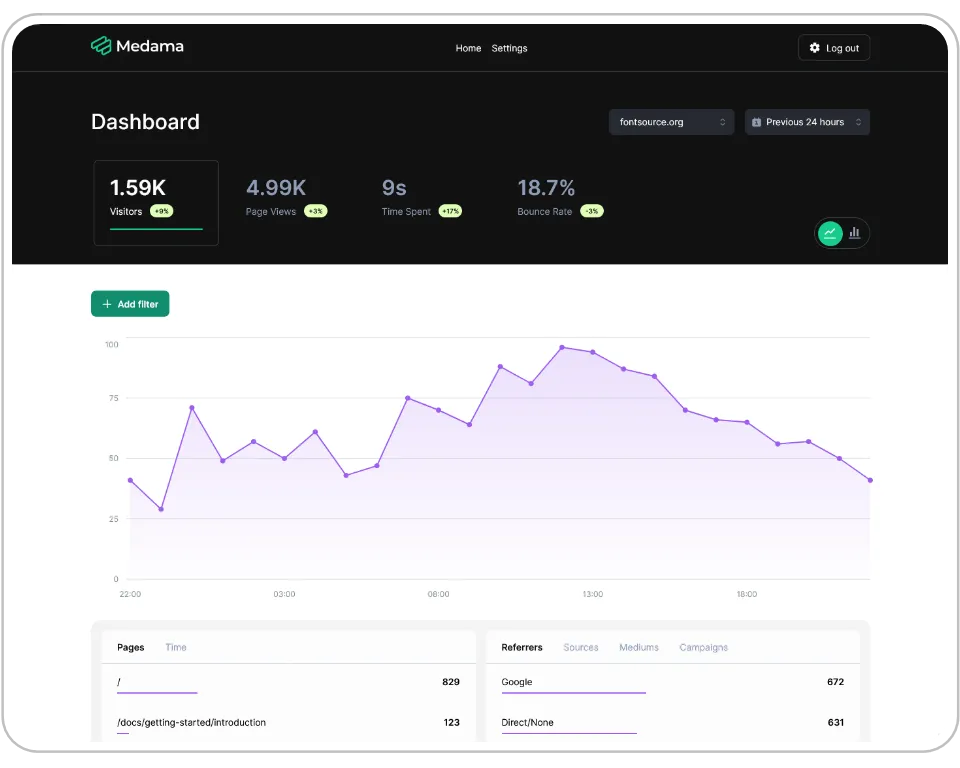
Medama Analytics is an open-source project dedicated to providing self-hostable, cookie-free website analytics. With a lightweight tracker of less than 1KB, it aims to offer useful analytics while prioritising user privacy.

FAQ
Do I need root privileges to bind to ports 80 and 443?
On Linux you may lack permission to bind to ports 80 and 443; you can grant the binary that ability without root using `sudo setcap cap_net_bind_service=+ep /path/to/your/binary`.
More in Web analytics
 OffenOffen Fair Web Analytics
 OpenAnalyticsOpen-source, cookieless web analytics with realtime dashboards, funnels and revenue attribution, self-hosted via Docker Compose on Postgres and ClickHouse.
 openpanelOpen-source, self-hosted web and product analytics in the spirit of Mixpanel: funnels, cohorts, session replay, A/B testing, revenue tracking, cookieless by default.
- openwebanalyticsSelf-hosted, open-source web analytics with a first-party JS tracker, dashboards, heatmaps, session recordings and a REST API — an alternative to Google Analytics.
 Plausible AnalyticsOpen-source, privacy-first web analytics with a one-page dashboard and a cookie-free tracker; self-hosted as Community Edition via Docker Compose.
 Plausible CESelf-hosted, AGPL-licensed community edition of Plausible: cookieless web analytics with a single-page dashboard, run via Docker Compose with PostgreSQL and ClickHouse.
 poeticmetricPoeticMetric is a self-hosted, open-source web analytics platform replacing Google Analytics with privacy-first, cookie-free tracking.
 PostHogOpen-source product toolkit - analytics, session replay, feature flags, error tracking - with a one-line self-hosted hobby deploy using Docker Compose.
 rightanaRightAna is a self-hosted, open-source web analytics platform tracking sessions with GDPR compliance, running as a single Go binary with embedded BoltDB.
- RybbitOpen-source cookieless web & product analytics replacing Google Analytics: session replays, funnels, retention, self-hosted with Docker, Postgres and ClickHouse.
 shynetSelf-hosted, open-source web analytics that watches visitors with no cookies and no required JavaScript, giving sessions, referrers, bounce rate and location data.
 sinkOpen-source, self-hosted URL shortener with visit analytics, custom slugs, QR codes and Cloudflare Access support, deployed serverlessly on Cloudflare Workers.
0 comments