selfhost.directory

The index of self-hostable projects — ranked, categorized and served with live updates.
Own your data and stop giving it to big tech.

OpenAnalytics logo

Self-host OpenAnalytics

v0.8.0

Privacy-first web analytics with revenue attribution

BetaOpen CoreAGPL-3.0
Updated6 days ago
LanguageTypescript
Setup difficultyAdvanced
Stars
642
RAM
about 4 GB
Storage
25 GB of free disk
Ports
443 (HTTPS for the four public hostnames (dashboard, api, collector, realtime), served by the bundled Caddy with Let's Encrypt certificates), 8081 (query-gateway, the only process allowed to read ClickHouse), 8082 (api control plane (auth, sites, keys, sharing, MCP)), 8083 (collector ingest endpoint), 8084 (realtime SSE stream behind the live dashboard), 8085 (worker (queue drain, rollups, mail, deletions)), 3000 (web dashboard (Next.js) server)
Requires
ClickHouse, PostgreSQL, Valkey
Docker
ghcr.io/openlabs-so/openanalytics
Install with Docker Compose
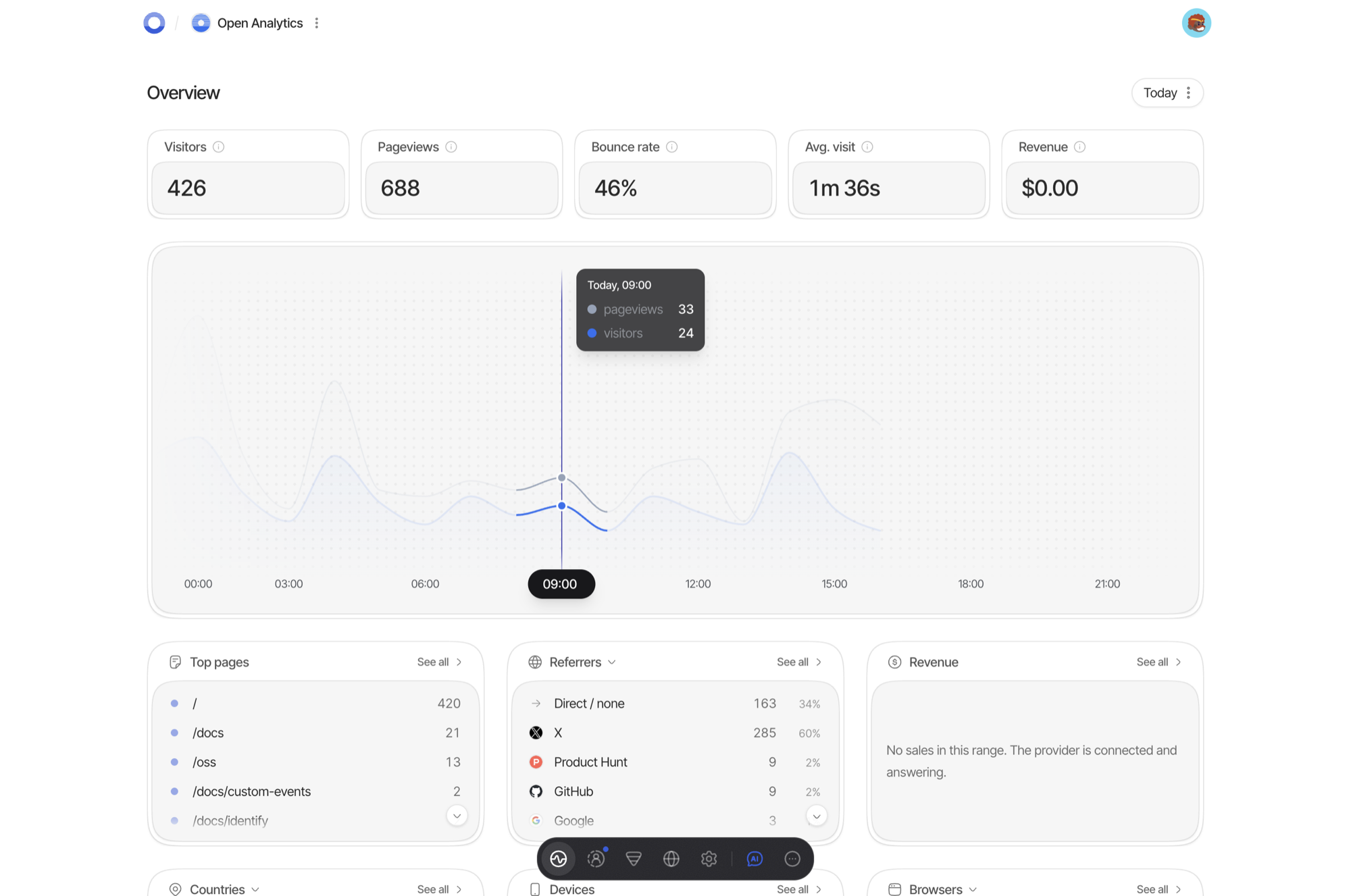
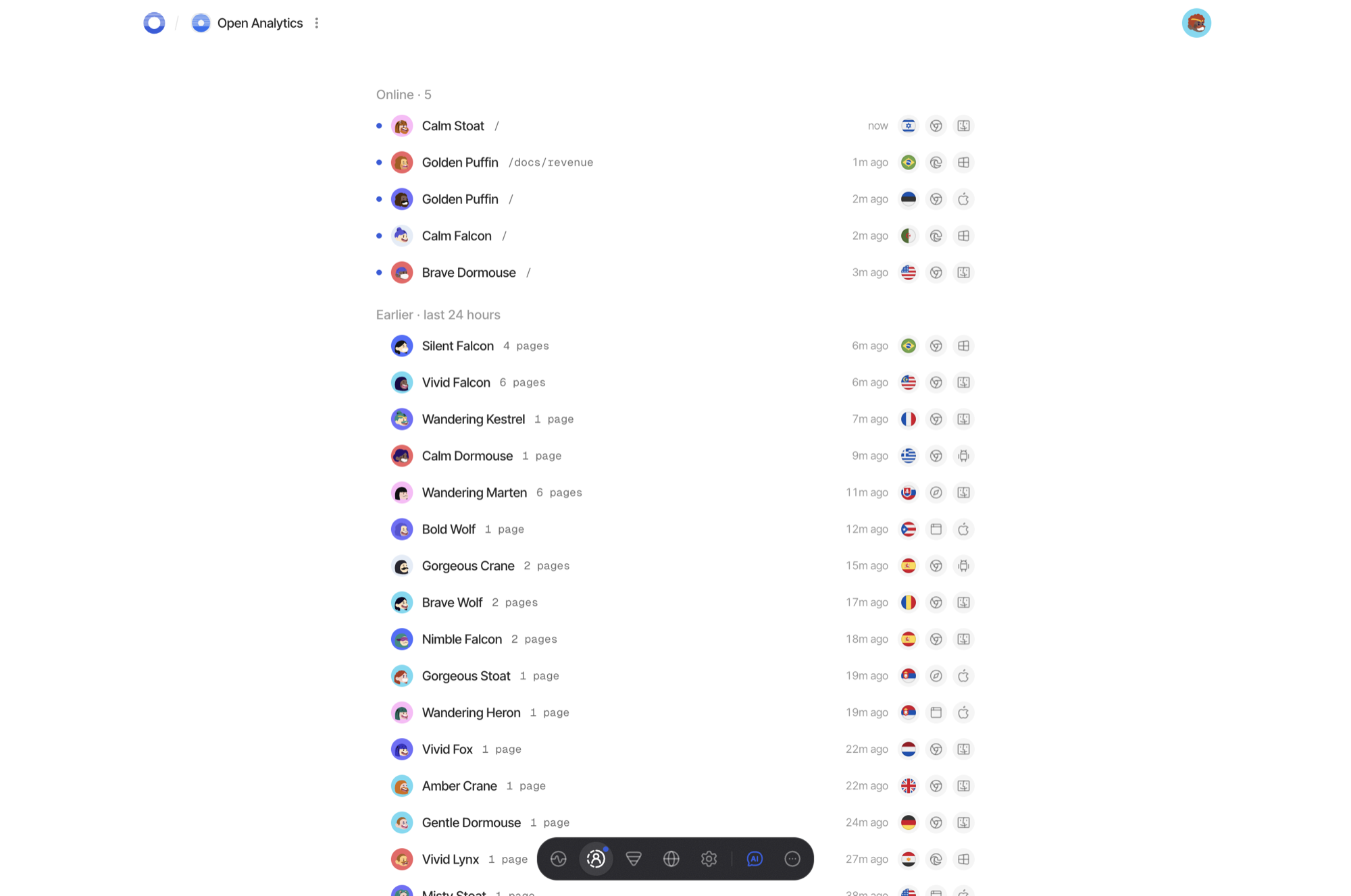
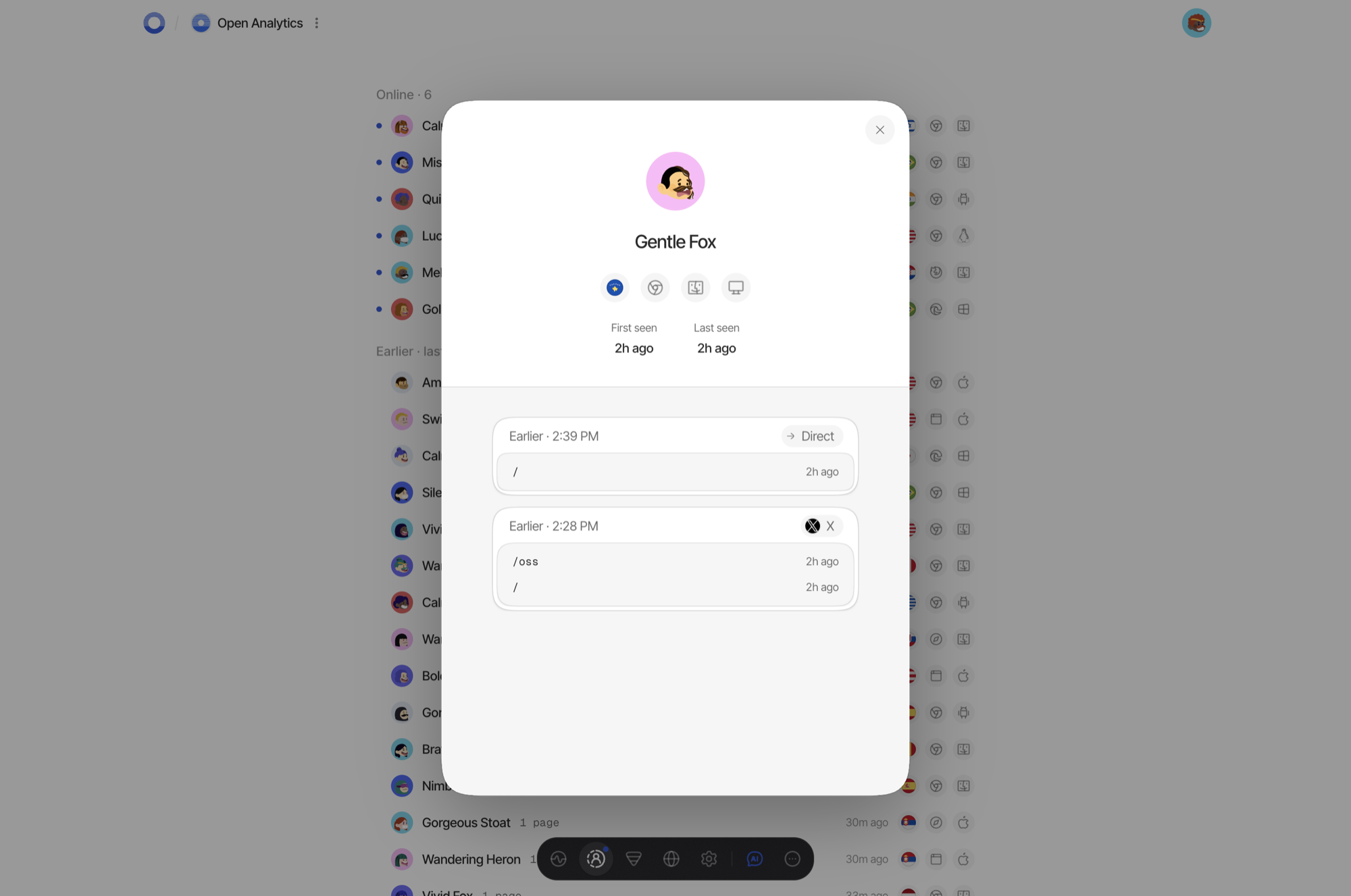
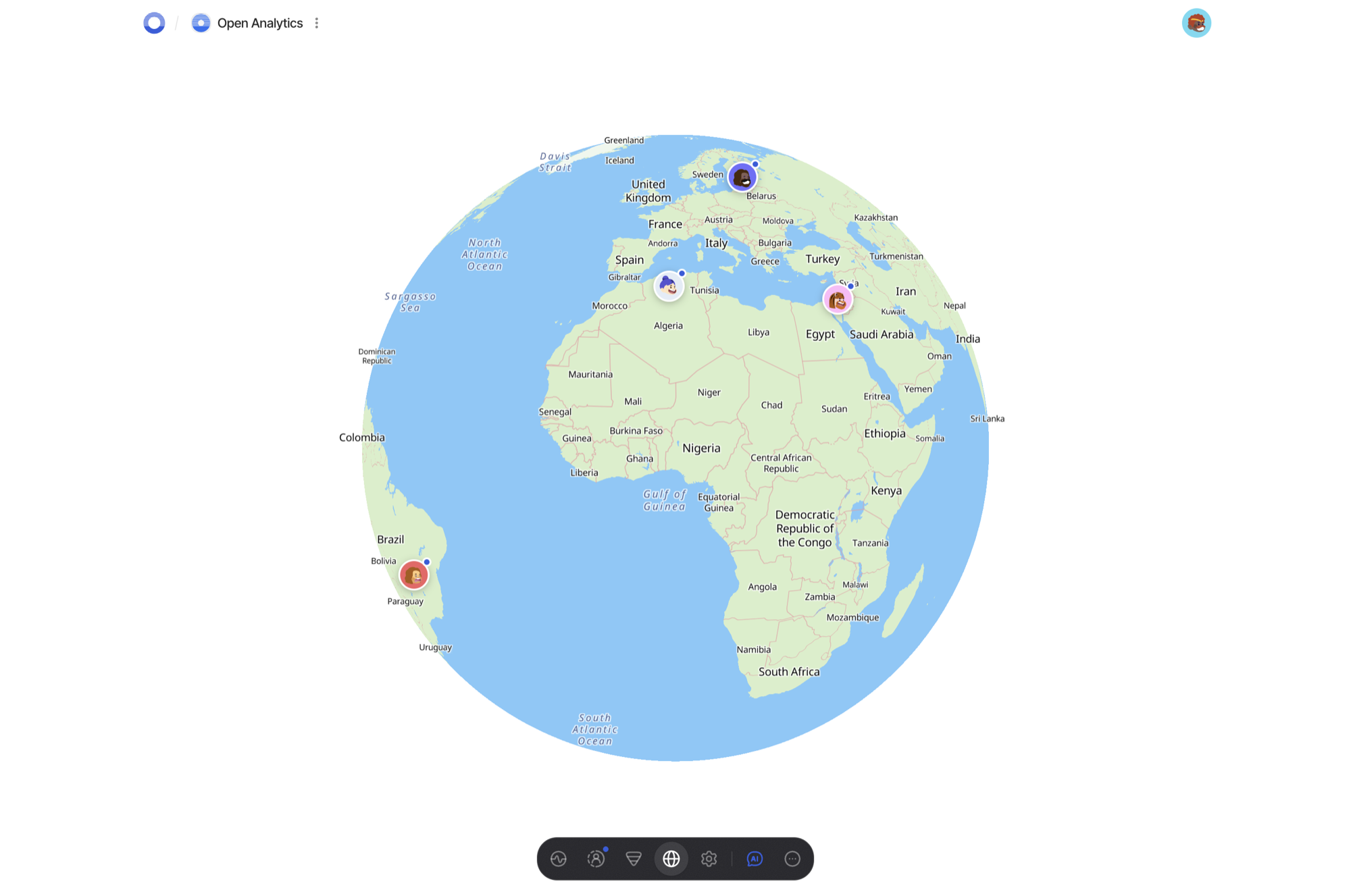
Overview screen: visitors, pageviews, bounce rate, average visit duration and revenue across a dayRealtime screen: visitors online now with the page each is onOne visitor's journey: two visits listing the pages opened inside eachLive globe placing individual visitors by country

What is OpenAnalytics?

OpenAnalytics (branded Open Analytics) is a privacy-first web-analytics product: a tiny async tracker script on your pages plus a dashboard, and nothing personal is retained — no cookies are set, nobody is fingerprinted, IP addresses are dropped after being hashed into a per-day visitor id. Day-to-day reporting covers pageviews, custom events, sessions, Core Web Vitals, funnels, campaign and UTM cuts, visitor journeys, a live presence view with a country globe, per-site retention, embeddable widgets and read-only share links. Money is tracked too: connect your own Stripe or Polar account with a read-only credential and payments appear next to the visit that produced them. It also ships a read API behind Bearer keys, an oa CLI, an MCP server for AI assistants, an optional OpenAI-powered chat, team roles, and CSV/JSON import and export backed by an S3-compatible bucket. Self-hosting is the supported Docker Compose path — point four hostnames at a Linux box, run ./generate-secrets.sh, then pull and start the stack; Caddy requests the TLS certificates itself, and seven services sit over Postgres, ClickHouse and two Valkey instances. Caveats: releases are still 0.x (v0.8.0), images are amd64 only so arm64 must build them, going back a version means restoring a snapshot, and the getopen.so cloud is subscription-billed while the repo's schema holds no billing tables.

Should you self-host OpenAnalytics?

OpenAnalytics scores 47/100 on selfhost.directory (how scoring works) and ranks #18 of 21 in Web analytics. It has 642 GitHub stars.

It shipped 7 stable releases in the past year. The latest, v0.8.0, came out on 19 September 2026. New versions land roughly every 3 days.

Setup is advanced: plan for several services and some ongoing maintenance. An official Docker image is available. It is AGPL-3.0-licensed and written mostly in Typescript.

Its closest alternative on selfhost.directory is Plausible Analytics (81/100, 29 704 stars). It scores higher overall, so compare the two before you pick. See OpenAnalytics vs Plausible Analytics side by side.

Features

  • Campaign / UTM reporting
  • City-level geolocationRequires downloading a GeoIP database (none bundled) and per-site opt-in for city detail.
  • Cookieless, fingerprint-free tracking
  • Core Web Vitals
  • CSV/JSON import and exportImport/export needs an S3-compatible bucket to be configured.
  • Custom Events
  • Embeddable Widgets
  • Funnels
  • Live visitor globe
  • MCP Server
  • Public share dashboards
  • Realtime visitor presence
  • Revenue attribution
  • Team roles
  • Visitor journeys

OpenAnalytics README

How to install OpenAnalytics

Install OpenAnalytics with Docker Compose

git clone https://github.com/OpenLabs-so/openanalytics
cd openanalytics
git checkout "$(git tag -l 'v*' --sort=-v:refname | sed '/-/d' | head -1)"   # newest release, not main
cd infra/selfhost
./generate-secrets.sh --domain example.com --email you@example.com --with-geoip
docker compose pull && docker compose up -d
# then open https://app.example.com and create the first account

Needs a Linux host with Docker plus four DNS names; images are amd64 only, so on arm64 you build them (`docker compose up -d --build`). Variants exist for platforms that own the proxy (Coolify, Dokploy, CapRover).

How to configure OpenAnalytics

  • ANONYMOUS_IDENTITY_KEY_VERSION
  • ANONYMOUS_IDENTITY_SECRET{{ANONYMOUS_IDENTITY_SECRET}}--- identity --------------------------------------------------------------- MUST BE THE SAME VALUE AND VERSION AS THE COLLECTOR'S. Used read-only here, to hash provider-side identifiers so a revenue fact joins against the event stream byte for byte. A different value joins against nothing while looking exactly like a value that should.

    --- identity --------------------------------------------------------------- MUST BE THE SAME VALUE AND VERSION AS THE COLLECTOR'S. Used read-only here, to hash provider-side identifiers so a revenue fact joins against the event stream byte for byte. A different value joins against nothing while looking exactly like a value that should.

  • APP_BASE_URL{{APP_BASE_URL}}
  • ASSISTANT_MODEL
  • AUTH_BASE_URL{{AUTH_BASE_URL}}--- public identity -------------------------------------------------------- Three different URLs with three different jobs: AUTH_BASE_URL Better Auth's own base — this api's public origin. The OAuth callback registered with Google/GitHub is {AUTH_BASE_URL}/api/auth/callback/{google,github}. APP_BASE_URL the DASHBOARD's origin. Every link meant for a human (invitation acceptance, bill

    --- public identity -------------------------------------------------------- Three different URLs with three different jobs: AUTH_BASE_URL Better Auth's own base — this api's public origin. The OAuth callback registered with Google/GitHub is {AUTH_BASE_URL}/api/auth/callback/{google,github}. APP_BASE_URL the DASHBOARD's origin. Every link meant for a human (invitation acceptance, bill

  • AUTH_EMAIL_VERIFICATIONWhether a password session requires a verified address first. Leave it alone. The first account is written verified — there is no mail to verify it with, which is the whole reason it exists — so the usual install never needs this. It is the escape hatch for an install whose mail transport broke later and which needs a password account it never verified.

    Whether a password session requires a verified address first. Leave it alone. The first account is written verified — there is no mail to verify it with, which is the whole reason it exists — so the usual install never needs this. It is the escape hatch for an install whose mail transport broke later and which needs a password account it never verified.

  • AUTH_PASSWORD_SIGNINEmail+password sign-in. ON by default here, and off on the hosted deployment. This is the only door a self-hosted install has that needs neither a third-party OAuth app nor a working mail server, so it is what the first-run screen uses: a fresh install shows "create the first account" at /login, and the account it makes signs in with this. Turning it off leaves that account unusable until OAuth or

    Email+password sign-in. ON by default here, and off on the hosted deployment. This is the only door a self-hosted install has that needs neither a third-party OAuth app nor a working mail server, so it is what the first-run screen uses: a fresh install shows "create the first account" at /login, and the account it makes signs in with this. Turning it off leaves that account unusable until OAuth or

  • AUTH_SECRET{{AUTH_SECRET}}--- secrets ----------------------------------------------------------------

    --- secrets ----------------------------------------------------------------

  • AUTH_TRUSTED_ORIGINS{{APP_BASE_URL}}One variable, two boundaries: Better Auth's origin/CSRF check and the credentialed CORS allowlist. Comma-separated. UNSET, THE API EMITS NO Access-Control-Allow-Origin AND EVERY BROWSER CALL FROM THE DASHBOARD IS REFUSED — fail-closed, by design.

    One variable, two boundaries: Better Auth's origin/CSRF check and the credentialed CORS allowlist. Comma-separated. UNSET, THE API EMITS NO Access-Control-Allow-Origin AND EVERY BROWSER CALL FROM THE DASHBOARD IS REFUSED — fail-closed, by design.

  • CLICKHOUSE_DBanalytics
  • CLICKHOUSE_INGEST_PASSWORD
  • CLICKHOUSE_INGEST_USERoa_ingest
  • CLICKHOUSE_MAINTENANCE_PASSWORD
  • CLICKHOUSE_MAINTENANCE_USERoa_maintenanceSite and account deletion runs on its own credential: ALTER DELETE and SELECT on analytics.*, and nothing else. Deliberately not the ingest user (which must stay insert-only) and not the migration user (which can also DROP tables, a privilege no long-running process should hold). WITHOUT IT, DELETION REQUESTS QUEUE AND RETRY FOREVER instead of erasing anything — a wait, not a loss, but a wait nobo

    Site and account deletion runs on its own credential: ALTER DELETE and SELECT on analytics.*, and nothing else. Deliberately not the ingest user (which must stay insert-only) and not the migration user (which can also DROP tables, a privilege no long-running process should hold). WITHOUT IT, DELETION REQUESTS QUEUE AND RETRY FOREVER instead of erasing anything — a wait, not a loss, but a wait nobo

  • CLICKHOUSE_READ_PASSWORD
  • CLICKHOUSE_READ_USERoa_read
  • CLICKHOUSE_URLhttp://clickhouse:8123--- ClickHouse -------------------------------------------------------------

    --- ClickHouse -------------------------------------------------------------

  • COLLECTOR_BASE_URL{{COLLECTOR_BASE_URL}}
  • CREDENTIAL_SOURCE_SECRETKeys the source fingerprint on the credential event journal — a hash of the addresses API keys and CLIs connect from. Unset, no credential event is journalled at all; reads are untouched.

    Keys the source fingerprint on the credential event journal — a hash of the addresses API keys and CLIs connect from. Unset, no credential event is journalled at all; reads are untouched.

  • DATABASE_URLpostgres://openanalytics:{{POSTGRES_PASSWORD}}@postgres:5432/openanalytics
  • DEPLOYMENT_SETTINGSWhether that screen exists. `enabled` is the default and is what a single-tenant install wants. Set `disabled` on a multi-tenant deployment, where the environment IS the configuration. The worker reads the same variable and the two must agree. Only the account that claimed this deployment — the oldest one — may use the screen, and it needs OA_CREDENTIAL_KEYRING above to encrypt what it stores.

    Whether that screen exists. `enabled` is the default and is what a single-tenant install wants. Set `disabled` on a multi-tenant deployment, where the environment IS the configuration. The worker reads the same variable and the two must agree. Only the account that claimed this deployment — the oldest one — may use the screen, and it needs OA_CREDENTIAL_KEYRING above to encrypt what it stores.

  • EMAIL_FROM--- mail ------------------------------------------------------------------- Delivery is a worker job: the api only writes the send to the outbox. WITH NO TRANSPORT CONFIGURED, MAIL IS WRITTEN TO THE LOG AND NEVER SENT — which means magic-link sign-in cannot complete and invitations never arrive. You do not have to configure it here. Sign in and open Account → Deployment: the relay you enter there

    --- mail ------------------------------------------------------------------- Delivery is a worker job: the api only writes the send to the outbox. WITH NO TRANSPORT CONFIGURED, MAIL IS WRITTEN TO THE LOG AND NEVER SENT — which means magic-link sign-in cannot complete and invitations never arrive. You do not have to configure it here. Sign in and open Account → Deployment: the relay you enter there

  • ENVIRONMENTproductionMust MATCH the gateway's ENVIRONMENT. The signed-query audience defaults to `query-gateway:<ENVIRONMENT>` on both sides, so a mismatch here rejects every analytics read with a signature error that names neither variable.

    Must MATCH the gateway's ENVIRONMENT. The signed-query audience defaults to `query-gateway:<ENVIRONMENT>` on both sides, so a mismatch here rejects every analytics read with a signature error that names neither variable.

  • EVENT_STREAM_REDIS_URLredis://:{{VALKEY_QUEUE_PASSWORD}}@{{VALKEY_QUEUE_IP}}:6379The worker's queue hop has no transport restriction (it is the consumer, not the public writer), but it uses the same addresses so there is one answer to "where is the queue".

    The worker's queue hop has no transport restriction (it is the consumer, not the public writer), but it uses the same addresses so there is one answer to "where is the queue".

  • GEOIP_DB_PATHCity-level geolocation, resolved locally — no lookup leaves this host. Point this at a City-schema .mmdb in `infra/selfhost/geoip/`, which the compose file mounts at /geoip read-only. UNSET, EVERY EVENT CARRIES NULL GEO — a degradation, never a failure, and the reason a fresh install shows every country as unknown. `cd geoip && ./fetch-dbip.sh` downloads DB-IP City Lite (CC BY 4.0: no account, red

    City-level geolocation, resolved locally — no lookup leaves this host. Point this at a City-schema .mmdb in `infra/selfhost/geoip/`, which the compose file mounts at /geoip read-only. UNSET, EVERY EVENT CARRIES NULL GEO — a degradation, never a failure, and the reason a fresh install shows every country as unknown. `cd geoip && ./fetch-dbip.sh` downloads DB-IP City Lite (CC BY 4.0: no account, red

  • GITHUB_CLIENT_ID
  • GITHUB_CLIENT_SECRET
  • GOOGLE_CLIENT_ID--- sign-in ---------------------------------------------------------------- A provider is offered only when BOTH its id and secret are present, so a deployment with neither pair simply has no Google/GitHub button. Register the callback as {AUTH_BASE_URL}/api/auth/callback/google (and /github).

    --- sign-in ---------------------------------------------------------------- A provider is offered only when BOTH its id and secret are present, so a deployment with neither pair simply has no Google/GitHub button. Register the callback as {AUTH_BASE_URL}/api/auth/callback/google (and /github).

  • GOOGLE_CLIENT_SECRET
  • LOG_LEVELinfo
  • METRICS_REMOTE_WRITE_TOKEN
  • METRICS_REMOTE_WRITE_URLMetrics, in Prometheus remote-write format. Without them every service keeps its structured-log metrics floor.

    Metrics, in Prometheus remote-write format. Without them every service keeps its structured-log metrics floor.

  • METRICS_REMOTE_WRITE_USER
  • NODE_ENVproduction
  • OA_CREDENTIAL_KEYRINGEncrypts customers' own payment-provider keys at rest. MUST BE BYTE-IDENTICAL to the worker's copy — the api encrypts, the worker decrypts, and two different rings cannot read each other's rows.

    Encrypts customers' own payment-provider keys at rest. MUST BE BYTE-IDENTICAL to the worker's copy — the api encrypts, the worker decrypts, and two different rings cannot read each other's rows.

  • OBJECT_STORAGE_ACCESS_KEY_ID
  • OBJECT_STORAGE_BUCKET
  • OBJECT_STORAGE_ENDPOINTObject storage for data import and export (see the object-storage profile). All five or none: a signature needs the endpoint, region, bucket and key pair, so a partial block is treated as "not configured" and the import surface is simply not mounted.

    Object storage for data import and export (see the object-storage profile). All five or none: a signature needs the endpoint, region, bucket and key pair, so a partial block is treated as "not configured" and the import surface is simply not mounted.

  • OBJECT_STORAGE_REGION
  • OBJECT_STORAGE_SECRET_ACCESS_KEY
  • OPENAI_API_KEYThe AI assistant. Unset, its routes stay mounted and answer 503 "not configured" BEFORE any question is charged, and the dashboard's chat button is drawn disabled rather than offering an error. You do not have to set it here either: Account → Deployment stores a key encrypted, it wins over this variable, and it takes effect on the next question with no restart.

    The AI assistant. Unset, its routes stay mounted and answer 503 "not configured" BEFORE any question is charged, and the dashboard's chat button is drawn disabled rather than offering an error. You do not have to set it here either: Account → Deployment stores a key encrypted, it wins over this variable, and it takes effect on the next question with no restart.

  • OPENAI_BASE_URL
  • PORT8082
  • PRODUCT_NAMEOpen AnalyticsShown in the product and in the mail it sends.

    Shown in the product and in the mail it sends.

  • QUERY_GATEWAY_AUDIENCELeave unset unless you set it on the gateway too — both default to `query-gateway:<ENVIRONMENT>`.

    Leave unset unless you set it on the gateway too — both default to `query-gateway:<ENVIRONMENT>`.

  • QUERY_GATEWAY_URLhttp://gateway:8081--- signed reads -----------------------------------------------------------

    --- signed reads -----------------------------------------------------------

  • QUERY_SIGNING_KEY_IDThe gateway accepts exactly one key id. Bump it on both sides when you rotate the pair: a stale signer then fails as "Unknown signing key" rather than as a signature error, which is the more diagnosable of the two.

    The gateway accepts exactly one key id. Bump it on both sides when you rotate the pair: a stale signer then fails as "Unknown signing key" rather than as a signature error, which is the more diagnosable of the two.

  • REALTIME_CACHE_REDIS_URLredis://:{{VALKEY_REALTIME_PASSWORD}}@{{VALKEY_REALTIME_IP}}:6379The shared nonce store, and the near-realtime usage counter. ADDRESSED BY IP, NOT BY SERVICE NAME — see note 2 in docker-compose.yml.

    The shared nonce store, and the near-realtime usage counter. ADDRESSED BY IP, NOT BY SERVICE NAME — see note 2 in docker-compose.yml.

  • RESEND_API_KEYThe hosted alternative, and the one a self-hosted install usually cannot have: it needs a Resend account with a verified sending domain. Set with SMTP_HOST also set, this wins and the worker logs that it ignored the SMTP block.

    The hosted alternative, and the one a self-hosted install usually cannot have: it needs a Resend account with a verified sending domain. Set with SMTP_HOST also set, this wins and the worker logs that it ignored the SMTP block.

  • SMTP_FROMOverrides EMAIL_FROM for SMTP only, for relays that refuse a From that is not the authenticated mailbox.

    Overrides EMAIL_FROM for SMTP only, for relays that refuse a From that is not the authenticated mailbox.

  • SMTP_HOSTSMTP is the transport a self-hosted install can actually have: SMTP_HOST alone activates it and the rest default sensibly — port 587, TLS negotiated with STARTTLS, no credential, EMAIL_FROM as the sender.

    SMTP is the transport a self-hosted install can actually have: SMTP_HOST alone activates it and the rest default sensibly — port 587, TLS negotiated with STARTTLS, no credential, EMAIL_FROM as the sender.

  • SMTP_PASS
  • SMTP_PORT
  • SMTP_SECUREImplicit TLS from the first byte. Set it for port 465; leave it unset for 587. Only the literals true and false are accepted.

    Implicit TLS from the first byte. Set it for port 465; leave it unset for 587. Only the literals true and false are accepted.

  • SMTP_USERBoth or neither — the transport authenticates only with a complete credential.

    Both or neither — the transport authenticates only with a complete credential.

  • STRIPE_SECRET_KEY--- optional integrations -------------------------------------------------- Subscription billing. Unset, the billing surfaces disable themselves cleanly and everything else runs — which is what a self-hosted install normally wants.

    --- optional integrations -------------------------------------------------- Subscription billing. Unset, the billing surfaces disable themselves cleanly and everything else runs — which is what a self-hosted install normally wants.

  • STRIPE_WEBHOOK_SECRET
  • TELEGRAM_BOT_TOKENTelegram notifications, if you want them. Without both halves the notification drain uses the log transport.

    Telegram notifications, if you want them. Without both halves the notification drain uses the log transport.

  • TELEGRAM_NOTIFY_CHAT_ID
  • TRIAL_IDENTITY_SECRETKeys the one-time-trial claim, which is keyed on an email HMAC and never the address itself.

    Keys the one-time-trial claim, which is keyed on an email HMAC and never the address itself.

OpenAnalytics releases & version history

FAQ

Will it slow my site down?

The tracker is a single small async tag of about 2 KB compressed, with no SDK or build step.

How does revenue attribution work?

You connect Stripe or Polar with a read-only credential, and each payment is joined to the visit that produced it.

Can I bring my history from another tool?

Yes, you can upload an export from Plausible, Fathom and other supported tools as a single ZIP, review it, and roll it back in one click.

Is there a free plan?

There is no free plan; the hosted service offers a 7-day free trial on the size you pick, and cancelling before day 7 costs nothing.

Why my numbers look lower than Google Analytics?

Visits from browsers sending Global Privacy Control or Do Not Track are not recorded at all, so lower counts are respected opt-outs rather than missing data.

What do you store about my visitors?

Only aggregate-style signals — pageviews, referrers, devices and the events you send — with visitors counted by an anonymous hash that rotates daily.

Can I self-host it?

Yes, the project is open source and can run on your own infrastructure with your own keys, or on their hosted cloud.

Do I need a cookie consent banner?

No — the tracker sets no cookies and collects nothing personal, so there is no consent to ask for, in the EU included.

More in Web analytics

Rate this project

Click to rate — no account needed.

0 comments

Posting as guest
Loading comments…