
Self-host koboldcpp
v1.125One-file GGUF LLM server with built-in chat and story UI
curl -sSL https://raw.githubusercontent.com/LostRuins/koboldcpp/concedo/android_install.sh | sh- Stars
- 12 359
- Rating
- 5.0 (1)
- RAM
- LLAMA 7B needs at least 8GB RAM
- Port
- 5001 (Web UI and all API endpoints)
koboldai/koboldcpp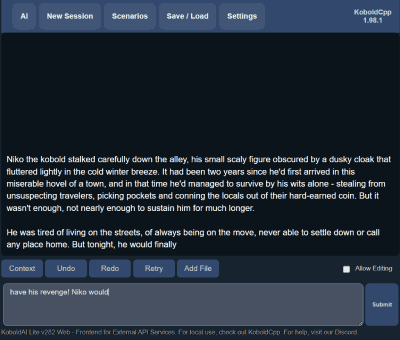
What is koboldcpp?
KoboldCpp is an AI text-generation server you run yourself, packaged as one standalone file and inspired by KoboldAI while building on llama.cpp. It loads GGUF (and legacy GGML) models and generates text in chat, adventure, instruct and story modes, on CPU or with CUDA, Vulkan and Metal acceleration, including optional layer offloading and an autofit mode. Media generation is built in: images (Stable Diffusion 1.5, SDXL, SD3, Flux, Qwen Image and others), video, speech recognition with Whisper, narration with several TTS engines, music with ACE-Step, plus vision input for multimodal models. Agent-style work is covered by MCP server support, tool calling, web search, TextDB retrieval-augmented generation and an integrated coding agent. On port 5001 it serves the bundled KoboldAI Lite UI and the classic llama.cpp UI together with OpenAI-compatible, KoboldAI, Ollama, A1111/Forge, ComfyUI, Whisper and XTTS endpoints, so existing clients can be repointed at it. Installation is a download-and-run binary for Windows, x86-64 Linux and Apple Silicon, an official Docker image aimed at cloud GPU rigs, and source builds for Android, OpenBSD and Raspberry Pi. Model weights are never bundled, and the project warns that koboldcpp.com is a fake site; genuine binaries come only from the GitHub releases page.
koboldcpp alternatives
 audio.cppSelf-hosted C++ framework running 100+ audio models locally with CUDA, Vulkan, Metal, CPU backends, built-in WebUI, no Python deps.Compareaudio.cpp with koboldcpp
 OllamaOllama is a self-hosted, open-source platform for running LLMs locally on macOS, Windows, and Linux with a REST API and official SDKs.CompareOllama with koboldcpp
 llama-gptSelf-hosted, open-source ChatGPT-style chatbot that runs Llama 2 and Code Llama locally, with a web chat UI and an OpenAI-compatible API.Comparellama-gpt with koboldcpp
 GuaardvarkSelf-hosted AI studio on your own GPU: chat with your files (RAG), screen and browser agents, coding swarms, LoRA training, an MCP server for Claude Code and Cursor, and local video, image, music and voice generation. No telemetry.CompareGuaardvark with koboldcpp
 airunnerSelf-hosted, open-source desktop AI engine: local LLM chat companions, Stable Diffusion art generation, TTS/STT voice, and a headless Ollama/OpenAI-compatible API.Compareairunner with koboldcpp
 unslothSelf-hosted, open-source UI and framework to run, fine-tune and export LLMs, GGUF/MLX and diffusion models on your own GPU or Mac.Compareunsloth with koboldcpp
 voice-chat-aiSelf-hosted open-source voice chat app for talking to AI characters in a web UI or terminal, mixing Ollama and cloud LLMs with Spark-TTS, Kokoro or ElevenLabs voices.Comparevoice-chat-ai with koboldcpp
 llama-swapSelf-hosted model swapping proxy for running multiple AI models locally. Swaps between llama.cpp, vllm, stable-diffusion.cpp on demand via OpenAI/Anthropic endpoints.Comparellama-swap with koboldcpp
Should you self-host koboldcpp?
koboldcpp scores 78/100 on selfhost.directory (how scoring works) and ranks #5 of 25 in LLM Inference. It has 12 359 GitHub stars, +332 in the last 30 days.
It shipped 14 stable releases in the past year. The latest, v1.125, came out on 22 November 2026. New versions land roughly every 2 weeks.
Setup is easy: most people get it running in one sitting. An official Docker image is available. It is AGPL-3.0-licensed and written mostly in C++.
Its closest alternative on selfhost.directory is openhands (87/100, 94 006 stars). It scores higher overall, so compare the two before you pick. See koboldcpp vs openhands side by side.
Features
- AI agent
- Bundled web UI
- GPU acceleration with layer offloading
- Image Generation
- Local GGUF model inference
- Multi-user sharing
- Music Generation
- Parallel batched requests
- Remote tunnel
- Speech-to-Text
- Text-to-Speech
- Tool calling and MCP support
- Video Generation
- Vision / image understanding
koboldcpp README
KoboldCpp is free and open-source software for running GGUF large language models (LLMs) on your own computer. Chat with an AI assistant, write stories, roleplay, or connect other apps to a local API. KoboldCpp runs on CPU or GPU and also includes text, image, video, speech and music generation with compatible models, an integrated agent, a bundled KoboldAI Lite WebUI, and many additional powerful features.
Inspired by KoboldAI and built on llama.cpp
One executable file, no installation required. Ready-to-run downloads are available for Windows, Linux, and macOS.


FAQ
What is grammar sampling?
Grammar sampling lets you supply a GBNF grammar that constrains the model's response to a specific syntax.
How do I see the available commands and how to use them?
Run it from a terminal with --help to print the list of available commands and launch flags.
Do I need all the files of a model, and which quantization should I pick?
You only need a single file per model; the different filenames are compression levels, with lower bit-per-weight files being smaller but slightly lower quality.
What is the difference between GGUF and GGML?
GGUF is the newer, more future-proof format and the recommended one for LLaMA models, while KoboldCpp still works with both GGUF and the older GGML versions.
Are my chats private?
Yes. It can run completely offline, sends inputs nowhere else, and the Lite UI keeps content only in the browser — though third-party clients and Horde jobs have their own privacy caveats.
What is --nomodel?
It launches the KoboldAI Lite UI by itself with no model loaded, so the UI can connect to another KoboldCpp instance or to services such as the AI Horde.
What is --config and what are .kcpps files?
A .kcpps file stores launcher preferences and settings, which can be loaded in the GUI or run directly with --config, and exported again with --exportconfig.
What is --multiuser mode?
It lets several people share one instance by queuing incoming requests and dispatching them to the right client; this is on by default, and --multiuser 0 turns it off.
How do I use streaming, and which types are supported?
Several: polled streaming is the default used by the Lite UI, pseudo-streaming is an older discouraged method, and SSE true per-token streaming is available through the API for a few third-party clients.
How do I use KoboldCpp from another device over the network?
From the same network open the host's LAN IP and port in a browser; elsewhere use the built-in Cloudflare tunnel helper (--remotetunnel), or the embedded AI Horde worker combined with the KoboldAI Lite web page.
How can I run KoboldCpp on my Android phone?
It is possible by building and running it inside Termux, though inference on the phone itself is likely slow and memory limited, so running it on another machine and connecting remotely is suggested instead.
What port does KoboldCpp use and how do I change it?
Yes, the default is 5001 and you can change it by launching with the --port parameter, then pointing your browser or API client at that port.
How much RAM or VRAM do I need to run KoboldCpp?
It depends on model size, context and quantization; with a 2048 context at Q4_0 a 3B model needs at least 4GB RAM, a 7B at least 8GB, a 13B at least 16GB and a 30B at least 32GB.
What is KoboldCpp?
It is an easy-to-use AI text-generation program for GGML and GGUF models, inspired by the original KoboldAI, built off llama.cpp and shipped as one self-contained distributable with many compatibility API endpoints and extra generation features.
Models koboldcpp runs
Popular open-weight models with koboldcpp support, with VRAM needs and licence at a glance.




More in LLM Inference
 lemonadeSelf-hosted, open-source local AI server that runs LLM, vision, image, speech, and transcription models on your own GPU or NPU and serves them through OpenAI-style APIs.
 libre-chatLibre Chat is a self-hosted, open-source chatbot web service powered by local LLMs like Mixtral or Llama 2, with web UI, API, streaming responses, and document-based QA.
 llama.cppllama.cpp is an open-source, self-hosted LLM inference engine written in C/C++ that runs quantized models locally on CPU and GPU with minimal dependencies.
 llamactlSelf-hosted control plane that manages llama.cpp, MLX, and vLLM inference servers through a web dashboard with a unified OpenAI-compatible API.
- llama-gptSelf-hosted, open-source ChatGPT-style chatbot that runs Llama 2 and Code Llama locally, with a web chat UI and an OpenAI-compatible API.
 LLMKubeOpen-source Kubernetes operator running LLMs on NVIDIA, AMD, Intel, and Apple Silicon with pluggable runtimes and hybrid routing.
 LumabriLumabri is a self-hosted, open-source system for running LLMs across LAN computers by distributing layers with donor approval, offering terminal and web chat.
 mistral.rsmistral.rs is a self-hosted, open-source LLM inference engine in Rust serving OpenAI-compatible and Anthropic-compatible APIs with built-in web UI.
- OllamaOllama is a self-hosted, open-source platform for running LLMs locally on macOS, Windows, and Linux with a REST API and official SDKs.
 ollama-intel-gpuA self-hosted Docker image running Ollama on Intel Arc GPUs via IPEX-LLM, drop-in replacement for Nvidia Ollama with same API on port 11434.
 production-stackSelf-hosted, open-source Helm stack that scales vLLM across a Kubernetes cluster, with KV-cache-aware request routing and a Prometheus/Grafana monitoring dashboard.
 ReameSelf-hosted LLM server for CPU inference using ternary models, runs 8B models in 2.2GB RAM on free-tier ARM with OpenAI-compatible API.
0 comments