
Self-host Hackatime
b35748e4b827c9a46543144a77957226d6620cf8WakaTime-compatible coding time tracker
docker compose up -d- Stars
- 216
- Port
- 3000 (HTTP web server)
- Requires
- PostgreSQL
ghcr.io/hackclub/hackatime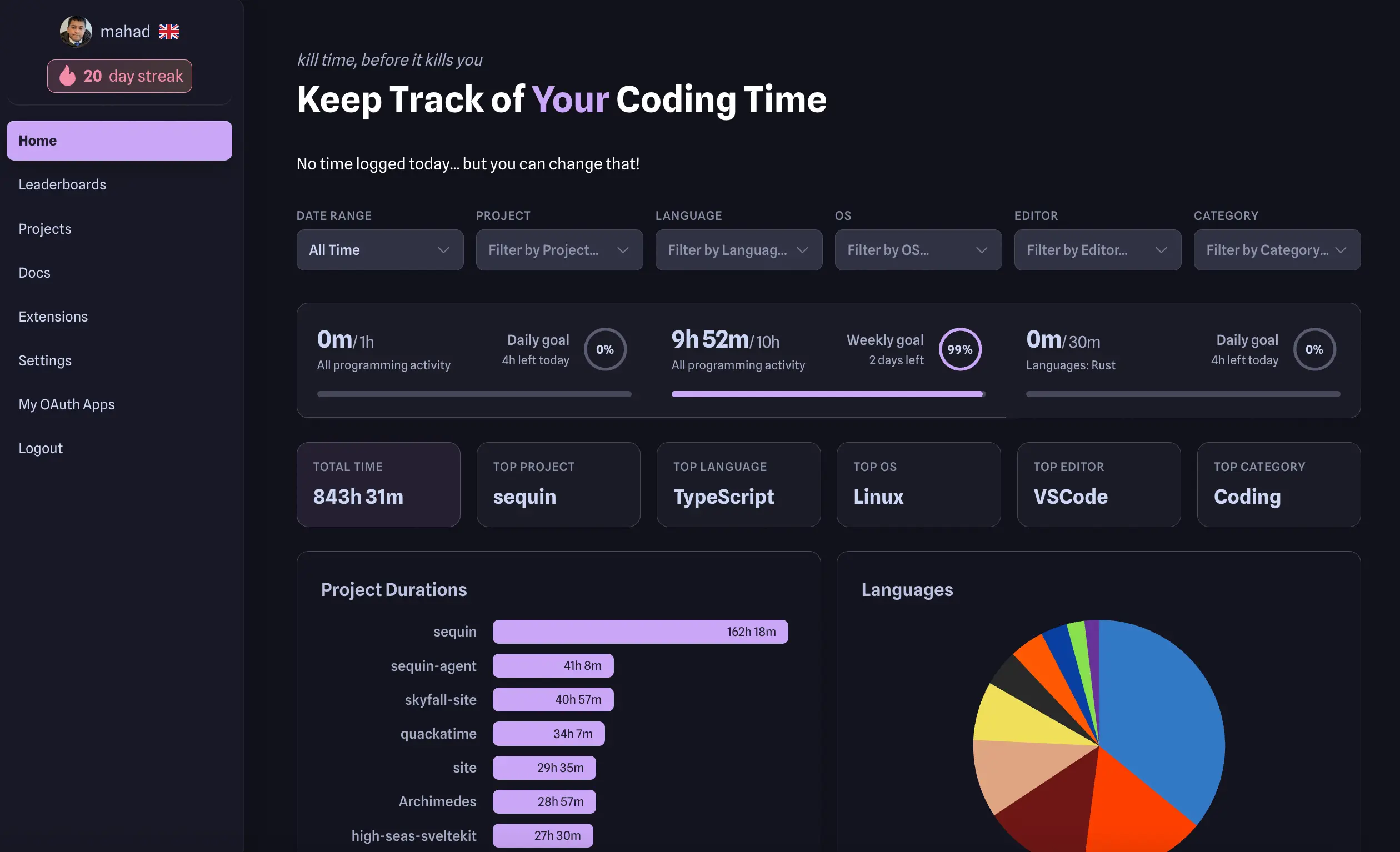
What is Hackatime?
Hackatime is a free, open-source coding time tracker created by Hack Club as a privacy-focused alternative to WakaTime. It works with the existing WakaTime plugin ecosystem, supporting over 70 editors including VS Code, JetBrains IDEs, Vim, Neovim, and more. The tracker automatically records coding time when you type and stops during breaks, providing granular insights into languages, projects, and individual files. All data belongs to the user and can be exported as JSON at any time. The project offers a REST API compatible with the WakaTime specification, OAuth 2.0 for integrations, and features like leaderboards for members. It can be self-hosted using Docker Compose with PostgreSQL, giving users complete data sovereignty. The hosted version at hackatime.hackclub.com is free with no premium tiers.
Should you self-host Hackatime?
Hackatime scores 52/100 on selfhost.directory (how scoring works) and ranks #69 of 166 in Developer Tools. It has 216 GitHub stars.
There was no stable release in the past 12 months, so check the repository's recent activity before you rely on it.
Setup is advanced: plan for several services and some ongoing maintenance. An official Docker image is available. It is MIT-licensed and written mostly in Ruby.
Its closest alternative on selfhost.directory is ActivityWatch (80/100, 19 401 stars). It scores higher overall, so compare the two before you pick. See Hackatime vs ActivityWatch side by side.
Features
- Automatic time tracking
- Badges
- Data Export
- File-level insights
- Language statistics
- LeaderboardsMarked as 'coming soon' on the website
- OAuth 2.0 provider
- Plugin privacy settings
- Privacy-first tracking
- Project and GitHub integration
- REST API
- WakaTime API compatibility
- WakaTime data import
Hackatime README
FAQ
Can I self-host this?
Yes, the entire codebase is open source on GitHub. You can spin up your own instance for complete data sovereignty.
Is my code private?
Hackatime only receives metadata (file names, project names, timestamps, language). It never sees your actual source code.
More in Time Tracking
 hakatimeSelf-hosted Wakatime server implementation with analytics dashboard, leaderboards, badge generation, and GitHub commit time tracking. Open-source under Unlicense.
 invoice-ninjaSelf-hosted invoicing platform for freelancers and small businesses: invoices, quotes, online payments, recurring billing, expenses, projects and time tracking.
 KimaiKimai is the #1 open-source time-tracking application. From freelancers to companies and organisations - everyone can manage timesheets, generate reports, create invoices and so much more... Web-based multi-user application, available as On-Premise or SaaS version: https://www.kimai.org
 middayOpen-source, self-hosted business assistant for freelancers: invoicing, bank transactions, time tracking, receipt matching and accountant-ready CSV exports.
 solidtimeSelf-hosted, open-source (AGPL-3.0) time tracking for freelancers and agencies: timer, calendar, timesheet, projects, billable rates and reports, run with Docker.
 taskview-communitySelf-hosted, source-available project and task manager for software teams: Kanban, dependency graphs, RBAC, SSO, time tracking and an MCP server.
 TimeCaseSelf-hosted time tracker for teams with manual/auto entry, real-time reports, CSV export, client portal, and five roles. Deploys via Docker or PHP/MySQL.
 timesheetSelf-hosted web app for consultants to track project hours with rates. Docker/binary, PostgreSQL/MySQL. Dark mode, backup/restore, REST API. CC BY-NC 4.0.
 TimeTaggerSelf-hosted, open-source time tracker for freelancers with interactive timeline, tag-based workflow, PDF/CSV reports, targets, Pomodoro, and cross-device sync.
 TimeTrackerOpen-source, self-hosted time tracking and invoicing app with timers, projects, expenses and Peppol e-invoicing — an alternative to Toggl, Clockify and Harvest.
 TitraSelf-hosted open-source time tracker for freelancers and small teams with REST API, dark mode, and Wekan/Zammad integrations. Runs via Docker with MongoDB.
 TraggoSelf-hosted, open-source tag-based time tracking with customizable dashboards, calendar view, and multiple themes.
0 comments