selfhost.directory

The index of self-hostable projects — ranked, categorized and served with live updates.
Own your data and stop giving it to big tech.

TimeTracker logo

Self-host TimeTracker

v5.18.4

Time tracking, invoicing and Peppol e-invoices for teams

ReleaseOpen SourceGPL-3.0
Updated8 hours ago
LanguagePython
Setup difficultyEasy
MobileNative app
Stars
634
CPU
1 core (2.0 GHz+)
RAM
2 GB
Storage
10 GB free space
Port
8080 (App HTTP web UI (container port; host mapping configurable via HTTP_PORT))
Docker
ghcr.io/drytrix/timetracker
Install with Docker
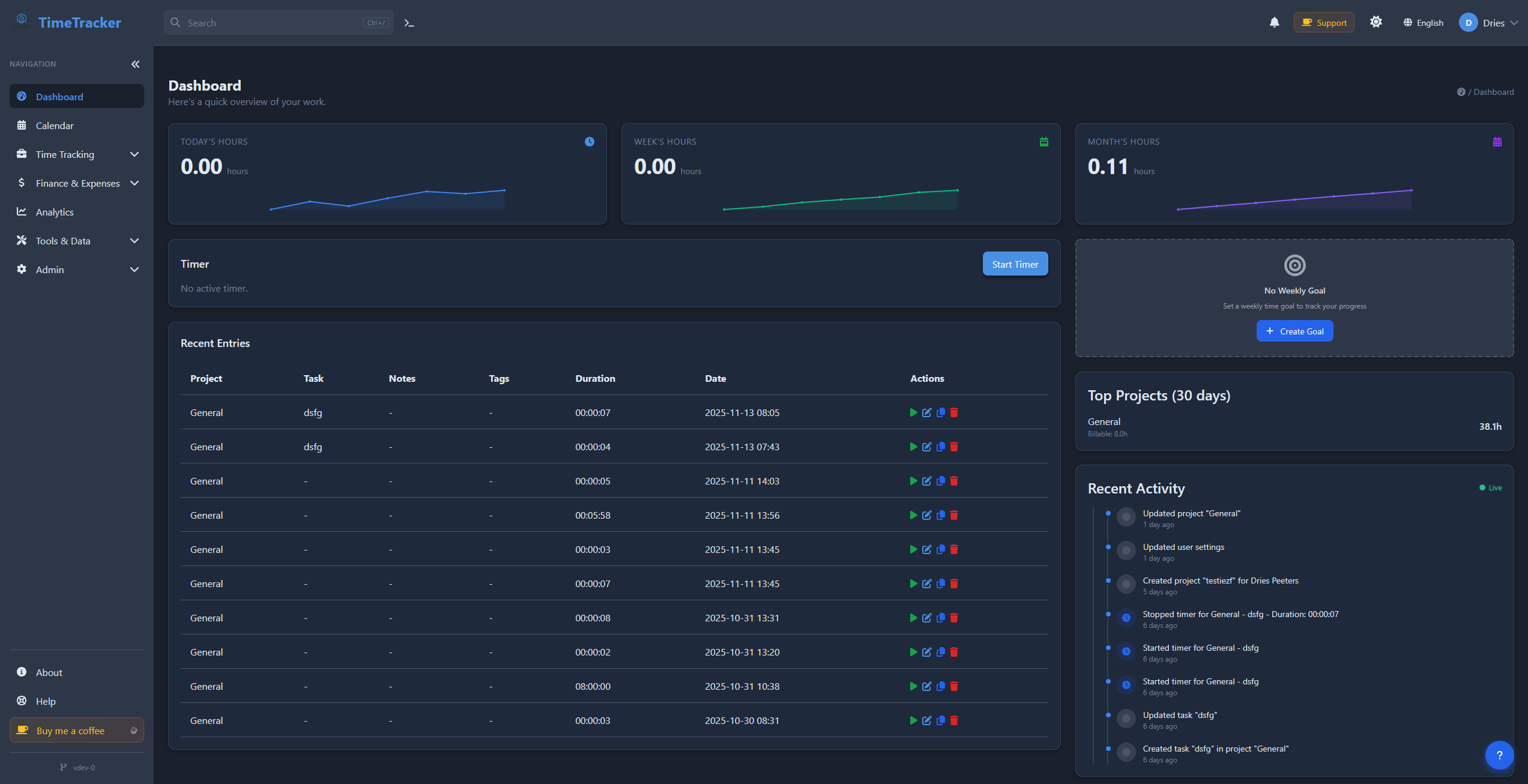
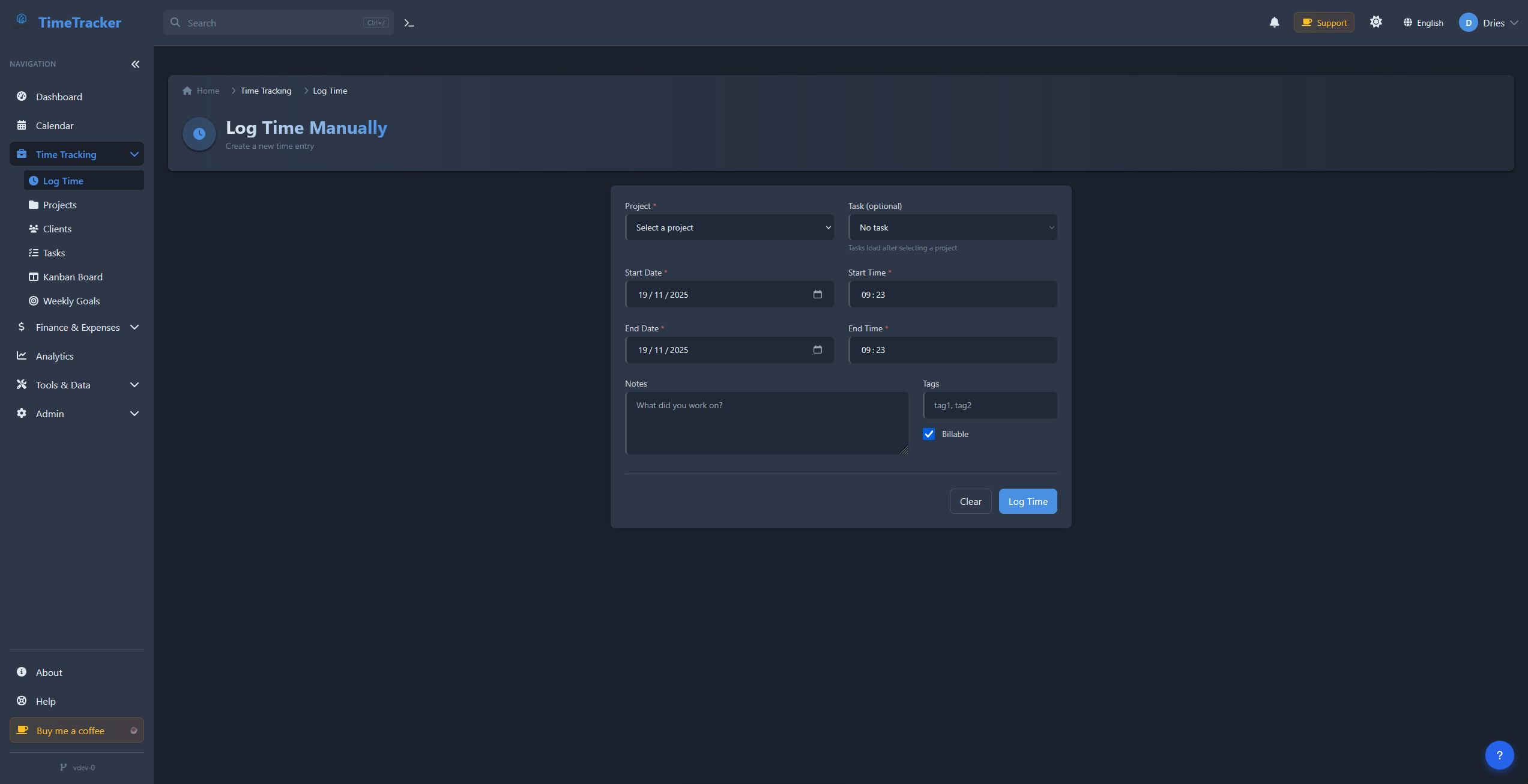
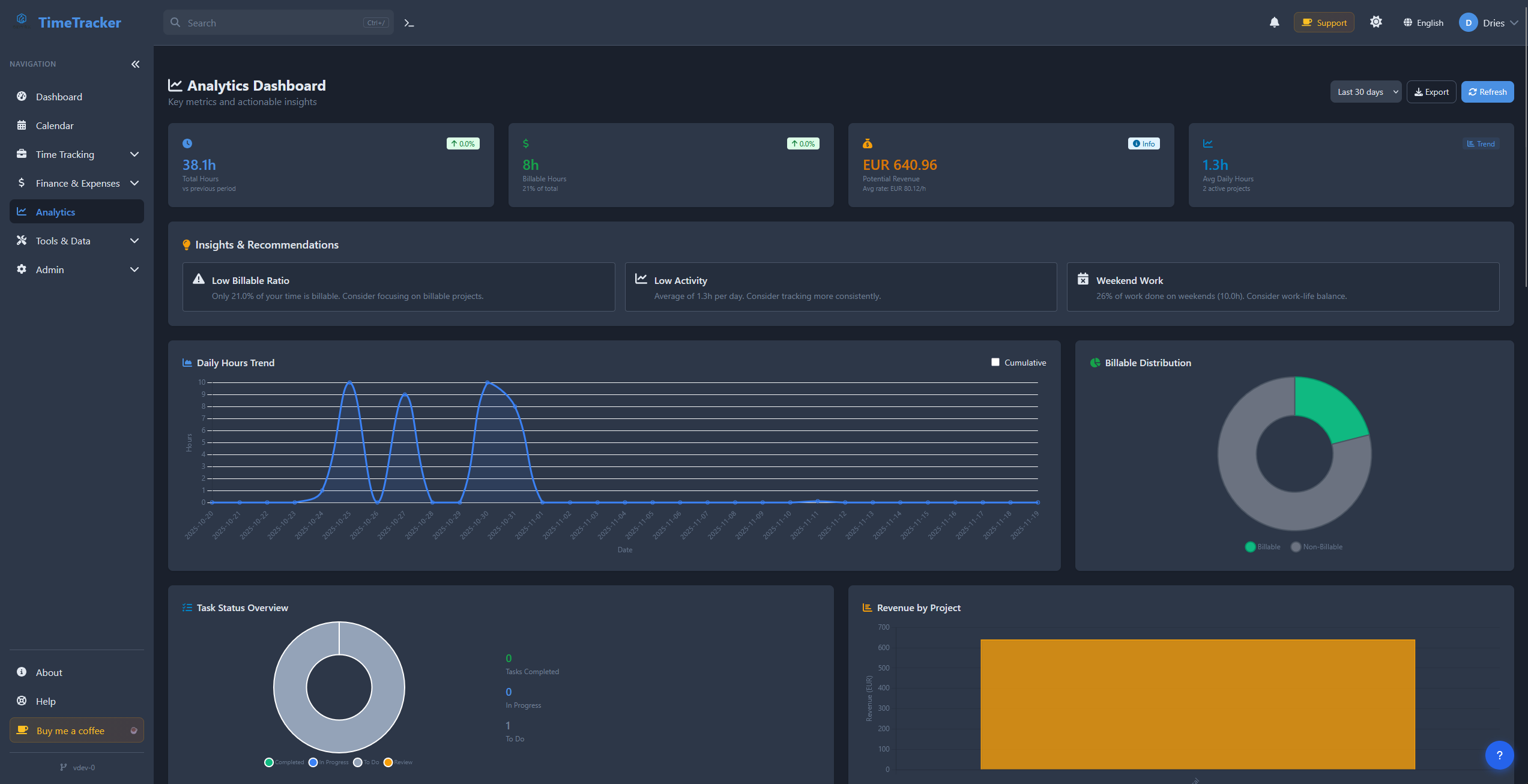
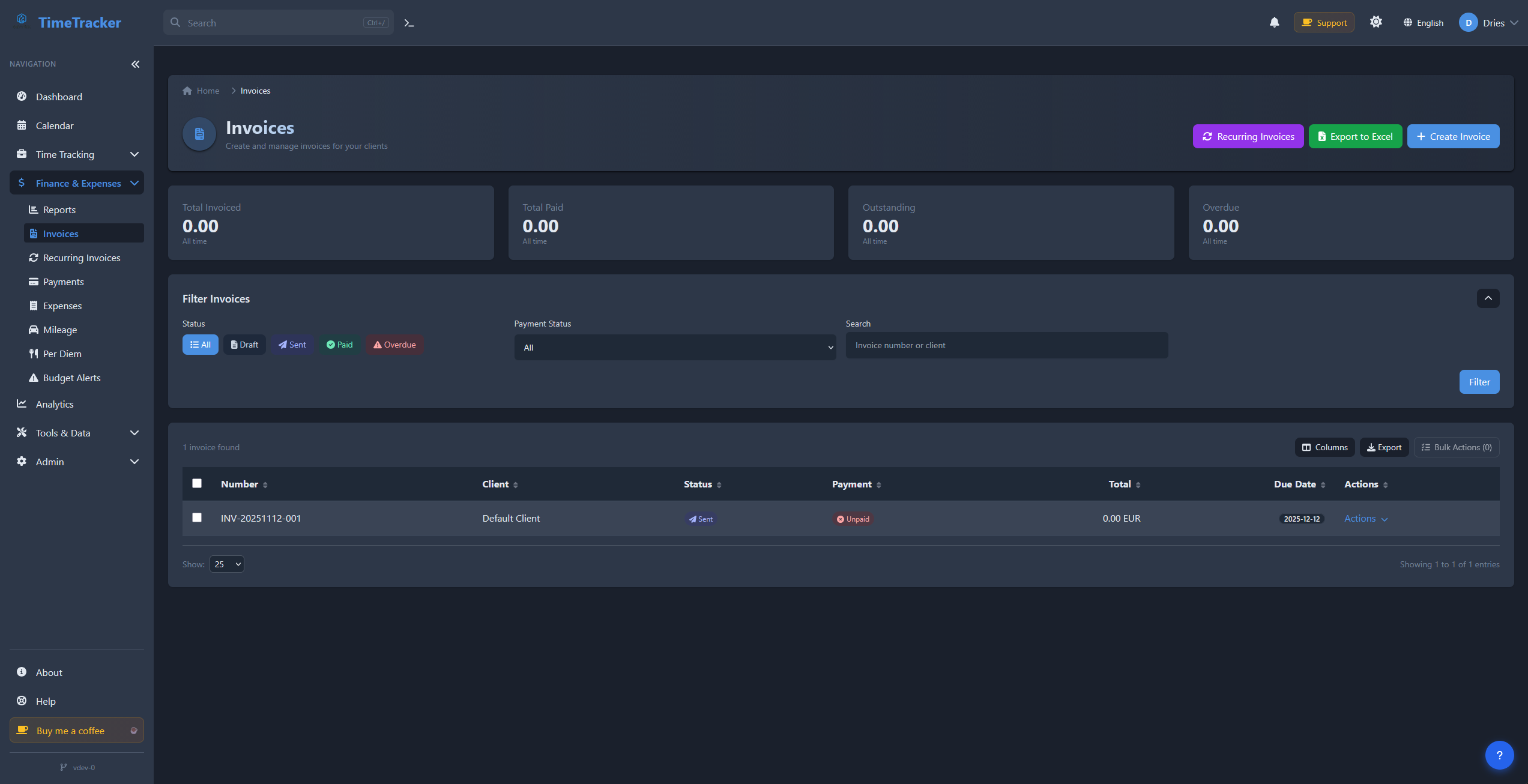
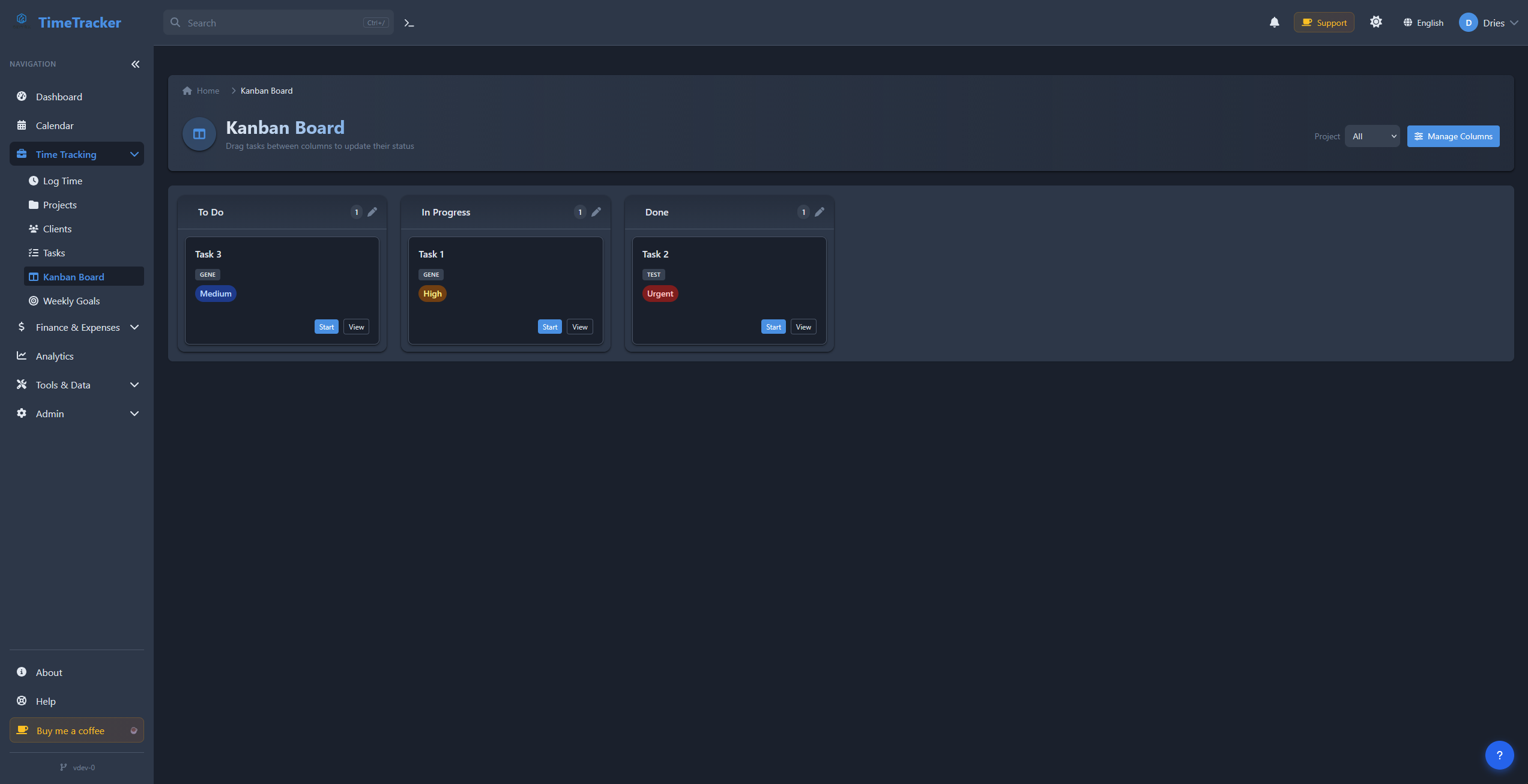
Dashboard: projects, timers and reports at a glanceProjects management viewTimer for tracking timeReports and analyticsInvoice list and generationKanban board for visual task management

What is TimeTracker?

TimeTracker is an open-source, web-based time tracking and invoicing application for freelancers, agencies and small teams that want their billable data on their own servers. Timers run server-side and keep going after the browser closes, with idle detection, manual and bulk entry, reusable templates and a calendar view. Beyond projects and tasks it offers a Kanban board, issue tracking, budget alerts and forecasting, plus a CRM layer with leads, scoring and a deal pipeline. Invoices are generated from tracked time with tax calculation, multi-currency support and recurring billing, exported as branded PDFs; it can also transmit EN 16931 e-invoices over the Peppol network using its bundled bridge, or inject Factur-X (ZUGFeRD) XML data into invoice PDFs. The Flask app ships as container images (ghcr.io/drytrix/timetracker, plus Docker Hub), and one compose file plus a SECRET_KEY is all that's needed to launch it—typically on port 8080, with a bundled PostgreSQL service; whoever logs in first becomes the admin. Optional extras include an AI helper backed by a self-hosted Ollama container or a hosted OpenAI-compatible API, a Prometheus/Grafana/Loki monitoring profile, and companion Flutter and Electron client apps. It is GPL-3.0 with no per-seat pricing; an optional one-time supporter key merely hides donate prompts.

Should you self-host TimeTracker?

TimeTracker scores 45/100 on selfhost.directory (how scoring works) and ranks #8 of 11 in Time Tracking. It has 634 GitHub stars.

It shipped 11 stable releases in the past year. The latest, v5.18.4, came out on 28 October 2026. New versions land roughly every 6 days.

Setup is easy: most people get it running in one sitting. An official Docker image is available. It is GPL-3.0-licensed and written mostly in Python.

Its closest alternative on selfhost.directory is Kimai (71/100, 5 106 stars). It scores higher overall, so compare the two before you pick. See TimeTracker vs Kimai side by side.

Features

  • AI time-entry helperOpt-in via AI_ENABLED
  • CRM & sales pipeline
  • Expense Tracking
  • Idle detection
  • Invoices from tracked time
  • Kanban Board
  • Multi-currency
  • PDF invoice export
  • Peppol e-invoicing (EN 16931)
  • Persistent server-side timers
  • Project & task management
  • Recurring Invoices
  • Reports & CSV export
  • REST API
  • Role-based Access Control

TimeTracker README

How to install TimeTracker

Install TimeTracker with Docker

Environment variables
SECRET_KEY, DATABASE_URL
docker pull ghcr.io/drytrix/timetracker:latest

Also published on Docker Hub as drytrix/timetracker.

How to configure TimeTracker

  • ADMIN_USERNAMESComma-separated admin usernames. Only the first username is automatically created during database initialization. The default admin has no password—set it on first login (enter username + any password 8+ chars). Additional admin usernames must either self-register (if ALLOW_SELF_REGISTER=true) or be created manually. Example: ADMIN_USERNAMES=admin,manager - only "admin" is created automatically; "

    Comma-separated admin usernames. Only the first username is automatically created during database initialization. The default admin has no password—set it on first login (enter username + any password 8+ chars). Additional admin usernames must either self-register (if ALLOW_SELF_REGISTER=true) or be created manually. Example: ADMIN_USERNAMES=admin,manager - only "admin" is created automatically; "

  • AI_API_KEY
  • AI_BASE_URL
  • AI_CONTEXT_LIMIT40
  • AI_ENABLEDAI helper (server-side; API keys are never sent to clients) Default install has no bundled LLM. Leave AI_ENABLED=false unless you use an external API or enable Ollama.

    AI helper (server-side; API keys are never sent to clients) Default install has no bundled LLM. Leave AI_ENABLED=false unless you use an external API or enable Ollama.

  • AI_MODEL
  • AI_PROVIDER
  • AI_TIMEOUT_SECONDSAI_API_KEY= # only needed when AI_PROVIDER=openai_compatible

    AI_API_KEY= # only needed when AI_PROVIDER=openai_compatible

  • ALLOW_SELF_REGISTERtrueUser management

    User management

  • API_TOKEN_RATE_LIMIT_PER_HOUR
  • API_TOKEN_RATE_LIMIT_PER_MINUTEAPI token rate limits (per token; Redis recommended for multi-worker)

    API token rate limits (per token; Redis recommended for multi-worker)

  • APP_BASE_URLPublic base URL of this instance (no trailing path), e.g. https://time.example.com Required for correct absolute links in emails sent by background jobs (hour-limit notices, weekly summaries, etc.). If unset, the app learns the host from live browser requests; set explicitly for reliable links right after deploy.

    Public base URL of this instance (no trailing path), e.g. https://time.example.com Required for correct absolute links in emails sent by background jobs (hour-limit notices, weekly summaries, etc.). If unset, the app learns the host from live browser requests; set explicitly for reliable links right after deploy.

  • AUTH_METHODAuthentication Options: none | local | oidc | ldap | both | all none = No password authentication (username only) local = Password authentication required oidc = OIDC/Single Sign-On only ldap = LDAP bind only both = OIDC + local password (backwards compatible) all = local + OIDC + LDAP

    Authentication Options: none | local | oidc | ldap | both | all none = No password authentication (username only) local = Password authentication required oidc = OIDC/Single Sign-On only ldap = LDAP bind only both = OIDC + local password (backwards compatible) all = local + OIDC + LDAP

  • BACKUP_FOLDEROptional: override where backup archives are stored (default: <UPLOAD_FOLDER>/backups)

    Optional: override where backup archives are stored (default: <UPLOAD_FOLDER>/backups)

  • BACKUP_RETENTION_DAYS30Backup settings (scheduler creates a full archive daily at backup_time and prunes older ones)

    Backup settings (scheduler creates a full archive daily at backup_time and prunes older ones)

  • BACKUP_TIME02:00
  • CURRENCYEURApplication settings

    Application settings

  • DATABASE_URLDatabase settings IMPORTANT: Set a strong POSTGRES_PASSWORD in production (required by docker-compose).

    Database settings IMPORTANT: Set a strong POSTGRES_PASSWORD in production (required by docker-compose).

  • DB_IDLE_TX_TIMEOUT_MS0
  • DB_LOCK_TIMEOUT_MS10000
  • DB_MAX_OVERFLOW
  • DB_POOL_SIZESQLAlchemy connection pool (PostgreSQL). Defaults suit a single app process. Raise for multi-worker / high concurrency; keep pool_size * workers under DB max_connections.

    SQLAlchemy connection pool (PostgreSQL). Defaults suit a single app process. Raise for multi-worker / high concurrency; keep pool_size * workers under DB max_connections.

  • DB_STATEMENT_TIMEOUT_MS30000PostgreSQL statement/lock timeouts (milliseconds, PostgreSQL-only). Applied only under the eventlet gunicorn worker (not CLI / flask db upgrade). Bound how long a query may run or wait for a lock before the connection is aborted — prevents one stuck query from wedging the whole app process. idle_in_transaction defaults to 0 (disabled) so scheduler jobs that hold a session open across HTTP calls ar

    PostgreSQL statement/lock timeouts (milliseconds, PostgreSQL-only). Applied only under the eventlet gunicorn worker (not CLI / flask db upgrade). Bound how long a query may run or wait for a lock before the connection is aborted — prevents one stuck query from wedging the whole app process. idle_in_transaction defaults to 0 (disabled) so scheduler jobs that hold a session open across HTTP calls ar

  • ENABLE_METRICS
  • ENABLE_TELEMETRYTelemetry (optional, opt-in, anonymous) Sends anonymous installation data to Grafana OTLP (version/platform/install heartbeat) Also gates server-side OTel traces/metrics when using baked-in OTLP credentials. Requires OTEL_EXPORTER_OTLP_ENDPOINT and OTEL_EXPORTER_OTLP_TOKEN (or baked-in defaults) Default: false (disabled) See docs/privacy.md for details

    Telemetry (optional, opt-in, anonymous) Sends anonymous installation data to Grafana OTLP (version/platform/install heartbeat) Also gates server-side OTel traces/metrics when using baked-in OTLP credentials. Requires OTEL_EXPORTER_OTLP_ENDPOINT and OTEL_EXPORTER_OTLP_TOKEN (or baked-in defaults) Default: false (disabled) See docs/privacy.md for details

  • ENABLE_TRACINGOpenTelemetry SDK (traces + metrics to OTLP; uses same endpoint/token as above) When unset, tracing and metrics default to enabled if OTLP credentials are present. Server-side export to the shared (baked-in) Grafana Cloud tenant also requires the telemetry opt-in below (ENABLE_TELEMETRY / admin dashboard). Setting your own OTEL_EXPORTER_OTLP_* env vars allows export without that opt-in (you own th

    OpenTelemetry SDK (traces + metrics to OTLP; uses same endpoint/token as above) When unset, tracing and metrics default to enabled if OTLP credentials are present. Server-side export to the shared (baked-in) Grafana Cloud tenant also requires the telemetry opt-in below (ENABLE_TELEMETRY / admin dashboard). Setting your own OTEL_EXPORTER_OTLP_* env vars allows export without that opt-in (you own th

  • FIREBASE_SERVICE_ACCOUNT_JSONOptional: Firebase Cloud Messaging for mobile idle "Still working?" wake-up (Issue #722). Path to a service-account JSON file, or the raw JSON string.

    Optional: Firebase Cloud Messaging for mobile idle "Still working?" wake-up (Issue #722). Path to a service-account JSON file, or the raw JSON string.

  • FLASK_DEBUGfalse
  • FLASK_ENVproduction
  • HTTP_PORTDocker Compose: nginx host port mappings (used by docker-compose.yml) Override when 80/443 are in use (e.g. behind Nginx Proxy Manager, Traefik, Caddy). Example: HTTP_PORT=8180 HTTPS_PORT=8443

    Docker Compose: nginx host port mappings (used by docker-compose.yml) Override when 80/443 are in use (e.g. behind Nginx Proxy Manager, Traefik, Caddy). Example: HTTP_PORT=8180 HTTPS_PORT=8443

  • HTTPS_PORT
  • IDLE_TIMEOUT_MINUTES30
  • IDLE_UNANSWERED_ACTIONreviewWhat happens when "Still working?" is unanswered: review (default) or auto_stop

    What happens when "Still working?" is unanswered: review (default) or auto_stop

  • LDAP_ADMIN_GROUP
  • LDAP_BASE_DN
  • LDAP_BIND_DN
  • LDAP_BIND_PASSWORD
  • LDAP_GROUP_DN
  • LDAP_GROUP_OBJECT_CLASS
  • LDAP_HOSTLDAP Authentication (used when AUTH_METHOD=ldap or all)

    LDAP Authentication (used when AUTH_METHOD=ldap or all)

  • LDAP_PORT
  • LDAP_REQUIRED_GROUP
  • LDAP_TIMEOUT
  • LDAP_TLS_CA_CERT_FILE
  • LDAP_USER_DN
  • LDAP_USER_EMAIL_ATTR
  • LDAP_USER_FNAME_ATTR
  • LDAP_USER_LNAME_ATTR
  • LDAP_USER_LOGIN_ATTR
  • LDAP_USER_OBJECT_CLASS
  • LDAP_USE_SSL
  • LDAP_USE_TLS
  • LOG_FILE/data/logs/timetracker.log
  • LOG_LEVELINFOLogging

    Logging

  • MAIL_DEFAULT_SENDER
  • MAIL_MAX_EMAILS
  • MAIL_PASSWORD
  • MAIL_PORT
  • MAIL_SERVEREmail settings (Flask-Mail) Configure these to enable email notifications and features

    Email settings (Flask-Mail) Configure these to enable email notifications and features

  • MAIL_USERNAME
  • MAIL_USE_SSL
  • MAIL_USE_TLS
  • MAX_CONTENT_LENGTH16777216File upload settings

    File upload settings

  • METRICS_TOKENProtect Prometheus /metrics (header X-Metrics-Token or ?token=). Recommended in production.

    Protect Prometheus /metrics (header X-Metrics-Token or ?token=). Recommended in production.

  • OIDC_ADMIN_EMAILS
  • OIDC_ADMIN_GROUP
  • OIDC_CLIENT_ID
  • OIDC_CLIENT_SECRET
  • OIDC_EMAIL_CLAIM
  • OIDC_FULL_NAME_CLAIM
  • OIDC_GROUPS_CLAIM
  • OIDC_ISSUEROIDC (used when AUTH_METHOD=oidc, both, or all)

    OIDC (used when AUTH_METHOD=oidc, both, or all)

  • OIDC_POST_LOGOUT_REDIRECT_URIOptional: RP-Initiated Logout. Only set if your provider supports end_session_endpoint. If unset, logout will be local only (recommended for providers like Authelia). If set, TimeTracker will redirect to the provider's logout endpoint.

    Optional: RP-Initiated Logout. Only set if your provider supports end_session_endpoint. If unset, logout will be local only (recommended for providers like Authelia). If set, TimeTracker will redirect to the provider's logout endpoint.

  • OIDC_REDIRECT_URI
  • OIDC_SCOPES
  • OIDC_USERNAME_CLAIM
  • OTEL_ENABLE_IN_TESTSTests only: in-memory tracing without network (pytest)

    Tests only: in-memory tracing without network (pytest)

  • OTEL_EXPORTER_OTLP_ENDPOINTOTEL OTLP export (optional sink) Example endpoint: https://otlp-gateway-prod-eu-west-2.grafana.net/otlp

    OTEL OTLP export (optional sink) Example endpoint: https://otlp-gateway-prod-eu-west-2.grafana.net/otlp

  • OTEL_EXPORTER_OTLP_TOKEN
  • OTEL_METRICS_EXPORT_INTERVAL_MSOptional: OTLP metrics export interval in milliseconds (default 60000)

    Optional: OTLP metrics export interval in milliseconds (default 60000)

  • PASSWORD_RESET_TOKEN_MAX_AGE_SECONDSPassword reset link lifetime (seconds)

    Password reset link lifetime (seconds)

  • PEPPOL_ACCESS_POINT_TIMEOUT
  • PEPPOL_ACCESS_POINT_TOKEN
  • PEPPOL_ACCESS_POINT_URLAccess point adapter (HTTP JSON endpoint your AP exposes)

    Access point adapter (HTTP JSON endpoint your AP exposes)

  • PEPPOL_ENABLEDPeppol e-invoicing (optional) Requires an access point provider. This app uses a generic HTTP adapter. Enable:

    Peppol e-invoicing (optional) Requires an access point provider. This app uses a generic HTTP adapter. Enable:

  • PEPPOL_PROVIDER
  • PEPPOL_SENDER_COUNTRYOptional:

    Optional:

  • PEPPOL_SENDER_ENDPOINT_IDSender identifiers (your company in Peppol) Example endpoint scheme ids: 0088 (GLN), 9906 (VAT), 0208 (LEI) depending on your country/AP rules

    Sender identifiers (your company in Peppol) Example endpoint scheme ids: 0088 (GLN), 9906 (VAT), 0208 (LEI) depending on your country/AP rules

  • PEPPOL_SENDER_SCHEME_ID
  • PERMANENT_SESSION_LIFETIME86400
  • POSTGRES_DBtimetracker
  • POSTGRES_HOSTdb
  • POSTGRES_PASSWORD
  • POSTGRES_USERtimetracker
  • PREFERRED_URL_SCHEMEhttpsPreferred URL scheme used when building absolute URLs from SERVER_NAME (if set).

    Preferred URL scheme used when building absolute URLs from SERVER_NAME (if set).

  • RATELIMIT_STORAGE_URIRate limiting storage (use Redis in multi-worker production; memory:// is not shared)

    Rate limiting storage (use Redis in multi-worker production; memory:// is not shared)

  • REDIS_ENABLEDOptional Redis (docker compose --profile redis up -d)

    Optional Redis (docker compose --profile redis up -d)

  • REDIS_PASSWORD
  • REDIS_URL
  • REQUIRE_2FA_FOR_ADMINSRequire TOTP 2FA for admin accounts (admins will be prompted to enroll)

    Require TOTP 2FA for admin accounts (admins will be prompted to enroll)

  • ROUNDING_ENFORCE_GLOBALfalse
  • ROUNDING_METHODnearest
  • ROUNDING_MINIMUM_MINUTES0
  • ROUNDING_MINUTES1
  • SCHEDULER_ENABLEDBackground scheduler (APScheduler). Default true. Set false on web-only replicas when a dedicated worker runs jobs. With Postgres, only one process acquires a session-level advisory lock (held on a dedicated DB connection for the process lifetime) and starts BackgroundScheduler; other processes skip starting it.

    Background scheduler (APScheduler). Default true. Set false on web-only replicas when a dedicated worker runs jobs. With Postgres, only one process acquires a session-level advisory lock (held on a dedicated DB connection for the process lifetime) and starts BackgroundScheduler; other processes skip starting it.

  • SCIM_BEARER_TOKEN
  • SCIM_ENABLEDSCIM 2.0 provisioning stub (GET /scim/v2/Users returns empty list when enabled)

    SCIM 2.0 provisioning stub (GET /scim/v2/Users returns empty list when enabled)

  • SECRET_KEYFlask settings CRITICAL: Change SECRET_KEY in production! Used for sessions, cookies, and CSRF tokens. Generate a secure key with: python -c "import secrets; print(secrets.token_hex(32))" The same key must be used across restarts and all app replicas.

    Flask settings CRITICAL: Change SECRET_KEY in production! Used for sessions, cookies, and CSRF tokens. Generate a secure key with: python -c "import secrets; print(secrets.token_hex(32))" The same key must be used across restarts and all app replicas.

  • SENTRY_DSNSentry Error Monitoring (optional) Get your DSN from https://sentry.io/settings/projects/

    Sentry Error Monitoring (optional) Get your DSN from https://sentry.io/settings/projects/

  • SENTRY_TRACES_RATE
  • SESSION_COOKIE_HTTPONLYtrue
  • SESSION_COOKIE_SECUREfalseSession settings Defaults: secure cookies true unless FLASK_ENV=development/dev or FLASK_DEBUG=true. ProductionConfig also defaults these to true. Set false only for HTTP/local access.

    Session settings Defaults: secure cookies true unless FLASK_ENV=development/dev or FLASK_DEBUG=true. ProductionConfig also defaults these to true. Set false only for HTTP/local access.

  • SETTINGS_ENCRYPTION_KEYSecurity hardening (recommended) Settings secrets encryption-at-rest (mail passwords, OAuth secrets, Peppol token, AI key, 2FA secret). Generate with: python -c "from cryptography.fernet import Fernet; print(Fernet.generate_key().decode())"

    Security hardening (recommended) Settings secrets encryption-at-rest (mail passwords, OAuth secrets, Peppol token, AI key, 2FA secret). Generate with: python -c "from cryptography.fernet import Fernet; print(Fernet.generate_key().decode())"

  • SETTINGS_ENCRYPTION_KEY_FILEOr mount from file:

    Or mount from file:

  • SINGLE_ACTIVE_TIMERtrueSeeds Settings.single_active_timer on first settings row; admin System Settings overrides thereafter.

    Seeds Settings.single_active_timer on first settings row; admin System Settings overrides thereafter.

  • SMART_NOTIFY_LONG_TIMER_HOURS
  • SMART_NOTIFY_MAX_PER_DAYSmart in-app notifications (session toasts; see docs/features/SMART_NOTIFICATIONS.md)

    Smart in-app notifications (session toasts; see docs/features/SMART_NOTIFICATIONS.md)

  • SMART_NOTIFY_NO_TRACKING_AFTER
  • SMART_NOTIFY_SCHEDULER_SLOT_MINUTES
  • SMART_NOTIFY_SUMMARY_AT
  • TELE_SALT
  • UPLOAD_FOLDER/data/uploads
  • VAPID_CONTACT_EMAIL
  • VAPID_PRIVATE_KEY
  • VAPID_PUBLIC_KEYWeb Push (browser "Still working?" notifications, works with the browser closed). Generate a VAPID keypair once: npx web-push generate-vapid-keys Without these, browser push is skipped and only the in-page prompt is shown.

    Web Push (browser "Still working?" notifications, works with the browser closed). Generate a VAPID keypair once: npx web-push generate-vapid-keys Without these, browser push is skipped and only the in-page prompt is shown.

  • WTF_CSRF_ENABLEDtrueCSRF protection IMPORTANT: Keep CSRF enabled in production for security Only disable for development/testing if needed

    CSRF protection IMPORTANT: Keep CSRF enabled in production for security Only disable for development/testing if needed

  • WTF_CSRF_SSL_STRICTfalseCSRF SSL Strict Mode Set to false if accessing via HTTP (localhost or IP address) Set to true only when using HTTPS in production

    CSRF SSL Strict Mode Set to false if accessing via HTTP (localhost or IP address) Set to true only when using HTTPS in production

  • WTF_CSRF_TIME_LIMIT3600

TimeTracker releases & version history

FAQ

How much does time tracking software cost for a team of 10?

The FAQ notes SaaS trackers commonly run $9-$18 per user per month once invoicing is needed, while TimeTracker has no per-seat licensing—just hosting and admin time.

What is the difference between cloud and self-hosted time tracking?

Cloud tools manage the database for a recurring fee; self-hosting means you operate the app, trading operational responsibility for lower long-run cost and data residency.

Is TimeTracker GDPR-friendly?

Self-hosting keeps time data on infrastructure you control instead of a SaaS vendor, but you still handle TLS, retention and DPIAs yourself.

Does TimeTracker work offline?

No—clients need network connectivity to your server, though users with flaky connections can log time once back online.

How do I export data from Toggl, Clockify, or Harvest?

Download each vendor's CSV/Excel exports of clients, projects, tags and time entries, map the columns into TimeTracker, and validate on a staging instance first.

Can I self-host time tracking software with Docker?

Yes, TimeTracker ships Docker Compose recipes that deploy in minutes following the getting-started quick-start commands.

Is there a free Toggl alternative for unlimited users?

The project positions itself as one: GPL-3.0 licensed, self-hosted, with no per-user license fee beyond your own infrastructure.

How do I get support or report issues?

Use GitHub Issues and Discussions for help, or email info@drytrix.com for direct contact.

Can multiple team members use TimeTracker?

Yes, there is no user limit; admin, manager and user roles control what each member sees, and managers can view team reports.

Is my data secure with TimeTracker?

Because the app is self-hosted your data stays on your server, and it adds role-based access control, audit logs and secure authentication options.

How does the invoicing feature work?

You pick time entries, add expenses and hourly rates, and produce PDF invoices; statuses (draft, sent, paid) and multiple currencies are tracked.

Can I use TimeTracker for multiple clients or projects?

Yes, projects, tasks and clients are unlimited, each tracked separately and billable per client or project.

What are the system requirements for self-hosting?

A Docker-capable server with at least 512MB RAM and a few GB of storage; it runs on Linux, Windows (with WSL) and macOS, using SQLite by default or PostgreSQL for larger deployments.

Do I need technical knowledge to set up TimeTracker?

Some basic technical knowledge helps, but if you are comfortable with Docker the documented deployment gets it running in minutes.

Is TimeTracker really free and open source?

Yes, it is completely free under the GPL-3.0 license, with no subscriptions or premium features locked behind a paywall.

More in Time Tracking

Rate this project

Click to rate — no account needed.

0 comments

Posting as guest
Loading comments…