Self-host ActivityWatch
v0.14.3Privacy-focused open-source automated time tracker
- Stars
- 19 655
- Rating
- 4.0 (1)
What is ActivityWatch?
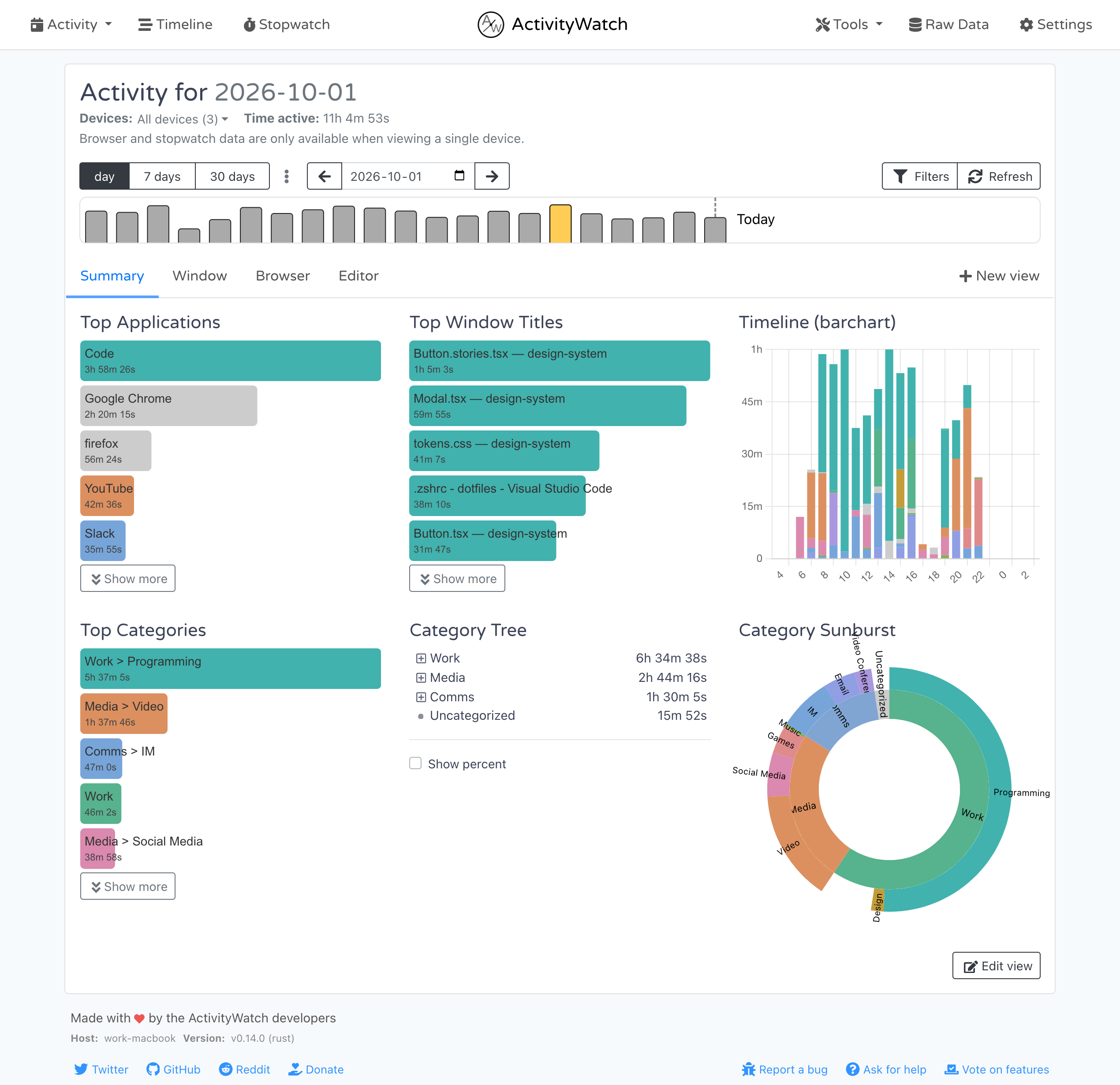
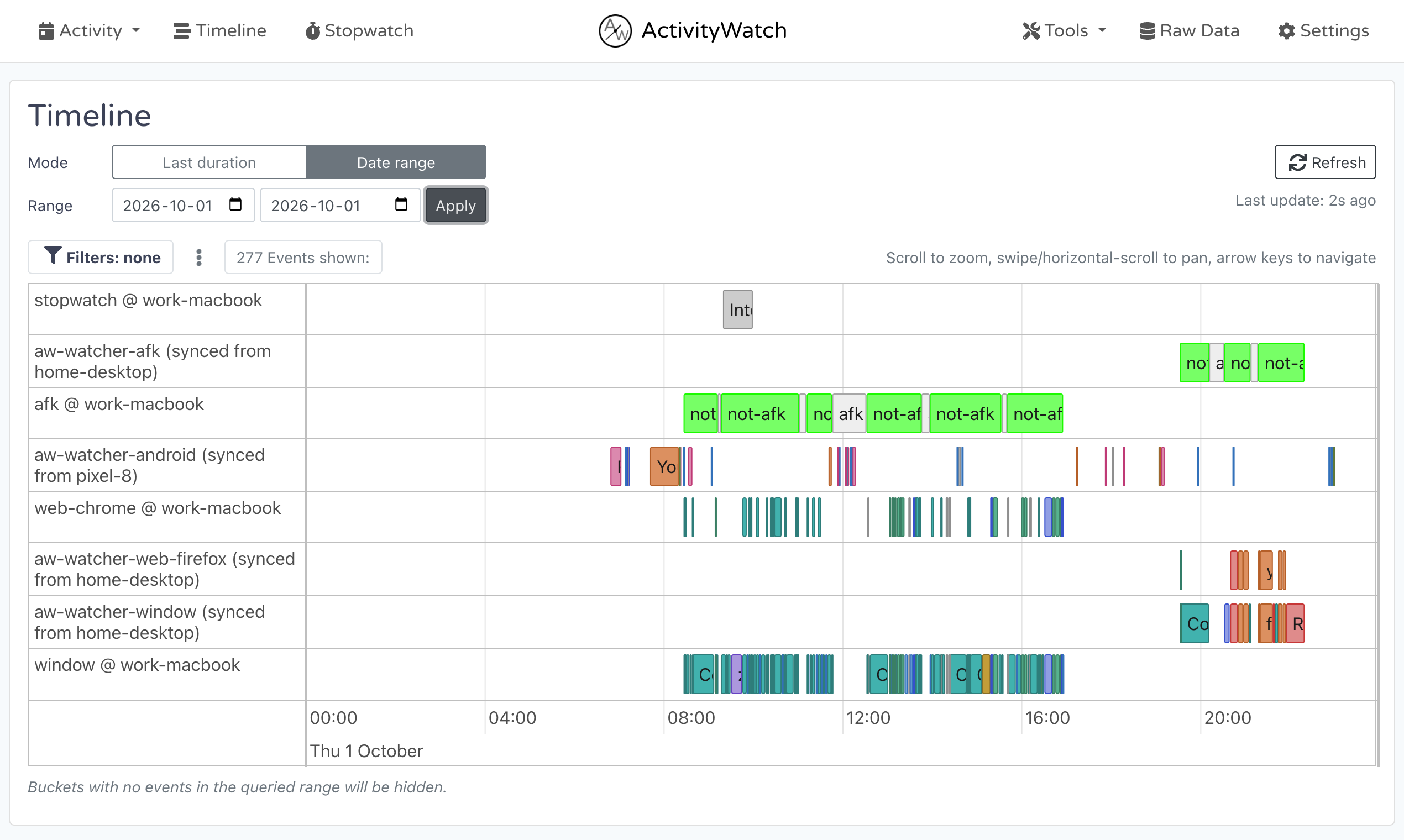
ActivityWatch is a free automated time tracker that monitors applications and websites you use on your computer. It operates on Windows, macOS, Linux, and Android while storing all data locally on your device instead of sending it to external servers. The app tracks active application/window titles, browser tabs via Chrome/Firefox/Edge extensions, keyboard and mouse activity for AFK detection, categorization, and export functionality through a web interface at localhost:5600 showing dashboard and timeline views of activity.
ActivityWatch alternatives
 ZiitZiit is an open-source, self-hosted WakaTime alternative that tracks coding time from IDEs into a clean dashboard with GitHub OAuth and data import.CompareZiit with ActivityWatch
 HackatimeFree, open-source, self-hostable coding time tracker compatible with WakaTime plugins across 70+ editors. Tracks coding activity automatically with language insights.CompareHackatime with ActivityWatch
 Beaver Habit TrackerOpen-source, self-hosted habit tracker for daily and periodic habits, with streaks, notes, categories, import/export and a REST API, run via a single Docker container.CompareBeaver Habit Tracker with ActivityWatch
 TimeTaggerSelf-hosted, open-source time tracker for freelancers with interactive timeline, tag-based workflow, PDF/CSV reports, targets, Pomodoro, and cross-device sync.CompareTimeTagger with ActivityWatch
 simonSimon is a self-hosted, open-source system monitor in Rust with real-time metrics, Docker monitoring, file browser, and alerting via webhooks — all in a single binary.Comparesimon with ActivityWatch
 CrossWatchCrossWatch is a self-hosted, open-source app that syncs watchlists, ratings, history, and playback progress across media servers and trackers. Runs via Docker.CompareCrossWatch with ActivityWatch
 HabitTroveSelf-hosted gamified habit tracker with coin rewards, streaks, dark mode, PWA support, and multi-language interface.CompareHabitTrove with ActivityWatch
 OpenHabitTrackerA free, open-source habit tracker that runs everywhere and lets you sync data to your own Docker server.CompareOpenHabitTracker with ActivityWatch
All self-hosted alternatives to ManicTime → All self-hosted alternatives to RescueTime → All self-hosted alternatives to WakaTime →
Should you self-host ActivityWatch?
ActivityWatch scores 80/100 on selfhost.directory (how scoring works) and ranks #1 of 11 in Time Tracking. It has 19 655 GitHub stars, +440 in the last 30 days.
It shipped 15 stable releases in the past year. The latest, v0.14.3, came out on 13 November 2026. New versions land roughly every 2 weeks.
Setup is moderate: expect some configuration beyond a single command. It is MPL-2.0-licensed and written mostly in Python.
Its closest alternative on selfhost.directory is Wakapi (64/100, 4 480 stars). ActivityWatch scores higher overall. See ActivityWatch vs Wakapi side by side.
Features
- Application tracking
- Categories
- Data Export
- REST API
ActivityWatch README
Records what you do so that you can know how you've spent your time.
All in a secure way where you control the data.
Website
— Forum
— Documentation
— Releases
Contributor stats
— CI overview

How to install ActivityWatch
Install ActivityWatch with Linux
unzip the archive into an appropriate directory, and run the aw-qt executable.
Install ActivityWatch with Debian
install it with your package manager, e.g. sudo apt install ./activitywatch--linux-x86_64.deb.
For Debian, Ubuntu, and derivatives
Install ActivityWatch with AppImage
make the file executable (chmod +x) and run it.
ActivityWatch releases & version history
These are the release notes for ActivityWatch version v0.14.3.
New to ActivityWatch? Check out the website and the README.
Installation
See the getting started guide in the documentation.
Downloads
Classic distribution
Tauri distribution (experimental — native Wayland support on Linux)
- Windows (.exe installer)
- macOS: Intel | Apple Silicon (.dmg)
- Linux: .AppImage | .zip
Support ActivityWatch
ActivityWatch is free and open source, with no feature gates. If it is useful to you, AW Pro is an optional subscription that funds ongoing development.
Contributors
Thanks to everyone who contributed to this release:
@0xbrayo, @ErikBjare, @TimeToBuildBob
Changelog
Changes since v0.14.2:
📦 activitywatch
(excluded 2 less relevant commits)
📦 aw-server
🐛 Fixes (2)
- fix(api): cache the inserted heartbeat with its id (#223) (
79e8ac5) - fix(ci): preserve explicit Ruff lint baseline after upgrade (#224) (
90fc21d)
📦 aw-server-rust
🐛 Fixes (2)
- fix(datastore): reject events outside the storable time range (#862) (
113752d) - fix(test): initialize disposable user profile via schtasks before server launch (#860) (
1bde448)
🔨 Misc (1)
📦 aw-webui
✨ Features (6)
- feat(timeline): optional time inputs for exact sub-day bounds (#1274) (
b5bb8c7) - feat(i18n): translate default category names at display time (#1268) (
332b28f) - feat(settings): server-stored supporter flag to hide support prompts (#1263) (
e64e648) - feat(event-list): add 'Show more' paging past the first 100 events (#1032) (
0a00cb1) - feat(settings): persist independent text size and content width (#1199) (
3412fcf) - feat(timeline): add a read-only List mode for the filtered events (#1269) (
9dcfac4)
🐛 Fixes (6)
- fix(periodusage): keep the Today label beside its bar, drawn on top (#1277) (
911288b) - fix(validate): guard validateRegex against non-string input (#1276) (
2666b6c) - fix(event-list): guard Show more footer against non-array events (#1271) (
147620d) - fix(query): render non-event Query Explorer results without EventList crashes (#1244) (
7652c39) - fix(ci): link screenshot artifacts without deprecated CML publish (#1264) (
f424d1e) - fix(stopwatch): clear the clock interval when the view is destroyed (#1270) (
78c2519)
📦 aw-qt
✨ Features (1)
🐛 Fixes (1)
📦 aw-tauri
✨ Features (1)
🐛 Fixes (4)
- fix(autostart): preserve disabled intent and retry failed migrations (#300) (
05ecf95) - fix(notify): update the aw-notify enabled field atomically in the server worker (#305) (
a30a08a) - fix(webview): skip javascript: pseudo-links in the external URL interceptor (#310) (
b87ab14) - fix(version): report the enclosing ActivityWatch bundle release (#293) (
fe4fc73)
(excluded 2 less relevant commits)
📦 aw-client
🐛 Fixes (4)
- fix(singleinstance): acquire Windows locks on fresh paths (#152) (
0fe5464) - fix(examples): UTC-aware index and timedelta duration for empty dataframe results (#169) (
cdb4b79) - fix(examples): handle empty dataframe query results (#165) (
312a669) - fix(deps): require tzdata at runtime on Windows (#167) (
c90621d)
Full Changelog: v0.14.2...v0.14.3
These are the release notes for ActivityWatch version v0.14.2.
New to ActivityWatch? Check out the website and the README.
Installation
See the getting started guide in the documentation.
Downloads
Classic distribution
Tauri distribution (experimental — native Wayland support on Linux)
- Windows (.exe installer)
- macOS: Intel | Apple Silicon (.dmg)
- Linux: .AppImage | .zip
Support ActivityWatch
ActivityWatch is free and open source, with no feature gates. If it is useful to you, AW Pro is an optional subscription that funds ongoing development.
Contributors
Thanks to everyone who contributed to this release:
@0xbrayo, @andreivince, @ErikBjare, @fanxing11, @kvnloo, @RaoufGhrissi, @TimeToBuildBob, @Yarish652, @zachsplat
Changelog
Changes since v0.14.1:
📦 activitywatch
✨ Features (1)
🐛 Fixes (5)
- fix(release): harvest signed Linux deb/rpm updater artifacts (#1542) (
b4b3bd3) - fix(release): pass bundle version to the Tauri compilation (#1535) (
71cdc78) - fix(packaging): pin Qt Wayland watcher substitution (#1532) (
5f54ca2) - fix(issue-forms): remove invalid empty title keys (#1524) (
33f667d) - fix(package): don't trust uname -m for Windows zip arch (#1520) (
e0d283f)
🔨 Misc (2)
- docs(readme): link AW Pro support with attribution; drop stale budget badge (#1543) (
0d114d7) - docs(README): update architecture diagram (
34c7e61)
(excluded 13 less relevant commits)
📦 aw-server
✨ Features (1)
🐛 Fixes (8)
Click to expand
- fix(api): reject nonfinite heartbeat pulse windows (#207) (
7af1920) - fix(export): serialize WSGI-safe attachment filenames (#212) (
b298f74) - fix(export): prefix CSV data keys that collide with id/timestamp/duration (#184) (
c1ea4ee) - fix(settings): preserve saved state on persistence errors (#198) (
05bc762) - fix(config): use [server] in isolated profile roots (#170) (
991fa6e) - fix(ci): drop brittle PAT-based dependabot automerge (#196) (
be99fec) - fix(storage): close request database connections (#171) (
6356feb) - fix(http): accept IPv6 loopback Host headers (#172) (
f8a352c)
(excluded 17 less relevant commits)
📦 aw-server-rust
✨ Features (7)
- feat(transform): add merge_subwatcher_fields query function (#824) (
1d101d4) - feat(aw-sync): status --clean-legacy prunes re-exported buckets from own staging (#723) (
b1d7976) - feat(aw-sync): add Android JNI resetStaging for own-device staging db (#815) (
82995ea) - feat(android): add setSetting JNI binding (#816) (
919cbff) - feat(server): bulk event delete endpoint (#781) (
ce65045) - feat(server): serve query reads from a read-only datastore handle (#807) (
af70e58) - feat(query): per-request time budget and slow-query logging (#806) (
6f4204f)
🐛 Fixes (15)
Click to expand
- fix(transform): parse scheme-less Android browser domains (#852) (
67432e6) - fix(datastore): invalidate heartbeat cache on delete and rename (#826) (
fe353a6) - fix(android): invalidate the query cache on JNI writes (#831) (
92631a3) - fix(transform): sort union_no_overlap inputs by timestamp (#838) (
c684083) - fix(datastore): update JSON settings fields atomically (#834) (
cfccd10) - fix(query): parse negative number literals in the query language (#832) (
c58b49d) - fix(sync): migrate staging database name (#800) (
69e0ac4) - fix(server): make bucket_list_changed non-blocking — drop reader.reload_buckets() (#821) (
9bedc57) - fix(android): let /api/0/info report the device hostname (#823) (
db85090) - fix(legacy-import): propagate insert_events/create_bucket errors instead of panicking (#822) (
c883054) - fix(recovery): restart-safe union of Windows Local and Roaming histories (#813) (
fe558c4) - fix(datastore): detect a corrupt database at startup, checkpoint WAL on close (#778) (
4f955b0) - fix(aw-server): detect if ActivityWatch is already running on AddrInUse (#773) (
efad1f0) - fix(android): force-commit setSetting before reporting ok (#817) (
d0f5074) - fix(query_cache): bound pending_flush to write_log_size, skip when no reader (#818) (
84a26e1)
🔨 Misc (3)
- test(client): fix Windows CI flake in test_wait_for_start_retries_without_blocking_executor (#819) (
6de27c9) - test(sync): pin PeerReport visibility contract for record_peers=true (#787) (
ccf07c5) - test(server): verify stopwatch acknowledgements survive process restart (#814) (
18fb62e)
(excluded 18 less relevant commits)
📦 aw-webui
✨ Features (30)
- feat(i18n): explain translation quality and invite native-speaker corrections (#1163) (
c933686) - feat(trends): group the time chart by day or week (#1194) (
1805832) - feat(activity): per-device active time in the multi-device view (#1170) (
a226d13) - feat(categories): carry common app defaults from #495 (#1166) (
283305e) - feat(timeline): group consecutive short events into expandable composites (#1181) (
d7f874b) - feat(activity): select exact sub-day intervals (#1168) (
dba35d3) - feat(trends): filter category history and comparisons (#1182) (
519c6ff) - feat(home): tag Android subscribe CTA as inapp-home-android (#1185) (
1f56021) - feat(i18n): add Indonesian (id) locale (#1155) (
d7d45cd) - feat(i18n): add Swahili (sw) locale (#1158) (
86178ef) - feat(i18n): add Bengali (bn) locale (#1156) (
244e7ec) - feat(i18n): add Urdu (ur) locale with RTL direction (#1157) (
360dd13) - feat(i18n): add Brazilian Portuguese (pt-BR) locale (#1150) (
fb8e824) - feat(i18n): add French (fr) locale (#1149) (
efcfbcc) - feat(i18n): add Japanese (ja) locale (#1154) (
f3c86db) - feat(i18n): add Hindi (hi) locale (#1151) (
db9e22d) - feat(i18n): add Arabic (ar) locale with rtl document direction (#1152) (
b1541fd) - feat(i18n): localize remaining screens in Simplified Chinese (#1147) (
78ad8ce) - feat(i18n): add Spanish (es) locale (#1145) (
f54fa2f) - feat(i18n): complete uk/de/ru/sv/zh-CN coverage and report translation % per locale (#1143) (
001921b) - feat(i18n): complete Simplified Chinese UI coverage (#1134) (
ac8a180) - feat(activity): show banner when core watcher bucket is stale (#1083) (
a3559fa) - feat(timeline): add merged final-category row (#1129) (
8557c08) - feat(timeline): add date shift buttons and preserve query params on period nav (#1128) (
7e3347f) - feat(search): include browser URL/title results alongside window events (#1025) (
d678505) - feat(android): blend browser URL data when aw-watcher-web is present (#1091) (
65ac42e) - feat(nav): add Category Builder to the tools menu as a standalone page (#1117) (
195d168) - feat(nav): add Category Builder to the tools menu as a standalone page (#1114) (
49d2091) - feat(buckets): list buckets as rows instead of a button table (#1092) (
375c135) - feat(ui): open phone navigation in a side drawer (#1102) (
e11ddab)
🐛 Fixes (66)
Click to expand
- fix(report): export successful calculation inputs with results (#1257) (
d6d1f21) - fix(transforms): enumerate every overlapping pair (#1144) (
50f6b74) - fix(sunburst): align reporting-day arcs with wall-clock ticks (#1240) (
5c6b36f) - fix(settings): keep the confirmed privacy-filter baseline when a save fails (#1136) (
4c85178) - fix(time): preserve relative intervals and validate inclusive range bounds (#1204) (
6b69113) - fix(bucket): bind merge inputs to current selection loads (#1211) (
c3a1f26) - fix(query): bind preset confirmations to invocation snapshots (#1218) (
bbf2fe5) - fix(reports): anchor query windows to the configured logical day (#1201) (
e174ede) - fix(graph): preserve structural category identities (#1219) (
3b898d8) - fix(categories): preserve structural hierarchy and tree expansion (#1220) (
3ebeadc) - fix(buckets): retry only pending confirmed host deletions (#1212) (
16aff47) - fix(categories): preserve structural paths through category selectors (#1226) (
3f8e326) - fix(categories): preserve complete paths during enumeration (#1232) (
f39df23) - fix(ai-summary): bind activity and inference to one invocation (#1237) (
fa2faee) - fix(views): isolate layout drafts and await confirmed saves (#1222) (
4176400) - fix(categories): avoid empty alternative when appending first pattern (#1230) (
2213244) - fix(top-bucket): preserve typed value identity in grouping (#1242) (
82f6ef6) - fix(categories): acknowledge only the saved category snapshot (#1228) (
2fc61ef) - fix(settings): persist only intentionally updated keys (#1223) (
ab82878) - fix(categories): reject malformed imports before live mutation (#1239) (
fd1c979) - fix(alerts): preserve category paths and compare goal units (#1216) (
034c919) - fix(top-bucket): keep async results owned by the latest load (#1234) (
c9e4cee) - fix(ai-summary): aggregate literal application and domain keys (#1238) (
68ac353) - fix(summary): redraw when the selected data key changes (#1245) (
ab97aa7) - fix(graph): keep Generate results owned by the current invocation (#1248) (
e2f3fa7) - fix(editor): bind drafts and mutations to selection identity (#1208) (
abbd592) - fix(bucket): reconcile confirmed event deletions (#1207) (
4b58484) - fix(reports): bind chart data to the successful report query (#1205) (
c3a1014) - fix(buckets): keep import status owned by the current selection (#1210) (
4fe9d20) - fix(query): keep results owned by the latest submission (#1217) (
bfc798b) - fix(notifications): persist preferences and backoff explicitly (#1224) (
18c276d) - fix(search): keep results owned by latest submission (#1206) (
5c50b93) - fix(ci): reject failed screenshot publication (#1236) (
de58c19) - fix(activity): open per-device breakdown as floating popover (#1197) (
0b73e83) - fix(categories): match default Kate alternative as a whole field (#1184) (
628a447) - fix(sunburst): use configured category colors for window arcs (#1183) (
d9a3386) - fix(export): neutralize spreadsheet formulas in client-side CSV exports (#1192) (
a3f9ed5) - fix(ai-summary): count app changes independently of idle gaps (#1180) (
8d662f8) - fix(color): read the saved color-fallback setting from the store (#1139) (
3caf486) - fix(transforms): detect interval containment in overlappingEvents (#1138) (
ca94fad) - fix(i18n): complete coverage for de, es, ru, sv, uk locales (#1177) (
8ba9a2d) - fix(test): bound Jest's default worker pool (#1159) (
bc41bd7) - fix(activity): cover DST days with matching hourly queries and labels (#1133) (
91c994e) - fix(activity): explain missing activity data (#1024) (
7924253) - fix(reports): honor configured calendar week start (#1148) (
9141d06) - fix(event-list): wrap event fields on phones (#1039) (
fc3cc08) - fix(reports): zero seconds in configured day boundaries (#1141) (
246cb87) - fix(trends): keep only the latest refresh's results (#1142) (
8124a6e) - fix(trends): slice day windows at the configured start of day (#1140) (
8e8e14a) - fix(timeline): AFK-filter the Categorized row by default (#1135) (
a9cde32) - fix(stopwatch): find old running timers and page through history (#1130) (
d97a72f) - fix(timeline): keep tooltip labels from being squeezed by long values (#1048) (
7b95d87) - fix(categories): preserve explicit numeric zero scores (#1132) (
0b0d0b4) - fix(timeline): refresh events after editing (#1082) (
25b7a41) - fix(ui): replace native confirm() with b-modal msgBoxConfirm (#1112) (
76dac82) - fix(top-bucket-data): cover the selected bucket's own history in All time (#1079) (
25286f9) - fix(buckets): stop later cards covering the unknown host's dropdowns (#1110) (
a362ff4) - fix(queries): match ungoogled-chromium in the chrome app-name pattern (#1124) (
1fb9c99) - fix(ci): run e2e on Chrome for Testing stable instead of the runner's Chrome (#1126) (
13a4625) - fix(ci): bound stalled TestCafe steps to ten minutes (#1120) (
5475b0e) - fix(activityContext): use formatToParts for locale-independent YYYY-MM-DD dates (#1115) (
ddf5f79) - fix(settings): keep developer-settings toggles beside their headings (#1108) (
aac7ecd) - fix(periodusage): cast e.target to Element for getAttribute (#1095) (#1111) (
8f76cf5) - fix(settings): give the active-pattern input the full width (#1109) (
651a40f) - fix(categories): reject negative rule priority (#1101) (
8a295fd) - fix(activity): build the Year barchart from day chunks and show progress for every chunked load (#1098) (
655a00a)
🔨 Misc (9)
Click to expand
- test(graph): align invocation assertions with structural identities (#1255) (
268b4ab) - refactor(i18n): one sorted endonym map instead of a copy in every locale file (#1164) (
da1c9bb) - refactor(i18n): sort locale registrations alphabetically to prevent cascade conflicts (#1161) (
63ced66) - refactor: convert remaining application JavaScript to TypeScript (#943) (
de2bc86) - Resolve outstanding webui TODO/FIXME markers (#979) (
b72413f) - perf(timeline): render only items near the viewport (#1086) (
8e8e807) - chore(deps): remove unused uuid direct dependency (#1127) (
d6e9d70) - test(e2e): add dark-mode and mobile screenshot matrix (#1105) (
05f5bc2) - test(queries): fix stale double-escaping in the Helium chrome-fork tests (
5e3daa4)
(excluded 14 less relevant commits)
📦 aw-watcher-afk
✨ Features (1)
🐛 Fixes (2)
- fix(afk): anchor steady-state not-afk heartbeats after not_afk_start (#91) (
fe882b6) - fix(afk): keep recording while the server starts (#93) (
2762612)
📦 aw-watcher-window
✨ Features (2)
- feat(privacy): add watcher-side privacy filter (drop/redact before send) (#135) (
d5b9c9c) - feat(config): add exclude_apps option to suppress logging for matched apps (#156) (
1d07782)
🐛 Fixes (9)
Click to expand
- fix(macos): keep foreground tracking when browser context fails (#146) (
12000f5) - fix(ci): pin Linux Python 3.9 jobs to Ubuntu 24.04 (#174) (
25d8940) - fix(macos): start the Swift helper after all globals are initialized (#172) (
86c5203) - fix(linux): match Mutter Xauthority records at the safe xlib pin (#169) (
70e23b9) - fix(config): let --exclude-titles and --exclude-apps be repeated (#173) (
b376ad9) - fix(windows): report the real app for UWP windows instead of Applicat… (#167) (
ad9f193) - fix(macos): keep JXA tracking when an app has no scriptable window (#168) (
10638b2) - fix(main): don't exit when aw-server starts slowly at boot (#164) (
e275219) - fix(macos): serialize heartbeats through a retrying queue, create the bucket lazily (#162) (
6d58cef)
🔨 Misc (1)
(excluded 2 less relevant commits)
📦 aw-watcher-input
✨ Features (1)
🐛 Fixes (1)
📦 aw-qt
✨ Features (4)
- feat(tray): add an attributed "Support ActivityWatch" menu item (#147) (
9f66797) - feat(wayland): accept aw-awatcher as the Wayland watcher (#143) (
5fb7634) - feat(wayland): auto-detect Wayland session and start aw-watcher-window-wayland (#142) (
b0b405c) - feat: opt-in aw-notify — start only when aw-notify.enabled is true, plus tray toggle (#134) (
e00fbcf)
🐛 Fixes (4)
- fix(manager): find Rust module logs on Windows for the crash dialog (#146) (
6a5d322) - fix(manager): start aw-sync only after the server answers (#145) (
bbccb71) - fix(tray): report failed Linux folder launches (#141) (
6a33293) - fix(tray): don't auto-restart modules that exited cleanly (#140) (
fa16bf8)
(excluded 2 less relevant commits)
📦 aw-tauri
✨ Features (2)
- feat(tray): add an attributed Support ActivityWatch item (#303) (
689b0db) - feat(dashboard): enable native zoom shortcuts (#301) (
b1b8c34)
🐛 Fixes (4)
- fix(config): preserve control characters in TOML rewrites (#298) (
d3b5527) - fix(autostart): refresh a stale autostart path and explain the second-instance exit (#297) (
3c17a4f) - fix(notify): reuse the server datastore for settings (#302) (
c2f06a2) - fix(export): keep blob downloads native and save backups to Downloads (#294) (
e4c7d7b)
(excluded 5 less relevant commits)
📦 aw-notify
🐛 Fixes (1)
📦 aw-core
🐛 Fixes (8)
Click to expand
- fix(transform): parse scheme-less Android browser domains (#200) (
14dd37c) - fix(query): report invalid custom filter regex as query errors (#193) (
e919457) - fix(query): validate required arguments before type inspection (#189) (
39b1bf3) - fix(query): accept whitespace-only empty collections (#187) (
919d82f) - fix(query): reject truncated dictionary keys as parse errors (#191) (
adef26b) - fix(query): accept negative integer literals in Python queries (#198) (
1dcab4c) - fix(transform): handle zero-duration base and sub events in merge_subwatcher_fields (#141) (
c782189) - fix(transform): sort union_no_overlap inputs by timestamp (#185) (
4f5df9d)
🔨 Misc (1)
📦 aw-client
✨ Features (2)
- feat(client): support configured HTTPS base URLs (carry of #74) (#137) (
c88cf12) - feat(client): add delete_events for bulk event deletion (#134) (
f024e34)
🐛 Fixes (12)
Click to expand
- fix(cli): resolve categories through the selected instance (#160) (
6cc2986) - fix(cli): preserve aware query bounds with explicit timezone (#147) (
eac48cd) - fix(examples): clip time spent today to local calendar bounds (#164) (
297b822) - fix(examples): preserve local workday boundaries across DST (#163) (
00598f8) - fix(examples): copy merge_buckets events without source IDs (#149) (
6ef3f6e) - fix(report): compute totals from uncapped active duration (#162) (
35e1423) - fix(cli): expose report and canonical cache query names (#158) (
a62317c) - fix(cli): render non-event AQL results without mutating events (#145) (
3abac4c) - fix(queries): preserve fullDesktopQuery caller parameters (#143) (
fe8b821) - fix(queries): preserve Unicode categories in generated AQL (#161) (
b0df1bc) - fix(client): make wait_for_start() respect its timeout (#136) (
a702e89) - fix(client): return None from get_event on 404 (#135) (
fe10696)
🔨 Misc (1)
(excluded 3 less relevant commits)
Full Changelog: v0.14.1...v0.14.2
These are the release notes for ActivityWatch version v0.14.1.
New to ActivityWatch? Check out the website and the README.
Installation
See the getting started guide in the documentation.
Downloads
Classic distribution
Tauri distribution (experimental — native Wayland support on Linux)
- Windows (.exe installer)
- macOS: Intel | Apple Silicon (.dmg)
- Linux: .AppImage | .zip
Support ActivityWatch
ActivityWatch is free and open source, with no feature gates. If it is useful to you, AW Pro is an optional subscription that funds ongoing development.
Contributors
Thanks to everyone who contributed to this release:
@0xbrayo, @AbdulGoodLooks, @ErikBjare, @Gabriel-Dalton, @kvnloo, @TimeToBuildBob
Changelog
Changes since v0.14.0:
📦 activitywatch
✨ Features (3)
- feat(research): ship an optional geography-free category preset (#1474) (
21142d0) - feat(scripts): automated screenshots with realistic demo data (#1500) (
bbcc9b8) - feat(changelog): add a Support ActivityWatch section to bundle release notes (#1486) (
45ae1c8)
🐛 Fixes (7)
Click to expand
- fix(release): don't bundle libwayland into the Tauri AppImage, and gate it (#1509) (
2251b6e) - fix(build): drop stale Tauri bundles, and stop packaging from failing silently (#1512) (
df22b2e) - fix(package): Linux Tauri zip: drop move-to-aw-modules.sh and the loose awatcher, rewrite README (#1508) (
ed54fd7) - fix(make): use pip's freeze format in the uninstall target (#1505) (
017d703) - fix(linux): stop bundling host-ABI libraries in the Qt bundle (#1484) (
0ef9191) - fix(changelog): use /commits/
<tip>when submodule is new to the release (#1504) (81885e2) - fix(changelog): use /commits/
<tip>when submodule is new to the release (#1496) (d02cc21)
🔨 Misc (6)
- chore: migrate issue templates to issue forms (#1482) (
0c4c185) - docs(contributing): remove the dead GitPOAP section (#1513) (
6a00b79) - docs(citation): update to v0.14.0 and 2026 (#1514) (
94eceed) - test(query-parity): assert the startup poll actually retried (#1472) (
17d0088) - docs(readme): repair release workflow badge URL (#1489) (
46c8ca8) - docs(readme): v0.14.0 screenshots (#1501) (
97db8ff)
(excluded 10 less relevant commits)
📦 aw-server
✨ Features (1)
🐛 Fixes (5)
- fix(api): invalidate the heartbeat cache when events are inserted (#178) (
384b122) - fix(import): return descriptive error messages and roll back failed imports (#176) (
72e3007) - fix(api): replace the merged heartbeat event by id, not the latest by timestamp (#177) (
ce55bbd) - fix(rest): return 400 instead of 500 for malformed client input (#175) (
5e3c0de) - fix(api): keep created and data when creating a bucket over REST (#180) (
4851fea)
🔨 Misc (1)
(excluded 2 less relevant commits)
📦 aw-server-rust
🐛 Fixes (16)
Click to expand
- fix(android): open the JNI datastore exactly once (#801) (
faeded2) - fix(query-cache): charge timestamps-only in key weight, not query text (#799) (
4c1cda9) - fix(aw-server): dedup re-imports against the privacy-filtered form of events (#768) (
9793c91) - fix(datastore): infer schema version when a restored DB has user_version 0 (#776) (
96f4113) - fix(export): prefix CSV data keys that collide with id/timestamp/duration (#795) (
344f476) - fix(dirs): restore %LOCALAPPDATA% on Windows, migrate v0.14.0 Roaming data, pin paths (#791) (
dc01d74) - fix(server): warn at startup when the web UI has no index.html (#794) (
d059a4c) - fix(aw-server): re-importing an updated export replaces events in place (#766) (
bb7f769) - fix(query): remove duplicate clippy allow attributes on parser module (#779) (
22a77dc) - fix(datastore): commit stopwatch changes before acknowledging (#743) (
fe0dfce) - fix(aw-server): return JSON errors with a reason for 400/404/422 under /api (#772) (
fcc1ede) - fix(datastore): log why legacy import was skipped, add explicit --import-legacy (#780) (
692fa0a) - fix(aw-sync): warn on orphaned 2-level staging db in aw-sync status (#788) (
0078d8d) - fix(server): explain missing web UI instead of a bare 404 on / (#777) (
a6d7730) - fix(datastore): make v3→v4 key_value migration idempotent (#792) (
d5d848b) - fix(endpoints): reject events with negative duration and heartbeats with negative pulsetime (#785) (
acbb3ee)
🔨 Misc (2)
- test(aw-client-rust): read wait_for_start mock connections concurrently (#783) (
3ebca20) - chore(transform): deprecate chunk_events_by_key (#758) (
bec71d5)
(excluded 3 less relevant commits)
📦 aw-webui
✨ Features (5)
- feat(categories): add 'Add on top of mine' option to import dialog (#1071) (
f76e1e2) - feat(bucket): show most recent events when the selected range is empty (#1030) (
47377e5) - feat(categories): layer category sets, and stop dropping edits made while layered (#1027) (
fabdeab) - feat(categories): softer default palette without breaking stored defaults (#1065) (
9bda65d) - feat(settings): add enabled toggle to notifications panel (Phase 3.1) (#1057) (
1a9f221)
🐛 Fixes (35)
Click to expand
- fix(queries): match Helium in the chrome bucket when no dedicated bucket exists (#989) (
3b1c444) - fix: recover category builder loading on Android (#992) (
df9d85d) - fix(work-report): tidy action buttons and dates on narrow screens (#1041) (
2a5e91e) - fix(buckets): keep row actions inside the card on phones (#1087) (
952c697) - fix: snap period-start URL dates; fix Trends chart height and x-axis labels (#1059) (
af9d80b) - fix(timespiral): scale spiral to fit narrow screens (#1036) (
65b15e3) - fix(queries): unescape browser regex backslashes after JSON.stringify (fixes Arc.exe on Windows) (#1084) (
c8b46d6) - fix(settings): keep the uncategorized-hint toggle beside its heading (#1047) (
69da8e8) - fix(sunburst): keep category sunburst labels inside the chart box (#1040) (
226d1e0) - fix(bucket): reload events when navigating to another bucket (#1044) (
d2b4890) - fix(work-report): count sessions using the break time (#1046) (
5875847) - fix(graph): draw category graph at container width and label nodes (#1042) (
239cf0a) - fix(trends): stop category table from overflowing on narrow screens (#1038) (
919c936) - fix(views): replace stored desktop defaults with Android views on Android (#1088) (
6ce8a8c) - fix(categories): persist layered category renames and deletions (#1072) (
0755d1f) - fix(activity): show browser data on Android when only aw-watcher-web is present (#1069) (
bdbbc39) - fix(activity): align week/month/year periods to their start (#1045) (
ac2c277) - fix(sunburst): fit category labels to their ring instead of clipping them (#1064) (
db18bbc) - fix(queries): use real bucket ids for synced hosts in single-host views (#1068) (
6812979) - fix(work-report): name hosts by bucket hostname and query their real bucket ids (#1067) (
9c441bd) - fix(ui): color Top Applications by each app's dominant category (#1063) (
8493914) - fix(ui): dismissable multi-device note; drop synthetic category tag from search results (#1062) (
58abaf4) - fix(build): honour --os=android under ESM config (#1061) (
34cdfb3) - fix(timeline): consistent row labels for synced buckets; fix dark theme stripes (#1060) (
6a182d4) - fix(dark-mode): set color-scheme: normal on iframes for custom visualizations (#1050) (
e2cc882) - fix(categorization): persist Category Builder ignored words across reloads (#1031) (
7d2efba) - fix(activity): explain why 'Time active' differs from period bar totals (#1029) (
83605b0) - fix(categories): don't throw when the edit modal is destroyed before its deferred hide (#1028) (
89a8fdd) - fix(categories): treat blank regex rules as matching nothing everywhere (#1026) (
4e8789c) - fix(hosts): keep the 'unknown' pseudo-host out of device pickers (#1023) (
822c8c0) - fix(bucket): show event count and a not-found state for unknown buckets (#1022) (
64a6036) - fix(timeline): clamp hourly bar stacks to 1h (fixes y-axis > 1h) (#1021) (
dada6c7) - fix(dark-mode): restore appsummary bar-chart label contrast (#1002) (
9092392) - fix(sunburst): resolve 'auto' theme for the root circle color (#1020) (
49f21f0) - fix(bucket): show the event count again; hide empty bucket data (#1054) (
95cd6b4)
🔨 Misc (1)
(excluded 5 less relevant commits)
📦 aw-watcher-window
🐛 Fixes (5)
- fix(logging): dedup and back off repeating poll exceptions (#157) (
c8814e4) - fix(config): normalize scalar title exclusion patterns (#158) (
f825398) - fix(linux): actionable Wayland warning and X auth error with backoff (#155) (
02f2607) - fix(research): classify Gecko browsers whose URL the macOS helper captures (#153) (
8e4d5a5) - fix(macos): don't relaunch a browser that quit while frontmost (#152) (
650c925)
📦 aw-watcher-input
✨ Features (1)
📦 aw-qt
✨ Features (1)
🐛 Fixes (1)
📦 aw-tauri
✨ Features (1)
- feat(notify): read aw-notify.enabled at startup, add tray toggle (
203edaf)
🐛 Fixes (10)
Click to expand
- fix(tray): persist module start/stop to [autostart] modules (#285) (
9460d90) - fix(dirs): keep install-relative discovery paths out of the persisted defaults (#283) (
d1796e4) - fix(windows): prefer bundled watchers over a stale classic install (#284) (
8b26b48) - fix(linux): disable WebKit DMA-BUF renderer when running from the AppImage (#286) (
e628a69) - fix(dirs): restore %LOCALAPPDATA% on Windows, migrate v0.14.0 Roaming data, pin paths, run tests in CI (#280) (
ce173c5) - fix(autostart): treat OS as authoritative after first run; remove legacy macOS LaunchAgent (#279) (
aa31d01) - fix(notify): match test fixture PID to stopped_module calls (
8e87c68) - fix(notify): validate PID in stopped_module to prevent stale-stop clobber (
0c675e0) - fix(notify): force stopped state on re-enable; use aw_config.port in GUI mode (
98c036d) - fix(notify): address 4 P1 Greptile findings — write-failure gate, mini/daemon opt-in, stop-in-backoff, re-enable race (
e6dcd93)
(excluded 4 less relevant commits)
📦 aw-notify
🐛 Fixes (1)
- fix: treat empty always_active_pattern as unset (
6694ffd)
🔨 Misc (1)
- Fix repo URL in README install instructions (
e64a4c6)
📦 aw-core
✨ Features (1)
- feat(transform)!: match aw-server-rust's merge_events_by_keys, split_url_events and tag (#173) (
29e62df)
🐛 Fixes (2)
- fix(transform): serialize IPv6 hosts like the URL Standard on every Python (#179) (
c571370) - fix(classify): do not crash on invalid user-supplied regex (carry of #148) (#176) (
429def4)
🔨 Misc (1)
📦 aw-client
🐛 Fixes (2)
- fix(queue): retry queued requests on transient errors instead of dropping them (#130) (
94717f0) - fix(client): bypass env proxies for loopback server addresses (#126) (
f880a71)
🔨 Misc (3)
- Add wait_for_queue_empty to RequestQueue/client (carry of #114, fixes #24) (#125) (
58ca367) - Catch OSError when persisting heartbeat to queue (carry of #113) (#124) (
343c52e) - test(queries): pin escape_doublequote actually escapes quotes (#123) (
63ca86c)
Full Changelog: v0.14.0...v0.14.1
Huzzah! v0.14.0 is finally here! 🎉
Almost two years since v0.13.2, and eight betas later. This is a big one: faster, steadier, a new desktop app, and an Android app that has caught up. And syncing between your devices works, local-first, with whatever sync tool you already use: it's still early and opt-in, with a few rough edges (see Sync below, or the announcement). More than 30 people contributed.
Since the last stable release, ActivityWatch also passed 1 million downloads, and it's now downloaded over 10,000 times a week. Thank you!
Read more: the announcement · the full changelog (about 1,000 changes, too long for this page)
Summary
- ⚡ Much faster, especially once you have years of data: dashboards load day by day and cache finished days, so long ranges no longer time out and repeat visits are near instant
- 🐛 Steadier all round: crashed watchers restart on their own, a macOS memory leak and crash are fixed, and a long tail of annoyances is gone
- 🔄 Sync between your devices works. It is local-first: no ActivityWatch server, no account. Point it at a folder you already sync with Syncthing, Dropbox or anything else, and each device's data shows up on the others. It is still rough in places (it takes more disk space than it should, and setup is manual), so it is opt-in (how to set it up)
- 👀 See all your devices together: the Activity view can now merge any set of devices into one view
- 📱 Android caught up: ActivityWatch for Android 0.14 shipped last month, its first stable release since 2023, with far fewer crashes and the same sync built in
- 🖥️ A new desktop app built on Tauri: same features as the classic one and lighter, but less battle-tested so far, so the classic app ships too and stays the default
- 🌐 A refreshed web UI: a better timeline, custom date ranges, a work-time report, billable hours export, and category sets for switching between rule profiles
- 🌍 ActivityWatch now speaks Swedish, German, Ukrainian, Russian and Chinese
- 🔒 More control over what gets stored: filter sensitive window titles before they ever reach the database
- 🛡️ For those who want it: put an API key on the server
- 🍎 macOS: signed and notarized builds for Apple Silicon and Intel, and browser URLs are tracked properly again
- 🐧 Linux: Wayland support out of the box in the new app, and arm64 builds
- 🤖 For the AI crowd: one canonical query that returns clean, categorized events, so an assistant can answer questions about your time without a custom integration (agents and AI)
- And a lot more...
Honorable mentions
Many of this release's features came from the community. Thank you:
- @0xbrayo for aw-tauri, from prototype to a release-ready app, and for aw-notify-rs and the Rust side of Android sync
- @BohdanRykush for the Ukrainian, German and Russian translations, and the original i18n setup and language picker (ActivityWatch/aw-webui#855)
- @JhihJian for the Simplified Chinese translation (ActivityWatch/aw-webui#865)
- @NickWick13 for the Swedish translation (ActivityWatch/aw-webui#947)
- @BelKed for rewriting the browser extension for Manifest V3 (ActivityWatch/aw-watcher-web#152), plus theme detection and top browser titles in the web UI
- @2e3s for awatcher, which gives the new app native Wayland support
- @nerumo for timeline swimlanes and the duration filter (ActivityWatch/aw-webui#679)
- @rrogerc for capturing URLs from Firefox-based browsers on macOS (ActivityWatch/aw-watcher-window#134)
- @hawai-i for the macOS Apple Events entitlement, which brought native browser URL capture back (#1411)
- @FractalMachinist for browser tracking on Android (ActivityWatch/aw-android#151)
- @Lorite for fixes to Android's folder-picker sync (ActivityWatch/aw-android#221, ActivityWatch/aw-android#222)
- @wind-mask for the Tauri app's headless
--daemonand--minimodes - @Q-Ze for fixing the multi-device view with synced data (ActivityWatch/aw-webui#969)
- @RTnhN for the universal columns visualization (ActivityWatch/aw-webui#733)
- @behdadmansouri for clearer import feedback (ActivityWatch/aw-webui#874)
- @fanxing11 for a string of fixes across the watchers, client and notifications
Installation
See the getting started guide in the documentation.
Downloads
Classic distribution
Tauri distribution (experimental — native Wayland support on Linux)
- Windows (.exe installer)
- macOS: Intel | Apple Silicon (.dmg)
- Linux: .AppImage | .zip
Contributors
Thanks to everyone who contributed to this release:
@0xbrayo, @2e3s, @almirb, @amsam0, @BelKed, @deancureton, @ErikBjare, @fanxing11, @Game4Move78, @hawai-i, @HomeArchbishop, @istudyatuni, @kenoma-hld, @luisgerhorst, @matt-seb-ho, @MBK-fr, @moodyhunter, @musicinmybrain, @nerumo, @NickWick13, @Noorts, @petrroll, @powellnorma, @Q-Ze, @reddaisyy, @rrogerc, @RTnhN, @Senophyx, @TiberiusNemesis, @TimeToBuildBob, @vdonich, @yuhldr
More detail
Faster
Measured on a real 9-year database (9.2 million events, 1.8 GB) on an M2 Mac, with each version's own dashboard queries. The new dashboard asks for long ranges one day at a time, so the servers are compared on that same workload:
| Year view, 365 daily queries | v0.13.2 | v0.14 first load | v0.14 repeat load |
|---|---|---|---|
| Classic app (Python server) | 120 s | 41 s | 0.6 s |
| Tauri app (Rust server) | 139 s | 32 s | 0.2 s |
The v0.13.2 dashboard fetched a Year as a single request instead. That took 120 s on the Python server (past the default 30 s timeout, so it failed) and 19 s on the Rust server. Asking day by day is what makes caching, progress and per-day charts possible. All time across nine years reopens in 5 s on the classic app; the Tauri app doesn't cache All time yet (aw-server-rust#784). Under the hood: new database indexes, SQLite WAL mode, cached category rules (categorizing a year of window titles went from 53 s to 10 s) and streaming exports.
Sync
aw-sync copies each device's data into a sync folder (~/ActivityWatchSync by default). You choose how that folder moves between devices: Syncthing, Dropbox, a network drive, anything that syncs files. Your data never touches a server of ours. Each device only writes its own files and opens everyone else's read-only, so devices can't corrupt each other, and synced data shows up as -synced-from- buckets that you can query, merge in the Activity view, or ignore.
This cycle we ran it on our own desktops and phones and fixed what we hit: duplicate events after a resume, one broken device aborting a whole sync, phone data not being picked up, and a new aw-sync status that tells you what each device has synced. Known rough edges: every device keeps a full copy of every other device's data, so it uses more disk than it should (a much more compact format is in the works), settings and deletions don't sync, and setup is manual. It isn't started by default: turn it on in the app's modules menu, or run aw-sync.
Android
ActivityWatch for Android 0.14 (v0.14.0 to v0.14.2, September) is the first stable Android release since 2023. User-perceived crashes went from about 7.8% to under 1%. It adds alerts, a home-screen widget, Firefox and Chrome tracking, CSV and JSON export, and the same sync: pick a folder, and your phone's data shows up on your desktop.
More reliable
- Crashed watchers restart automatically, with crash logs, in both apps; only one instance runs at a time
- macOS window watcher: fixed a crash on unusual window titles and a leak of up to ~359 MB of memory per day on busy machines
- AFK: locking the screen counts as AFK on macOS, held keys count once, gamepads count on Linux, recovery after an X server restart, and a Windows idle-time overflow after 49.7 days is fixed
- Data safety: heartbeats are rejected cleanly under load instead of risking corruption, a damaged database recovers on startup, and imports merge into existing buckets instead of failing
- The Python and Rust servers now return the same query results, checked by a new parity test suite (server comparison)
The new app (Tauri)
aw-tauri ships alongside the classic aw-qt app for Windows, macOS (Apple Silicon and Intel) and Linux (x86_64 and arm64). It has its own window, runs the Rust server inside the app, is smaller to download, supports Wayland on Linux, and updates itself on macOS and Linux (on Windows, install new versions manually for now). The story: A lighter, faster ActivityWatch with Tauri.
Also new
- Web UI: timeline swimlanes and AFK/category/duration filters, "merge by app", keyboard and scroll panning, rule priority and field-scoped regex rules, top browser titles, top stopwatch events, CSV export that streams large buckets, and bulk delete of a device's buckets
- Browsers: Arc, Dia, Zen, Helium, Floorp, Firefox ESR and more Chromium variants; URLs from Firefox-based browsers on macOS
- Notifications rewritten in Rust (aw-notify-rs), with a settings panel. They are now off until you enable them
- Start at login is a toggle in the app
- iOS: Screen Time data imported with aw-import-screentime shows up correctly
Upgrade notes
- The first start after upgrading updates the database indexes once. Your data isn't changed. On large databases this takes a while (about 30 s for the classic app and a minute for the Tauri app on a 1.8 GB database), and the dashboard may not connect until it's done. Leave ActivityWatch running and reload.
- Notifications (aw-notify) are now opt-in. Enable them in Settings if you used them before.
- macOS 12 or newer is required.
Supporting ActivityWatch
ActivityWatch has no ads, no venture funding and no data business. It is maintained by a tiny team, and ActivityWatch Pro, our patronage subscription, keeps releases like this coming. From $5/month, and it doesn't unlock anything: nothing is locked. Prefer a one-time contribution? See Donate, or sponsor us on GitHub.
Full changelog
About 1,000 changes across 13 repositories, too long for this page: see the v0.14.0 changelog in the documentation, or compare v0.13.2...v0.14.0.
Announcement: ActivityWatch v0.14.0: faster, steadier, synced, and a new app
These are the release notes for ActivityWatch version v0.14.0b8.
New to ActivityWatch? Check out the website and the README.
Installation
See the getting started guide in the documentation.
Downloads
Classic distribution
Tauri distribution (experimental — native Wayland support on Linux)
- Windows (.exe installer)
- macOS: Intel | Apple Silicon (.dmg)
- Linux: .AppImage | .zip
Contributors
Thanks to everyone who contributed to this release:
Changelog
Changes since v0.14.0b7:
📦 activitywatch
✨ Features (1)
🐛 Fixes (1)
(excluded 2 less relevant commits)
📦 aw-server
📦 aw-webui
✨ Features (1)
🐛 Fixes (3)
- fix(multidevice): include Android hosts that lack an afkstatus bucket (#988) (
22cb53b) - fix(queries): match Dia/Arc chrome forks and surface empty Browser view (#949) (
5d5378a) - fix(search,buckets): drop early-dev notice, case-insensitive search, relocate data-collection alert (#986) (
262322d)
📦 aw-server-rust
✨ Features (1)
🐛 Fixes (4)
- fix(aw-sync): isolate per-peer discovery errors; extract discover_peers; add dedup test (#712) (
ac47b09) - fix(aw-sync): dedup boundary events on resume to prevent cursor re-imports (#711) (#713) (
a7ddf50) - fix(aw-sync): scan pre-#697 buckets by origin to avoid re-import after Android hostname migration (#708) (
745918d) - fix(aw-sync): daemon discovers 3-level Android peers in sync_run (#710) (
e8bcb18)
📦 aw-webui
✨ Features (1)
🐛 Fixes (3)
- fix(multidevice): include Android hosts that lack an afkstatus bucket (#988) (
22cb53b) - fix(queries): match Dia/Arc chrome forks and surface empty Browser view (#949) (
5d5378a) - fix(search,buckets): drop early-dev notice, case-insensitive search, relocate data-collection alert (#986) (
262322d)
📦 aw-core
🐛 Fixes (1)
📦 aw-tauri
(excluded 2 less relevant commits)
📦 aw-webui
✨ Features (1)
🐛 Fixes (3)
- fix(multidevice): include Android hosts that lack an afkstatus bucket (#988) (
22cb53b) - fix(queries): match Dia/Arc chrome forks and surface empty Browser view (#949) (
5d5378a) - fix(search,buckets): drop early-dev notice, case-insensitive search, relocate data-collection alert (#986) (
262322d)
Full Changelog: v0.14.0b7...v0.14.0b8
@ Every self-hosted release, weekly
One Monday email with the week's stable releases across the directory.
FAQ
How does ActivityWatch compare to RescueTime?
ActivityWatch keeps data local while RescueTime sends to cloud servers; supports Linux (which RescueTime dropped); is completely free; allows custom watchers; and gives full data access.
Does ActivityWatch track my data privately?
Yes, ActivityWatch follows a local-first approach where all time tracking data is stored on your own device and never sent to any server.
Is ActivityWatch really free?
Yes, ActivityWatch is completely free and open-source software under MPL-2.0 license with no premium tiers, no usage limits, and no ads.
What is ActivityWatch?
ActivityWatch is a free, open-source, automated time tracker that runs on your computer and monitors which applications and websites you use. It works on Windows, macOS, Linux, and Android, with all data stored locally for privacy.
More in Time Tracking
 AlianHub-Project-Management-SystemSelf-hosted project management alternative to Jira and ClickUp with AI agents via MCP, native time tracking, built-in chat, 10+ views — free forever with unlimited users.
 CattrCattr is a self-hosted, open-source time tracking platform with project management, screenshot capture, activity tracking, and a public API for teams.
 eigenfocusEigenfocus is a self-hosted project management tool with boards, timeline, grid, list views and time tracking — alternative to Jira and Trello without per-user fees.
 ever-teamsSelf-hosted, open-source work and project management platform with time tracking, productivity metrics, team management, and integrations for GitHub, GitLab, Jira.
- HackatimeFree, open-source, self-hostable coding time tracker compatible with WakaTime plugins across 70+ editors. Tracks coding activity automatically with language insights.
 hakatimeSelf-hosted Wakatime server implementation with analytics dashboard, leaderboards, badge generation, and GitHub commit time tracking. Open-source under Unlicense.
 invoice-ninjaSelf-hosted invoicing platform for freelancers and small businesses: invoices, quotes, online payments, recurring billing, expenses, projects and time tracking.
 KimaiSelf-hosted, open-source (AGPL-3) time tracker for freelancers to large teams: timesheets, rates, invoicing, reports, SAML/LDAP login, JSON API, Docker install.
 middayOpen-source, self-hosted business assistant for freelancers: invoicing, bank transactions, time tracking, receipt matching and accountant-ready CSV exports.
 solidtimeSelf-hosted, open-source (AGPL-3.0) time tracking for freelancers and agencies: timer, calendar, timesheet, projects, billable rates and reports, run with Docker.
 taskview-communitySelf-hosted, source-available project and task manager for software teams: Kanban, dependency graphs, RBAC, SSO, time tracking and an MCP server.
 TimeCaseSelf-hosted time tracker for teams with manual/auto entry, real-time reports, CSV export, client portal, and five roles. Deploys via Docker or PHP/MySQL.
0 comments