
Self-host ezservermonitor-web
v2.5Lightweight Linux server monitoring dashboard
- Stars
- 356
- Requires
- PHP, Web server (Apache, Nginx, Lighttpd)


What is ezservermonitor-web?
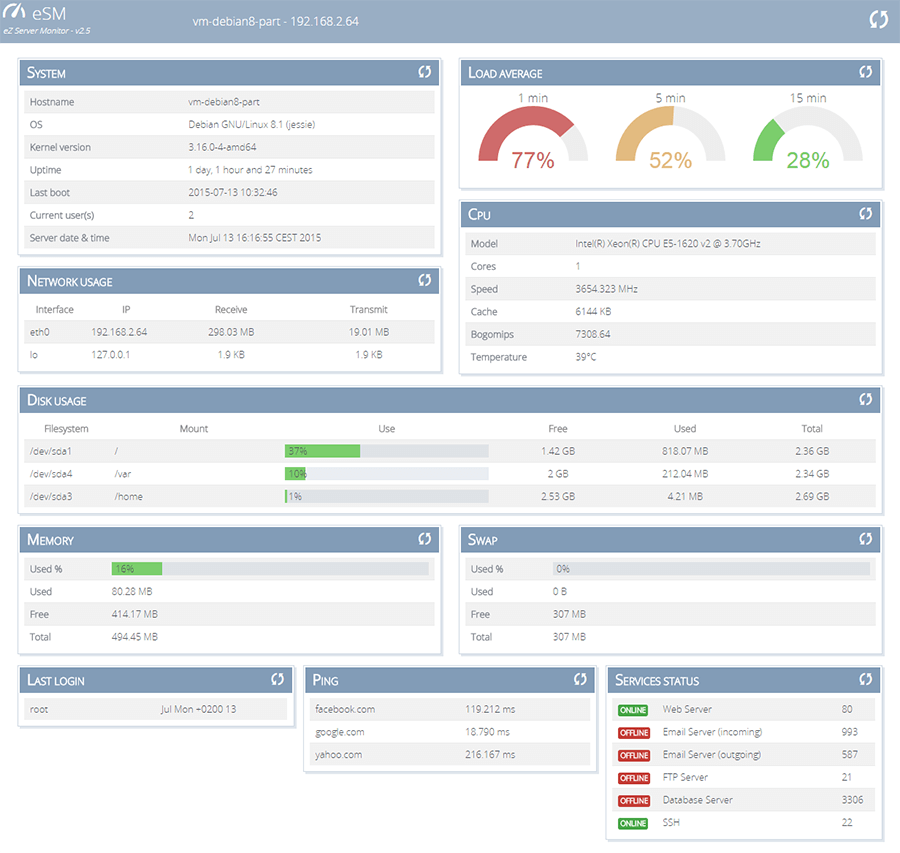
eZ Server Monitor Web is a PHP-based web dashboard for monitoring Linux servers. It displays system information (hostname, OS, kernel, uptime), load average with gauges, CPU details (model, cores, speed, cache, temperature), network usage per interface, disk usage per mount point, memory and swap usage, last user logins, ping checks for configured hosts, and service status (TCP/UDP ports). It runs on any web server with PHP 5.3+, offers multiple color themes including a dark theme, has a responsive design for mobile, and is configured via a JSON file. The project is licensed under GPL-3.0 and last released v2.5 in 2015.
Should you self-host ezservermonitor-web?
ezservermonitor-web scores 47/100 on selfhost.directory (how scoring works) and ranks #70 of 104 in Monitoring & observability. It has 356 GitHub stars.
There was no stable release in the past 12 months, so check the repository's recent activity before you rely on it.
Setup is easy: most people get it running in one sitting. It is GPL-3.0-licensed and written mostly in PHP.
Its closest alternative on selfhost.directory is grafana (90/100, 77 568 stars). It scores higher overall, so compare the two before you pick. See ezservermonitor-web vs grafana side by side.
Features
- Auto-refresh
- CPU information
- Custom title
- Disk Usage
- Last login tracking
- Load average monitoring
- Memory and swap monitoring
- Network usage
- Per-block manual reload
- Ping Monitoring
- Raspberry Pi compatible
- Service status monitoring
- System information
ezservermonitor-web README
More in Server Management
 factorio-server-managerSelf-hosted web interface for managing Factorio multiplayer servers, including saves, mods, and modpacks with authentication.
 FileCatA self-hosted web application for managing files and administering servers, offering AI assistance, remote desktop access, and network tunneling in one package.
 flexisipFlexisip is a self-hosted, open-source SIP server suite in C++20 providing proxy, presence, conference, B2BUA, and push notifications for real-time communications.
 froxlorSelf-hosted open-source server management panel for managing hosting resources like domains, mail, FTP, and databases with a modern responsive UI.
 FulcrumFulcrum is a self-hosted, open-source SPV server implementing the Electrum protocol for Bitcoin Cash, Bitcoin, and Litecoin. Written in C++20.
 GameAPGameAP is a self-hosted, open-source game server panel written in Go for managing game servers across multiple machines via web UI, REST API, and a lightweight daemon.
 GumCPGumCP is a self-hosted, open-source Raspberry Pi web control panel with system monitoring, GPIO control, and command buttons with an HTTP API.
 HomelabOSOpen-source Ansible toolkit for a self-hosted homelab: deploys 100+ Docker services behind Traefik with Let's Encrypt HTTPS, Tor access, and nightly restic backups.
 hothostSelf-hosted, open-source monitoring for servers and HTTP endpoints with disk/RAM alerts, SSL checks, and Email/Slack/Telegram notifications.
 HydrodactylSelf-hosted, open-source game server control panel forked from Pterodactyl with a redesigned UI, faster builds, and built-in mod marketplace.
 idrac6Self-hosted Docker container that provides web and VNC access to Dell iDRAC 6 consoles without requiring Java on the host machine.
 isaiahSelf-hosted web app for managing Docker containers, images, volumes, networks, and stacks with a lazydocker-inspired terminal UI.
0 comments