
Self-host GumCP
2.8.0Lightweight Raspberry Pi web control panel and dashboard
- Stars
- 170
- CPU
- Raspberry Pi 1 or newer
- Requires
- PHP, Php-curl, Php-sqlite3, Php-ssh2, Php-zip, SSH server, Sudo
What is GumCP?
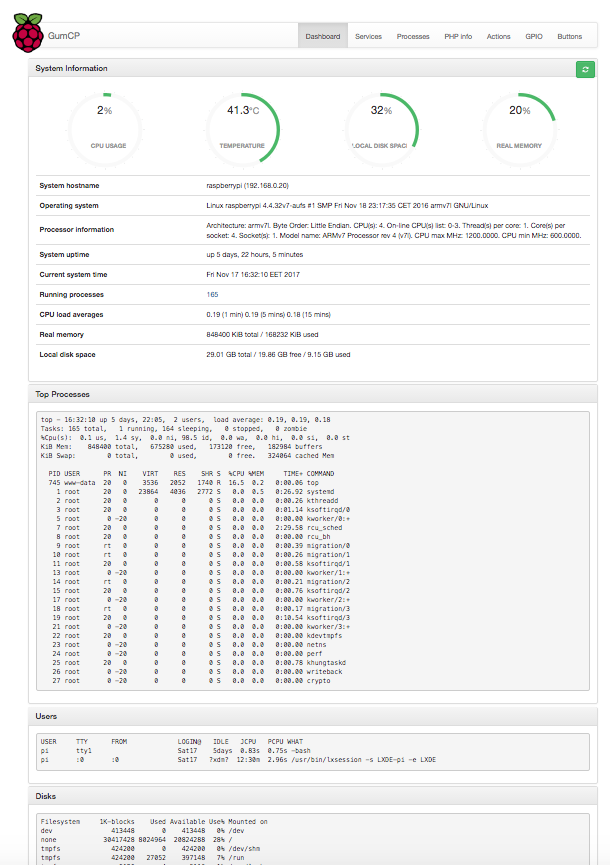
GumCP is a lightweight web control panel designed for Raspberry Pi devices. It operates on Apache with PHP and delivers a browser-based dashboard displaying real-time system metrics. Users can control GPIO pins, manage system services and processes, execute shell commands via SSH, and build custom buttons that run commands. An optional HTTP API enables automation tools to activate those buttons without authentication. The panel also provides a script editor with syntax highlighting, package update handling, system log viewing, cron job management, and a built-in diagnostic checker. Several authentication methods are available: a login page, HTTP Basic Auth, or verification against the actual system account through SSH. The interface supports multiple languages. Setup works on any Raspberry Pi from the first generation through Pi 5 using either a one-line installer script or a manual Apache/PHP installation.
Should you self-host GumCP?
GumCP scores 47/100 on selfhost.directory (how scoring works) and ranks #19 of 27 in Server Management. It has 170 GitHub stars.
It shipped 15 stable releases in the past year. The latest, 2.8.0, came out on 28 August 2026. New versions land roughly every 1 days.
Setup is moderate: expect some configuration beyond a single command. It is MIT-licensed and written mostly in PHP.
Its closest alternative on selfhost.directory is 1panel (79/100, 37 298 stars). It scores higher overall, so compare the two before you pick. See GumCP vs 1panel side by side.
Features
- Button HTTP APIOff by default; enable in config.php
- Command Buttons
- Cron Job Management
- Docker ManagementDisabled by default; enable in config.php if you run Docker
- GPIO Control
- Package Updates
- Process management
- Raspberry Pi Tools
- Service Management
- SSH Command Execution
- System Check
- System Dashboard
- System Logs Viewer
- Users & Groups
GumCP README
FAQ
Can I trigger commands from Home Assistant or scripts?
Yes — every command button has a secret HTTP API URL you can call from Home Assistant, curl, or any automation tool.
Can I monitor my Raspberry Pi remotely from a browser?
Yes. The dashboard shows live CPU, memory, swap, disk, temperature, throttling and per-interface network stats, auto-refreshing without a page reload. Protect remote access with the built-in login page or HTTP Basic Auth.
Which Raspberry Pi models are supported?
All models — Pi 1, 2, 3, 4 and Pi 5. GPIO uses WiringPi on Pi 1–4 and raspi-gpio on Pi 5 automatically.
Is GumCP a Webmin or Cockpit alternative for Raspberry Pi?
Yes, it's a lightweight, single-purpose web control panel focused on Raspberry Pi: system monitoring, GPIO, services, processes and one-click command buttons. It installs in minutes on Raspberry Pi OS with no database required.
More in IoT
 ha-bridgeha-bridge is a self-hosted, open-source Java app that emulates the Philips Hue Bridge API, letting Alexa and Google Home control non-Hue devices.
 hass-otbr-dockerSelf-hosted Docker container running a stand-alone OpenThread Border Router for Home Assistant Thread/Matter support without Yellow or HassOS.
 HiveMQ Community EditionHiveMQ Community Edition is an open-source Java MQTT broker with full MQTT 3.x and MQTT 5 support, TLS and WebSocket listeners, a Java extension SDK and an embedded mode.
 Home AssistantSelf-hosted open-source home automation platform with 1500+ integrations, powerful automations, customizable dashboards, and a built-in voice assistant.
 home-assistant-matter-hubSelf-hosted open-source Matter bridge that publishes Home Assistant entities to Apple Home, Alexa, Google Home, SmartThings and Aqara Home, configured through a web UI.
 HomeBridgeSelf-hosted, open-source HomeKit bridge: a Node.js server that emulates the HomeKit Accessory Protocol so 2,000+ community plugins expose non-HomeKit devices to Siri.
 HomeGenieSelf-hosted, open-source home automation server for Windows, Linux, macOS and Raspberry Pi, adding local LLM agents, AI vision, voice control and scriptable automations.
 HomeMatic IP LocalA custom Home Assistant component for HomeMatic(IP) that connects to OpenCCU
 HyperHDROpen-source, self-hosted ambient lighting: it analyses HDMI grabber or screen video and audio, then drives LED strips, WLED, Philips Hue or LIFX lights.
 ioBrokerSelf-hosted, open-source IoT and smart-home platform: wire devices, protocols and online services together through adapters, then script, log and visualise the data.
 JeedomSelf-hosted open-source home automation centralizing devices with multi-protocol support, scenarios, and plugins. Runs on Debian Linux.
 Kia Uvo & Hyundai BluelinkA Home Assistant HACS integration that supports Kia Connect(Uvo) and Hyundai Bluelink. The integration supports the EU, Canada and the USA.
0 comments