
Self-host ESP-KVM
v.0.73.0IP-KVM for ESP32-P4: HDMI capture, USB HID in browser
- Stars
- 559
- CPU
- ESP32-P4 (dual-core RISC-V, up to 400 MHz)
- RAM
- 32 MB PSRAM
- Storage
- 16 MB flash
- Requires
- TC358743 HDMI-to-CSI bridge board
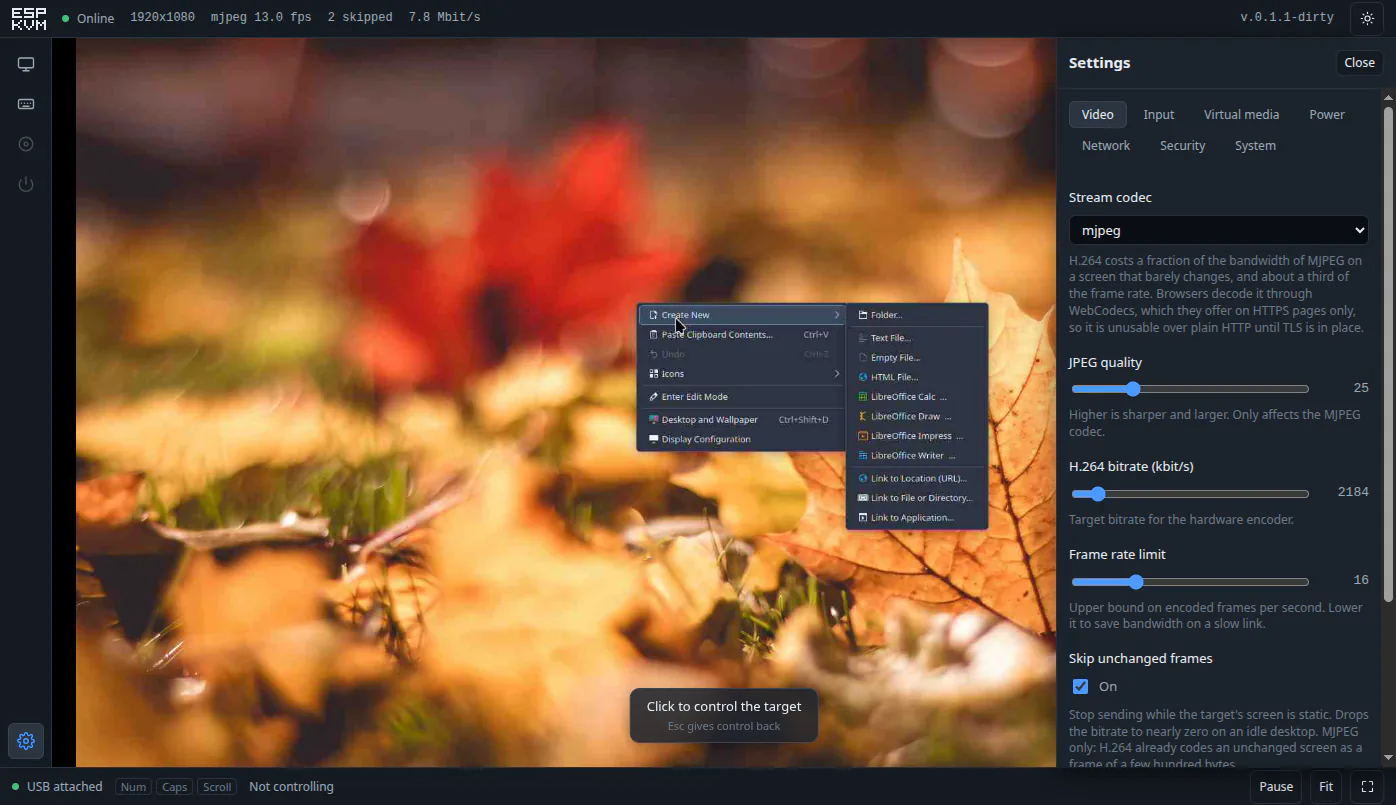
What is ESP-KVM?
ESP-KVM is open-source firmware turning an ESP32-P4 board with a TC358743 HDMI-to-CSI bridge into a complete IP-KVM. The hardware connects to a target machine's HDMI output and USB port, capturing video from the BIOS upward and emulating a USB keyboard and mouse. The web console runs in any browser on laptops, phones, or tablets, with touch providing a trackpad and on-screen keyboard. Features include MJPEG and hardware H.264 streaming, virtual media for booting targets from ISO images on microSD or internal flash, screen recording with dashcam and timelapse modes, runbooks and a scheduler for automated macros, Home Assistant integration via MQTT, built-in Tailscale and WireGuard VPN clients, two-factor authentication (TOTP), ATX power control via optocouplers, HDMI-CEC remote control, gamepad support for consoles, serial console access, netboot.xyz one-click rescue images, text-mode screen reading and copying, and over-the-air firmware updates with automatic rollback. The firmware runs on 15+ off-the-shelf ESP32-P4 boards from multiple vendors with no soldering required. No Linux is used — the entire device is a single firmware image of about 1 MB, ready in roughly 15 seconds from power-on.
Should you self-host ESP-KVM?
ESP-KVM scores 57/100 on selfhost.directory (how scoring works) and ranks #17 of 23 in Remote Access. It has 559 GitHub stars.
It shipped 10 stable releases in the past year. The latest, v.0.73.0, came out on 26 October 2026. New versions land roughly every 1 days.
Setup is advanced: plan for several services and some ongoing maintenance. It is Apache-2.0-licensed and written mostly in C.
Its closest alternative on selfhost.directory is DezKVM (36/100, 140 stars). ESP-KVM scores higher overall. See ESP-KVM vs DezKVM side by side.
Features
- ATX power controlRequires optocoupler or relay hardware
- H.264 hardware encodingNeeds HTTPS in browser for WebCodecs decoding
- HDMI-CEC remote controlTC358743 boards only
- HDMI video capture
- MJPEG streaming
- Multi-viewer with control takeover
- Runbooks and macrosText screens only for wait commands
- Scheduler (cron)Requires clock set over network
- Screen recording and screenshots
- Telegram and webhook notifications
- Text-mode screen readingCharacter modes only
- USB keyboard and mouse emulation
- Virtual media (boot from ISO)
- Wake-on-LAN
ESP-KVM README
FAQ
Which ESP32-P4 boards do not work?
Boards missing any of: 32 MB PSRAM, 16 MB flash, accessible CSI connector with 3.3V/I2C, USB OTG-HS on a pluggable port/header, and network connectivity (Ethernet PHY or onboard ESP32-C6). The LILYGO T-Halow P4 fails on four of five criteria.
How do I connect the target's serial console?
Three wires: target TX to device RX, target RX to device TX, ground to ground. Enable in Settings → Power → Serial console, pick pins and baud rate (115200 for Linux, often 9600/115200 for BIOS). 3.3V logic wires directly; RS-232 needs MAX3232 module.
How do I update the firmware?
Enable 'Offer firmware updates' in Settings → System. The console checks for updates and installs in one click. Failed updates roll back automatically. Older releases can be installed via 'Let the device fetch releases itself' or by flashing a downloaded -merged.bin via the web flasher.
Can I use a different ESP32 chip (S3, S31) instead of the P4?
No. Only the ESP32-P4 has both a MIPI-CSI-2 receiver (for the TC358743 HDMI bridge) and a hardware H.264 encoder. Other ESP32 chips have DVP camera interface and lack H.264 encoding.
Why does the mouse pointer land in the wrong place?
Usually because the target has multiple displays. ESP-KVM uses absolute positioning addressing the whole desktop. Solutions: disable extra displays, or switch to relative mouse mode in Settings → Input.
What USB cable connects the device to the target (Waveshare ESP32-P4-ETH)?
The Waveshare ESP32-P4-ETH routes USB OTG-HS to an MX1.25 header, not the USB-C port. You need an MX1.25-to-USB cable ending in a male Type-A plug. The USB-C port is only for flashing/console.
Which chip revision does my board have?
Check the chip marking: ESP32-P4NRW32X (ends in X) is revision 3.x; ESP32-P4NRW32 without X is revision 1.x. Or use esptool: `esptool --chip esp32p4 chip-id` or the browser board check tool at espkvm.io/tools/#board-check.
How is this different from IPMI?
IPMI is built into server motherboards for internal management with real power control and sensors. ESP-KVM is external, clipping onto any machine with HDMI and USB to provide remote console, virtual media, and wake-on-LAN for hardware without a BMC.
More in Remote Access
 firefoxOpen-source, self-hosted Docker container running the Firefox browser, streamed to any web browser or VNC client with audio, clipboard sync, file manager and terminal.
 FirezoneZero-trust remote access built on WireGuard for teams: gateways run in your network, while policies, device trust and audit logs are managed from a hosted portal.
 friendupFriend OS is a self-hosted, open-source web OS providing a full desktop in the browser with file management, chat, video calls, and collaborative workspaces.
 gateway-gogateway-go is a self-hosted, open-source LAN gateway that pairs with OpenIoTHub client via QR code to expose local ports over NAT traversal and P2P tunnels.
 GLKVM CloudSelf-hosted KVM remote management platform with web SSH, remote desktop, batch ops, and LDAP/OIDC auth via Docker.
 gravitlSelf-hosted, open-source WireGuard automation: mesh VPNs, remote access gateways and site-to-site networks managed from a web UI with ACLs and DNS.
 GuacamoleThe open-source guacd proxy daemon behind Apache Guacamole: self-hosted remote desktop access to RDP, VNC, SSH, telnet and Kubernetes hosts from any browser.
 HA FiremoteHA-Firemote is a self-hosted, open-source Home Assistant custom card providing on-screen remotes for Fire TV, Apple TV, Chromecast, Shield, Roku, Xiaomi, Homatics, onn.
 Hermes-RelayHermes-Relay is an open-source, self-hosted Android app and desktop CLI that connects to your own Hermes AI agent for streaming chat, voice, and remote terminal access.
 hoppSelf-hosted, open-source pair programming tool with sub-100ms latency, multiplayer rooms up to 10, shared remote control, and native desktop apps for macOS/Windows.
 idrac6Self-hosted Docker container that provides web and VNC access to Dell iDRAC 6 consoles without requiring Java on the host machine.
 IM.codesSelf-hosted open-source messaging and control layer for AI coding agents providing shared memory, remote desktop, supervised execution, and cross-provider audit.
0 comments