
Self-host Drone CI
v2.28.2Open-source Git hosting, CI/CD pipelines, and registries
docker run -d -p 3000:3000 -p 3022:3022 -v /var/run/docker.sock:/var/run/docker.sock -v /tmp/harness:/data --name opensource --restart always harness/harness- Stars
- 38 916
- Ports
- 3000 (Web UI and API (container mapping -p 3000:3000)), 3022
- Requires
- Docker
harness/harness
What is Drone CI?
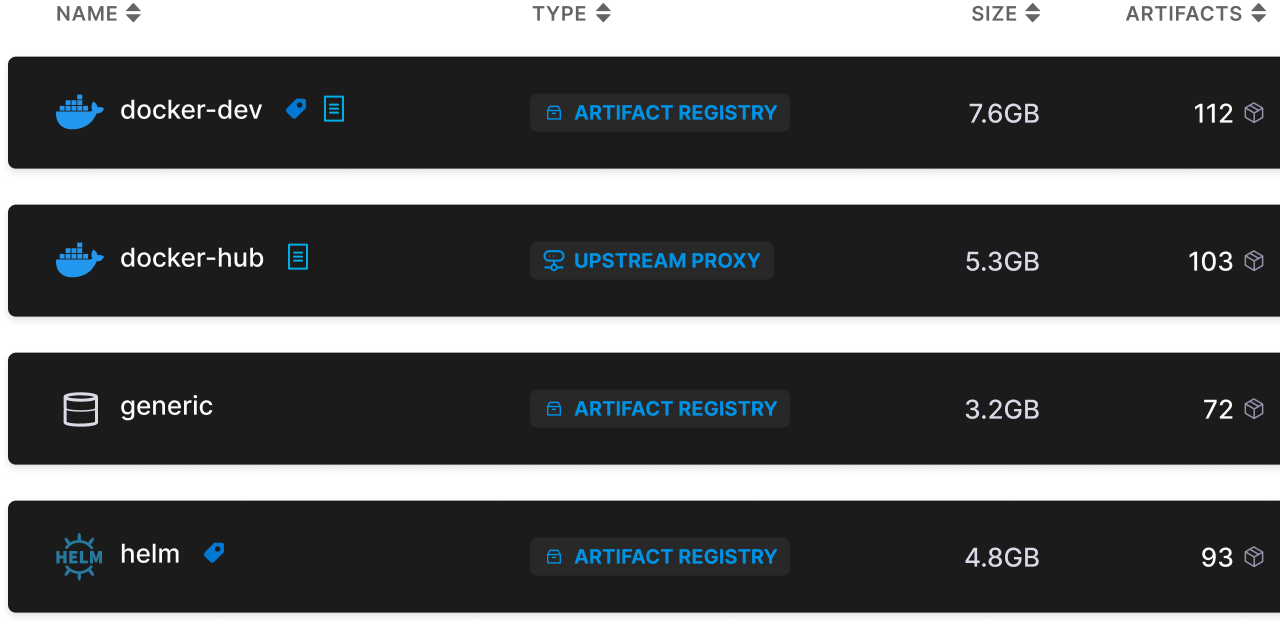
Harness Open Source is the company's all-in-one developer platform under an Apache-2.0 licence: Git code hosting, CI/CD pipelines, ephemeral cloud development environments called Gitspaces, and artifact registries, all served from one web UI with a REST API and a small command-line tool. Repositories cover commits, branches, pull requests and code review, protected branches, quality gates and notifications, while pipelines execute as Docker containers with stages, steps, triggers, variables, conditions, matrix and parallelism, backed by hundreds of reusable templates for Java, Go, Node, Rust, Android and Docker workloads. Registries store Docker images, Helm charts and generic artifacts in a single place and can proxy upstream repositories, and repositories plus pipelines can be migrated in one click from GitHub, GitLab, Bitbucket and CircleCI. Self-hosting is a single container: publish ports 3000 and 3022, bind-mount the Docker socket and a volume at /data, then sign up in the browser. Environment variables let you swap the bundled SQLite file for your own Postgres, limit parallel pipeline workers, pre-create an admin account, turn off open signup, or encrypt stored secrets; secrets stay in plaintext until you supply a key. Building from source needs Node, Go 1.20 or newer and protobuf. The project is the successor to Drone, which the team preserved as a snapshot branch while Harness works towards pipeline parity.
Drone CI alternatives
 docker-gha-runnerDocker-based self-hosted GitHub Actions runner with stateless execution, platform emulation, and Docker-in-Docker support.Comparedocker-gha-runner with Drone CI
 swiftwaveSwiftWave: self-hosted open source PaaS for deploying apps on any server. Alternative to Heroku/Netlify/Render with 1GB RAM min and integrated app store.Compareswiftwave with Drone CI
 DiggerOpen-source Terraform CI/CD that plans and applies inside your existing CI, with PR comments, drift detection, OPA policies and a self-hosted orchestrator backend.CompareDigger with Drone CI
 GogsA lightweight, open-source, self-hosted Git service written in Go: repos, issues, pull requests, wikis and LDAP login, run from one binary or a Docker image.CompareGogs with Drone CI
 Gitea RunnerGit with a cup of tea! Painless self-hosted all-in-one software development service, including Git hosting, code review, team collaboration, package registry and CI/CDCompareGitea Runner with Drone CI
 GitLab-CESelf-hosted, open-source DevOps platform for Git repositories, merge requests, CI/CD pipelines, issue boards and wikis, with free CE and paid Premium/Ultimate tiers.CompareGitLab-CE with Drone CI
 Concourse CIConcourse is an open-source, self-hosted CI/CD automation system built around resources, tasks, and jobs with declarative YAML pipelines configured via the fly CLI.CompareConcourse CI with Drone CI
 woodpecker-ciSelf-hosted, open-source Apache-2.0 CI/CD engine: pipeline steps run in Docker containers and workflows trigger from forges like GitHub, Gitea, GitLab or Bitbucket.Comparewoodpecker-ci with Drone CI
Should you self-host Drone CI?
Drone CI scores 78/100 on selfhost.directory (how scoring works) and ranks #4 of 28 in CI/CD. It has 38 916 GitHub stars, +395 in the last 30 days.
It shipped 6 stable releases in the past year. The latest, v2.28.2, came out on 20 April 2026. New versions land roughly every 2 weeks.
Setup is easy: most people get it running in one sitting. An official Docker image is available. It is Apache-2.0-licensed and written mostly in Go.
Its closest alternative on selfhost.directory is jenkins (83/100, 26 776 stars). It scores higher overall, so compare the two before you pick. See Drone CI vs jenkins side by side.
Features
- Artifact Registry
- CI/CD Pipelines
- CLI
- Git repository hosting
- Hosted development environments
- Notifications and alerts
- One-click migration from other forges
- Pipeline templates
- Protected branches
- Quality Gates
- REST API
- Secrets encryptionOff by default; without a key secrets are kept in plaintext.
- Upstream registry proxy
- Webhooks
Drone CI README
Harness Open Source is an open source development platform packed with the power of code hosting, automated DevOps pipelines, hosted development environments (Gitspaces), and artifact registries.
Harness Open source is an open source development platform packed with the power of code hosting, automated DevOps pipelines, Gitspaces, and artifact registries.
FAQ
How can I handle SSL errors when using the default clone task?
You can bypass SSL errors by setting clone.insecure to true, or keep SSL enabled by making your Docker environment trust the relevant certificates.
Can I override the default cloning task image used by Harness?
Yes: make the image you want available in the local Docker cache, or route pulls through a Docker registry mirror, and Harness will use the locally cached image.
How can I avoid Harness from pulling the :latest tag of an image?
Reference a specific version tag instead of :latest, and add pull: if-not-exists to the pipeline step so the image is only fetched when it is not already present locally.
What images are required to run Harness Open Source offline?
Only the drone/git image is essential for running pipelines; plugin images exist but are optional.
How can I run Harness Open Source in an offline environment without internet access?
Pre-pull the images the pipelines need on a connected machine, export them with docker save and load them into the offline Docker cache, or point the Docker daemon at a local registry mirror.
More in CI/CD
 dxlanderDXLander is a self-hosted deployment platform that auto-detects frameworks and generates Docker, Kubernetes, and Compose configs.
 dyrector.iodyrector.io is an open-source, self-hosted CD and container management platform for Docker, Kubernetes and Podman with environments, versions and secret management.
 exoframeExoframe is an open-source, self-hosted tool for one-command Docker deployments with SSH auth, automated HTTPS, and Traefik reverse proxy.
 FeatbitRun feature management and A/B experiments on your own servers with FeatBit, an MIT-licensed, open-core flags platform deployed via Docker Compose or Helm charts.
 ForgejoA self-hosted, open-source software forge: git hosting with issues, pull requests, wikis, CI and package registries in one lightweight binary or container.
 gansSelf-hosted open-source tool that monitors a local Git repository for changes and automatically executes only the modified Ansible playbooks via a web interface.
 garmGARM is an open-source, self-hosted tool that automatically provisions and scales ephemeral GitHub Actions and Gitea runners across multiple clouds.
 GiteaGitea is a self-hosted, open-source Git platform with code hosting, CI/CD, package registries, issues, and project management — a lightweight GitHub alternative.
- Gitea RunnerGit with a cup of tea! Painless self-hosted all-in-one software development service, including Git hosting, code review, team collaboration, package registry and CI/CD
 github-actions-cache-serverSelf-hosted open-source reimplementation of GitHub's Actions cache service; works with the stock actions/cache step, storing data on S3, GCS, Azure or the filesystem.
 github-actions-runner-operatorSelf-hosted Kubernetes operator that schedules GitHub Actions runner pods on demand; declare runner pools, use a GitHub App or PAT, and install with a Helm chart.
 github-act-runnerA self-hosted GitHub Actions runner that uses nektos/act to execute workflows, supporting more platforms like FreeBSD and running without Docker.
0 comments