
Self-host Drawpile
2.3.1Real-time collaborative drawing app and session server
docker run -it --rm -p 27750:27750 drawpile/drawpile-srv:2.2- Stars
- 1 347
- Port
- 27750 (TCP port drawpile-srv listens on for client connections)
drawpile/drawpile-srv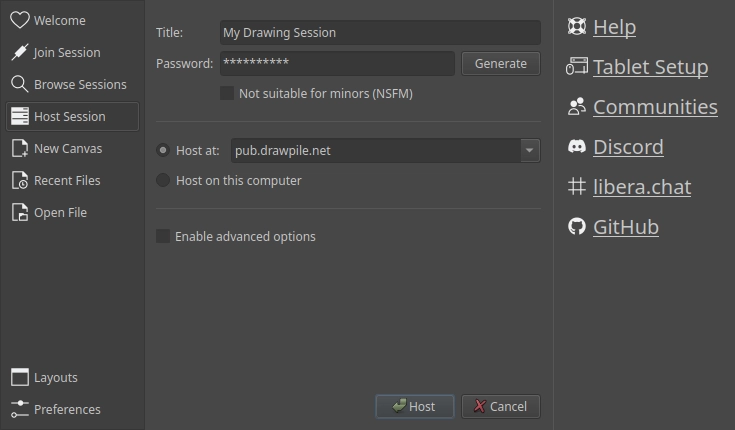
What is Drawpile?
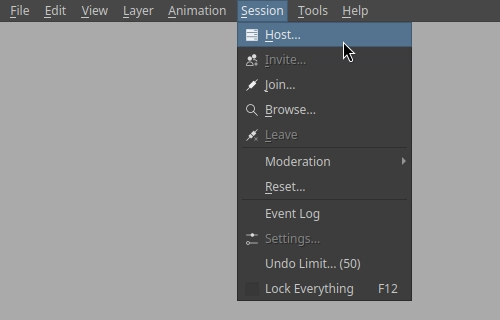
Drawpile is an open-source painting application whose core idea is a shared canvas: people sketch, paint and animate at the same time on the same picture, whether on a public community server or one you host yourself. The client ships more than 200 brushes across several brush engines, a brush editor, a stroke stabilizer, layers and layer groups with blend modes, clipping and masking, plus a frame-based animation timeline with onion skins and timelapse video export. Drawing tablets with pressure input work on every supported system, and sessions can be locked behind a password and handed out as invite links. On the server side, users fall into operator, trusted, registered and guest tiers, with permissions configurable per feature and per layer, layer censoring for mixed content, kick and ban tools, and an optional abuse-report hook. Desktop builds cover Windows, macOS and Linux, there is a native Android app, and a browser version connects over WebSockets so tablet and phone users can join without installing anything. Self-hosting means running drawpile-srv: as a downloaded binary, from the Linux AppImage started with --server, or via the drawpile/drawpile-srv Docker image, with TLS, file-backed and persistent sessions, session recordings, templates and an HTTP admin API; the dpserver compose package adds a list server, an abuse-report relay and nginx with Let's Encrypt. Canvases can be exported to OpenRaster or PSD, and the program also works fine as a standalone offline editor.
Should you self-host Drawpile?
Drawpile scores 59/100 on selfhost.directory (how scoring works) and ranks #3 of 7 in Design. It has 1 347 GitHub stars.
It shipped 4 stable releases in the past year. The latest, continuous, came out on 26 October 2026. New versions land roughly every 5 days.
Setup is moderate: expect some configuration beyond a single command. An official Docker image is available. It is GPL-3.0-licensed and written mostly in C.
Its closest alternative on selfhost.directory is OpenDesign (83/100, 104 574 stars). It scores higher overall, so compare the two before you pick. See Drawpile vs OpenDesign side by side.
Features
- Animation timeline with onion skins
- Brush editor with 200+ built-in brushes
- File-backed and persistent sessions
- Layers and layer groups with blend modes
- Offline drawing mode
- OpenRaster and PSD file interchange
- Password-protected private sessions
- Pressure-sensitive tablet support
- Real-time collaborative canvas
- Roles, permissions and moderation
- Session Recording
- Stroke stabilizer
- Timelapse export
- Web admin API for the server
- Web browser client
Drawpile README
FAQ
Why does Drawpile not recognize pen pressure?
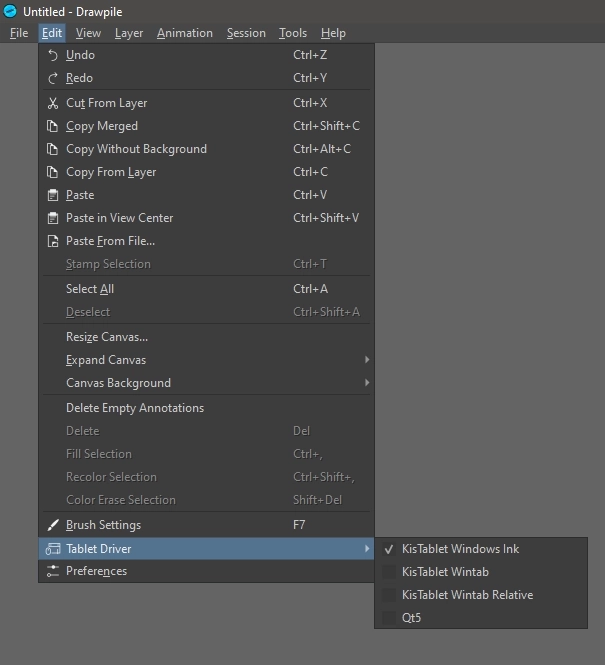
The current brush may simply have no pressure dynamics enabled, so try another one. On Windows it is often a driver mismatch: pick a different option under Edit → Tablet Driver and test them.
More in Design
 google-webfonts-helperAn open-source, self-hosted tool to grab Google Fonts as woff2, woff, ttf, eot and svg files in a zip, with @font-face CSS snippets.
 gridaOpen-source canvas for graphics, images, and AI-assisted presentations; runs as a self-hosted desktop app on macOS, Windows, and Linux with your own AI keys or Ollama.
 HyCanvasFree, open-source, self-hosted design platform for graphics, presentations, videos, whiteboards, docs, sheets — every feature included, no watermarks.
 JaazAn open-source AI creative agent with an infinite canvas for one-prompt image and video generation, a Canva alternative that runs locally on Windows and macOS.
 OnlookOpen-source, self-hosted visual code editor: build and style Next.js + Tailwind apps in a Figma-like canvas with AI, editing real code directly.
 OpenDesignOpen-source, local-first design workspace, self-hosted in a single Docker container; briefs become prototypes, decks and dashboards via your own coding agent.
 openpencilOpenPencil is a self-hosted, open-source design editor that opens native Figma .fig files and adds built-in AI, a scriptable CLI, and serverless P2P collaboration.
 RAWGraphsSelf-hosted, open-source web app that turns tabular data (CSV, TSV, JSON or pasted text) into nearly 30 SVG-based charts you can refine in vector editors.
 ConcatAn open-source, self-hosted desktop and mobile video editor pitched as a CapCut replacement, with local Whisper captions, text-to-speech and 4K export.
 Digicardself-hosted, open-source web app for composing simple graphics and virtual cards: text, images, shapes, Pixabay backgrounds and image export, with no account needed.
 DigifaceSelf-hosted, open-source avatar maker built on the Avataaars art: twelve customization options, random generation, PNG export at 900x960, and four interface languages.
0 comments