
Self-host OpenDesign
open-design-v0.27.1AI design workspace driven by your own coding agent
docker compose up -d- Stars
- 106 877
- Port
- 7456 (Daemon HTTP listener inside the container — serves both /api and the built Next.js web UI; compose publishes it as 127.0.0.1:7456)
ghcr.io/nexu-io/odWhat is OpenDesign?
OpenDesign is a collaborative design workspace in which a coding agent does the drawing: you submit a brief, pick a brand package, and it writes working HTML prototypes, dashboards, slide decks, images or MP4 motion graphics into a project you preview and keep editing. It ships no model of its own by design — it drives agent CLIs already on your PATH (Claude Code, Codex, Cursor, Copilot, OpenCode, DeepSeek Harness and more) or calls provider endpoints directly through a local BYOK proxy, with the vendor's hosted OpenDesign Cloud as an optional third path. Work stays on your machine: projects are ordinary folders of HTML and CSS, state is kept in an embedded SQLite database, and the exposed MCP server is read-only by default with SSRF guarding at the proxy edge. Self-hosting is one Alpine container from GHCR behind docker compose, authenticated with a single shared API token in Basic or Bearer form; macOS and Windows also get native desktop builds, while Linux has no prebuilt artifact and runs from source with Node 24 and pnpm. The Apache-2.0 app is free, but publish/share links, hosted model credits, team seats and SSO/SAML belong to paid OpenDesign Cloud plans, and some collaboration features such as comment-mode surgical edits are still only partly shipped (v0.x releases).
OpenDesign alternatives
 ChatGPT Next WebSelf-hosted, open-source AI chat UI for OpenAI, Claude, Gemini, DeepSeek and many other providers, with Docker, Vercel and native desktop/mobile clients.CompareChatGPT Next Web with OpenDesign
 open-managed-agentsSelf-hosted open-source agent platform managing sessions, execution, recovery. Supports any model, harness, sandbox via Docker, Node.js, Fly.io, Cloudflare.Compareopen-managed-agents with OpenDesign
 MindsDBSelf-hosted, open-source agent workspace that automates recurring knowledge work, publishes artifacts to live URLs, and routes across frontier and open models.CompareMindsDB with OpenDesign
 EigentOpen-source desktop app to run single agents or multi-agent workforces; self-host the FastAPI backend with Docker and use any cloud or local model.CompareEigent with OpenDesign
 Big-AGISelf-hosted, open-source AI workspace for experts: run 2 to 24 models in parallel with Beam, personas, image generation, voice and BYO API keys via Docker.CompareBig-AGI with OpenDesign
 poco-clawSelf-hosted, open-source AI coding agent platform with sandboxed Claude Code execution, team channels, MCP/Skills and Telegram/DingTalk/Feishu bridges.Comparepoco-claw with OpenDesign
 CodinIT.devSelf-hosted open-source AI full-stack dev platform for building Node.js apps with code generation and 19+ AI providers.CompareCodinIT.dev with OpenDesign
 helixHelix gives each AI coding agent its own GPU desktop, orchestrating fleets on a spec-driven Kanban board with human PR review. Self-hosted on Docker, Kubernetes, Mac.Comparehelix with OpenDesign
All self-hosted alternatives to Bolt → All self-hosted alternatives to Claude Design → All self-hosted alternatives to Figma →
Should you self-host OpenDesign?
OpenDesign scores 83/100 on selfhost.directory (how scoring works) and ranks #1 of 7 in Design. It has 106 877 GitHub stars, +4 046 in the last 30 days.
It shipped 12 stable releases in the past year. The latest, open-design-v0.27.1, came out on 10 November 2026. New versions land roughly every 5 days.
Setup is moderate: expect some configuration beyond a single command. An official Docker image is available. It is Apache-2.0-licensed and written mostly in Typescript.
Its closest alternative on selfhost.directory is penpot (84/100, 62 230 stars). It scores higher overall, so compare the two before you pick. See OpenDesign vs penpot side by side.
Features
- Agent-generated prototypes
- BYOK multi-provider model proxy
- Claude Design import
- CLI project management
- Codebase refresh to brand spec
- Design system catalogue
- Desktop appsLinux users run it from source; the published Linux desktop release is an open roadmap item.
- Direct visual editing
- Image Generation
- MCP server for coding agents
- Motion graphics to MP4
- Plugin and skill marketplace
- Sandboxed artifact preview
- Slide deck generation and export
OpenDesign README
✨ Celebrating 100K GitHub stars with OpenDesign Go — Go credits are doubled: $8 for your first month, with up to $120 in monthly credits for eligible Design Plan models. Use them across 10+ models, including GPT-6 Luna, DeepSeek V4.1 Flash, GLM-5.3 Flash-X, and MiMo V2.6 Flash. All personal plans include API access for Codex, Claude Code, DSH, OpenCode, and more.

Website · Download · OpenDesign Cloud · Discord · Follow @OpenDesignHQ
English · Español · Português · Deutsch · Français · 简体中文 · 繁體中文 · 한국어 · 日本語 · العربية · Русский · Українська · Türkçe · ภาษาไทย
OpenDesign is the 1st collaborative AI design agent workspace. Start with a brief, then use your coding agent or OpenDesign Cloud to create a prototype that follows your design system. Share it with your team for feedback, and let your agent refine it in the same project.
That workflow is open and extensible. OpenDesign is licensed under Apache 2.0 and gives teams skills, design templates, design systems, and plugins they can inspect and adapt to their own process.
 Home — start with a brief or an example. |
 All projects — revisit design systems, media, and prototypes. |
 Design Systems — inspect brand assets and refine them with an agent. |
 Plugins — find skills and launch them with Try it.
|
 Prototype — build and refine interactive web experiences with your agent and live preview. |
 Slides — create decks, review slides and speaker notes, and export when ready. |
 Image — generate visual assets from the conversation, inspect the result, then download or open it. |
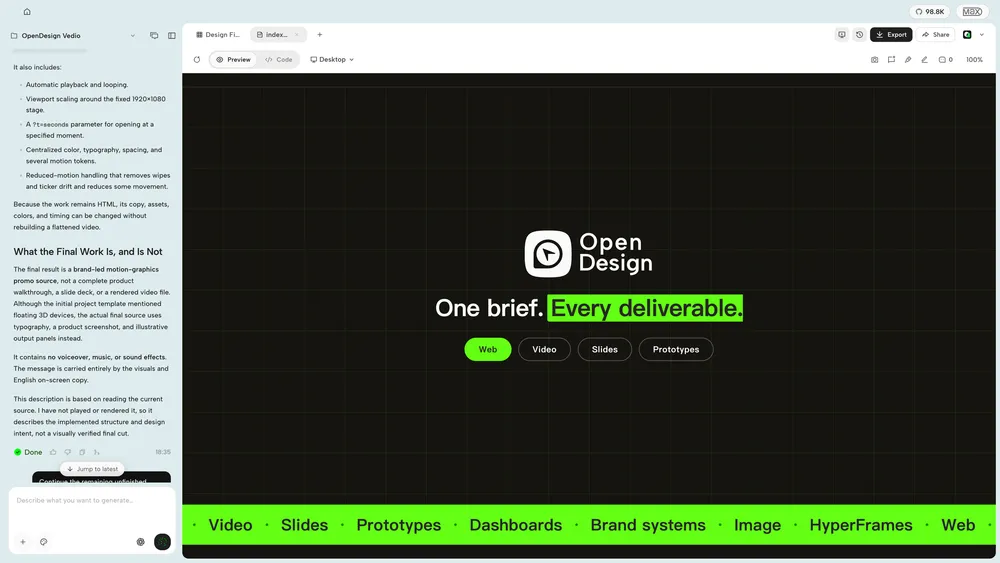 HyperFrames — create motion graphics with your agent and export to MP4. Watch the video. |
OpenDesign connects to mainstream coding agents in two ways: skills, CLI, and MCP for agents that consume OD, plus native runtime adapters for agents that OD launches directly. DeepSeek Harness is a first-class native runtime through the official
dshCLI, with structured streaming, model discovery, cancellation, and session resume.
| Coding agent / platform | Status | Quick setup |
|---|---|---|
| Claude Code | ✅ Supported | od mcp install claude |
| Claude Desktop | ✅ Supported¹ | od mcp install claude-desktop |
| Codex CLI | ✅ Supported | od mcp install codex |
| DeepSeek Reasonix | ✅ Supported | od mcp install reasonix |
| DeepSeek Harness | ✅ Native runtime | od agent setup deepseek-harness |
| Raven | ✅ Supported | od mcp install raven |
| Cursor | ✅ Supported | od mcp install cursor |
| VS Code + GitHub Copilot | ✅ Supported | od mcp install copilot |
| GitHub Copilot CLI | ✅ Supported | od mcp install copilot |
| OpenCode | ✅ Supported | od mcp install opencode |
| OpenClaw | ✅ Supported | od mcp install openclaw |
| Antigravity | ✅ Supported | od mcp install antigravity |
| Cline | ✅ Supported | od mcp install cline |
| Trae | ✅ Supported | od mcp install trae |
| Kimi CLI | ✅ Supported | od mcp install kimi |
| Kiro | ✅ Supported | od mcp install kiro |
| Pi Agent | ✅ Supported | od mcp install pi |
| Mistral Vibe CLI | ✅ Supported | od mcp install vibe |
| Hermes Agent | ✅ Supported | od mcp install hermes |
For DeepSeek Harness, install the official dsh CLI first, then select it in OpenDesign or run od agent setup deepseek-harness to install/repair OD's connection component. For MCP integrations: od mcp install <agent> --print for a dry-run preview · --uninstall to remove · full list with od mcp install --help.
¹ Automatic MCP configuration for Claude Desktop is currently supported on macOS and Windows only.
No CLI installed? The BYOK proxy at POST /api/proxy/{anthropic,openai,azure,google,ollama,senseaudio}/stream gives you the same loop (no process spawn) — paste baseUrl + apiKey + model, with presets for OpenAI, Atlas Cloud, Anthropic, Azure OpenAI, Google Gemini, Ollama, LM Studio, vLLM, or any OpenAI-compatible endpoint. Atlas Cloud uses https://api.atlascloud.ai/v1 with your own key and OpenAI-compatible model ids such as qwen/qwen3.5-flash. Per-target SSRF protection blocks internal IPs / link-local / CGNAT at the daemon edge.
Runtime definitions live in apps/daemon/src/runtimes/defs/, with registration and shared stream handling under apps/daemon/src/runtimes/. See docs/agent-adapters.md for the adapter contract.
Four core product categories, all rendered by a coding agent running on your laptop. Click a thumbnail to see the real example.
The default output surface. Single-page HTML artifacts that read your DESIGN.md and render in a sandboxed iframe.
 Web prototype — an editorial dashboard with scrollbars, KPIs, and charts. Rendered straight from design-templates/dating-web/.
|
 Mobile app prototype — a three-screen gamified flow with XP ribbons and quest detail. Hand off straight to Cursor / Codex / Claude Code to turn into React/Next/Vue. |
Live dashboards, decision rooms, KPI walls — single-page artifacts that pull data through a tweaks panel and stay editable in place.
 Live dashboard — an editable KPI wall whose tweaks panel surfaces the parameters worth nudging. The agent emits a manifest, and the iframe re-renders without a reload. |
 Decision room — a multi-source briefing artifact for product / research / ops meetings. |
 GitHub-style dashboard — repo metrics presented as a live artifact. |
 Flow live-dashboard template — a domain-specific KPI template, branded through the active DESIGN.md.
|
 Deck mode (guizang-ppt) — magazine layouts, WebGL hero, P0/P1/P2 checklists. Bundled verbatim from op7418/guizang-ppt-skill with its original license preserved.
|
 Swiss International-style deck — grid-anchored, monochrome accents. One of 15 deck templates and 36 themes under design-templates/html-ppt-*/.
|
Every deck exports to HTML (single file, inlined assets), PDF (browser print, deck-aware), PPTX (agent-driven skill), ZIP (archive), or Markdown.
Illustrated city food map Hand-drawn editorial travel poster |
Cinematic elevator scene Single-frame editorial still |
Cyberpunk portrait Profile avatar — neon face text |
3D stone staircase Hewn-stone infographic |
Glamorous portrait Editorial studio shot |
93 ready-to-replicate prompts live in prompt-templates/ — preview thumbnails, full prompt body, target model, aspect ratio, and source attribution. One click drops a brief into the composer.
HyperFrames is HeyGen's open-source, agent-native video framework, integrated as a first-class citizen in OpenDesign. The agent writes HTML + CSS + GSAP, and HyperFrames renders it to a deterministic MP4 via headless Chrome + FFmpeg. Pair it with Seedance 2.0 for cinematic t2v / i2v, Veo 3 / Sora 2 / Kling 2 for routed model variants, and Suno v5 / Lyria 2 for the audio layer.
30s SaaS product promo · 16:9 · UI 3D reveals |
TikTok karaoke talking-head · 9:16 · TTS + word-synced captions |
30s brand sizzle reel · 16:9 · audio-reactive kinetic type |
Bar chart race · 16:9 · NYT-style data infographic |
Flight map · 16:9 · Apple-style route reveal |
4s cinematic logo outro · 16:9 · piece-by-piece assembly + bloom |
$0 → $10K money counter · 9:16 · Apple-style hype |
Website-to-video · 16:9 · captures the site at 3 viewports |
11 HyperFrames templates + 39 Seedance prompts ship with the repo. Catalog thumbnails © HeyGen; the framework is Apache-2.0. The OD-specific render workflow (composition cache, sandbox-exec workaround, MP4-as-chip) is detailed in design-templates/hyperframes/.
- 🤖 Agent-native, model-agnostic. We don't ship an agent. The
claude/codex/cursor-agent/copilot/hermes/kimialready on yourPATHare the design engine. Swap with one click. - 🧠 Brand-grade by default. Every render reads the active package's
DESIGN.mdas the core brand contract. 151 design-system packages ship with the repo; legacy packages may beDESIGN.md-only, while newer packages can addmanifest.json,tokens.css, components, assets, and provenance. Drop a folder in, the picker finds it. - 🖥️ Local-first, BYOK at every layer. Native desktop apps for macOS (Apple Silicon + Intel) and Windows (x64). Linux desktop users can currently run OpenDesign from source; the latest official release does not include a prebuilt Linux artifact. Product analytics and session replay are consent-gated; scrubbed safety and reliability telemetry is always on. Before describing daemon data paths, contributors and operators MUST read
AGENTS.md→ Daemon data directory contract. This README MUST NOT restate it. - 🌍 Composable on four planes. Plugins carry runnable workflows · functional skills carry agent behavior · design templates carry rendering blueprints · design systems carry the brand. All four use portable, versionable directories that anyone can author and publish.
- 🔁 Refresh an existing codebase. Hand a
gitrepo +DESIGN.mdto the agent and it refactors your real components to the brand spec. - 🔒 Privacy by conviction. Projects can run locally or in your own deployment. Cloud model and OpenDesign Cloud requests are sent to the corresponding services. The BYOK proxy includes SSRF safeguards.
The fastest way to use OpenDesign. No Node, no pnpm, no clone.
- macOS (Apple Silicon · Intel x64) → open-design.ai or GitHub Releases
- Windows (x64) → open-design.ai or GitHub Releases
- Linux → No prebuilt Linux artifact is currently published in the official releases. For now, run OpenDesign from source; Linux release work is tracked in #4368.
After install: the app auto-detects every coding-agent CLI on your PATH, loads 100+ functional skills, the separate rendering-template catalog, and 151 design systems, and lets you type a brief in the entry view.
You can use OpenDesign without ever opening the GUI — call it as a skill, plugin, or MCP server inside Claude Code, Codex, Cursor, Copilot, OpenClaw, Antigravity, Hermes, Kimi, and more.
If you installed the macOS desktop app via the DMG or Homebrew cask, your shell
may still resolve od to Apple's built-in /usr/bin/od octal-dump utility. In
that case, open Settings → MCP server in the desktop app and copy the
client-specific snippet; it uses absolute paths and does not rely on the bare
od command.
# One-line install into the agent you're using:
od mcp install <agent>
# <agent> = claude | codex | reasonix | raven | cursor | copilot | openclaw
#         | antigravity | pi | vibe | hermes | cline | kimi | kiro
#         | trae | opencode

# Hosted equivalent for curl-based setup:
curl -fsSL https://open-design.ai/install.sh | sh -s <agent>
install.sh is a thin shell wrapper around od mcp install; it exists so the
hosted URL returns shell instead of the landing-page HTML fallback and fails
fast if your shell resolves a non-Open-Design od binary.
macOS / WSL2 users:
/usr/bin/odis a system octal-dump command and can shadow OpenDesign'sodcommand. Desktop-app users should prefer the Settings → MCP server snippet; WSL2 users should follow theWSL2 setup guidefirst.
Then, inside the agent:
> Use open-design to generate a landing page with the Linear design system
In a filesystem-backed local CLI run, the agent composes the selected functional skill or design template with your DESIGN.md, writes the canonical project files, and OpenDesign previews those files. A BYOK/plain-API run without filesystem tools instead returns one complete <artifact> block.
git clone https://github.com/nexu-io/open-design.git
cd open-design/deploy
cp .env.example .env
echo "OD_API_TOKEN=$(openssl rand -hex 32)" >> .env
docker compose up -d
# open http://127.0.0.1:7456
If the browser asks for credentials, use open-design as the username and the
OD_API_TOKEN value from deploy/.env as the password. This keeps Docker bridge
traffic authenticated without requiring host networking. API clients can keep
using Authorization: Bearer <OD_API_TOKEN>.
The Sealos App Store template runs the published OpenDesign Docker image with persistent workspace storage and Basic Auth on the public proxy. For custom public or shared Docker deployments, follow the reverse-proxy and OPEN_DESIGN_ALLOWED_ORIGINS guidance in deploy/README.md.
git clone https://github.com/nexu-io/open-design.git
cd open-design
corepack enable && pnpm install
pnpm tools-dev run web
Open the URL printed by tools-dev; development ports are allocated dynamically unless you pass explicit port flags.
Node ~24, pnpm 10.33.x. WSL2 users, see docs/wsl-setup.md; native Windows users, see docs/windows-troubleshooting.md. Full quickstart, env vars, and packaged build flow → QUICKSTART.md.
brief → plugin → direction → design system → artifact → handoff → memory
- A PM submits a brief. The plugin picker offers landing page · pitch deck · dashboard · social post · PM spec · OKR scorecard…
- A designer (or the agent) locks the direction. No brand? Pick from 5 curated directions. Have a brand? Drop a screenshot / URL → the agent connects GitHub and codifies a reusable
DESIGN.md. - The agent creates the first deliverable. Plugin + functional skill or design template +
DESIGN.mdare bound. Filesystem-backed CLI runs write canonical project files and the preview follows them; BYOK/plain-API runs without file tools return one complete<artifact>block. - Hand off to engineering. The artifact is real HTML/CSS — drop it into Cursor, Codex, or Claude Code to keep building as code. Or export PPTX / PDF / MP4 straight to marketing.
- OpenDesign gets smarter as you use it. Your screenshots, fonts, palettes, and confirmed artifacts accumulate as defaults for the next session. Less rework, less drift.
OpenDesign ships a stdio MCP server and per-agent install scripts. Any MCP-compatible agent in another repo can read files from your local OpenDesign projects directly — tokens CSS, JSX components, entry HTML — as a structured API queryable by name. The agent always sees the live file, not a stale export.
# One-line install (16+ CLIs supported):
od mcp install <agent>

# Then the agent can:
od project list --json
od files list <project-id> --json
od files read <project-id> <relative-path>
od plugin list --json
od skills list --json
Why MCP? Exporting and re-attaching a zip every iteration breaks flow. MCP exposes the design source directly — the agent always sees the live file.
For an agent starting from scratch, the installer places ~/.config/<agent>/open-design.json (or the platform equivalent) plus a copy-paste MCP snippet. Cursor gets a one-click deeplink; Claude Code gets a claude mcp add-json one-liner; every other agent gets JSON in the schema its config expects. On macOS desktop installs, prefer that Settings snippet over typing bare od mcp install <agent> in Terminal, because /usr/bin/od may win on PATH. Full per-agent flow → Settings → MCP server in the desktop app, or docs/agent-adapters.md.
Security model. Read-only by default, the daemon binds to 127.0.0.1, and SSRF is blocked at the proxy edge. LAN exposure requires an explicit OD_BIND_HOST plus OD_ALLOWED_ORIGINS. Connector credentials and live-artifact preview routes stay loopback-only regardless.
Internally-hosted model endpoints. To prevent SSRF, the daemon blocks provider base URLs that resolve to private/internal address ranges (RFC1918, link-local, CGNAT, and cloud-metadata IPs) by default, surfacing Internal IPs blocked. If you run an internally-hosted gateway (e.g. LiteLLM or Ollama on a VPN-only 10.x/192.168.x address), opt that host out with OD_ALLOWED_INTERNAL_HOSTS=<host1>,<host2>,... — a comma- or whitespace-separated list of bare hostnames or IPs (10.0.0.5, litellm.internal.corp; a host:port or full URL is accepted and reduced to its hostname; IPv6 must be bracketed, e.g. [fd00::1]). The allowlist is strict opt-in (empty by default), exact-host (no subdomain/substring matching), and applies only to provider endpoints you configure (connection test, model discovery, BYOK chat). It deliberately does not relax the guard on download URLs returned inside upstream responses, which stay blocked. A malformed entry — or CIDR notation, which is not supported — is dropped with a warning rather than silently trusted, so a typo never quietly widens (or fails to widen) the guard. Allowlisting a hostname trusts whatever it resolves to (like OD_ALLOWED_ORIGINS); allowlist the resolved IP instead if you want the DNS-resolved address re-checked.
100+ functional skills ship in skills/. Each follows the Agent Skills SKILL.md convention and supplies reusable agent behavior, references, or utilities. Renderable starters live separately in design-templates/; they may also use SKILL.md, but they populate the design-template catalog rather than the functional-skill registry.
Two modes anchor the design-template catalog: prototype (web/mobile/desktop single-page artifacts) and deck (horizontal-swipe presentations). Other templates cover image, video, audio, and utility surfaces. The scenario field groups templates by audience: design · marketing · operation · engineering · product · finance · hr · sale · personal.
| Design template | Mode | Scenario | What it produces |
|---|---|---|---|
web-prototype |
prototype | design | Default landing page / hero |
saas-landing |
prototype | marketing | Hero / features / pricing / CTA |
dashboard |
prototype | operation | Admin / analytics (with sidebar) |
mobile-app |
prototype | design | iPhone 15 Pro / Pixel framed app |
mobile-onboarding |
prototype | design | Splash · value-prop · sign-in flow |
social-carousel |
prototype | marketing | 3-card 1080×1080 carousel |
email-marketing |
prototype | marketing | Table-fallback-safe brand email |
magazine-poster |
prototype | marketing | Single-page magazine layout |
motion-frames |
prototype | marketing | Looping CSS motion hero |
sprite-animation |
prototype | marketing | 8-bit pixel animated explainer |
pm-spec |
prototype | product | PM spec doc (with TOC + decision log) |
team-okrs |
prototype | product | OKR scorecard |
eng-runbook |
prototype | engineering | Incident runbook |
finance-report |
prototype | finance | Exec finance summary |
hr-onboarding |
prototype | hr | Role onboarding plan |
guizang-ppt |
deck | marketing | Magazine-style web PPT (deck default) |
html-ppt-* |
deck | marketing | 15 deck templates × 36 themes (master template in design-templates/html-ppt/) |
hyperframes |
video | marketing | HTML → MP4 motion graphics (HeyGen OSS framework) |
critique |
utility | design | Five-dimensional self-critique scoresheet |
tweaks |
utility | design | AI-emitted tweaks-panel manifest |
Full protocol and directory split → docs/skills-protocol.md. Registry endpoints: GET /api/skills for functional skills and GET /api/design-templates for rendering templates.
151 brand-grade design-system packages centered on DESIGN.md ship with the repo. Legacy packages may contain only that Markdown contract; newer packages can also carry manifest.json, compiled tokens.css, component fixtures, assets, and provenance evidence. The catalog mixes upstream-derived systems with project-owned additions; design-systems/README.md records the package shape and provenance. Switch a system → the next render uses the new tokens.
Full catalog (click to expand)
AI & LLM — claude · cohere · mistral-ai · minimax · together-ai · replicate · runwayml · elevenlabs · ollama · x-ai
Developer Tools — cursor · vercel · linear-app · expo · clickhouse · mongodb · supabase · hashicorp · posthog · sentry · warp · sanity · mintlify · composio · opencode-ai · voltagent
Productivity — notion · miro · airtable · superhuman · intercom · zapier · cal · clay · raycast
Fintech — stripe · coinbase · binance · kraken · mastercard · revolut · wise
E-commerce — shopify · airbnb · uber · nike · starbucks · pinterest
Media — spotify · playstation · wired · theverge · meta
Automotive — tesla · bmw · ferrari · lamborghini · bugatti · renault
Other — apple · ibm · nvidia · vodafone · resend · spacex
Starters — default (Neutral Modern) · warm-editorial
Re-import the library via scripts/sync-design-systems.ts. Add your own brand → drop a DESIGN.md into design-systems/<brand>/. Full guide → design-systems/README.md.
277 official plugins plus 183 remixable reference examples live in plugins/_official/. Each entry is a portable plugin directory anchored by open-design.json plus the payload required by its type: for example SKILL.md for agent workflows, template.json for media templates, or DESIGN.md for design-system entries. Jump straight to a category:
| Category | Count | Contents |
|---|---|---|
scenarios/ |
13 | Complete design scenarios — od-default, od-design-refine, od-figma-migration, od-code-migration, od-react-export, od-nextjs-export, od-vue-export, od-media-generation, od-new-generation, od-tune-collab, od-plugin-authoring, od-share-to-community, od-web-effect-extractor |
image-templates/ |
45 | One-shot image prompts — editorial, cinematic, product, portrait |
video-templates/ |
63 | HyperFrames / Seedance / Veo motion templates |
design-systems/ |
143 | Brand DESIGN.md wrapped as plugins |
atoms/ |
13 | Reusable UI fragments (buttons, heroes, KPI cards) |
examples/ |
183 | Remixable reference outputs |
Also plugins/community/ for community plugins and plugins/registry/ for the publishing flow.
- 🤖 Run in any coding agent — Claude Code, Codex, Cursor, Copilot, OpenClaw, Antigravity, Hermes, Kimi… through the same skill protocol the agent already knows.
- 🔁 Migrate Figma / Pencil workflows → React, Next.js, or Vue source. See
od-figma-migration. - 🛠️ Refresh an existing codebase to a brand spec — point a plugin at a
gitrepo +DESIGN.md, get a PR. Seeod-code-migration. - 💾 Persist custom workflows — your team's reusable templates sit next to the shipped ones.
Plugins are at full parity across the web UI and the od CLI — same /api/plugins endpoints, pick whichever fits.
In the desktop / web app: open the Plugin page to browse the marketplace and click Install; inside a project's Studio, plugins appear as composer chips you click to apply (with the inputs they declare).
On the command line (runs without a UI — this is the path external agents use):
od plugin list                       # list installed plugins (--task-kind / --mode / --tag filters)
od plugin search "landing page"      # search by keyword
od plugin info od-default            # inspect a plugin's metadata, inputs, capabilities
od plugin install od-default        # install from a registry; also accepts ./local-folder or an https://… link
od plugin apply od-default --input brief="a one-page pitch for our seed round"
od plugin upgrade od-default         # upgrade
od plugin uninstall od-default       # uninstall
Every command supports --json, so you can pipe it through jq / xargs into automation.
An OpenDesign plugin requires open-design.json plus the payload required by its type. A workflow skill or scenario also includes SKILL.md; manifest-only template and design-system entries use their own payloads instead:
my-plugin/
├── open-design.json    ← required: marketplace metadata + inputs + pipeline + capabilities
├── SKILL.md            ← required for agent-skill/scenario entries; omitted for other plugin types
├── README.md           ← optional: usage, install, registry links
├── preview/            ← optional: index.html / poster.png (strongly recommended for visual plugins)
└── examples/           ← optional: concrete use cases
Core open-design.json fields: specVersion (currently 1.0.0), name (stable ID), version (semver), optional compat.agentSkills[].path (points at ./SKILL.md when the entry exposes an Agent Skill), od.kind (skill / scenario / atom / bundle), od.taskKind (new-generation / figma-migration / code-migration / tune-collab), od.mode (the output surface, e.g. prototype / deck / live-artifact / image / video / hyperframes / audio / design-system / scenario), od.capabilities[] (declare the minimum — a restricted install grants only prompt:inject by default), od.inputs[] (apply-time parameters).
Scaffold + validate locally:
od plugin scaffold --id my-plugin --title "My Plugin"   # generate the skeleton
od plugin validate ./my-plugin                          # check manifest / file layout
pnpm guard && pnpm --filter @open-design/plugin-runtime typecheck
Full field set and runtime contract → plugins/spec/SPEC.md; developing a plugin with a coding agent → plugins/spec/AGENT-DEVELOPMENT.md; copy-paste minimal templates → plugins/spec/examples/.
- Drop the plugin folder into
plugins/community/(third-party plugins), or — to ship it bundled with OpenDesign — into the matching tier ofplugins/_official/. - Pass validation:
od plugin validate,pnpm guard,pnpm --filter @open-design/plugin-runtime typecheck. - Fill the PR using the template in
plugins/spec/CONTRIBUTING.md(ID, version, lane, mode, capabilities, trigger examples; attach a screenshot / preview for visual plugins). - To publish to an external registry (skills.sh / ClawHub / standalone GitHub) →
plugins/spec/PUBLISHING-REGISTRIES.md.
Plugin registry endpoint: GET /api/plugins. Directory overview → plugins/README.md (简体中文).
┌────────────────── browser (Next.js 16) / Electron shell ──────────────┐
│  chat · file workspace · iframe preview · settings · import · MCP     │
└──────────────┬─────────────────────────────────────┬─────────────────┘
               │ /api/*                              │
               ▼                                     ▼
   ┌─────────────────────────────────┐   /api/proxy/{provider}/stream (SSE)
   │  local daemon (Express+SQLite)  │   ─→ any OpenAI-compatible BYOK,
   │                                  │       SSRF-guarded at the edge
   │  /api/skills    /api/design-templates    /api/plugins    │
   │  /api/design-systems            │
   │  /api/chat (SSE)   /api/proxy/* │
   │  /api/projects/:id/files/...    │
   │  /api/artifacts/{save,lint}     │
   │  /api/import/claude-design      │
   │  MCP stdio server                │
   └─────────┬───────────────────────┘
             │ spawn(cli, [...], { cwd: managed project cwd })
             ▼
   ┌──────────────────────────────────────────────────────────────────┐
   │  Local runtime definitions come from runtimes/registry.ts;                 │
   │  the base registry has 27 definitions (including byok-opencode),           │
   │  backed by 26 distinct local CLI executables because byok-opencode shares │
   │  the OpenCode executable. See docs/agent-adapters.md.                     │
   │  composes a functional skill or design template + DESIGN.md; writes files │
   └──────────────────────────────────────────────────────────────────┘
| Layer | Stack |
|---|---|
| Frontend | Next.js 16 App Router + React 18 + TypeScript |
| Daemon | Node 24 · Express · SSE streaming · better-sqlite3 |
| Storage | Before changing or documenting daemon storage paths, you MUST read AGENTS.md → Daemon data directory contract. This README MUST NOT restate it. |
| Preview | Filesystem runs render canonical project files; BYOK/plain-API runs parse one complete <artifact> block into a sandboxed srcdoc iframe |
| Export | HTML (inlined) · PDF (browser print) · PPTX (agent-driven) · ZIP · Markdown · MP4 (HyperFrames) |
| Desktop | Electron shell + sandboxed renderer + sidecar IPC (STATUS · EVAL · SCREENSHOT · CONSOLE · CLICK · SHUTDOWN) |
| Lifecycle | One entry point: pnpm tools-dev (start / stop / run / status / logs / inspect / check) |
Full architecture → docs/architecture.md. Skill protocol → docs/skills-protocol.md. Agent adapter contract → docs/agent-adapters.md.
- Daemon + 27 runtime definitions across 26 distinct coding-agent CLI executables + skill/design-template registries + design-system catalog
- Web app + chat + question form + 5-direction picker + todo progress + sandboxed preview
- 100+ functional skills · separate rendering-template catalog · 151 design-system packages · 5 visual directions · 5 device frames
- SQLite-backed projects · conversations · messages · tabs · templates
- Multi-provider BYOK proxy (
/api/proxy/{anthropic,openai,azure,google,ollama,senseaudio}/stream) with OpenAI-compatible presets including Atlas Cloud + SSRF guard - Claude Design ZIP import (
/api/import/claude-design) - Sidecar protocol + Electron desktop + IPC automation
- Artifact lint API + 5-dim self-critique pre-emit gate
- 0.8.0 — plugin marketplace infrastructure (261 official plugins, manifest spec, per-agent install scripts)
- 0.9.0 — OpenDesign Cloud (official model service built into the app: zero config, one-click sign-in)
- 0.10.0 — the all-in-one design workspace: the whole craft loop in one window (references → material → interactive editing → motion → handoff)
- 0.11.0 — The Bazaar: built in the open — a community marketplace of plugins and design systems anyone can pick from and contribute to
- 0.12.0 — Brand-backed Design System: turn the brand you already own into a reusable, portable
DESIGN.mdsystem - 0.13.0 — Stay in Flow: native session resume, faster model picking, and export straight to screenshot-backed PPTX / PDF
- Published desktop releases — macOS (Apple Silicon + Intel) + Windows (x64)
- Published Linux desktop release (optional lane) — tracked in #4368
- Comment-mode surgical edits — partially shipped; reliable targeted patching in progress
- AI-emitted tweaks panel UX — not yet implemented
-
npx od initto scaffold a project withDESIGN.md - Plugin SDK +
od plugin {add,list,remove,test,publish}CLI - Figma / Pencil → React / Next / Vue migration plugins (alpha)
- Refresh-existing-codebase plugin (point at a git repo +
DESIGN.md)
Phased delivery → docs/roadmap.md.
Real people behind every channel.
- 💬 Discord — daily chat, plugin sharing, questions → discord.gg/mHAjSMV6gz
- 🐦 X / Twitter — release notes, milestones, behind the scenes → @OpenDesignHQ
- 🗣️ GitHub Discussions — deep Q&A, RFCs, "show your work" → Discussions
- 🐛 GitHub Issues — bug reports, feature requests → Issues
The good-first-issue and help-wanted labels are the easiest way in.
OpenDesign keeps moving because contributors — designers, engineers, prompt authors — keep showing up. Many of the most-used skills, design systems, and plugins were written by people outside the core team.
| Want to ship… | How | Where |
|---|---|---|
| A new functional skill | Drop a folder with SKILL.md + optional assets/ + references/ |
skills/ · spec in docs/skills-protocol.md |
| A new rendering design template | Add a renderable SKILL.md bundle |
design-templates/ |
| A new design system | Drop a package centered on DESIGN.md; add manifest.json, tokens.css, components, assets, or provenance when needed |
design-systems/<brand>/ |
| A new plugin | Drop open-design.json + the type-specific payload under a category folder |
plugins/community/ · spec in plugins/spec/SPEC.md · agent dev guide in plugins/spec/AGENT-DEVELOPMENT.md |
| Support a new coding-agent CLI | One runtime definition + registry entry; add a parser only for a new wire format | apps/daemon/src/runtimes/defs/ |
| Fix a bug or polish UI | Browse the good-first-issue label |
Issues → |
| Translate the docs | Update the README.<lang>.md files |
TRANSLATIONS.md |
If you are the agent reading this, the fastest path is:
# 1. Boot locally
git clone https://github.com/nexu-io/open-design.git
cd open-design && corepack enable && pnpm install
pnpm tools-dev run web

# 2. Find a good-first-issue and assign yourself
gh issue list --label "good first issue" --state open --limit 20
gh issue develop <number>   # create a branch and worktree

# 3. Make the change, run the checks
pnpm guard && pnpm typecheck
pnpm --filter @open-design/<package> test

# 4. Open the PR
gh pr create --fill
Full agent-friendly contribution flow, code style, and PR bar → CONTRIBUTING.md (Deutsch · Français · 简体中文 · 日本語 · 한국어 · Português · ภาษาไทย).
We're recruiting OpenDesign Fellows around the world — Fellows shape the product alongside the core team, represent OpenDesign officially in their region, and grow the community locally, backed by funded support ($1,000 / MR), free LLM credits, and a direct review track. Details → MAINTAINERS.md and the announcement on Discord.
They carry a lot of the load — daily maintenance, review, and community support.
 @Nagendhra-web Maintainer |
 @Sid-Qin Maintainer |
 @YOMXXX Maintainer |
Maintainer rules, promotion criteria, and the exit protocol → MAINTAINERS.md (also Deutsch · Français · 简体中文 · 日本語 · 한국어 · Português · ภาษาไทย).
Thanks to everyone who has taken part — code, docs, feedback, a sharp issue, a new skill, a new design system.
The SVG above is regenerated daily by .github/workflows/metrics.yml using lowlighter/metrics.
If this saved you thirty minutes, give it a ★. Stars don't pay rent — but they tell the next designer, agent, and contributor that this experiment is worth their attention. One click, three seconds, a real signal.
FAQ
Can I use OpenDesign with my team?
You can share files or a share link on your own; team plans add a shared workspace with viewing, comments, shared design systems and plugins, and larger rollouts are handled by contacting the company.
What can I export from OpenDesign?
Standalone HTML, PDF and PNG, plus editable PowerPoint for decks; you can also keep editing the files or hand them to your coding agent. There is no Figma export.
Where do my files and data go?
Projects are folders of HTML, CSS and related files on your computer, and prompts go only to the agent, provider or cloud you picked. Product analytics is on by default but can be disabled under Settings → Privacy.
Do I need to know how to code?
No — describe the work, choose a design system and refine in the preview, though turning a prototype into a production app remains engineering work.
Do I need an account or an API key?
No sign-in is needed to start: pick a local coding agent or your own key. OpenDesign Cloud requires an account with credits, and a plain API key can generate designs but cannot edit project files.
Does OpenDesign run on macOS and Windows?
Yes — macOS 11 or newer on Apple Silicon and Intel, and Windows 10/11 x64 as installer or portable zip. There is no Linux download; on Linux you build from source.
Is OpenDesign free?
The desktop app is free and Apache-2.0, and running it with a local coding agent or your own API key costs nothing from OpenDesign (your agent or provider bills you). Paid OpenDesign Cloud plans add hosted model credits.
More in Design
 openpencilOpenPencil is a self-hosted, open-source design editor that opens native Figma .fig files and adds built-in AI, a scriptable CLI, and serverless P2P collaboration.
 RAWGraphsSelf-hosted, open-source web app that turns tabular data (CSV, TSV, JSON or pasted text) into nearly 30 SVG-based charts you can refine in vector editors.
 ConcatAn open-source, self-hosted desktop and mobile video editor pitched as a CapCut replacement, with local Whisper captions, text-to-speech and 4K export.
 Digicardself-hosted, open-source web app for composing simple graphics and virtual cards: text, images, shapes, Pixabay backgrounds and image export, with no account needed.
 DigifaceSelf-hosted, open-source avatar maker built on the Avataaars art: twelve customization options, random generation, PNG export at 900x960, and four interface languages.
 DrawpileOpen-source collaborative drawing program with desktop, Android and browser clients, plus a self-hosted drawpile-srv session server you can run with Docker.
 google-webfonts-helperAn open-source, self-hosted tool to grab Google Fonts as woff2, woff, ttf, eot and svg files in a zip, with @font-face CSS snippets.
 gridaOpen-source canvas for graphics, images, and AI-assisted presentations; runs as a self-hosted desktop app on macOS, Windows, and Linux with your own AI keys or Ollama.
 HyCanvasFree, open-source, self-hosted design platform for graphics, presentations, videos, whiteboards, docs, sheets — every feature included, no watermarks.
 JaazAn open-source AI creative agent with an infinite canvas for one-prompt image and video generation, a Canva alternative that runs locally on Windows and macOS.
 OnlookOpen-source, self-hosted visual code editor: build and style Next.js + Tailwind apps in a Figma-like canvas with AI, editing real code directly.
0 comments