
Self-host docker-ddns
1.5.0Dynamic DNS server with Docker, Go and Bind9
- Stars
- 672
- Ports
- 53 (DNS (TCP)), 8080 (Management REST API)
davd/docker-ddns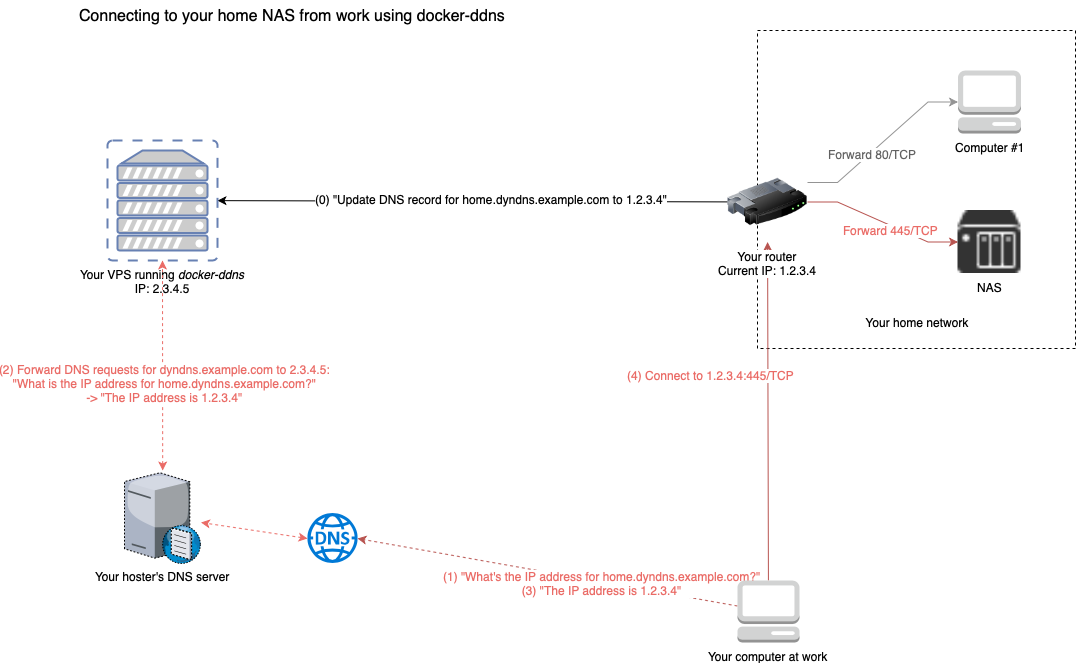
What is docker-ddns?
A self-hosted dynamic DNS solution that runs in Docker using Go and Bind9. It provides a REST API and DynDNS-compatible endpoints for routers and clients like ddclient. You need a VPS, domain, and nameserver access. The container exposes DNS on ports 53 (TCP/UDP) and a management API on port 8080. Configuration is via environment variables (SHARED_SECRET, ZONE, RECORD_TTL). Last release was 1.5.0 in 2020, with no updates since 2022.
docker-ddns alternatives
 mikrotik-dnsSelf-hosted DNS analytics dashboard collecting MikroTik logs via UDP with real-time React UI, domain/client analysis, and live DNS search.Comparemikrotik-dns with docker-ddns
 dnsboxDNSBox is a self-hosted DNS server that issues Let's Encrypt SSL certs for any public IP without a domain, enabling instant HTTPS for servers and IoT devices.Comparednsbox with docker-ddns
 pihole-v6-unboundSelf-hosted Docker image running Pi-hole plus an integrated Unbound recursive resolver in one container, published to Docker Hub and GHCR with weekly rebuilds.Comparepihole-v6-unbound with docker-ddns
 pihole-unbound-dockerSelf-hosted DNS ad-blocking with Pi-hole and Unbound recursive resolver for privacy and security, deployed via Docker Compose.Comparepihole-unbound-docker with docker-ddns
 Technitium DNS ServerSelf-hosted, open-source authoritative and recursive DNS server with a web console, DNS sinkhole ad blocking, DoH/DoT/DoQ, and a built-in DHCP server.CompareTechnitium DNS Server with docker-ddns
 Smart-DNSSelf-hosted Smart DNS service that resolves whitelisted domains to a specified IP while forwarding other queries normally, using a Python DNS server and Nginx SNI proxy.CompareSmart-DNS with docker-ddns
 pihole-unbound-tailscale-dockerizedSelf-hosted Docker Compose project combining Pi-hole ad-blocking, Unbound recursive DNS, and Tailscale VPN for secure remote DNS access behind CGNAT.Comparepihole-unbound-tailscale-dockerized with docker-ddns
 gatekeeperSelf-hosted DHCP/DNS server for home networks with web dashboard, Full Cone NAT, and zero-config setup.Comparegatekeeper with docker-ddns
Should you self-host docker-ddns?
docker-ddns scores 47/100 on selfhost.directory (how scoring works) and ranks #20 of 31 in Networking. It has 672 GitHub stars.
There was no stable release in the past 12 months, so check the repository's recent activity before you rely on it.
Setup is moderate: expect some configuration beyond a single command. An official Docker image is available. It is MIT-licensed and written mostly in Go.
Its closest alternative on selfhost.directory is headscale (82/100, 45 188 stars). It scores higher overall, so compare the two before you pick. See docker-ddns vs headscale side by side.
Features
- DNS delegation support
- DynDNS-compatible API
- IPv4 and IPv6 Support
- Multiple domain updates
- Persistent DNS storage
- REST API
docker-ddns README
More in Network Management
 docker-unmsSelf-hosted Docker image packaging Ubiquiti UISP network management into a single container with all components, supporting x86_64 and ARM.
 Docker ZeroTier PlanetA self-hosted ZeroTier Planet you deploy with Docker on a Linux server, with a web management UI for networks and members plus planet/moon file downloads.
 FireHOLFireHOL is a self-hosted, open-source iptables firewall generator and traffic shaper for Linux with human-readable configs.
 fn-knockSelf-hosted gateway that combines reverse proxy, authentication, WAF, SSL certificates, DDNS, and tunneling for home servers and NAS devices.
 Freebox-Ultra-DashboardSelf-hosted React/Express dashboard for Freebox routers with real-time bandwidth, device management, WiFi, VPN, downloads, files, telephony, TV, VMs.
- gatekeeperSelf-hosted DHCP/DNS server for home networks with web dashboard, Full Cone NAT, and zero-config setup.
 genieacs-containerDocker image and Helm chart packaging GenieACS TR-069 ACS with MongoDB for self-hosted router and CPE device management.
 GravitySelf-hosted DNS, DHCP, TFTP server using etcd for cluster replication. Includes ad-blocking, auto DNS registration for DHCP, Wake-on-LAN, Prometheus metrics.
 guardium-dnsSelf-hosted parental control dashboard for Technitium DNS with profiles, schedules, quotas, and optional ASUS router integration. Free, open-source.
 HeadplaneSelf-hosted, open-source web admin panel for Headscale, the open Tailscale control server: nodes, ACLs, DNS, SSO and browser SSH.
 headscale-adminSelf-hosted web UI for headscale (Tailscale control server). Manage users, nodes, routes, ACLs via static files in Docker or any web server.
 HomeLabInfoSelf-hosted, open-source network scanner and visualization dashboard for homelab infrastructure with DHCP discovery, topology mapping, and container monitoring.
0 comments