
Self-host chmonitor
v0.3.11Operational advisor for ClickHouse with AI recommendations
- Stars
- 305
- Port
- 3000 (HTTP dashboard)
- Requires
- ClickHouse
ghcr.io/chmonitor/chmonitor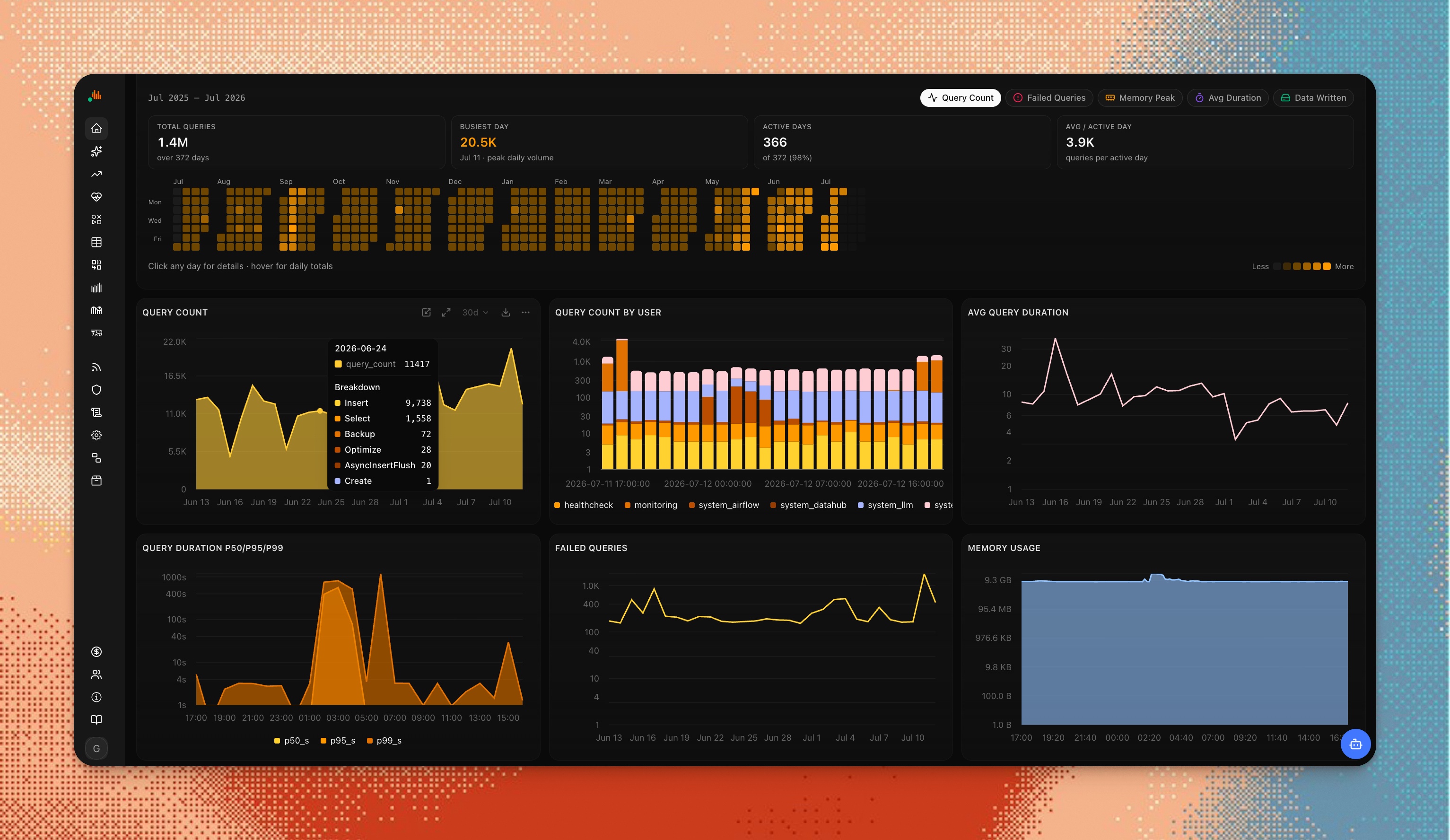



What is chmonitor?
chmonitor is a purpose-built dashboard and advisor for ClickHouse clusters. It connects directly to ClickHouse system tables over HTTP — no exporters or agents required — and provides real-time views of queries, merges, replication, storage, and cluster health. An integrated AI agent (with MCP server at /api/mcp) offers read-only recommendations for skip indexes, projections, PREWHERE rewrites, and TTL tuning. The dashboard supports multiple ClickHouse hosts from a single instance, includes alerting with webhooks to Slack, Discord, PagerDuty, Opsgenie, Matrix, Telegram, and more, and can also monitor PeerDB replication and Postgres (beta). It runs as a single Docker container, on Kubernetes via Helm, on Cloudflare Workers, or as a standalone Node.js binary. Licensed GPL-3.0 with optional commercial licenses for invoicing and support; all features are free in the community build.
chmonitor alternatives
 checkmateSelf-hosted, open-source uptime and infrastructure monitor: HTTP, ping, DNS, Docker and gRPC checks with incidents, status pages and Slack or email alerts.Comparecheckmate with chmonitor
 maintenantSelf-hosted monitoring auto-discovering Docker, Swarm, and Kubernetes containers, endpoints, TLS certs, cron jobs, and host resources from one Go binary (~100MB).Comparemaintenant with chmonitor
 Percona Monitoring and Management (PMM)Self-hosted open-source database observability platform with query analytics, dashboards, advisors, alerting, and backup for major databases.ComparePercona Monitoring and Management (PMM) with chmonitor
 corootSelf-hosted, open-source APM and observability platform where eBPF agents capture every telemetry signal without code changes, with service maps and SLO alerting.Comparecoroot with chmonitor
 openclaw-dashboardA self-hosted, open-source dashboard that tracks OpenClaw AI agent spending, token usage, cron jobs, sessions and gateway health in one zero-dependency Go binary.Compareopenclaw-dashboard with chmonitor
 heliconeHelicone is a self-hosted, open-source LLM observability platform and AI gateway for 100+ models with cost tracking, agent tracing, prompt management, and a playground.Comparehelicone with chmonitor
 homelab-monitorSelf-hosted homelab dashboard monitoring GPU, AI VRAM, Docker, systemd, disks, network and power costs across machines over SSH with a read-only MCP server.Comparehomelab-monitor with chmonitor
 netdataNetdata is an open-source, self-hosted infrastructure monitoring platform with per-second metrics, automated dashboards, ML anomaly detection, and zero-config deployment.Comparenetdata with chmonitor
All self-hosted alternatives to ClickHouse native /dashboard → All self-hosted alternatives to Datadog → All self-hosted alternatives to Grafana + ClickHouse plugin →
Should you self-host chmonitor?
chmonitor scores 53/100 on selfhost.directory (how scoring works) and ranks #32 of 41 in Database Management. It has 305 GitHub stars.
It shipped 7 stable releases in the past year. The latest, v0.3.11, came out on 4 November 2026.
Setup is moderate: expect some configuration beyond a single command. An official Docker image is available. It is GPL-3.0-licensed and written mostly in Typescript.
Its closest alternative on selfhost.directory is netdata (86/100, 81 433 stars). It scores higher overall, so compare the two before you pick. See chmonitor vs netdata side by side.
Features
- AI advisor with MCP server
- Alerting with webhooks
- CLI tool (chm)
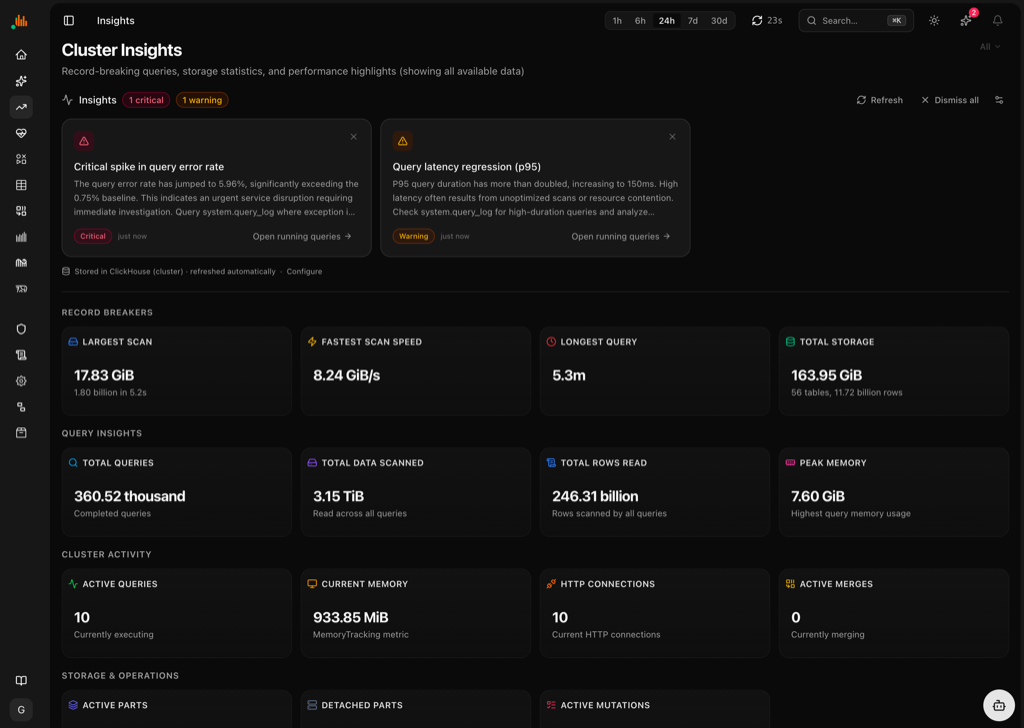
- Cluster insights and findings
- Cluster topology visualization
- Data Explorer with SQL console
- MCP Server
- PostgreSQL monitoring (beta)Beta feature, free on every plan while in beta
- Query monitoring and analysis
- Schema compare and settings diff
- TTL and partition health
- Workspace roles
chmonitor README

The operational advisor for ClickHouse

Live demo · Website · Docs · Getting started · Quick start

chmonitor is a dashboard and advisor for ClickHouse. It reads system.*
tables and shows what the cluster is doing — queries, merges, replication,
storage, health — then recommends what to change next.
It does not apply DDL for you. Recommendations stay recommendations.
Runs the same way on Docker, Kubernetes, bare metal, or ClickHouse Cloud. Self-host it free (GPL-3.0), or use the hosted demo.
Current release: v0.3.11. Upgrading from v0.2? See Migrate to v0.3.
| You need | chmonitor |
|---|---|
| See the cluster | Overview, topology, health checks, 30+ charts |
| Catch expensive work | Running, slow, failed, and historical queries |
| Understand data | Explorer, table size, parts, compression, TTLs |
| Keep replicas healthy | Merges, mutations, replication queue, Keeper |
| Get a second opinion | AI advisor: projections, skip indexes, PREWHERE, MVs |
| Ask in English | Built-in AI agent + MCP for Claude / Cursor |
| Work from a terminal | chm CLI — live TUI and chm doctor |
Works with multiple ClickHouse hosts from one dashboard (?host=0).
More detail: docs · AI agent · editions
One container, pointed at any reachable ClickHouse (OSS, Altinity, or ClickHouse Cloud):
docker run -d --name chmonitor -p 3000:3000 \
  -e CLICKHOUSE_HOST=https://clickhouse.example.com:8443 \
  -e CLICKHOUSE_USER=default \
  -e CLICKHOUSE_PASSWORD=change-me \
  ghcr.io/chmonitor/chmonitor:0.3.11
Open http://localhost:3000. Pin a version tag in production; use :latest only if you want the rolling tip.
Image tags carry no v prefix. The release v0.3.11 publishes
0.3.11, plus 0.3 and latest.
Want a look first? dash.chmonitor.dev — no setup.
Install the CLI:
curl -sSf https://chmonitor.dev/install.sh | bash
chm doctorSame CLICKHOUSE_HOST / CLICKHOUSE_USER / CLICKHOUSE_PASSWORD everywhere.
| Target | Guide |
|---|---|
| Docker | docs/operate/deploy/docker |
| Kubernetes (Helm) | docs/operate/deploy/k8s |
| Cloudflare Workers | docs/operate/deploy |
| Railway / Render / Fly | One-click |
| Local development | Getting started |
Release artifacts (Docker image, Node standalone, Workers archive) are on the GitHub Releases page.
chmonitor is GPL-3.0: self-host every feature, unlimited hosts, no payment, no key. A commercial license is optional and buys paper, not features — an invoice and named vendor, priority email support for the paid term, and an opt-in listing. Same binary either way.
| License | Hosts | Yearly | Lifetime |
|---|---|---|---|
| Personal Self Hosted | Unlimited | Free | Free |
| Team | 3 | $499 | $1,349 |
| Unlimited | Unlimited | $999 | $2,999 |
You do not get extra dashboard features versus the free build today. A host is one monitored connection; replicas in the same shard are not counted.
Details: Editions · Commercial license · Buy.
Self-hosting is free under GPL-3.0. Sponsorship is not a license — it buys no features, no support window, and no key. It funds the free build, and it earns a listing.
| Tier | One-off | You get |
|---|---|---|
| Supporter | $19 | Your name on the sponsors page |
| Backer | $59 | Your name and a link to your site on the sponsors page |
| Hero | $99 | Your logo and link under the homepage hero, plus the sponsors page |
| Partner | $199 | A larger hero slot, plus a short line about you on the sponsors page |
Want to support the free build? Start sponsoring — from $19 one-off, or $99 to put your logo under the homepage hero.
The wall: chmonitor.dev/sponsors. A commercial license is a separate thing — see Editions.
More in Database Management
 clinSelf CLI provisions a production-ready backend — PostgreSQL, Hasura GraphQL, Auth, Nginx — on your own server in minutes via Docker. MIT licensed with 171 plugins.
 clickhouseClickHouse is an open-source, self-hosted column-oriented DBMS for real-time OLAP analytics using SQL.
 CloudBeaverOpen-source, self-hosted web front end for your databases: SQL and data editors, multi-user administration, LDAP and proxy login, shipped as a Docker image.
 cloudberryOne advanced and mature open-source MPP (Massively Parallel Processing) database. Open source alternative to Greenplum Database.
 cogneeCognee is the open-source AI memory platform for agents. Give your AI agents persistent long-term memory with small models for free
 CouchDBSeamless multi-primary syncing database with an intuitive HTTP/JSON API, designed for reliability
 d9d9 is a self-hosted, open-source headless CMS forked from Directus 9 with GPLv3 licensing, REST/GraphQL APIs, a no-code Data Studio, and multi-database support.
 DatabasusSelf-hosted open-source backup tool for PostgreSQL (also MySQL, MariaDB and MongoDB) with point-in-time recovery, restore verification, encrypted archives and S3 storage.
 DBackupSelf-hosted open-source backup for 10 databases and files. Supports S3, Google Drive, SFTP with AES-256-GCM encryption, incremental backups, GFS retention, OIDC SSO, 2FA.
 DbGateSelf-hosted, open-source (GPL-3.0) database client for engines like MySQL, Postgres, SQL Server, Mongo and Redis, shipped as desktop apps or a Docker/NPM web UI.
 dbhubDBHub is a minimal, token-efficient MCP server connecting AI assistants to PostgreSQL, MySQL, SQL Server, Oracle, MariaDB, and SQLite with built-in guardrails.
 docker-borg-mysql-backupSelf-hosted Docker container backing up MySQL/PostgreSQL and files to Borg repos with cron scheduling, encryption, pruning, and error notifications.
0 comments