
Self-host CarWatch
v0.7.0Car agent that runs a local LLM on a Raspberry Pi 5
- Stars
- 299
- CPU
- Raspberry Pi 5 (BCM2712), active cooling mandatory
- RAM
- 8 GB minimum, 16 GB recommended for 35B MoE model
- Storage
- High-endurance microSD for OS; USB SSD recommended for model storage
- Ports
- 8088 (Phone dashboard (carwatch-chat)), 8080 (llama.cpp server (local LLM API))
- Requires
- Bluetooth ELM327 OBD adapter, GroupMind server, Llama.cpp, Piper, Raspberry Pi OS (64-bit), Systemd, Whisper.cpp

What is CarWatch?
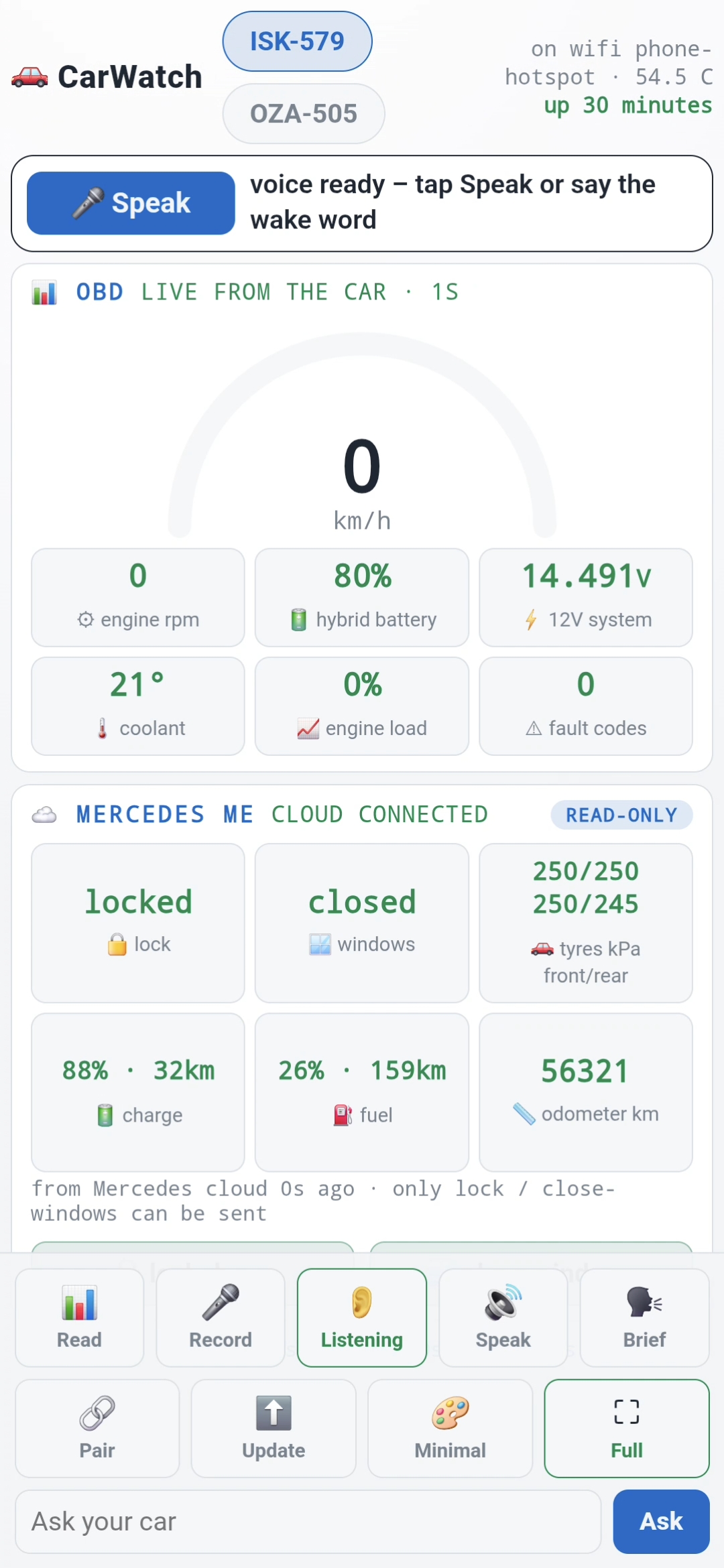
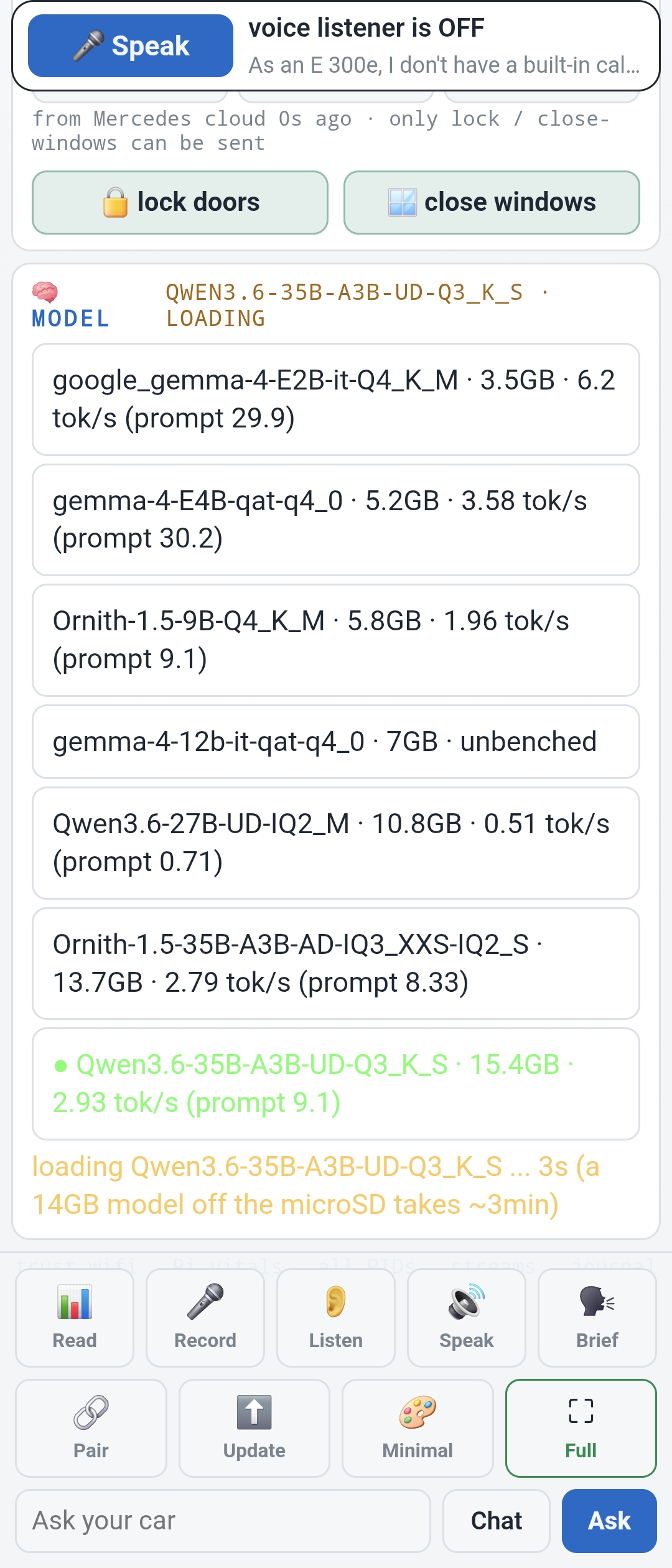
CarWatch is a self-hosted automotive agent that runs on a Raspberry Pi 5 installed in your car. It connects via a Bluetooth ELM327 OBD-II adapter to read live vehicle data (RPM, coolant, speed, hybrid battery, 12V system, fault codes), runs a 35B-parameter mixture-of-experts LLM (Qwen3.6-35B-A3B) locally via llama.cpp for grounded question answering, and uses whisper.cpp for speech-to-text and piper for text-to-speech — all fully offline. The car joins GroupMind chat rooms as an agent (@gle or custom handle), posting telemetry, trip summaries, and dashcam clips, and answering voice questions hands-free. A phone dashboard served by the Pi on port 8088 provides status, Wi-Fi management, voice toggle, and self-updates. Manufacturer cloud data (Mercedes me) is accessed via Home Assistant over Tailscale. The stack is pure Python standard library with systemd services, zero pip dependencies, and hourly self-updates from the repo. Hardware tested: Pi 5 16GB, Vgate iCar Pro 2S OBD adapter, WOLFBOX G900 dashcam.
Should you self-host CarWatch?
CarWatch scores 49/100 on selfhost.directory (how scoring works) and ranks #74 of 104 in Home Automation. It has 299 GitHub stars.
It shipped 8 stable releases in the past year. The latest, v0.7.0, came out on 7 September 2026. New versions land roughly every 2 days.
Setup is advanced: plan for several services and some ongoing maintenance. It is AGPL-3.0-licensed and written mostly in Python.
Its closest alternative on selfhost.directory is Home Assistant (91/100, 91 789 stars). It scores higher overall, so compare the two before you pick. See CarWatch vs Home Assistant side by side.
Features
- Dashcam clip retrievalCamera API mapped, pipeline not fully wired
- Dial-out tunnel
- GroupMind chat integration
- Hands-free voice assistant
- Local LLM Inference
- Make-safe commands
- Model hot-swapping
- OBD-II vehicle telemetry
- Owner's manual RAG
- Phone dashboard
- Radiation monitoring
- Raw CAN broadcast captureDecoding is open puzzle
- Self-updates
- Three-tier connectivity
CarWatch README
FAQ
Should you trust anything a Pi-sized LLM says about your car?
No — the design assumes you shouldn't. The model is never the source of truth: OBD numbers pass through verbatim, manual answers carry page citations, anything unverified is labeled.
How does the Pi do TLS to the manufacturer API?
It doesn't — the Pi reads Home Assistant over Tailscale, and HA holds the Mercedes integration and credentials. No manufacturer credentials in the car.
Is the model trained or fine-tuned for cars?
No — it's a stock open-weight model. Car knowledge comes from grounding: live OBD values passed verbatim, owner's manual chunked with page numbers for citations.
Which runtime and what speed do you really get?
llama.cpp serving Qwen3.6-35B-A3B in Unsloth's UD-Q3_K_S quant (14.3 GB). Measured: 3.5 tokens/s generation, 25+ tokens/s prompt processing, 65°C sustained. Full spoken answer takes 1.5-4 minutes.
What hardware do you need?
A Raspberry Pi 5, a ~15 € Bluetooth ELM327 OBD adapter (Vgate iCar Pro tested), and a power source in the car. No cables beyond the OBD dongle, no soldering.
Will it answer its own voice or the radio?
Not anymore — v0.4 ships an echo gate that keeps the mic closed until cabin audio finishes, and drops anything that transcribes as a copy of the car's last answer.
Does it really work with no internet?
Yes — the last question in the release video is asked with the phone hotspot off. Speech-to-text (whisper.cpp), the model, and the voice (piper) all run on the Pi. OBD readings and manual answers work fully offline.
How do I actually talk to the car?
Say a wake phrase ("Hello car", "Hey car", "Hei auto") or tap Speak on the phone dashboard, then ask in the same breath. For 30 seconds after an answer you can keep talking with no new wake phrase.
More in IoT
 ChirpStackSelf-hosted open-source LoRaWAN Network Server for private or public networks with web-based gateway, device, and tenant management.
 ConBee IISelf-hosted Docker image for deCONZ Zigbee gateway with ConBee/RaspBee adapters, Phoscon UI, REST/WebSocket APIs, and optional VNC mesh view.
 diyHueSelf-hosted, open-source Philips Hue Bridge emulator controlling 50+ light types via Hue app and Home Assistant.
 DomoticzFree open-source home automation server you run yourself. Works on major OSes and Raspberry Pi, managing 150+ device types via mobile-friendly web UI.
 DroneBridgeDroneBridge is an open-source, self-hosted long-range radio link for drones using WiFi. Supports 1080p video, MAVLink telemetry, RC control, and OSD.
 Eclipse MosquittoSelf-hosted open-source MQTT broker for MQTT 5.0, 3.1.1 and 3.1 with TLS, WebSockets, bridging, ACLs and a C client library plus CLI pub/sub tools.
 ecowitt2mqttSelf-hosted open-source bridge for Fine Offset weather stations to MQTT with Home Assistant discovery.
 ejabberdejabberd is a self-hosted, open-source XMPP/MQTT/SIP server in Erlang, proven at massive scale with 2M+ concurrent users per node.
 EmoncmsOpen-source app that ingests, logs and charts energy, temperature and environmental readings; self-hosted free via Docker or EmonScripts, from OpenEnergyMonitor.
 EMQXThe most scalable and reliable MQTT broker for AI, IoT, IIoT and connected vehicles
 escooter-monitoringSelf-hosted open-source IoT solution for real-time monitoring and remote control of Xiaomi e-scooters using Raspberry Pi, GPS, 4G connectivity, and Grafana dashboards.
 esp32-meter-readerSelf-hosted OCR service that reads water meter digits from ESP32 camera photos and publishes readings to Home Assistant via MQTT with Prometheus metrics.
0 comments