Self-host DroneBridge
v0.7.0Long-range bidirectional radio link for UAVs via WiFi
- Stars
- 954
- CPU
- Raspberry Pi 2 or 3 recommended (Pi Zero not recommended)
- Storage
- SD cards with min. 16GB storage
- Ports
- 5000 (UDP raw H.264 video stream), 14556 (TCP MAVLink telemetry)
- Requires
- Supported WiFi adapters (Atheros AR9271, Ralink RT2070/RT2770/RT2870/RT3070/RT3071/RT3072/RT3370/RT3572/RT5370/RT5372/RT3573/RT5572, MediaTek MT7601, Realtek 8812au)
What is DroneBridge?
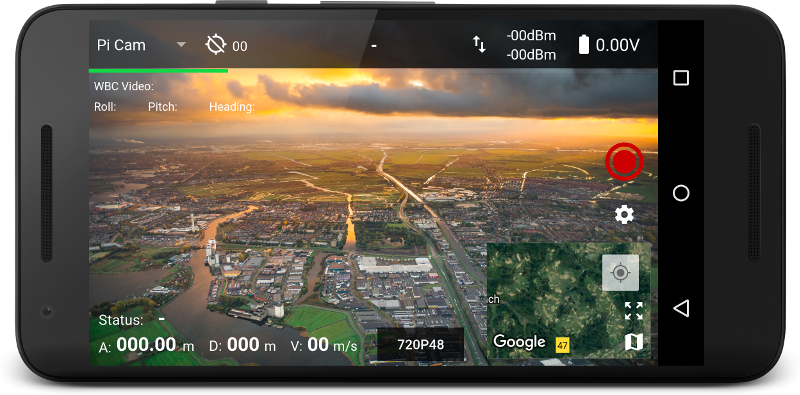
DroneBridge constructs a two-way digital radio link between an unmanned aircraft and a ground station using off-the-shelf WiFi gear and a custom protocol built on the WifiBroadcast concept. It aims at UAV scenarios and positions itself as an alternative to closed systems like DJI Lightbridge or OcuSync. The code runs on Raspberry Pi boards for both the air and ground sides, on ESP32 microcontrollers for telemetry-only links, and ships with an Android application for ground-station display and control. Highlights include 1080p video at roughly 110 ms glass-to-glass latency, 12-channel RC control, MAVLink and iNAV flight-controller support, an on-screen display (OSD), error-correcting codes for data integrity, and a modular plugin architecture. Deployment means flashing ready-made SD-card images onto Raspberry Pis, wiring UART lines to the flight controller, and tuning settings through INI files. The Android app links via USB tethering or a WiFi hotspot. The project's own code carries the Apache-2.0 licence, while WifiBroadcast legacy parts use GPL v2. Development has slowed; the last release was v0.7.0 alpha in 2020 and the Android app is now marked as deprecated.
Should you self-host DroneBridge?
DroneBridge scores 47/100 on selfhost.directory (how scoring works) and ranks #19 of 23 in Remote Access. It has 954 GitHub stars.
There was no stable release in the past 12 months, so check the repository's recent activity before you rely on it.
Setup is advanced: plan for several services and some ongoing maintenance. It is Apache-2.0-licensed and written mostly in C.
Its closest alternative on selfhost.directory is Pangolin (76/100, 23 258 stars). It scores higher overall, so compare the two before you pick. See DroneBridge vs Pangolin side by side.
Features
- AES encryptionPython only
- Android ground station appMarked as deprecated in documentation
- ESP32 telemetry-only variantNo video transmission support
- Forward Error Correction (FEC)
- iNAV flight controller supportLegacy support only
- Long-range video transmission
- Low latency video
- MAVLink telemetry support
- Modular plugin architecture
- On-Screen Display (OSD)No OSD support on Pi 4 in v0.6
- RC control over radio linkExperimental
- Software diversity with multiple WiFi adapters
DroneBridge README
More in Telecommunications
 FlowcatFlowcat is an open-source, self-hosted Rust runtime for real-time voice agents — single binary, no hosted control plane, native SIP/RTP/WebRTC, 80+ provider connectors.
 fonosterOpen-source, self-hosted voice-agent platform for real phone calls: Autopilot agents defined in YAML, SIP trunks and numbers, transfer, recording, webhooks.
 FreeSWITCHOpen-source self-hosted softswitch replacing proprietary telecom hardware: SIP PBX with dialplan, voicemail, conferencing, WebRTC and an ESL control API.
 KamailioSelf-hosted, open-source SIP signalling server for carrier-scale VoIP: registrar, proxy, load balancer and least-cost routing, with WebRTC, TLS and IMS support.
 openSIPSOpen-source SIP proxy/server for VoIP, video, IM, and presence with modular architecture and high throughput.
 RoutrA self-hosted SIP server handling signaling only, built as cloud-native gRPC services. Works with Asterisk and FreeSWITCH media servers.
 sendiumSendium is a self-hosted, open-source SMS gateway bridging apps and SMPP providers with advanced routing and data sovereignty.
 Yeti SwitchYeti Switch is an open-source, self-hosted SIP SBC and Class 4 softswitch with real-time VoIP billing, dynamic routing, and a REST API.
 AsteriskAsterisk is a self-hosted, open-source PBX and telephony toolkit written in C for business telephone systems with VoIP/SIP, PSTN, and APIs (AMI, ARI, AGI).
 dograhSelf-hosted open-source voice AI platform: build phone agents in a visual workflow editor with BYOK LLM/STT/TTS and telephony — an alternative to Vapi and Retell.
0 comments