
Self-host agno
v3.1.12Framework and runtime for self-hosted AI agent platforms
- Stars
- 43 169
- Port
- 8000 (AgentOS REST API and MCP server (production))
What is agno?
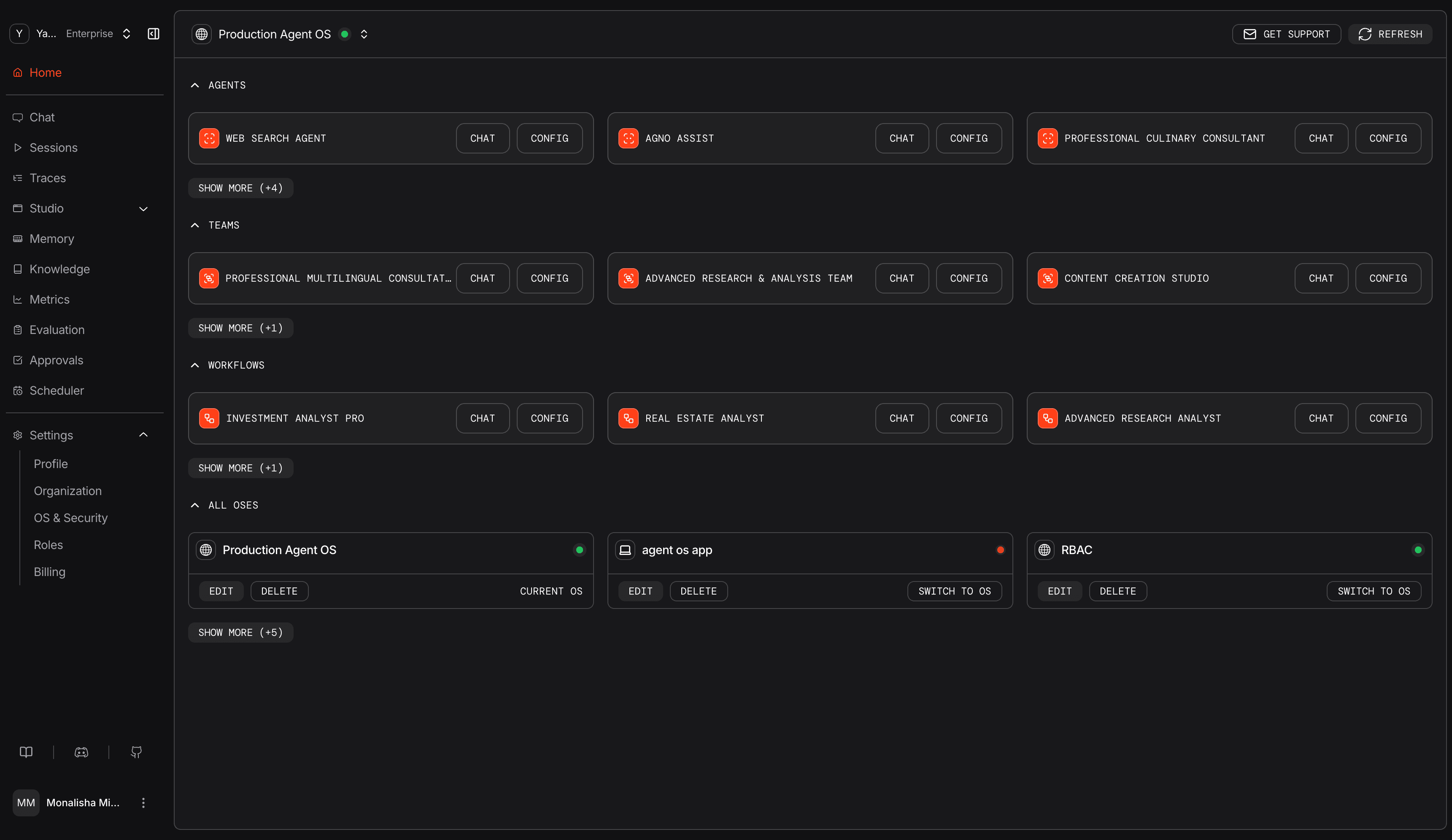
Agno provides a three-layer platform for AI agents: an SDK for building agents with multiple frameworks, a runtime (AgentOS) that serves agents as a secure API and MCP server, and a web-based Control Plane for monitoring and management. Self-hosted deployments use Docker Compose with PostgreSQL (pgvector) for persistence, featuring JWT-based RBAC, multi-tenant isolation, 100+ toolkit integrations, scheduling, OpenTelemetry observability, human-in-the-loop approvals, and chat interfaces for Slack, Telegram, WhatsApp, Discord, A2A, and AG-UI. Templates cover Docker, Kubernetes (Helm), Railway, AWS, GCP, Azure, Fly, Render, and Modal. A local quickstart runs on port 7777 with SQLite; production uses port 8000 with PostgreSQL and requires JWT verification keys.
Should you self-host agno?
agno scores 79/100 on selfhost.directory (how scoring works) and ranks #13 of 209 in AI Agents. It has 43 169 GitHub stars, +547 in the last 30 days.
It shipped 69 stable releases in the past year. The latest, v3.1.12, came out on 29 October 2026. New versions land roughly every 1 days.
Setup is moderate: expect some configuration beyond a single command. It is Apache-2.0-licensed and written mostly in Python.
Its closest alternative on selfhost.directory is Orca (91/100, 122 912 stars). It scores higher overall, so compare the two before you pick. See agno vs Orca side by side.
Features
- 100+ Toolkit Integrations
- Agent Evaluation
- Agent Storage
- Chat Interfaces
- Context Providers
- Control Plane UI
- Human in the Loop
- MCP Server
- Multi-agent Teams
- Multi-framework support
- Observability
- REST API
- Scheduling
- Security & Auth
- Workflows
agno README
FAQ
What is the default model in Agno?
The default model is OpenAIResponses which requires OPENAI_API_KEY.
What environment variables does Agno read?
Agno reads provider API keys (OPENAI_API_KEY, ANTHROPIC_API_KEY, GOOGLE_API_KEY, GROQ_API_KEY), AgentOS security keys (OS_SECURITY_KEY, JWT_VERIFICATION_KEY, JWT_JWKS_FILE), CLI settings (AGENTOS_URL, AGNO_ADMIN_TOKEN), and debug flags (AGNO_DEBUG, AGNO_TELEMETRY).
More in AI Agents
 ai-agent-automationSelf-hosted workflow engine for AI-driven automations with visual builder, agent config, deterministic execution, document RAG, and observability.
 Ailin¹ Collective IntelligenceSelf-hosted open-source engine coordinating 100,000+ AI models through 31 strategies with verifiable consensus and OpenAI-compatible API.
 AlexClawSelf-hosted personal AI agent on Elixir/OTP that monitors feeds, web pages, and APIs, stores knowledge with pgvector, runs workflows, and chats via Telegram or Discord.
 amuxSelf-hosted control plane for parallel AI coding agents with shared task board, inter-agent messaging, self-healing, and mobile access.
 ANA — Agent-Native AgentSelf-hosted app where a coding agent serves as the runtime — you watch a live dashboard and chat to evolve the app live, no deploy step.
 AngusKitSelf-hosted AI-native platform bundling six dev tools with shared identity. Free Community Edition for up to 10 users.
 AnythingLLMAnythingLLM is a self-hosted, open-source AI app for document chat, AI agents, and local/cloud LLMs — running on your hardware with no token limits.
 anythingmcpSelf-hosted gateway turning APIs and databases into MCP tools for AI assistants, with hundreds of ready connectors and access controls.
 aquarium-ceSelf-hosted AI agent management platform to deploy and orchestrate AI agents locally with one command, supporting 27+ providers and 14 messaging channels.
 ArrakisOpen-source, self-hosted sandbox platform that runs AI agent code in isolated MicroVMs with snapshot-and-restore backtracking, a REST API and a Python SDK.
 AstrBotAstrBot is a self-hosted, open-source AI agent platform connecting to QQ, Telegram, Discord, Slack, and 15+ messaging apps with LLM support, plugins, and agent sandbox.
 ATLASOpen-source, self-hosted AI coding agent for your own GPU. It wraps compact GGUF models in a verify-before-write pipeline with a sandboxed executor and a terminal UI.
0 comments