
Self-host addon-grafana
v13.0.4Grafana analytics platform as a Home Assistant addon
- Stars
- 280
- Ports
- 80 (HTTP web UI (not required for Ingress)), 1337 (Ingress internal port)
- Requires
- Home Assistant
What is addon-grafana?
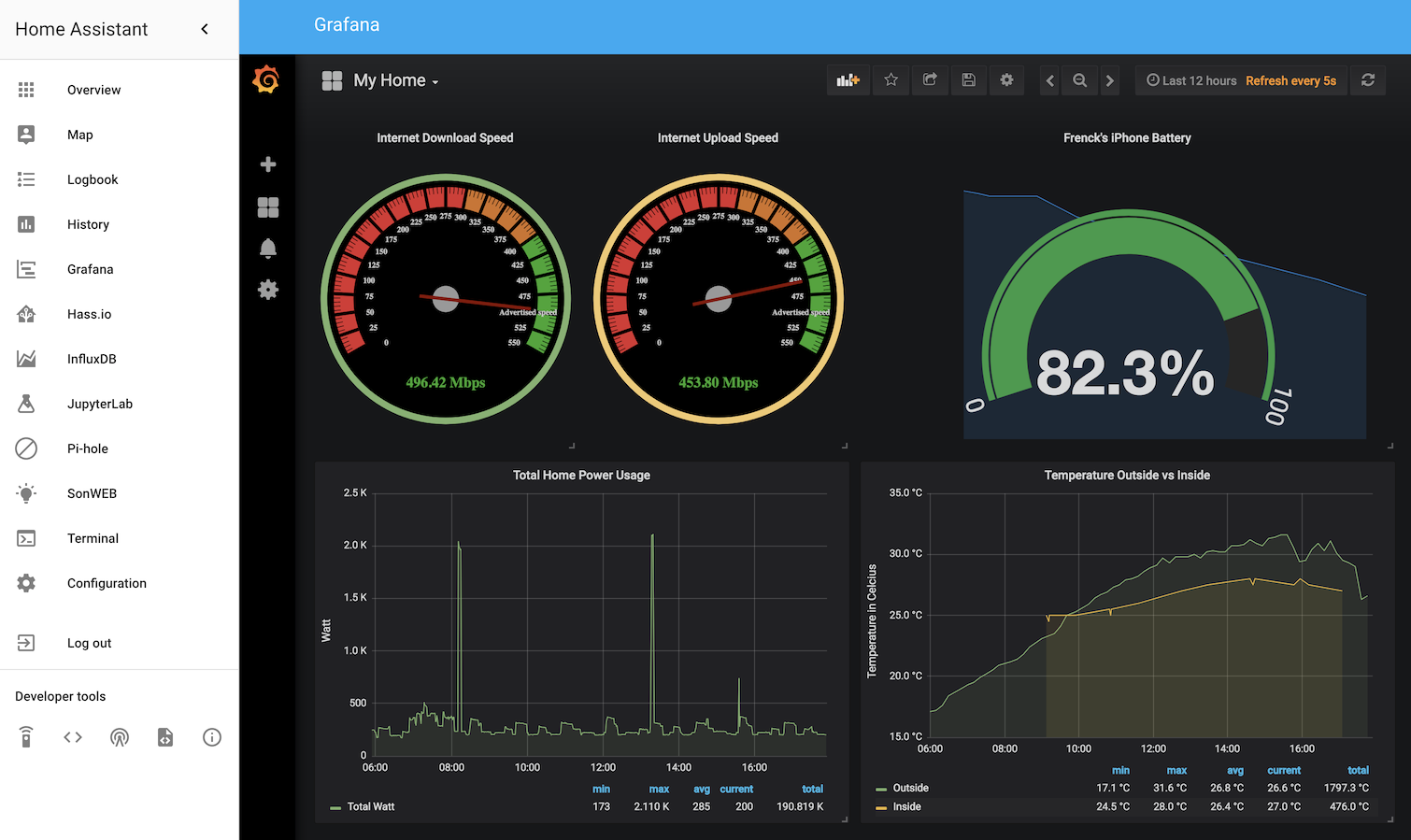
This Home Assistant Community App packages Grafana as an addon for Home Assistant, allowing users to run the analytics platform on their self-hosted Home Assistant instance. It provides a web UI accessible via Home Assistant Ingress or direct port access, with a default admin user (password: hassio). The addon supports installing Grafana plugins and custom plugins, configuration via environment variables (GF_* prefix), and integration with InfluxDB for home automation metrics. It runs on aarch64 and amd64 architectures. Image rendering requires a separate rendering service. The project is actively maintained with regular releases following semantic versioning.
Should you self-host addon-grafana?
addon-grafana scores 56/100 on selfhost.directory (how scoring works) and ranks #48 of 104 in Monitoring & observability. It has 280 GitHub stars.
It shipped 7 stable releases in the past year. The latest, v13.0.4, came out on 23 October 2026. New versions land roughly every 2 weeks.
Setup is easy: most people get it running in one sitting. It is MIT-licensed and written mostly in Jinja.
Its closest alternative on selfhost.directory is grafana (90/100, 77 562 stars). It scores higher overall, so compare the two before you pick. See addon-grafana vs grafana side by side.
Features
- Anonymous access supportNot available with Home Assistant Cloud
- Dashboard creation
- Environment Variable Configuration
- Image rendering via external serviceRequires separate rendering service (not included)
- Metrics visualization
- Plugin System
- SSL/TLS support
addon-grafana README
More in Data Visualization
 agxagx is a self-hosted, open-source desktop app for SQL analytics with AI-assisted queries and ClickHouse backend. Runs natively via Tauri or as a web interface via Docker.
 AkashicSelf-hosted open-source geospatial intelligence workspace combining live aircraft, satellite, seismic, weather, radio, and OSINT data on an interactive map.
 ArkhamMirrorSHATTERED is a self-hosted, open-source tool for investigative document analysis with AI features, structured analytic techniques, graph views, and offline deployment.
 AzimuttOpen-source, self-hosted database explorer and Next-Gen ERD: design schemas with AML, document tables and columns, browse data and lint large, messy databases.
 bitfeedSelf-hosted open-source tool that visualizes Bitcoin network activity in real time, showing unconfirmed transactions and confirmed blocks.
 carto-selfhosted-helmCARTO Self-Hosted is a commercial geospatial analytics platform deployed on Kubernetes via Helm, keeping sensitive data within your network for compliance and security.
 ChartbrewOpen-source reporting platform for building and sharing live dashboards from SQL, NoSQL databases and REST APIs, with a chart builder, embeds, schedules and AI help.
 datahubSelf-hosted open-source GIS for harmonizing and exploring spatiotemporal data across health, demographic, and environmental domains with interactive dashboard and API.
 datalensDataLens is a self-hosted, open-source BI system for dashboards from SQL sources like ClickHouse and PostgreSQL. Runs via Docker Compose or Kubernetes Helm.
 datalineSelf-hosted, open-source AI tool to chat with data and generate SQL, charts, reports — supports PostgreSQL, MySQL, Snowflake, SQLite, CSV, Excel.
 DigiwordsOpen-source, self-hosted word cloud maker from La Digitale for in-person and remote classes: per-word weight, colour and font, PNG export, QR link, view counter.
 EDAEdalitics is a self-hosted, open-source BI platform for no-code dashboards and KPI alerts, with advanced SQL and AI analytics. Runs via Docker with MongoDB.
0 comments