
Self-host agx
v0.4.0AI-powered SQL analytics desktop app with ClickHouse
docker compose up- Stars
- 261
- Port
- 80 (Web frontend (nginx))
- Requires
- ClickHouse
What is agx?
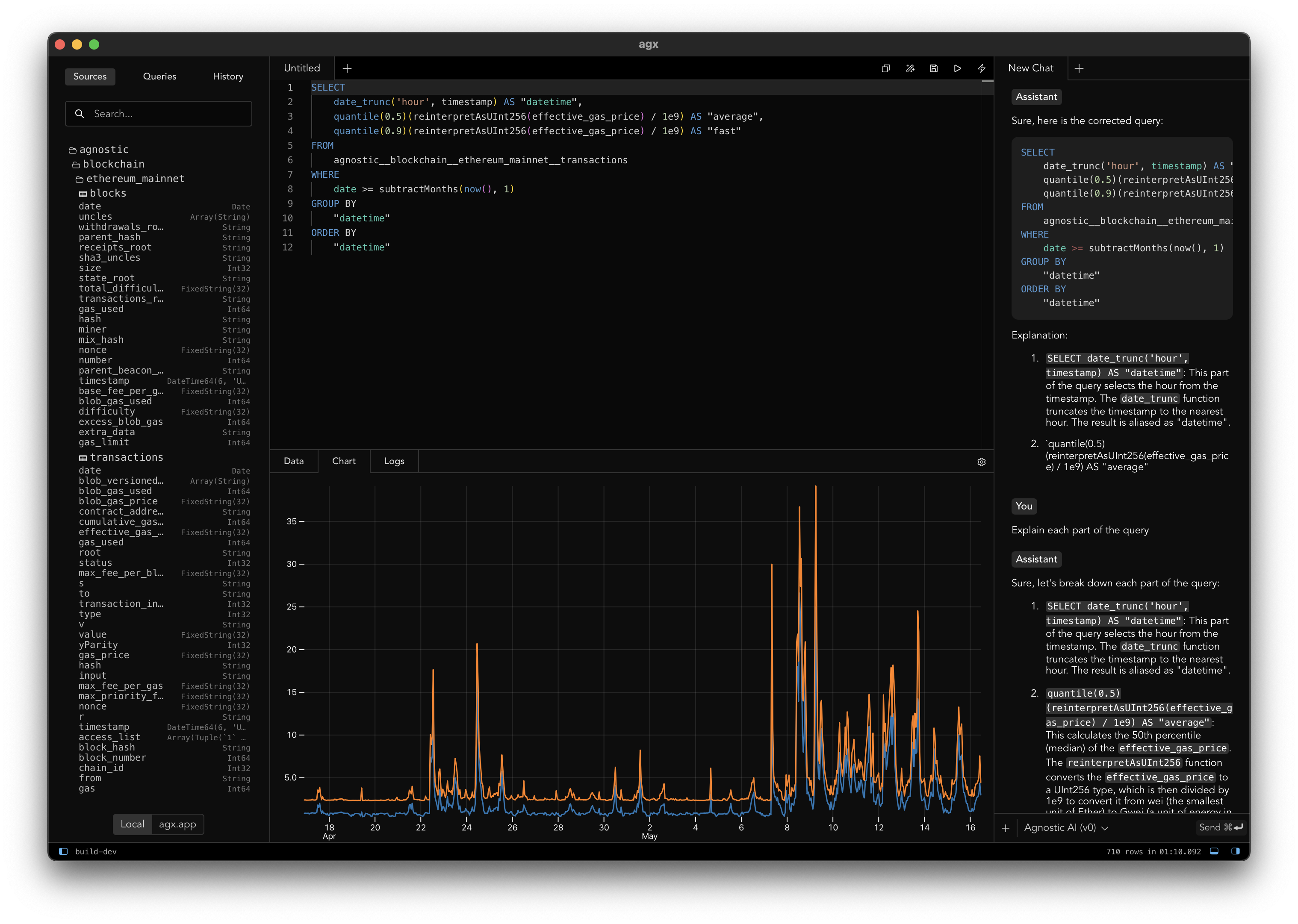
agx is a desktop application built with Tauri, SvelteKit, and Plot for exploring and querying data. It operates in two modes: a native desktop app with an embedded ClickHouse engine, or a web interface connecting to a remote server. Features include an interactive SQL editor with syntax highlighting, AI-assisted query generation via local Ollama models, a schema browser, tabular results, drag-and-drop file support, and cross-platform compatibility (macOS, Linux, Windows). Self-hosting options are Docker Compose (web frontend on port 80, ClickHouse on 8123) or native binaries from GitHub Releases. A live demo runs at agx.app. All releases are pre-releases (v0.4.0 latest, January 2026). The code is MIT-licensed and developed by the Agnostic organization.
Should you self-host agx?
agx scores 42/100 on selfhost.directory (how scoring works) and ranks #6 of 7 in Data Visualization. It has 261 GitHub stars.
It shipped 1 stable release in the past year. The latest, v0.4.0, came out on 21 January 2026.
Setup is moderate: expect some configuration beyond a single command. It is MIT-licensed and written mostly in Svelte.
Its closest alternative on selfhost.directory is JSON Crack (79/100, 44 559 stars). It scores higher overall, so compare the two before you pick. See agx vs JSON Crack side by side.
Features
- Cross-platform Desktop App
- Drag & drop file operations
- Interactive SQL query editor
- LLM Integration
- Schema browser
- Tabular results display
- Web Interface
agx README
More in Data Visualization
 AkashicSelf-hosted open-source geospatial intelligence workspace combining live aircraft, satellite, seismic, weather, radio, and OSINT data on an interactive map.
 ArkhamMirrorSHATTERED is a self-hosted, open-source tool for investigative document analysis with AI features, structured analytic techniques, graph views, and offline deployment.
 AzimuttOpen-source, self-hosted database explorer and Next-Gen ERD: design schemas with AML, document tables and columns, browse data and lint large, messy databases.
 bitfeedSelf-hosted open-source tool that visualizes Bitcoin network activity in real time, showing unconfirmed transactions and confirmed blocks.
 carto-selfhosted-helmCARTO Self-Hosted is a commercial geospatial analytics platform deployed on Kubernetes via Helm, keeping sensitive data within your network for compliance and security.
 ChartbrewOpen-source reporting platform for building and sharing live dashboards from SQL, NoSQL databases and REST APIs, with a chart builder, embeds, schedules and AI help.
 datahubSelf-hosted open-source GIS for harmonizing and exploring spatiotemporal data across health, demographic, and environmental domains with interactive dashboard and API.
 datalensDataLens is a self-hosted, open-source BI system for dashboards from SQL sources like ClickHouse and PostgreSQL. Runs via Docker Compose or Kubernetes Helm.
 datalineSelf-hosted, open-source AI tool to chat with data and generate SQL, charts, reports — supports PostgreSQL, MySQL, Snowflake, SQLite, CSV, Excel.
 DigiwordsOpen-source, self-hosted word cloud maker from La Digitale for in-person and remote classes: per-word weight, colour and font, PNG export, QR link, view counter.
 EDAEdalitics is a self-hosted, open-source BI platform for no-code dashboards and KPI alerts, with advanced SQL and AI analytics. Runs via Docker with MongoDB.
 EmoncmsOpen-source app that ingests, logs and charts energy, temperature and environmental readings; self-hosted free via Docker or EmonScripts, from OpenEnergyMonitor.
0 comments