
Self-host EDA
edalitics-3.1.1Open-source BI for no-code dashboards and AI analytics
- Stars
- 212
- Ports
- 80 (HTTP web interface (Docker container)), 8666 (Backend API (development mode)), 4200 (Frontend dev server (development mode))
- Requires
- MongoDB, Node.js
jortilles/eda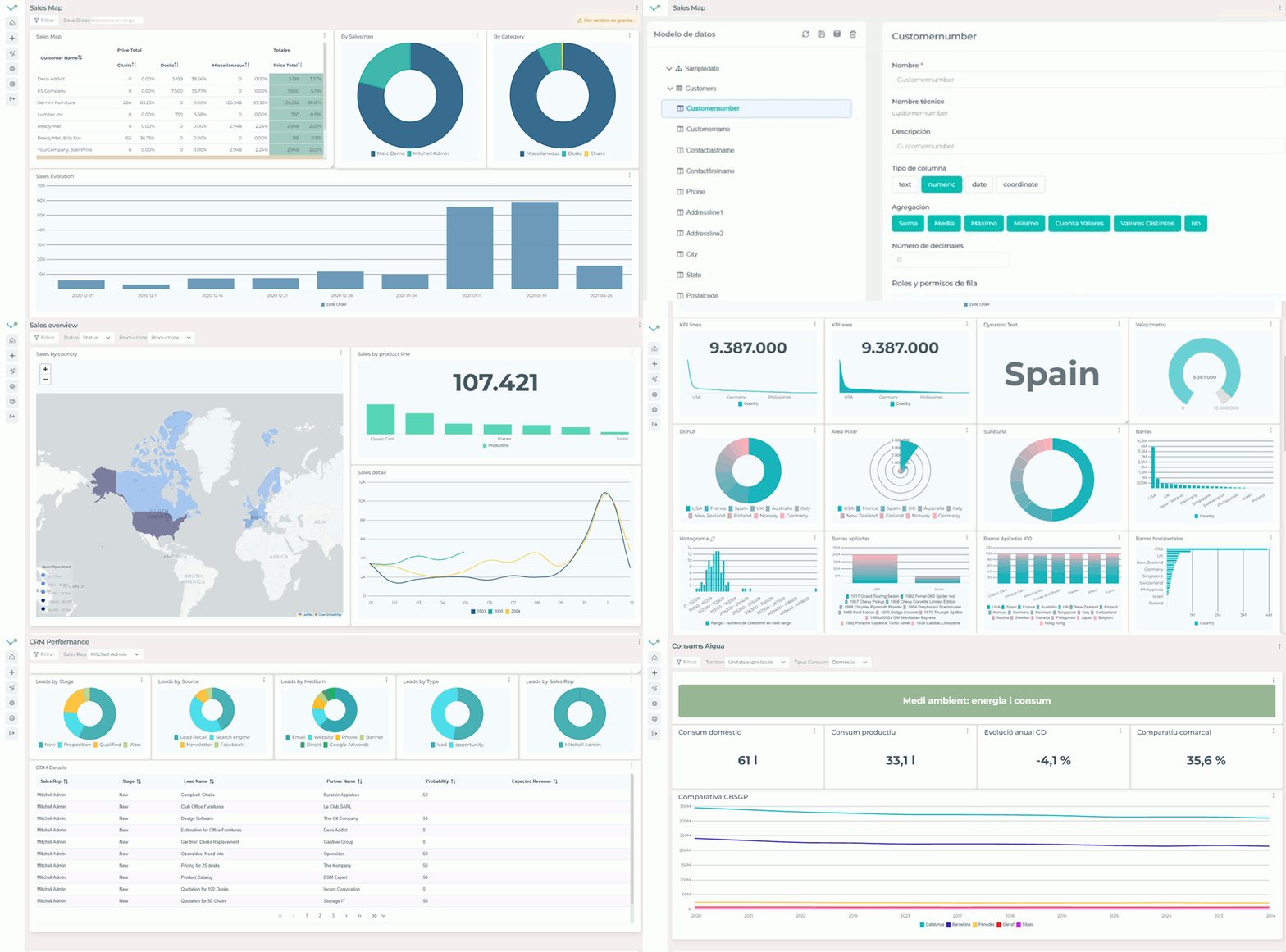
What is EDA?
Jortilles developed this open-source business intelligence platform. The software enables anyone to explore data and create interactive dashboards without writing code, while also offering advanced SQL querying and a tree-based model explorer for power users. Features include KPI tracking with automated email alerts, public dashboard sharing via links, row-level security for data access control, and AI assistant connectivity. Built with Node.js, TypeScript, and Angular, it uses MongoDB to store metadata and configuration. You can self-host it easily with a single Docker command or by running the backend and frontend separately after cloning the repository. A live demo is accessible at demoeda.jortilles.com. The code is licensed under AGPL-3.0, and a managed cloud version with paid tiers is also available.
Should you self-host EDA?
EDA scores 50/100 on selfhost.directory (how scoring works) and ranks #14 of 15 in Business Intelligence. It has 212 GitHub stars.
It shipped 4 stable releases in the past year. The latest, edalitics-3.1.1, came out on 25 June 2026. New versions land roughly every 2 months.
Setup is easy: most people get it running in one sitting. An official Docker image is available. It is AGPL-3.0-licensed and written mostly in Typescript.
Its closest alternative on selfhost.directory is Superset (88/100, 75 337 stars). It scores higher overall, so compare the two before you pick. See EDA vs Superset side by side.
Features
- Advanced SQL query mode
- AI assistant integration
- Cross-table analysis
- KPI definitions and email alerts
- Multi-source data analysis
- No-code dashboard creation
- Public dashboard sharing
- Row-level security (RLS)
- Scheduled report emails
- Tree mode data exploration
EDA README
FAQ
¿Por qué debo contratar Edalitics?
It simplifies data analysis, enables flexible sharing, and is built by a focused team dedicated to improving the product daily.
¿Qué no está incluido en mi compra?
Support beyond the contracted level and consulting beyond the contracted level require purchasing extra support hours.
¿Qué está incluido en mi compra?
The Edalitics SaaS service, unlimited users, unlimited remote data sources, accesses per plan, and support per plan.
¿Puedo cancelar la suscripción cuando quiera?
Yes, you can cancel anytime by email. No further charges and you can always export your resources.
¿Realmente los usuarios son ilimitados?
Yes, users are truly unlimited. Edalitics segments usage by accesses, not by users.
More in Business Intelligence
 EvidenceOpen-source, self-hosted business intelligence as code: write SQL and markdown reports, ship interactive dashboards, and serve them from your own infrastructure.
 frappe-insightsSelf-hosted open-source BI tool with visual query builder, charts, dashboards. Connects MySQL, PostgreSQL, DuckDB, BigQuery.
 Helical InsightHelical Insight is a self-hosted, open-source BI platform with AI analytics, pixel-perfect reporting, dashboards, SSO, multi-tenancy, embedding — all free under AGPL-3.0.
 jsreportOpen-source self-hosted reporting server: design reports with javascript templates in a studio and render pdf, excel, docx or html, plus REST API and scheduling.
 lightdashLightdash is an open-source, self-hosted BI platform with a governed metrics layer, AI agents, dashboards, and data apps for modern data teams.
 MetabaseSelf-hosted, open-source BI tool with dashboards, a no-code query builder, a SQL editor, Metabot AI answers and embedding; run it in Docker or as a Java JAR.
 naoOpen-source analytics agent that answers plain-English questions with SQL on your warehouse; a self-hosted chat UI, agent unit tests and bring-your-own LLM keys.
 RedashOpen-source, self-hosted business intelligence tool: query over 35 database and API back ends, build dashboards, schedule refreshes, and get data alerts.
 ShaperOpen-source, self-hosted BI tool that turns plain SQL into dashboards, PDF/Excel reports and embedded analytics, querying data through DuckDB.
 SupersetApache Superset is a Data Visualization and Data Exploration Platform
 telleryTellery is a self-hosted, open-source BI tool for defining SQL metrics and building collaborative dashboards with real-time multiplayer editing and dbt imports.
 Wren AI OSSOpen-source, self-hosted GenBI engine: an MDL semantic layer and MCP server that turn natural-language questions into governed SQL across 20+ data sources.
0 comments