
Self-host Tagr
v1.16.2Self-hosted music metadata editor with web UI
- Stars
- 236
- Port
- 3000 (HTTP web interface)
- Requires
- Node.js
ghcr.io/suitux/tagr




What is Tagr?
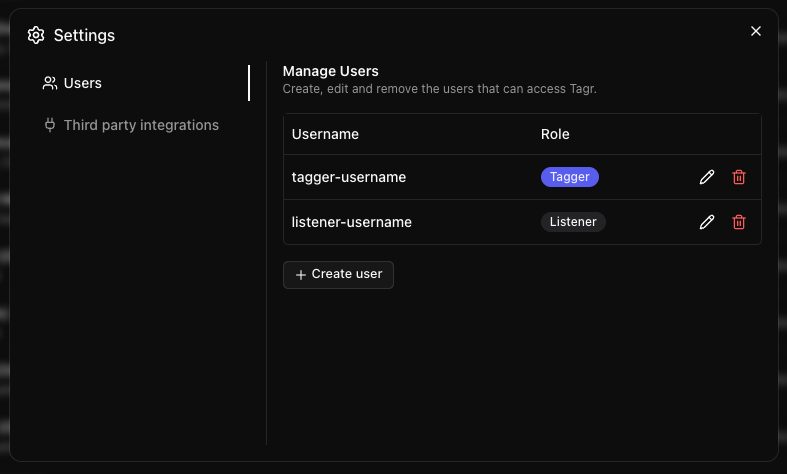
Tagr provides a browser-based interface for organizing and editing music file tags. Users point the application at their music directories and gain access to a three-pane layout showing folder hierarchy, track listings, and a detailed tag editor. The software handles over forty metadata fields, supports custom tags, and writes changes directly back to the audio files. An integrated player offers waveform visualization and playback controls, while optional ListenBrainz integration submits listening data. Multiple user accounts with distinct permission levels control who can edit versus only play. The interface adapts to mobile screens with swipe navigation, includes a dark theme by default, and preserves view state in the URL. Deployment options include Docker containers from GHCR or a manual Node.js setup, with SQLite handling data storage.
Should you self-host Tagr?
Tagr scores 48/100 on selfhost.directory (how scoring works) and ranks #16 of 31 in Music. It has 236 GitHub stars.
It shipped 7 stable releases in the past year. The latest, v1.16.2, came out on 27 October 2026. New versions land roughly every 3 days.
Setup is moderate: expect some configuration beyond a single command. An official Docker image is available. It is AGPL-3.0-licensed and written mostly in Typescript.
Its closest alternative on selfhost.directory is Beets (77/100, 15 857 stars). It scores higher overall, so compare the two before you pick. See Tagr vs Beets side by side.
Features
- Album art management
- Built-in audio player
- Change history with revert
- File format support
- Folder exclusion patterns
- Library browsing with three-panel layout
- ListenBrainz scrobbling
- Listen history and play counts
- Metadata Editing
- Multi-language Support
- Multi-user with roles
- Star ratings
- URL-based state
Tagr README
More in Audio
 tidaloaderA self-hosted, open-source web app that downloads music from Tidal in multiple quality tiers and imports playlists from Spotify and ListenBrainz.
 tunesynctooltunesynctool is a self-hosted, open-source web app that transfers and syncs playlists between Spotify, Deezer, YouTube Music, and Subsonic-compatible servers.
 whisper-asr-webserviceSelf-hosted, open-source speech-to-text webservice wrapping OpenAI Whisper, Faster Whisper and WhisperX behind a REST API with Swagger docs.
 YouCastYouCast is a self-hosted desktop app that converts YouTube channels and playlists into podcast feeds for any podcatcher, running a local server on port 22703.
 YuE-GPYuEGP is a self-hosted tool for generating full songs from lyrics using YuE models, optimized for consumer GPUs with 10+ GB VRAM.
 ACE-StepSelf-hosted, open-source AI music generator: full songs in seconds from text, lyrics or reference audio, with covers, stem separation and LoRA training on consumer GPUs.
 audio.cppSelf-hosted C++ framework running 100+ audio models locally with CUDA, Vulkan, Metal, CPU backends, built-in WebUI, no Python deps.
 AudioserveSimple personal server to serve audiofiles files from folders. Intended primarily for audio books, but anything with decent folder structure will do.
 aurralOpen-source self-hosted music discovery with personalized recommendations, rotating playlist flows, and library management. Works standalone or with Lidarr.
 BeetsOpen-source, self-hosted music library manager: the beet CLI auto-tags your collection from MusicBrainz and can serve a web UI or an MPD-protocol player.
 BokeBoxSelf-hosted private AI podcast studio turning videos, links, articles, and meetings into spoken episodes with customizable persona, voice, and MCP/plugin extensibility.
 Breeze TTS 2Self-hosted open-weight TTS model with voice cloning, design from descriptions, and voice direction. Streaming REST API and CLI for real-time synthesis on NVIDIA GPUs.
0 comments