
Self-host SimpleRelay
v1.1.0SMTP relay you host with a web dashboard
- Stars
- 189
- Ports
- 8080 (Web dashboard), 2525 (SMTP relay (your apps connect here))
- Requires
- Postfix, PostgreSQL
What is SimpleRelay?
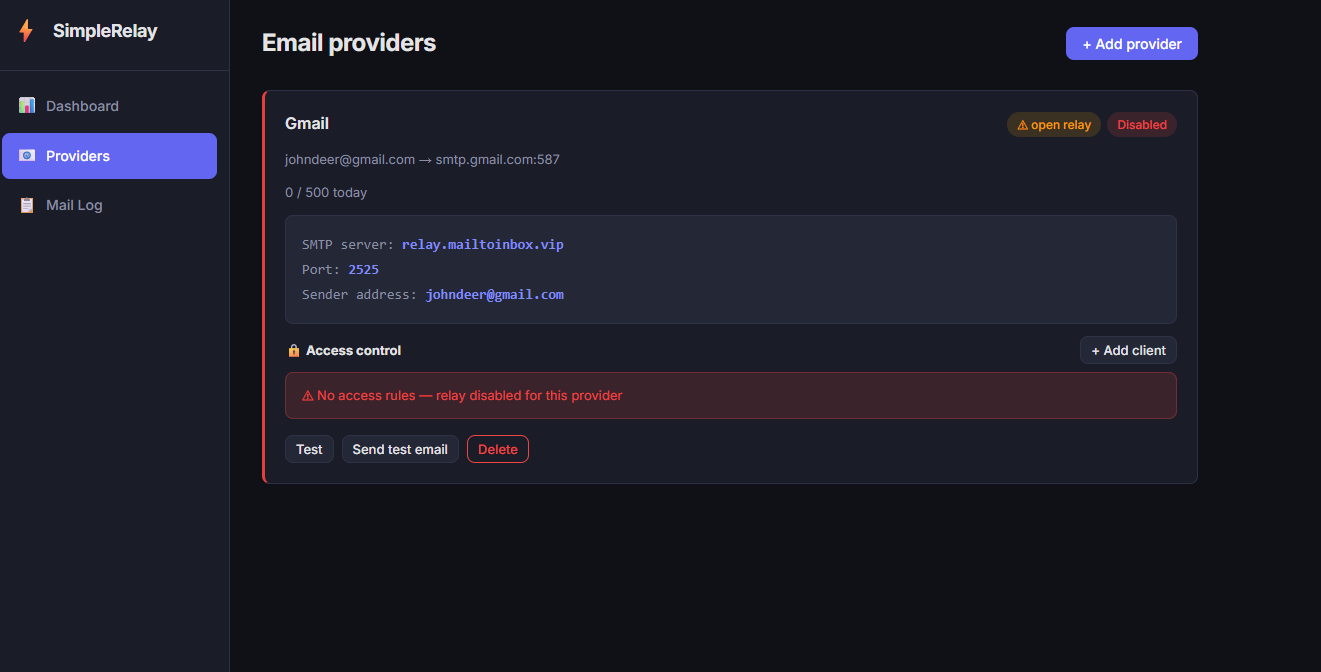
SimpleRelay is a self-hosted SMTP relay for homelabs and small teams that sends outgoing mail through various upstream providers like Gmail, Outlook, or custom SMTP servers, choosing the right one based on the sender address. Its web interface includes a setup wizard that auto-detects provider settings, checks DNS records (SPF, DKIM, DMARC), and enforces IP whitelists with optional SMTP authentication. You can view searchable mail logs, monitor provider health, and manage users, proxies, and sending limits from an admin panel. The whole stack runs in one Docker Compose file with Postfix, PostgreSQL, FastAPI, and a React frontend. It works on a LAN without a public IP or port forwarding.
Should you self-host SimpleRelay?
SimpleRelay scores 46/100 on selfhost.directory (how scoring works) and ranks #77 of 106 in Email. It has 189 GitHub stars.
It shipped 2 stable releases in the past year. The latest, v1.1.0, came out on 20 June 2026. New versions land roughly every 5 days.
Setup is moderate: expect some configuration beyond a single command. It is MIT-licensed and written mostly in Python.
Its closest alternative on selfhost.directory is Listmonk (80/100, 24 017 stars). It scores higher overall, so compare the two before you pick. See SimpleRelay vs Listmonk side by side.
Features
- DNS validation
- Domain routing
- Email Verification
- Health Monitoring
- Mail logs
- Multilingual UI
- Multi-tenant SMTP relay
- Per-sender access control
- Provider auto-detection
- Provider type limits
- Proxy management
- Relay expiry
- User Management
- Web Dashboard
SimpleRelay README
More in Self-hosting
 SmallwebSmallweb is a self-hosted personal cloud mapping subdomains to folders for instant app deployment. Runs as a single Go binary with Deno, no build step, sandboxed apps.
 smsSelf-hosted vector tile server serving OSM data from MBTiles with hiking/cycling routing, SAC ratings, and MCP for LLM agents to plan tours.
 StartOSOpen-source, self-hosted Linux server OS: run services in isolated containers from a web UI with a marketplace, local HTTPS, Tor and encrypted backups.
 supabase-ai-starter-kitSelf-hosted open-source starter kit bundling Supabase, n8n workflows, and Ollama LLMs in one Docker Compose stack with seeded AI agents for RAG and chat.
 SyncloudSyncloud is a self-hosted, open-source platform turning your hardware into a personal app server with one-click installs for 50+ apps.
 taOStaOS is a self-hosted AI agent OS turning your hardware into a distributed compute cluster with a web desktop, multi-framework agents, offline memory, and 100+ apps.
 uncompressedSelf-hosted Docker Compose reference for a media server — Jellyfin, *arr, qBittorrent in a Gluetun VPN namespace, Tailscale-only ingress via Traefik, auto-healing.
 vibebinvibebin is a self-hosted platform using Incus/LXC containers to run AI coding agent sandboxes with automatic HTTPS and SSH access on a VPS.
 voxperySelf-hosted community chat platform with text channels, voice calls, screen sharing, and moderation — run it yourself or use the hosted instance.
 WeightTrackerSelf-hosted, open-source mobile-first app for tracking weight, hydration, activity, blood pressure, and medications with charts and Home Assistant integration.
 心潮动态心智系统心潮 is a self-hosted, open-source AI dynamic mind state engine with drives, thoughts, fatigue, sleep, and short-term context. HTTP API and remote MCP with OAuth 2.1.
 A-EyeA self-hosted photo application that runs AI vision models on your own hardware to automatically organize and find pictures without any cloud service.
0 comments