
Self-host roadmap
4.32Open-source roadmapping software for feature tracking
docker-compose up -d --build- Stars
- 567
- Port
- 9000 (PHP-FPM)
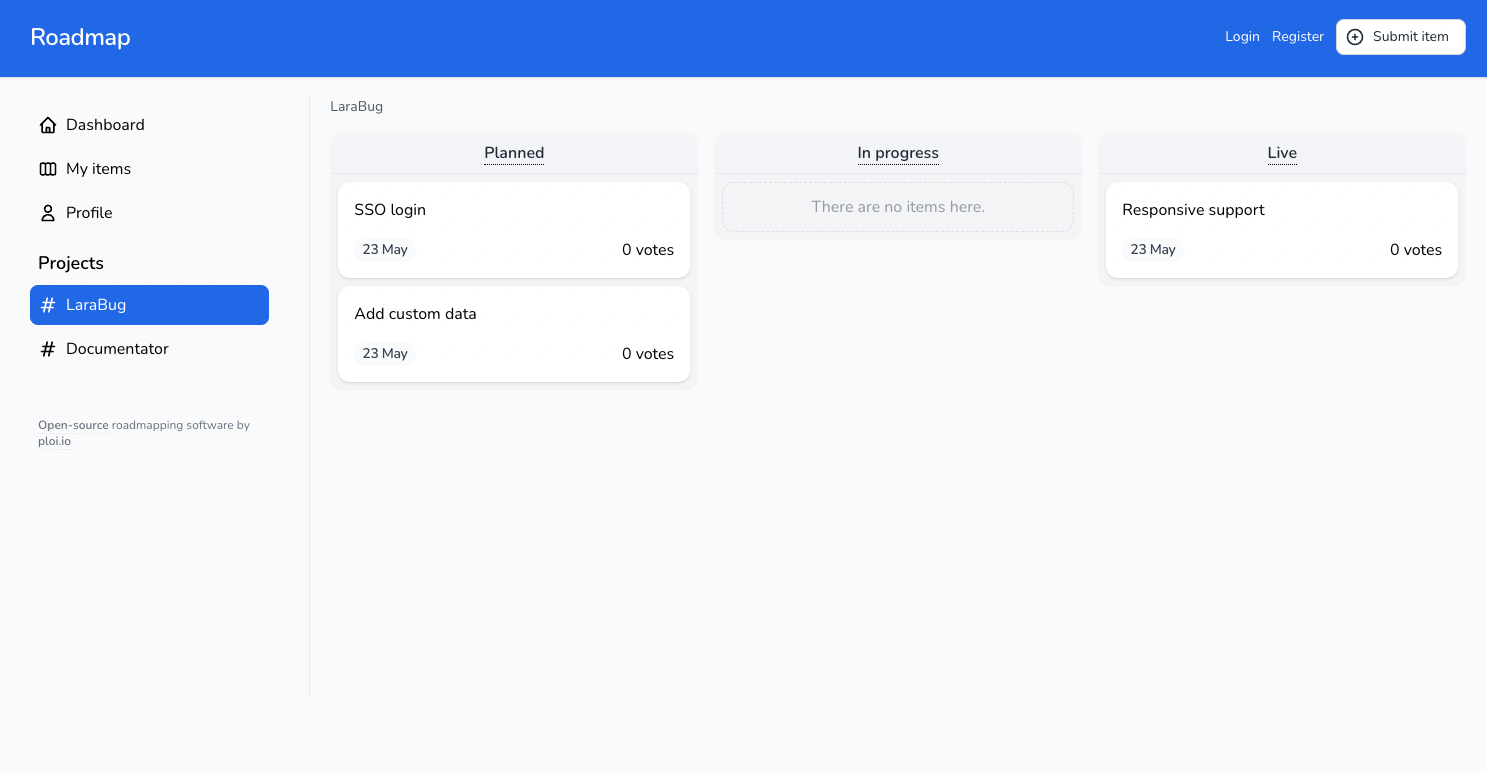
What is roadmap?
Roadmap is a self-hosted, open-source roadmapping application built with Laravel and Filament. It lets teams collect feature requests, bug reports, and feedback, then prioritize them through upvoting and comments. The software includes a three-level role system, OAuth 2 single sign-on, GitHub integration for linking issues, automatic Open Graph image generation, and an AI-readable endpoint for each item. It runs on PHP 8.4 with MySQL or PostgreSQL, and can be installed via Docker Compose or a manual Composer-based setup. The project is actively maintained with regular releases.
Should you self-host roadmap?
roadmap scores 54/100 on selfhost.directory (how scoring works) and ranks #25 of 45 in Project Management. It has 567 GitHub stars.
It shipped 18 stable releases in the past year. The latest, 4.32, came out on 22 October 2026. New versions land roughly every 7 days.
Setup is moderate: expect some configuration beyond a single command. It is MIT-licensed and written mostly in PHP.
Its closest alternative on selfhost.directory is Plane (86/100, 61 601 stars). It scores higher overall, so compare the two before you pick. See roadmap vs Plane side by side.
Features
- AI-readable endpoints
- Automatic OG image generation
- Automatic Slug Generation
- Comments with mentions
- Customizable Roadmaps
- Filament Admin Panel
- GitHub Integration
- Multi-language Support
- OAuth 2 single sign-on
- Role-based Access Control
- Upvoting
roadmap README
More in Project Management
 Roundup Issue TrackerRoundup is a highly customizable issue-tracking system with command-line, web, REST, XML-RPC, and e-mail interfaces. It is designed to be easy to install and use, and can be adapted to various use cases.
- RukovoditelRukovoditel is a free, open-source, web-based project management and CRM platform that allows users to design custom applications for project management, CRM, ERP, helpdesk, and more. It is highly customizable, supports multi-user access, and includes features like Gantt charts, Kanban boards, calendars, and reporting tools.
 sayrProject management with a public feedback portal where users submit ideas, vote, and track progress. Self-hosted via Docker Compose.
 scrumboyOpen-source self-hosted Kanban project management with customizable boards, sprints, analytics, OIDC/SSO, Trello import and an MCP server for AI agents.
 solidtimeSelf-hosted, open-source (AGPL-3.0) time tracking for freelancers and agencies: timer, calendar, timesheet, projects, billable rates and reports, run with Docker.
 taiga-backTaiga is a self-hosted, open-source agile project management tool with Kanban, Scrum, REST API, webhooks, and GitHub/GitLab/Slack integrations.
 taiga-dockerSelf-host the Taiga project management platform with this official Docker Compose stack: back, front, realtime events, PostgreSQL, RabbitMQ, served on port 9000.
 taskboardSelf-hosted Kanban tool for developers with built-in terminal and AI assistant integration via MCP. One executable, SQLite storage, zero dependencies.
 taskcafeTaskcafe is an open-source, self-hosted project management tool built around Kanban boards, with teams, personal projects, labels, checklists and task activity.
 TaskosaurSelf-hosted open-source project management with conversational AI that executes tasks in-app. Kanban, sprints, Jira/Trello sync, bring-your-own-LLM.
 Tasks.mdA self-hosted, open-source Kanban board that stores tasks as Markdown files on disk. Runs in a single Docker container with PWA support, dark mode, and multilingual UI.
 taskview-communitySelf-hosted, source-available project and task manager for software teams: Kanban, dependency graphs, RBAC, SSO, time tracking and an MCP server.
0 comments