
Self-host PaddleOCR Local
0.2.0Local-first document parsing workbench with five OCR models
- Stars
- 138
- Ports
- 8000 (WebUI and FastAPI proxy), 8001 (Internal model controller API)
- Requires
- Docker
What is PaddleOCR Local?
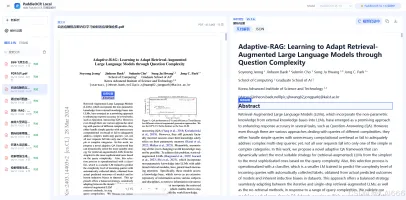
PaddleOCR Local is a self-hosted document parsing workbench that converts PDFs, images, and Office documents (Word, PowerPoint) into editable Markdown. It provides a unified WebUI and CLI for five OCR models: PaddleOCR-VL 1.6, PP-OCRv6, OvisOCR2, HPD-Parsing, and NaviDC-OCR. The software runs entirely locally with no cloud uploads, supports model switching with automatic GPU memory release, and offers batch processing, progress tracking, and multiple export formats (Markdown, JSON, DOCX, searchable PDF, HTML, CSV/XLSX). It deploys via Docker Compose on Linux/Windows with NVIDIA GPU, has a CPU-only mode using PP-OCRv6, and provides native Apple Silicon support via MLX for OvisOCR2. The project includes an API token for access control and a FastAPI interface with OpenAPI documentation.
Should you self-host PaddleOCR Local?
PaddleOCR Local scores 44/100 on selfhost.directory (how scoring works) and ranks #35 of 46 in Document Management. It has 138 GitHub stars.
There was no stable release in the past 12 months, so check the repository's recent activity before you rely on it.
Setup is advanced: plan for several services and some ongoing maintenance. It is Apache-2.0-licensed and written mostly in Python.
Its closest alternative on selfhost.directory is Reactive Resume (87/100, 44 977 stars). It scores higher overall, so compare the two before you pick. See PaddleOCR Local vs Reactive Resume side by side.
Features
- Apple Silicon / MLX support
- Batch processing and CLI
- Bilingual UI (Chinese/English)
- CPU-only deployment
- External OCR engine integration
- FastAPI with OpenAPI
- Five OCR models unified
- GPU memory pre-check
- Model switching with GPU memory release
- Multiple Export Formats
- Office document support
- PDF to Markdown conversion
- Side-by-side original and result view
- Table and formula rendering
- Task history and search
PaddleOCR Local README
More in OCR
 Paperless-GPTOpen-source, self-hosted AI companion for paperless-ngx: suggests titles, tags, correspondents and dates, and runs LLM vision OCR for searchable scans.
 Paperless-ngxSelf-hosted open-source document management system that turns paper documents into a searchable digital archive with OCR, AI features, and multi-user support
 pdfscanexplorerSelf-hosted web app for previewing, renaming, and organizing scanned PDFs using OCR and optional AI, lightweight for NAS or server.
 ReadurSelf-hosted OCR document management system with multi-language support, full-text search, and S3/WebDAV sync for individuals and teams.
 Receipt Parser ServerSelf-hosted, open-source receipt parser server that uses Tesseract OCR to extract structured data from receipt images via a REST API with token authentication.
 sist2Self-hosted, open-source file indexer and search tool: scans directories, extracts text, thumbnails and metadata, and serves a web UI over Elasticsearch or SQLite.
 SnapOtterOpen-source, self-hosted file-processing suite with 200+ image, video, audio, PDF and document tools, local AI, a REST API and pipelines.
 unstructuredSelf-hosted open-source REST API for document partitioning into structured elements as JSON/CSV. Supports PDF, images, OCR, table extraction, chunking.
 Apache TikaOpen-source toolkit that extracts text and metadata from 1000+ file types, with a self-hosted REST or gRPC server for search indexing and LLM/RAG pipelines.
 DeepSeek OCR AppThis self-hosted, open-source OCR web app runs DeepSeek-OCR on an NVIDIA GPU to read images and multi-page PDFs, exporting Markdown, HTML, DOCX or JSON.
 DeepSeek-OCR-WebUISelf-hosted, open-source OCR web app and REST API that converts images and PDFs to Markdown using the DeepSeek-OCR-2 model, with 7 modes and batch processing.
 Docling-ServeSelf-hosted, open-source REST service that wraps Docling to convert PDF, Office and image documents to Markdown or JSON, with a playground UI and async tasks.
0 comments