selfhost.directory

The index of self-hostable projects — ranked, categorized and served with live updates.
Own your data and stop giving it to big tech.

openlinker logo

Self-host openlinker

v0.17.0

E-commerce orchestration for multi-channel order sync

AlphaOpen SourceApache-2.0
Updated9 hours ago
LanguageTypescript
Setup difficultyAdvanced
MobileResponsive
ThemeDark mode
Stars
50
Port
3000 (API server)
Requires
MySQL, PostgreSQL, Redis
Install with Docker Compose
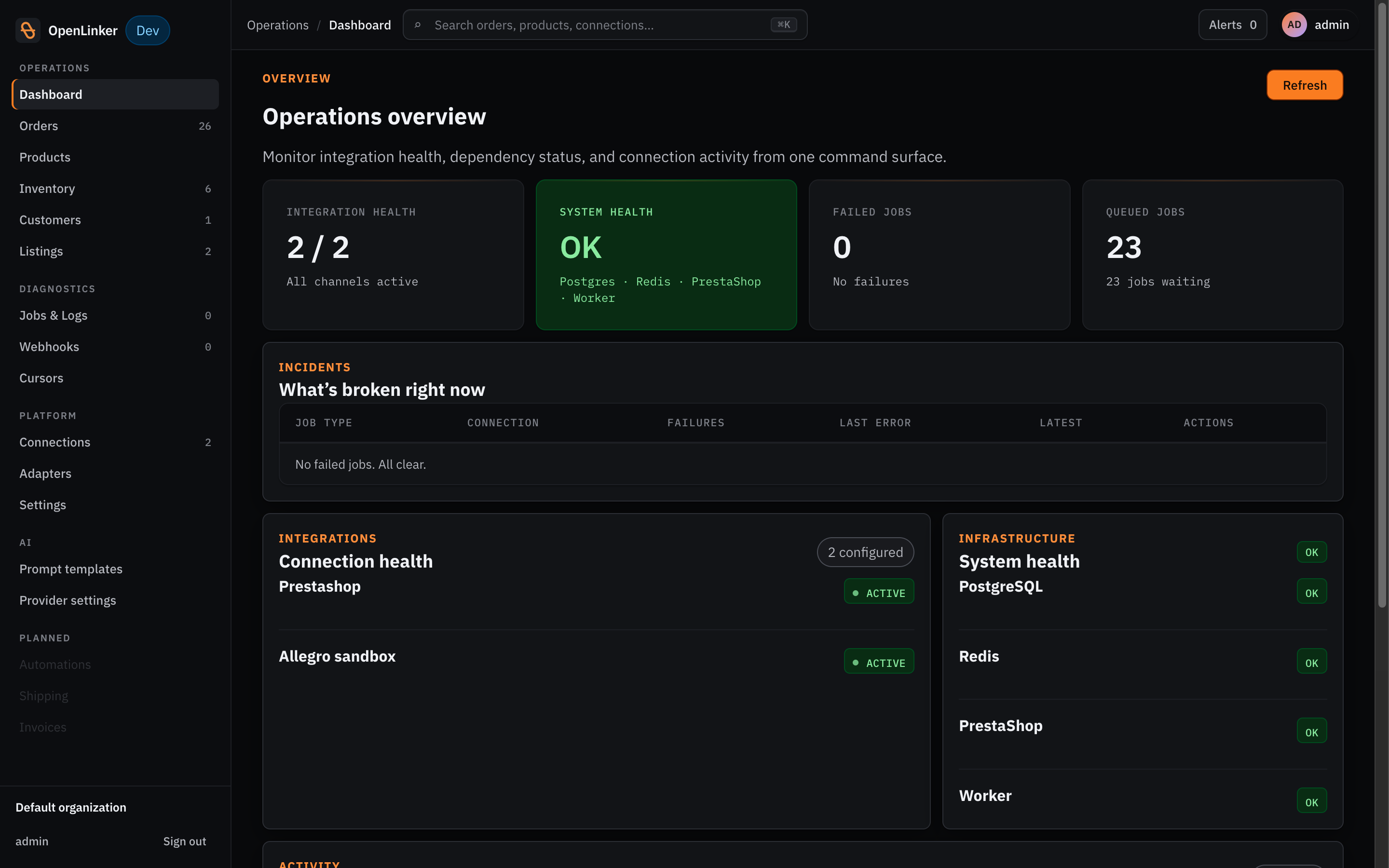
OpenLinker admin dashboard showing jobs, connections, and recent orders

What is openlinker?

OpenLinker is a self-hosted, API-first e-commerce orchestration platform that connects your store with marketplaces, shipping carriers, and invoicing systems. It synchronizes orders, inventory, and product listings between platforms like PrestaShop, WooCommerce, Allegro, and Erli. The platform uses a plugin architecture with capability ports so developers can add new integrations without modifying core code. It runs on TypeScript, NestJS, and React with PostgreSQL and Redis, deployed via Docker Compose. Current status is alpha (pre-1.0) with live integrations for multiple shops, marketplaces, shipping providers, and invoicing systems. Licensed under Apache 2.0 with no subscription or per-order fees.

Should you self-host openlinker?

openlinker scores 36/100 on selfhost.directory (how scoring works) and ranks #25 of 27 in E-commerce. It has 50 GitHub stars.

It shipped 10 stable releases in the past year. The latest, v0.17.0, came out on 27 October 2026. New versions land roughly every 7 days.

Setup is advanced: plan for several services and some ongoing maintenance. It is Apache-2.0-licensed and written mostly in Typescript.

Its closest alternative on selfhost.directory is MedusaJs (83/100, 36 978 stars). It scores higher overall, so compare the two before you pick. See openlinker vs MedusaJs side by side.

Features

  • AI-powered content generation
  • Bidirectional inventory sync
  • Buyer-paid shipping cost round-trip
  • Carrier mapping
  • Customer identity resolution
  • Encrypted credentials store
  • Invoicing and fiscal compliance
  • Marketplace listing management
  • Multi-channel order synchronization
  • Multi-store, multi-marketplace support
  • Offer quantity batch updatesCapability defined but no adapter implements it yet
  • Plugin Architecture
  • Shipping label generation
  • Sync job orchestration with retry
  • Webhook handling with HMAC and replay

openlinker README

How to install openlinker

Install openlinker with Docker Compose

Environment variables
OPENLINKER_CREDENTIALS_ENCRYPTION_KEY (required), OL_CORS_ORIGIN, VITE_API_BASE_URL, PS_DOMAIN, PRESTASHOP_BASE_URL, WEB_URL, OL_BOOTSTRAP_ADMIN_PASSWORD, OL_DEMO_MODE, OL_REGISTRATION_ENABLED, OL_REPORTING_CURRENCY, JWT_SECRET, JWT_EXPIRES_IN, OL_PII_HASH_SALT, OL_BIND_ADDRESS, COMPOSE_PROJECT_NAME, *_HOST_PORT overrides, database credentials

git clone https://github.com/openlinker-project/openlinker.git cd openlinker

Required pre-step: provide the credentials encryption key (not committable).

.env.example already ships an empty OPENLINKER_CREDENTIALS_ENCRYPTION_KEY=

line, so drop it and append the generated one instead of >> .env, which

would leave two lines with the same key (harmless — env-file parsing is

last-wins — but confusing to anyone editing .env by hand).

grep -v '^OPENLINKER_CREDENTIALS_ENCRYPTION_KEY=' .env.example > .env echo "OPENLINKER_CREDENTIALS_ENCRYPTION_KEY=$(openssl rand -base64 32)" >> .env

pnpm demo:up # builds the images and starts everything (first run takes a while) pnpm demo:logs # follow the logs pnpm demo:down # stop the stack (add -v to also wipe the data volumes)

One-command demo that boots entire stack: PostgreSQL, Redis, MySQL, seeded PrestaShop, and full OpenLinker app tier (API + Worker + admin UI)

How to configure openlinker

  • ADMIN_MAILSeeded PrestaShop admin login email + password. Must not be exposed beyond localhost with the default values. Defaults: demo@prestashop.com / prestashop_demo

    Seeded PrestaShop admin login email + password. Must not be exposed beyond localhost with the default values. Defaults: demo@prestashop.com / prestashop_demo

  • ADMIN_PASSWD
  • API_DOMAINPublic hostname for the API. Must also be set as VITE_API_BASE_URL above (https://<API_DOMAIN>) so the built UI bundle calls the right origin. Example: api.example.com

    Public hostname for the API. Must also be set as VITE_API_BASE_URL above (https://<API_DOMAIN>) so the built UI bundle calls the right origin. Example: api.example.com

  • API_HOST_PORT
  • CADDYFILE_PATHPath to the Caddyfile mounted into the caddy service. Leave unset for the production ACME Caddyfile. Point at ./docker/caddy/Caddyfile.local for local verification without real DNS (uses Caddy's internal CA instead of Let's Encrypt). Default: ./docker/caddy/Caddyfile

    Path to the Caddyfile mounted into the caddy service. Leave unset for the production ACME Caddyfile. Point at ./docker/caddy/Caddyfile.local for local verification without real DNS (uses Caddy's internal CA instead of Let's Encrypt). Default: ./docker/caddy/Caddyfile

  • COMPOSE_PROJECT_NAMEPrefixes the Compose project name and every container_name (e.g. openlinker-postgres becomes ${COMPOSE_PROJECT_NAME}-postgres). Set a distinct value per stack instance to run more than one instance on the same host without container-name collisions. Default: openlinker

    Prefixes the Compose project name and every container_name (e.g. openlinker-postgres becomes ${COMPOSE_PROJECT_NAME}-postgres). Set a distinct value per stack instance to run more than one instance on the same host without container-name collisions. Default: openlinker

  • JWT_EXPIRES_INAccess-token lifetime (e.g. 15m, 1h, 1d). Default: 1d

    Access-token lifetime (e.g. 15m, 1h, 1d). Default: 1d

  • JWT_SECRETJWT signing secret. The default is a throwaway dev value — rotate before any non-local exposure. Default: development-secret-key-change-in-production

    JWT signing secret. The default is a throwaway dev value — rotate before any non-local exposure. Default: development-secret-key-change-in-production

  • MYSQL_HOST_PORT
  • OL_BACKUP_DAILY_RETENTIONHow many of the most recent daily dumps to keep before older ones are pruned. Default: 7

    How many of the most recent daily dumps to keep before older ones are pruned. Default: 7

  • OL_BACKUP_TIMEAutomated nightly backup service (#3618, D36; runbook: docs/operations/backup-and-restore.md). All optional — every default below reproduces the shipped behaviour with nothing set. HH:MM, UTC, when the nightly pg_dump runs. Default: 03:00

    Automated nightly backup service (#3618, D36; runbook: docs/operations/backup-and-restore.md). All optional — every default below reproduces the shipped behaviour with nothing set. HH:MM, UTC, when the nightly pg_dump runs. Default: 03:00

  • OL_BACKUP_WEEKLY_DAYWhich day's daily dump also becomes that week's weekly dump (date(1) `%u`: 1=Monday .. 7=Sunday). Default: 7 (Sunday)

    Which day's daily dump also becomes that week's weekly dump (date(1) `%u`: 1=Monday .. 7=Sunday). Default: 7 (Sunday)

  • OL_BACKUP_WEEKLY_RETENTIONHow many of the most recent weekly dumps to keep. Default: 4

    How many of the most recent weekly dumps to keep. Default: 4

  • OL_BIND_ADDRESSInterface every service's port is published on. Defaults to loopback-only so postgres/redis/mysql/phpMyAdmin/PrestaShop/api are never reachable from outside the host just because a firewall wasn't configured. Only change this if a service genuinely needs to be reachable beyond loopback (normally handled by a reverse proxy in front of `web`/`api` instead). Default: 127.0.0.1

    Interface every service's port is published on. Defaults to loopback-only so postgres/redis/mysql/phpMyAdmin/PrestaShop/api are never reachable from outside the host just because a firewall wasn't configured. Only change this if a service genuinely needs to be reachable beyond loopback (normally handled by a reverse proxy in front of `web`/`api` instead). Default: 127.0.0.1

  • OL_BOOTSTRAP_ADMIN_PASSWORDSeeded admin password (api's OL_BOOTSTRAP_ADMIN_PASSWORD). The default admin/admin login must not be exposed beyond localhost. Default: admin

    Seeded admin password (api's OL_BOOTSTRAP_ADMIN_PASSWORD). The default admin/admin login must not be exposed beyond localhost. Default: admin

  • OL_CORS_ORIGINPublic browser-facing origin the UI is served from. Must match exactly (scheme + host) or the API rejects the browser's requests with a CORS error. Default: http://localhost:8090

    Public browser-facing origin the UI is served from. Must match exactly (scheme + host) or the API rejects the browser's requests with a CORS error. Default: http://localhost:8090

  • OL_DEMO_MODEDemo mode (self-registration auto-activation, read-only banner for viewer sessions, rate-limited registration, scheduled demo-account cleanup — see apps/api/src/auth/demo-mode.service.ts). The demo overlay (docker-compose.demo.yml, i.e. `pnpm demo:up`) defaults this to true — booting the demo overlay IS the signal you want a demo deployment. Set to false to run the full demo container set without

    Demo mode (self-registration auto-activation, read-only banner for viewer sessions, rate-limited registration, scheduled demo-account cleanup — see apps/api/src/auth/demo-mode.service.ts). The demo overlay (docker-compose.demo.yml, i.e. `pnpm demo:up`) defaults this to true — booting the demo overlay IS the signal you want a demo deployment. Set to false to run the full demo container set without

  • OL_PII_HASH_SALTSalt used to hash customer PII during order ingestion (api + worker share this value). The default is a throwaway dev value — rotate before any non-local exposure. Default: development-pii-hash-salt-change-in-production

    Salt used to hash customer PII during order ingestion (api + worker share this value). The default is a throwaway dev value — rotate before any non-local exposure. Default: development-pii-hash-salt-change-in-production

  • OL_REGISTRATION_ENABLEDGates the self-service registration endpoint itself (RegistrationService. register checks this BEFORE demo mode) — without it, OL_DEMO_MODE=true above has no visible effect, since no visitor can ever reach the auto-activation path it's supposed to gate. Same demo-overlay-only default as OL_DEMO_MODE. Set to false to keep the demo read-only with admin-provisioned accounts only, no public sign-up. D

    Gates the self-service registration endpoint itself (RegistrationService. register checks this BEFORE demo mode) — without it, OL_DEMO_MODE=true above has no visible effect, since no visitor can ever reach the auto-activation path it's supposed to gate. Same demo-overlay-only default as OL_DEMO_MODE. Set to false to keep the demo read-only with admin-provisioned accounts only, no public sign-up. D

  • OL_REPORTING_CURRENCYSystem-level reporting currency every order total is additionally stamped in (ADR-040). Fallback below a saved settings row, above the built-in 'EUR' default — the default CONVERTS, so a deployment that never opens the settings page still gets a defensible figure. Currently shippable: PLN, EUR. The demo overlay (docker-compose.demo.yml) defaults this to PLN, matching the demo shop's own currency.

    System-level reporting currency every order total is additionally stamped in (ADR-040). Fallback below a saved settings row, above the built-in 'EUR' default — the default CONVERTS, so a deployment that never opens the settings page still gets a defensible figure. Currently shippable: PLN, EUR. The demo overlay (docker-compose.demo.yml) defaults this to PLN, matching the demo shop's own currency.

  • OPENLINKER_CREDENTIALS_ENCRYPTION_KEYREQUIRED. Encryption key for the integration_credentials store. Migration 1795000000000-encrypt-integration-credentials fails closed (and aborts the whole demo boot) under NODE_ENV=production if this is unset, and the api / worker need it to decrypt connection credentials at runtime. Generate a fresh value with: openssl rand -base64 32

    REQUIRED. Encryption key for the integration_credentials store. Migration 1795000000000-encrypt-integration-credentials fails closed (and aborts the whole demo boot) under NODE_ENV=production if this is unset, and the api / worker need it to decrypt connection credentials at runtime. Generate a fresh value with: openssl rand -base64 32

  • PHPMYADMIN_HOST_PORT
  • POSTGRES_HOST_PORT
  • POSTGRES_PASSWORDPostgres superuser password. Shared by the api/worker/migrate services' DB connection — changing it here changes it everywhere automatically. Default: postgres

    Postgres superuser password. Shared by the api/worker/migrate services' DB connection — changing it here changes it everywhere automatically. Default: postgres

  • PRESTASHOP_BASE_URLInternal URL the api container uses to reach PrestaShop for the dashboard "System health" widget (#1415). Default already points at the compose service name (http://prestashop), which resolves correctly from inside the api container — only override if PrestaShop is reachable at a different internal address (e.g. an external PrestaShop instance not run by this compose file). Default: http://prestas

    Internal URL the api container uses to reach PrestaShop for the dashboard "System health" widget (#1415). Default already points at the compose service name (http://prestashop), which resolves correctly from inside the api container — only override if PrestaShop is reachable at a different internal address (e.g. an external PrestaShop instance not run by this compose file). Default: http://prestas

  • PRESTASHOP_DOMAINPublic hostname for PrestaShop. Should also be set as PS_DOMAIN above so PrestaShop's own generated links match. Internally, OpenLinker always reaches PrestaShop via http://prestashop regardless of this value. Example: shop.example.com

    Public hostname for PrestaShop. Should also be set as PS_DOMAIN above so PrestaShop's own generated links match. Internally, OpenLinker always reaches PrestaShop via http://prestashop regardless of this value. Example: shop.example.com

  • PRESTASHOP_HOST_PORT
  • PRESTASHOP_MYSQL_PASSWORD
  • PRESTASHOP_MYSQL_ROOT_PASSWORDPrestaShop-side MySQL instance: root password and the `prestashop` DB user's password. PRESTASHOP_MYSQL_PASSWORD is also used by the prestashop service itself (PS_DB_PASSWD/DB_PASSWD) — always kept in sync. Defaults: root / prestashop

    PrestaShop-side MySQL instance: root password and the `prestashop` DB user's password. PRESTASHOP_MYSQL_PASSWORD is also used by the prestashop service itself (PS_DB_PASSWD/DB_PASSWD) — always kept in sync. Defaults: root / prestashop

  • PS_DOMAINCanonical PrestaShop shop domain, baked into generated links/redirects. This is the PUBLIC domain the operator's browser opens — it is unrelated to how the api/worker containers reach PrestaShop internally, which is always the compose service name (http://prestashop) regardless of this value. Default: localhost:8080

    Canonical PrestaShop shop domain, baked into generated links/redirects. This is the PUBLIC domain the operator's browser opens — it is unrelated to how the api/worker containers reach PrestaShop internally, which is always the compose service name (http://prestashop) regardless of this value. Default: localhost:8080

  • REDIS_HOST_PORT
  • REDIS_MAXMEMORYHost-side port overrides. Set distinct values (together with a distinct COMPOSE_PROJECT_NAME above) to run a second stack instance alongside an existing one on the same host. Defaults: 5432 / 6379 / 3306 / 8081 / 8080 / 3307 / 8082 / 3000 / 8090 Redis memory cap for the dev stack. `maxmemory-policy` is `noeviction`, so reaching this refuses writes rather than evicting — deliberate for a queue, but

    Host-side port overrides. Set distinct values (together with a distinct COMPOSE_PROJECT_NAME above) to run a second stack instance alongside an existing one on the same host. Defaults: 5432 / 6379 / 3306 / 8081 / 8080 / 3307 / 8082 / 3000 / 8090 Redis memory cap for the dev stack. `maxmemory-policy` is `noeviction`, so reaching this refuses writes rather than evicting — deliberate for a queue, but

  • TLS_EMAILContact address Let's Encrypt uses for certificate-expiry notices.

    Contact address Let's Encrypt uses for certificate-expiry notices.

  • VITE_API_BASE_URLAPI origin reachable from the operator's BROWSER — baked into the web bundle at IMAGE BUILD TIME (Vite), not read at container start. Changing this requires `--build` on the web image, not just a restart. Default: http://localhost:3000

    API origin reachable from the operator's BROWSER — baked into the web bundle at IMAGE BUILD TIME (Vite), not read at container start. Changing this requires `--build` on the web image, not just a restart. Default: http://localhost:3000

  • WEB_DOMAINPublic hostname for the admin UI. Must resolve (DNS A/AAAA record) to this host before Caddy can obtain a Let's Encrypt certificate for it. Example: app.example.com

    Public hostname for the admin UI. Must resolve (DNS A/AAAA record) to this host before Caddy can obtain a Let's Encrypt certificate for it. Example: app.example.com

  • WEB_HOST_PORT
  • WEB_URLBase URL the api container uses to build confirm-email/reset-password links emailed to users. Defaults to the demo web service's own published port (WEB_HOST_PORT). Default: http://localhost:8090

    Base URL the api container uses to build confirm-email/reset-password links emailed to users. Defaults to the demo web service's own published port (WEB_HOST_PORT). Default: http://localhost:8090

  • WOOCOMMERCE_ADMIN_EMAIL
  • WOOCOMMERCE_ADMIN_PASSWORD
  • WOOCOMMERCE_ADMIN_USERNAMESeeded WooCommerce (WordPress) admin login. Must not be exposed beyond localhost with the default values. Defaults: admin / admin123 / admin@openlinker.local

    Seeded WooCommerce (WordPress) admin login. Must not be exposed beyond localhost with the default values. Defaults: admin / admin123 / admin@openlinker.local

  • WOOCOMMERCE_DOMAINPublic hostname for WooCommerce. Required for a WooCommerce Connection's siteUrl to authenticate at all (#1416): WooCommerce's REST API rejects Basic-Auth/query-string credentials over plain HTTP (PHP's is_ssl() gate), and OpenLinker's adapter doesn't implement the OAuth 1.0a alternative. This overlay's `woocommerce` service override teaches WordPress to trust Caddy's X-Forwarded-Proto header, so

    Public hostname for WooCommerce. Required for a WooCommerce Connection's siteUrl to authenticate at all (#1416): WooCommerce's REST API rejects Basic-Auth/query-string credentials over plain HTTP (PHP's is_ssl() gate), and OpenLinker's adapter doesn't implement the OAuth 1.0a alternative. This overlay's `woocommerce` service override teaches WordPress to trust Caddy's X-Forwarded-Proto header, so

  • WOOCOMMERCE_HOST_PORT
  • WOOCOMMERCE_MYSQL_HOST_PORT
  • WOOCOMMERCE_MYSQL_PASSWORD
  • WOOCOMMERCE_MYSQL_ROOT_PASSWORDWooCommerce-side MySQL instance: root password and the `woocommerce` DB user's password. Independent from the PrestaShop MySQL instance above — the two databases rotate separately. WOOCOMMERCE_MYSQL_PASSWORD is also used by the woocommerce service itself (WORDPRESS_DATABASE_PASSWORD). Defaults: root / woocommerce

    WooCommerce-side MySQL instance: root password and the `woocommerce` DB user's password. Independent from the PrestaShop MySQL instance above — the two databases rotate separately. WOOCOMMERCE_MYSQL_PASSWORD is also used by the woocommerce service itself (WORDPRESS_DATABASE_PASSWORD). Defaults: root / woocommerce

openlinker releases & version history

More in Integration

Rate this project

Click to rate — no account needed.

0 comments

Posting as guest
Loading comments…