
selfhost.directory

The index of self-hostable projects — ranked, categorized and served with live updates.
Own your data and stop giving it to big tech.

OpenCode Manager logo

Self-host OpenCode Manager

v1.1.0

Web command center for OpenCode coding-agent sessions

ReleaseOpen SourceMIT
Updated9 hours ago
LanguageTypescript
Setup difficultyEasy
MobilePWA
ThemeDark mode
Stars
906
Ports
5003 (Manager web UI and API), 5004 (Preview gateway)
Requires
OpenCode
Docker
ghcr.io/chriswritescode-dev/opencode-manager
Install with Docker Compose
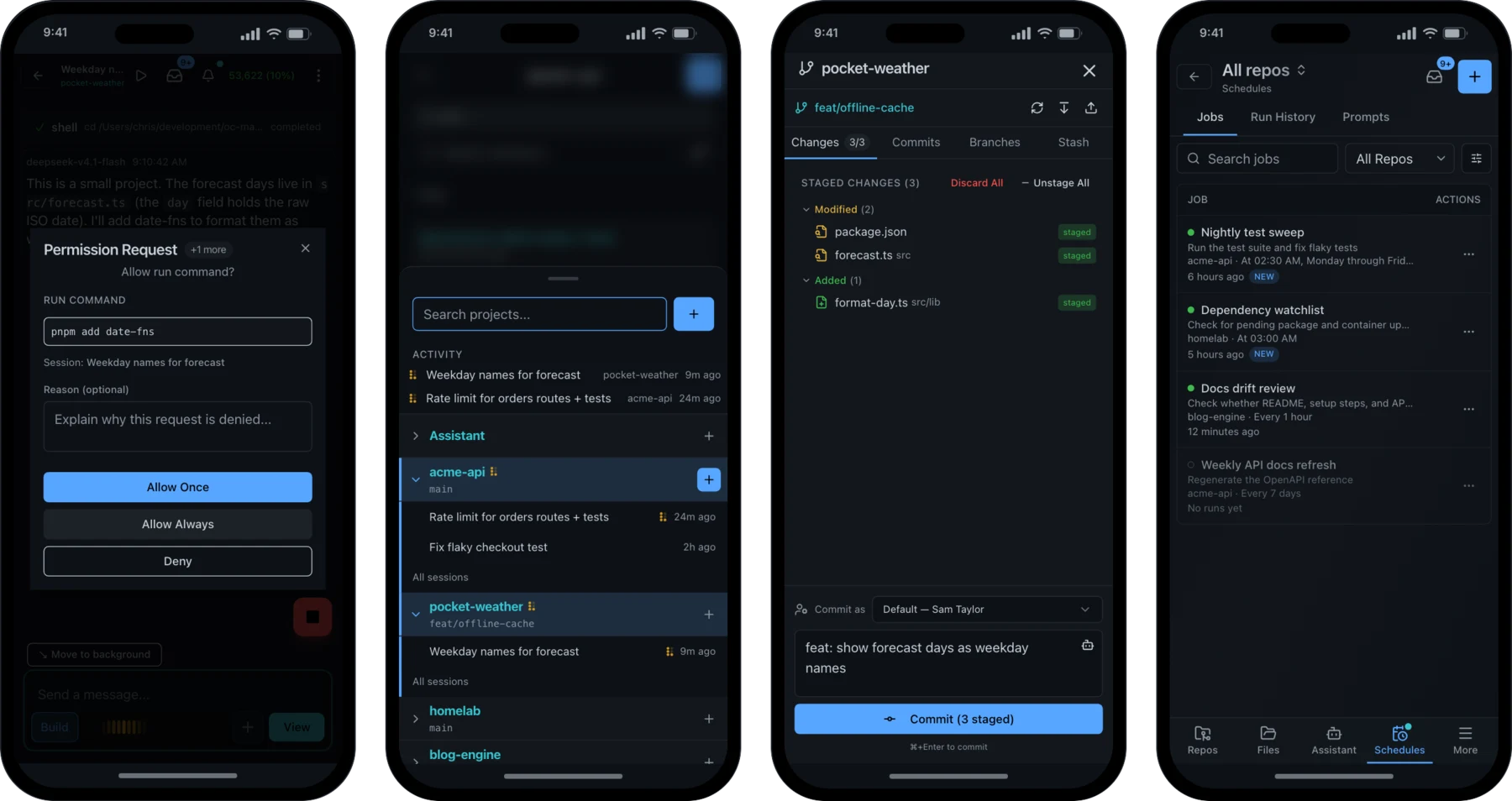
The same OpenCode Manager session shown on a laptop and a phone

What is OpenCode Manager?

OpenCode Manager is a web app for steering OpenCode's AI coding agents from any device. It puts agent chat sessions, a git source-control panel (diffs, staging, branches, worktrees, stash), and interactive PTY terminals beside each repository, so you can approve a permission request, review a diff, or commit from your phone. Jobs can fire prompts on a cron or interval in dedicated git worktrees — fresh per run, kept, or shared — with full run history, and a single prompt can be sent to as many as five models simultaneously, optionally merging the best results. OpenCode servers on other machines can be linked into the same UI via the ocm CLI and QR pairing. It also supports MCP servers, SKILL.md skills, voice dictation and text-to-speech, push notifications, an in-app dev-server preview gateway, and optional per-session microVM sandboxing for agent shell commands. Install with a one-line shell script or the published Docker Compose file; the container bundles the OpenCode 2 binary, and login is email/password, passkey, or GitHub/Google/Discord OAuth. It is free under MIT, aimed at trusted personal deployments rather than user isolation, and the only ongoing cost is whichever AI provider accounts you bring.

Should you self-host OpenCode Manager?

OpenCode Manager scores 55/100 on selfhost.directory (how scoring works) and ranks #65 of 209 in AI Agents. It has 906 GitHub stars.

It shipped 10 stable releases in the past year. The latest, v1.1.0, came out on 26 October 2026. New versions land roughly every 6 days.

Setup is easy: most people get it running in one sitting. An official Docker image is available. It is MIT-licensed and written mostly in Typescript.

Its closest alternative on selfhost.directory is Orca (91/100, 108 642 stars). It scores higher overall, so compare the two before you pick. See OpenCode Manager vs Orca side by side.

Features

  • Agent command sandboxingRequires a Linux host with /dev/kvm and the sandbox compose overlay.
  • AI agent chat sessions
  • AI commit messages
  • Change walkthroughs
  • Dev server preview
  • File browser and editing
  • Git source control panel
  • Linked remote servers
  • MCP Server Management
  • Multi-model runs
  • Push Notifications
  • Scheduled agent jobs
  • Skills
  • Voice input and text-to-speech
  • Web Terminal

OpenCode Manager README

How to install OpenCode Manager

Install OpenCode Manager with Docker Compose

mkdir opencode-manager && cd opencode-manager curl -fsSL https://raw.githubusercontent.com/chriswritescode-dev/opencode-manager/main/docker-compose.release.yml -o docker-compose.yml docker compose up -d

Runs the published release image; open http://localhost:5003 and create the admin account.

How to configure OpenCode Manager

  • ADMIN_EMAILPre-configured admin email

    Pre-configured admin email

  • ADMIN_PASSWORDPre-configured admin password

    Pre-configured admin password

  • ADMIN_PASSWORD_RESETfalseSet to true to reset admin password

    Set to true to reset admin password

  • AUTH_SECRETDocker: generated on first start and kept in /app/data/.auth-secret; dev: random per startSession and credential encryption secret. Required for production outside Docker

    Session and credential encryption secret. Required for production outside Docker

  • AUTH_SECURE_COOKIESRuntime: true in prod, false in dev; Compose: false unless setUse secure cookies (HTTPS only)

    Use secure cookies (HTTPS only)

  • AUTH_TRUSTED_ORIGINSRuntime: http://localhost:5173,http://localhost:5003,http://127.0.0.1:5173,http://127.0.0.1:5003; Compose: http://localhost:5003 unless setComma-separated list of trusted origins (frontend + backend). The first entry is the auth base URL that OAuth providers redirect back to. The list also sets the allowed CORS origins and the origins allowed to open terminal and OpenCode proxy WebSockets. Browser requests that change state from another site (Sec-Fetch-Site: same-site or cross-site) are rejected unless their Origin is listed here. lo

    Comma-separated list of trusted origins (frontend + backend). The first entry is the auth base URL that OAuth providers redirect back to. The list also sets the allowed CORS origins and the origins allowed to open terminal and OpenCode proxy WebSockets. Browser requests that change state from another site (Sec-Fetch-Site: same-site or cross-site) are rejected unless their Origin is listed here. lo

  • CORS_ORIGINhttp://localhost:5173Accepted but currently unused. CORS allows the origins in AUTH_TRUSTED_ORIGINS; /api/opencode-proxy/ and /api/internal/ allow any origin

    Accepted but currently unused. CORS allows the origins in AUTH_TRUSTED_ORIGINS; /api/opencode-proxy/ and /api/internal/ allow any origin

  • DATABASE_PATH./data/opencode.dbPath to SQLite database file

    Path to SQLite database file

  • DEBUGfalseEnable debug logging

    Enable debug logging

  • DISCORD_CLIENT_IDDiscord OAuth client ID

    Discord OAuth client ID

  • DISCORD_CLIENT_SECRETDiscord OAuth client secret

    Discord OAuth client secret

  • GITHUB_CLIENT_IDGitHub OAuth client ID

    GitHub OAuth client ID

  • GITHUB_CLIENT_SECRETGitHub OAuth client secret

    GitHub OAuth client secret

  • GOOGLE_CLIENT_IDGoogle OAuth client ID

    Google OAuth client ID

  • GOOGLE_CLIENT_SECRETGoogle OAuth client secret

    Google OAuth client secret

  • HEALTH_CHECK_TIMEOUT_MS30000OpenCode liveness probe timeout

    OpenCode liveness probe timeout

  • HOST0.0.0.0Server bind address

    Server bind address

  • LOG_LEVELinfoAccepted but currently unused; debug output is controlled by DEBUG

    Accepted but currently unused; debug output is controlled by DEBUG

  • MAX_FILE_SIZE_MB50Maximum file size for reading/preview

    Maximum file size for reading/preview

  • MAX_UPLOAD_SIZE_MB50Maximum upload file size

    Maximum upload file size

  • MSB_API_KEYMicrosandbox API key passed through to the client

    Microsandbox API key passed through to the client

  • MSB_API_URLMicrosandbox API URL passed through to the client

    Microsandbox API URL passed through to the client

  • MSB_BACKENDlocalBackend the microsandbox client uses

    Backend the microsandbox client uses

  • MSB_HOME~/.microsandboxMicrosandbox home directory for state

    Microsandbox home directory for state

  • MSB_LIBKRUNFW_PATH/opt/microsandbox/lib/libkrunfw.soPath to the libkrunfw firmware library used by msb (set in the container image)

    Path to the libkrunfw firmware library used by msb (set in the container image)

  • MSB_PATHmsbPath to the msb executable

    Path to the msb executable

  • MSB_PROFILEMicrosandbox profile passed through to the client

    Microsandbox profile passed through to the client

  • NODE_ENVdevelopmentEnvironment (development or production)

    Environment (development or production)

  • OPENCODE_BINPath to an externally managed OpenCode binary. Overrides binary discovery; while set, in-app upgrade and version install are disabled (HTTP 409)

    Path to an externally managed OpenCode binary. Overrides binary discovery; while set, in-app upgrade and version install are disabled (HTTP 409)

  • OPENCODE_HEALTH_FAILURE_THRESHOLD2Failed health checks before recovery starts

    Failed health checks before recovery starts

  • OPENCODE_HEALTH_POLL_MS30000OpenCode health watcher poll interval

    OpenCode health watcher poll interval

  • OPENCODE_HEALTH_WATCH_ENABLEDtrue (false in tests)Enable OpenCode health watcher and recovery

    Enable OpenCode health watcher and recovery

  • OPENCODE_HOST127.0.0.1OpenCode server bind address

    OpenCode server bind address

  • OPENCODE_IMPORT_CONFIG_PATH~/.config/opencode filesExisting standalone OpenCode config file to import on first startup. When set to an existing file, only that file is imported. When unset, or set to a path that does not exist, the host's opencode.json, opencode.jsonc, and legacy config.json in ~/.config/opencode are mirrored into the workspace, workspace copies absent on the host are removed, and the mirrored legacy file is folded into the worksp

    Existing standalone OpenCode config file to import on first startup. When set to an existing file, only that file is imported. When unset, or set to a path that does not exist, the host's opencode.json, opencode.jsonc, and legacy config.json in ~/.config/opencode are mirrored into the workspace, workspace copies absent on the host are removed, and the mirrored legacy file is folded into the worksp

  • OPENCODE_IMPORT_STATE_PATH~/.local/share/opencodeExisting standalone OpenCode state directory to import on first startup. The first of this path and the default that contains opencode.db is used

    Existing standalone OpenCode state directory to import on first startup. The first of this path and the default that contains opencode.db is used

  • OPENCODE_SERVER_PASSWORDauto-generatedBasic Auth password for the managed OpenCode server. OpenCode 2 always requires one: when unset, OpenCode Manager generates and persists a password (override it any time via Settings → OpenCode → Server Auth). DB-stored passwords override this env var. The default docker-compose.yml does not forward this variable from .env; add it to the compose environment: block or set it via Settings → OpenCode

    Basic Auth password for the managed OpenCode server. OpenCode 2 always requires one: when unset, OpenCode Manager generates and persists a password (override it any time via Settings → OpenCode → Server Auth). DB-stored passwords override this env var. The default docker-compose.yml does not forward this variable from .env; add it to the compose environment: block or set it via Settings → OpenCode

  • OPENCODE_SERVER_PORT5551Port for the OpenCode CLI server

    Port for the OpenCode CLI server

  • PASSKEY_ORIGINhttp://localhost:5003Origin URL for WebAuthn (backend port)

    Origin URL for WebAuthn (backend port)

  • PASSKEY_RP_IDlocalhostRelying party ID (your domain)

    Relying party ID (your domain)

  • PASSKEY_RP_NAMEOpenCode ManagerDisplay name for passkey prompts

    Display name for passkey prompts

  • PORT5003Server port

    Server port

  • PREVIEW_PORT5004Port for the preview gateway. Set to 0 to disable preview entirely. If the port is already in use, the Manager starts anyway, logs a warning and reports preview as unavailable.

    Port for the preview gateway. Set to 0 to disable preview entirely. If the port is already in use, the Manager starts anyway, logs a warning and reports preview as unavailable.

  • PREVIEW_PUBLIC_URLemptySame-site HTTPS origin that proxies the preview gateway; do not add it to AUTH_TRUSTED_ORIGINS. Set this when the Manager is served over HTTPS or behind a reverse proxy, where mixed content and third-party cookies otherwise block the preview iframe.

    Same-site HTTPS origin that proxies the preview gateway; do not add it to AUTH_TRUSTED_ORIGINS. Set this when the Manager is served over HTTPS or behind a reverse proxy, where mixed content and third-party cookies otherwise block the preview iframe.

  • PROCESS_START_WAIT_MS2000Wait time for OpenCode process to start

    Wait time for OpenCode process to start

  • PROCESS_VERIFY_WAIT_MS1000Wait time for process health verification

    Wait time for process health verification

  • REPO_BROWSE_ROOTempty (disabled)Root directory the folder browser may browse (supports ~). When unset, folder browsing is disabled

    Root directory the folder browser may browse (supports ~). When unset, folder browsing is disabled

  • SANDBOX_CPUS2Default microVM CPU count, used when neither a Settings default nor a per-session override is set

    Default microVM CPU count, used when neither a Settings default nor a per-session override is set

  • SANDBOX_EXEC_TIMEOUT_MS600000Timeout for a single sandboxed command, in milliseconds

    Timeout for a single sandboxed command, in milliseconds

  • SANDBOX_EXEC_USER${PUID:-1000} via the overlay, otherwise nodeGuest identity sandboxed commands run as: a numeric uid, a numeric uid:gid, or a guest username. A numeric uid must match the Manager's effective uid (PUID); the compose overlay defaults it to ${PUID:-1000}. A guest username is resolved to the Manager's effective uid:gid so writes to the mounted project roots always succeed. When a configured numeric identity cannot write the workspace, enforcemen

    Guest identity sandboxed commands run as: a numeric uid, a numeric uid:gid, or a guest username. A numeric uid must match the Manager's effective uid (PUID); the compose overlay defaults it to ${PUID:-1000}. A guest username is resolved to the Manager's effective uid:gid so writes to the mounted project roots always succeed. When a configured numeric identity cannot write the workspace, enforcemen

  • SANDBOX_IMAGEdocker.io/cstechdev/ocm-sandbox@sha256:9df035cf…OCI image the microVM boots from. Digest-pinned by default so a rebuilt guest image is actually adopted; see Sandbox Guest Image for what the default ships and how to build your own

    OCI image the microVM boots from. Digest-pinned by default so a rebuilt guest image is actually adopted; see Sandbox Guest Image for what the default ships and how to build your own

  • SANDBOX_MEMORY4GDefault microVM memory (e.g. 4G), used when neither a Settings default nor a per-session override is set

    Default microVM memory (e.g. 4G), used when neither a Settings default nor a per-session override is set

  • SANDBOX_NETpublicNetwork mode for the microVM: public, private, or host, or a comma-separated composition (for example public,host). Passed to msb run --net and attested against the profile's canonical network policy

    Network mode for the microVM: public, private, or host, or a comma-separated composition (for example public,host). Passed to msb run --net and attested against the profile's canonical network policy

  • SANDBOX_START_TIMEOUT_MS300000Timeout for microVM startup, in milliseconds

    Timeout for microVM startup, in milliseconds

  • VAPID_PRIVATE_KEYVAPID private key for push notifications

    VAPID private key for push notifications

  • VAPID_PUBLIC_KEYVAPID public key for push notifications

    VAPID public key for push notifications

  • VAPID_SUBJECTContact email for VAPID (MUST use mailto: format)

    Contact email for VAPID (MUST use mailto: format)

  • VITE_API_URLempty (same origin)Backend API URL for frontend. Empty (the default) means same-origin requests; the Vite dev server proxies /api to the backend

    Backend API URL for frontend. Empty (the default) means same-origin requests; the Vite dev server proxies /api to the backend

  • VITE_MAX_FILE_SIZE_MB50File size limit for frontend

    File size limit for frontend

  • VITE_MAX_UPLOAD_SIZE_MB50Upload size limit for frontend

    Upload size limit for frontend

  • VITE_OPENCODE_PORT5551OpenCode server port hint

    OpenCode server port hint

  • VITE_SERVER_PORT5003Backend port hint for frontend

    Backend port hint for frontend

  • WORKSPACE_PATH./workspace (Docker: /workspace)Path to workspace directory (supports ~)

    Path to workspace directory (supports ~)

OpenCode Manager releases & version history

FAQ

Will it touch my existing OpenCode setup?

Only if you opt in. The installer offers to import your config, provider logins and chats, and the default answer is no.

Is it a fork of OpenCode?

No; it runs and manages a real OpenCode server for you.

How do I open it on my phone?

Use the network URL the installer prints on the same Wi-Fi, or set up a Cloudflare Tunnel for HTTPS from anywhere (required for push notifications), then add it to your home screen.

How much does it cost?

Nothing — it is free and MIT licensed; you only pay your model provider.

What do I need to run it?

Docker with Compose v2 (included in Docker Desktop); the container image is about a 1.2 GB download.

More in Remote Access

Rate this project

Click to rate — no account needed.

0 comments

Posting as guest
Loading comments…