
Self-host stack-auth
dashboard-v1.0.135Open-source user infrastructure: auth, teams, billing
docker run -d --name hexclave-postgres --network hexclave -e POSTGRES_USER=postgres -e POSTGRES_PASSWORD=password -e POSTGRES_DB=stackframe -p 5432:5432 postgres:latest- Stars
- 6 887
- Ports
- 8101 (Admin dashboard), 8102 (API backend used by the dashboard and your applications)
- Requires
- ClickHouse, Cron scheduler, PostgreSQL, Reverse proxy / load balancer, SMTP email provider
stackauth/server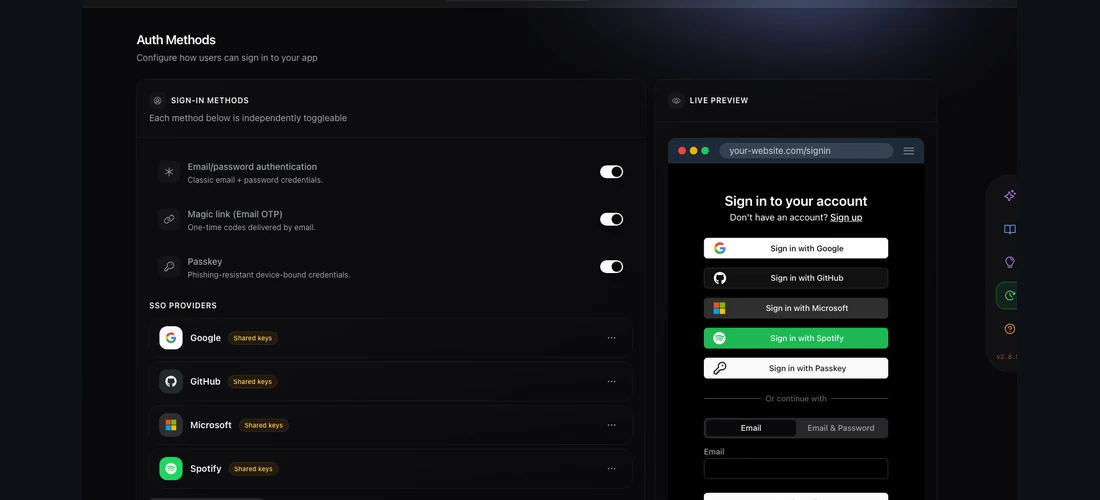
What is stack-auth?
Hexclave is an open-source user-infrastructure platform for SaaS products: your app keeps its own frontend, backend and database while Hexclave covers everything around your users. Functionality ships as a catalog of switchable apps that share one user model — authentication (passkeys, OAuth, magic links, hosted auth pages), teams and workspaces with email invites, nested RBAC roles and permission checks, leak-aware API keys, subscriptions with usage metering and credits, transactional plus marketing emails with open and click tracking, product analytics with live user counts and session replays, signed webhooks with retries, an encrypted data vault for user secrets, and a pre-launch checklist. Integration happens through SDKs for Next.js, React, JavaScript and TanStack Start, a REST API with near-full parity, or a CLI that manages projects, syncs a declarative config file and injects development credentials. Self-hosting runs the official server container image: port 8101 serves the admin dashboard, 8102 serves the API, and you supply Postgres 15+ plus ClickHouse, a cron scheduler, an HTTPS reverse proxy and an email provider; Svix and S3-compatible object storage cover webhooks and file storage, while custom email code and dashboard AI features need outside services. The docs warn that self-hosting leaves updates, security patches and reliability to the operator, and the vendor also sells managed cloud plans (free, Team, Growth).
stack-auth alternatives
 hankoOpen-source self-hosted authentication and user management platform with passkeys, MFA, OAuth SSO and SAML, an API-first alternative to Auth0 or Clerk.Comparehanko with stack-auth
 onecliOpen-source sandboxed agent harness for teams. Giving every employee a secured personal agent.Compareonecli with stack-auth
 MachinaOSSelf-hosted open-source AI organisation with six specialised employees owning business functions end-to-end. Token budget, bring your own model keys.CompareMachinaOS with stack-auth
 QuickStackA free, open-source platform you host yourself that replaces Vercel or Heroku — deploy apps and databases on your own hardware with automatic HTTPS and backups.CompareQuickStack with stack-auth
 openlegionSelf-hosted platform for isolated AI agent teams with credential vaulting, spend limits, and a web dashboard — free for internal use under a source-available license.Compareopenlegion with stack-auth
 REI3REI3 is a self-hosted, open-source low-code platform for building multi-user business apps with full data ownership, replacing spreadsheets and SaaS tools.CompareREI3 with stack-auth
 DocusealOpen-source, self-hosted DocuSign alternative for creating fillable PDF forms and collecting digital signatures via a mobile-friendly web tool.CompareDocuseal with stack-auth
 laudspeakerSelf-hosted, open-source customer engagement platform for building visual onboarding journeys and sending event-triggered email, SMS, push and webhook messages.Comparelaudspeaker with stack-auth
Should you self-host stack-auth?
stack-auth scores 66/100 on selfhost.directory (how scoring works) and ranks #9 of 40 in Authentication. It has 6 887 GitHub stars, +27 in the last 30 days.
It shipped 91 stable releases in the past year. The latest, dashboard-v1.0.135, came out on 30 October 2026. New versions land roughly every 1 days.
Setup is advanced: plan for several services and some ongoing maintenance. An official Docker image is available. It is Other-licensed and written mostly in Typescript.
Its closest alternative on selfhost.directory is keycloak (86/100, 37 754 stars). It scores higher overall, so compare the two before you pick. See stack-auth vs keycloak side by side.
Features
- Admin Dashboard
- API Key Management
- CLI
- Encrypted secret storage for end users
- Fraud protection
- Launch checklist
- Passwordless and social authentication
- Payments and subscriptions
- Product Analytics
- REST API
- Role-based Access Control
- SDKs for JavaScript frameworks
- Teams and workspaces
- Transactional and marketing email
- Webhooks
stack-auth README


More in Authentication
 Stalwart Mail ServerSelf-hosted, open-source Rust mail server with calendars, contacts and shared files over JMAP, IMAP, POP3, SMTP and the DAV protocols, plus built-in anti-spam.
 supabaseSelf-hosted open-source Postgres platform with database, auth, realtime, storage, edge functions, and vector embeddings as a Firebase alternative.
 supabase-automated-self-hostA bash script that automates deploying Supabase with Nginx or Caddy reverse proxy, Let's Encrypt SSL, and optional Authelia 2FA on Linux using Docker Compose.
 supertokensSelf-hosted, open-source authentication service replacing Auth0, Firebase Auth or AWS Cognito, with passwordless, social, email-password login and session management.
 systemprompt-templateSelf-hosted AI governance gateway between AI clients, models, and tools with policy enforcement, audit logging, and extensible Rust runtime.
 TeleportSelf-hosted open-source platform replacing VPNs with short-lived certificates, SSO, MFA, RBAC, and session audit across SSH, Kubernetes, databases, and web apps.
 tesseralTesseral is a self-hosted, open-source auth platform for B2B SaaS with multi-tenant login, SAML/OIDC/SCIM, RBAC, MFA, passkeys, API keys, and audit logs.
 TinyauthSelf-hosted OpenID Connect certified authentication and authorization server with OAuth, LDAP, and TOTP 2FA support for protecting self-hosted applications.
 tlsproxySelf-hosted TLS termination proxy with auto Let's Encrypt, SSO (OIDC/SAML/Passkeys), and reverse proxy for multiple services on one port.
 tobabtobab is a self-hosted, open-source identity-aware proxy using passkeys for authentication, designed as a forward auth target for Caddy, nginx, or Traefik in homelabs.
 tsidptsidp is a self-hosted OIDC/OAuth identity provider for Tailscale, letting you use Tailscale identities to authenticate into any OIDC-compatible app or MCP server.
 Ultimate Certificate ManagerManage your own PKI with this web-based CA: issue certificates, run ACME/SCEP/EST servers, integrate with Active Directory, and automate renewals.
0 comments