
Self-host open-notebook
v1.15.1Notebook LM alternative with podcasts and multi-model AI
docker compose up -d- Stars
- 42 025
- Ports
- 8502 (Web UI), 5055 (REST API (also served under /api, with Swagger UI at /docs))
lfnovo/open_notebook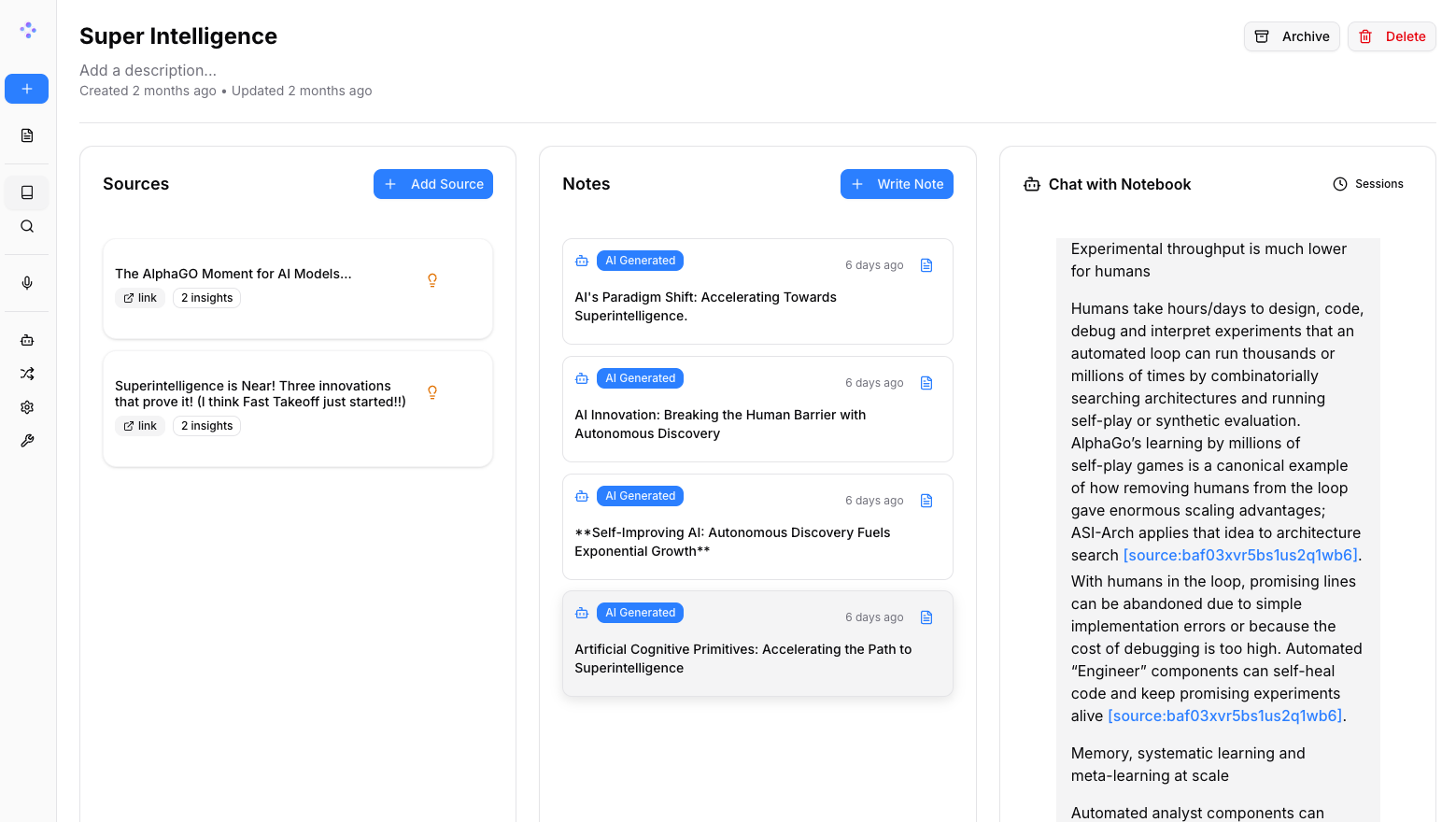
What is open-notebook?
Open Notebook is a privacy-focused research notebook for students, researchers and self-directed learners who want Notebook LM style features without surrendering their material to a cloud vendor. Work is organised into notebooks that collect sources — documents, spreadsheets and presentations, e-books, web pages, YouTube transcripts, recordings and typed text — alongside your own notes and AI-derived insights. A chat session draws only on the context you select and returns answers that point back to the material behind them; a separate Ask mode runs vector search over the whole library, and plain full-text search is also available. Reusable transformations summarise or extract from a source and store the result as an insight. The podcast studio writes a script and voices it with up to four configurable speakers. Models are picked per task from more than twenty backends, hosted or self-run, so pairing the app with Ollama keeps everything on your own hardware and lets it run offline once installed. The interface itself is translated into many languages. Self-hosting is the project's compose file: a SurrealDB container plus one app container serving the UI on 8502 and the API on 5055, after you set an encryption key and enter provider credentials in the UI. Limits worth knowing: access control is a single optional shared password with no user accounts (multi-user support is only a stated future direction), the all-in-one image is deprecated, and a from-source or native Windows route exists when Docker is unavailable.
open-notebook alternatives
 EchoEcho is a self-hosted, open source AI journal for capturing thoughts via text or voice, transcribing with Whisper, and chatting with entries via local LLMs — all offline.CompareEcho with open-notebook
 Local Deep Research ~95% on SimpleQA (e.g. Qwen3.6-27B on a 3090). Supports all local and cloud LLMs (llama.cpp, Ollama, Google, ...). 10+ search engines - arXiv, PubMed, your private documents. Everything Local & Encrypted.CompareLocal Deep Research with open-notebook
 surfsenseSelf-hosted, open-source NotebookLM alternative: an air-gapped desktop AI agent that researches, edits and transforms your documents with any local or hosted model.Comparesurfsense with open-notebook
 libre-chatLibre Chat is a self-hosted, open-source chatbot web service powered by local LLMs like Mixtral or Llama 2, with web UI, API, streaming responses, and document-based QA.Comparelibre-chat with open-notebook
 OpenWorkSelf-hosted and open-source, this Electron workspace puts AI agents to work on local files; over 50 providers, Ollama support, and a self-hosted Den control plane.CompareOpenWork with open-notebook
 eclaireA self-hosted, open-source AI assistant that keeps data private by running locally — it handles your personal information using a local language model.Compareeclaire with open-notebook
 novaSelf-hosted personal AI with a measured memory loop and 70+ autonomous monitors building living dossiers — all local, zero cloud.Comparenova with open-notebook
 Open ResponsesA self-hosted, open-source server implementing the OpenAI Responses API specification with support for multiple LLM providers and the Agents SDK.CompareOpen Responses with open-notebook
All self-hosted alternatives to Google Notebook LM → All self-hosted alternatives to NotebookLM →
Should you self-host open-notebook?
open-notebook scores 81/100 on selfhost.directory (how scoring works) and ranks #4 of 42 in Knowledge Management. It has 42 025 GitHub stars, +1 868 in the last 30 days.
It shipped 17 stable releases in the past year. The latest, v1.15.1, came out on 4 November 2026. New versions land roughly every 10 days.
Setup is easy: most people get it running in one sitting. An official Docker image is available. It is MIT-licensed and written mostly in Typescript.
Its closest alternative on selfhost.directory is surfsense (71/100, 16 890 stars). open-notebook scores higher overall. See open-notebook vs surfsense side by side.
Features
- Chat with document context
- Citations in AI answers
- Custom content transformations
- Fine-grained AI context control
- Full-text and vector search
- MCP Server
- Multi-language UI
- Multi-modal content ingestion
- Multi-model AI provider support
- Notes
- Podcast Generation
- Reasoning model support
- REST API
- Run AI models locally
open-notebook README

An open source, privacy-focused alternative to Google's Notebook LM!
Join our Discord server for help, to share workflow ideas, and suggest features!
Checkout our website »
Follow @lfnovo on X for updates
📚 Get Started
·
📖 User Guide
·
✨ Features
·
🚀 Deploy
FAQ
Is this right for me?
The project targets learning enthusiasts, people who want a tailor-made AI learning partner, those with a large backlog of links to catalogue, independent thinkers, privacy-aware users and people who want to decide how their content is handled.
More in Knowledge Management
 open-silongOpen-source, self-hosted Notion/Obsidian-inspired workspace with block editor, databases, and knowledge graph for teams who want full data ownership.
 OpenTutorOpenTutor is a self-hosted, open-source AI learning platform turning uploaded materials into notes, flashcards, quizzes, and an adaptive tutor with 10+ LLM providers.
 outlineSelf-hosted team wiki and knowledge base with realtime collaborative editing, comments, search and 20+ integrations, run as a Docker container with PostgreSQL and Redis.
 OxynoteOxynote is a self-hosted, open-source technical wiki with live Prometheus/SQL charts, Stripe-style API docs, and GitHub-like review flows.
 PandaWikiOpen-source, self-hosted knowledge base that builds product docs, FAQs and blogs with AI Q&A, AI search and chatbots for DingTalk, Feishu and WeCom.
 Pepperminty-WikiSelf-hosted, open-source wiki engine in a single PHP file with flat-file storage, Markdown, full-text search, revision history, file uploads, and dark theme.
 Personal External Brain Knowledge GraphSelf-hosted, open-source personal knowledge graph for notes, web pages, PDFs, audio/video with topic-isolated recall and source citations — refuses ungrounded answers.
 PetrichorPetrichor is an open-source, self-hosted platform turning Markdown into semantic wikis with agentic RAG for traceable, evidence-backed answers.
 PharosSelf-hosted, open-source RAG system with multi-format document ingestion, hybrid retrieval, enterprise ACL, and dual HTTP + MCP exits for team knowledge bases.
 PineDocsPineDocs is a self-hosted, open-source file viewer for Markdown, HTML, code, images, PDFs, and media — no database needed. Runs via Docker or PHP with dark mode.
 plan42Collavre is a self-hosted, open-source workspace where every block is a document, task, discussion, and AI agent context in one. Built on Rails with MCP.
 PlanePlane is a self-hosted open-source project management platform combining work items, cycles, wiki docs, and AI agents as an alternative to Jira, Linear, and ClickUp.
0 comments