
Self-host nanocl
nanocld-0.18.1Container and VM orchestrator with declarative Statefiles
- Stars
- 1 004
- Requires
- Docker or Podman


What is nanocl?
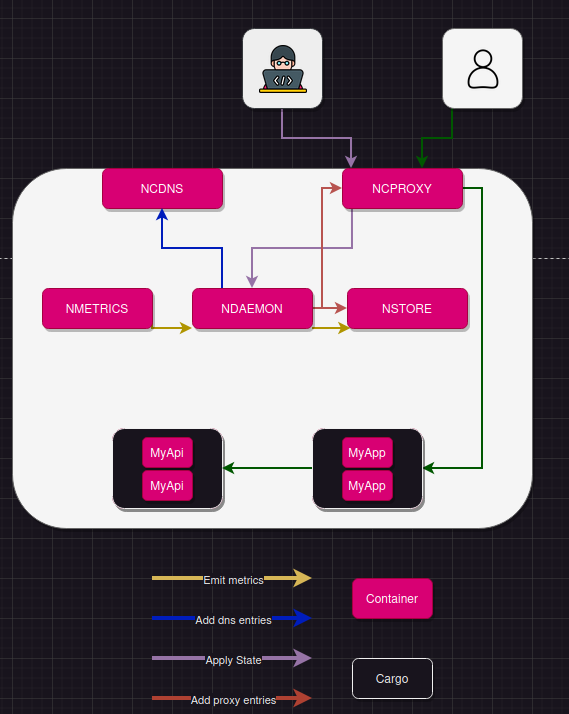
Nanocl is an open-source tool for running containers and virtual machines on your own hardware. It gives you a command-line interface (nanocl) and a background daemon (nanocld) that works with Docker or Podman, keeping the desired state in a CockroachDB database (nstore). You describe your workloads — groups of containers called Cargoes, plus VMs, scheduled jobs, secrets, and network rules — in declarative Statefiles written as YAML, TOML, or JSON, then apply them with a single command. Built-in controllers handle HTTP/TCP routing with TLS (via NGINX) and service DNS (via dnsmasq). The system is designed mainly for single-node use and does not yet provide automatic multi-node scheduling or high availability. You can install it with a one-line script, prebuilt binaries for Linux, macOS, and Windows, a Debian package, or by compiling from source with Cargo. The code is dual-licensed under MIT OR Apache-2.0 and is actively maintained by the Next Hat organization.
Should you self-host nanocl?
nanocl scores 52/100 on selfhost.directory (how scoring works) and ranks #6 of 11 in Container Orchestration. It has 1 004 GitHub stars.
It shipped 8 stable releases in the past year. The latest, nanocl-0.18.1, came out on 26 September 2026.
Setup is advanced: plan for several services and some ongoing maintenance. It is Apache-2.0-licensed and written mostly in Rust.
Its closest alternative on selfhost.directory is uncloud (65/100, 5 584 stars). It scores higher overall, so compare the two before you pick. See nanocl vs uncloud side by side.
Features
- CLI and REST API
- Container Orchestration
- Declarative Statefile configuration
- HTTP/TCP proxy with TLS
- Job Scheduling
- Multi-container Cargoes
- Resource Metrics
- Secrets Management
- Service DNS
- Single-node operationMulti-node features are experimental
- State backup
- Statefile templating
- Virtual Machine Management
nanocl README
More in Infrastructure
 nsdNSD is an open-source, self-hosted authoritative DNS name server optimized for speed and reliability, used by root servers and TLD registries worldwide.
 os-modaA self-hosted NixOS operating system where an AI agent manages your server through structured tools, with tamper-proof audit logs and instant rollback.
 Proxmox Kubernetes EngineSelf-hosted tool to deploy HA Kubernetes clusters on Proxmox VE using Cluster API with native storage, load balancing, and CNI.
 PulumiOpen-source infrastructure-as-code CLI and engine for AWS, Azure, GCP and Kubernetes in TypeScript, Python or Go, with self-hosted state in S3 or PostgreSQL.
 RackPeekSelf-hosted web UI and CLI for home lab infrastructure documentation, tracking hardware, services, and networks in open YAML formats.
 RunPanelRunPanel is a self-hosted web panel for managing servers, containers, and files across multiple hosts. It unifies host operations and LXC/Incus orchestration.
 SandBase HarnessSelf-hosted, open-source runtime for AI agent sessions: sandboxes, MCP toolsets, credential vaults, memory, audit replay, and a built-in web Console.
 StewardSelf-hosted open-source tool that inventories resources across major clouds, maps dependencies, and lets you review cleanup impact before deletion.
 TeleportSelf-hosted open-source platform replacing VPNs with short-lived certificates, SSO, MFA, RBAC, and session audit across SSH, Kubernetes, databases, and web apps.
 terrateamOpen-source Terraform and OpenTofu orchestration that plans every pull request and applies on merge, self-hosted with Docker Compose against PostgreSQL.
 Xen OrchestraXen Orchestra is a self-hosted, open-source web interface to manage, back up, and delegate XCP-ng and XenServer virtualization infrastructure from a single pane of glass.
 cloudflare-dns-failoverSelf-hosted Go daemon that monitors server health and updates Cloudflare DNS A records to the first responsive IP for high availability.
0 comments