
Self-host mkcertWeb
v4.4.2Web UI for generating local TLS certificates with mkcert
- Stars
- 221
- Ports
- 3000 (HTTP server), 3443 (HTTPS server)
- Requires
- Mkcert, OpenSSL
jeffcaldwellca/mkcertweb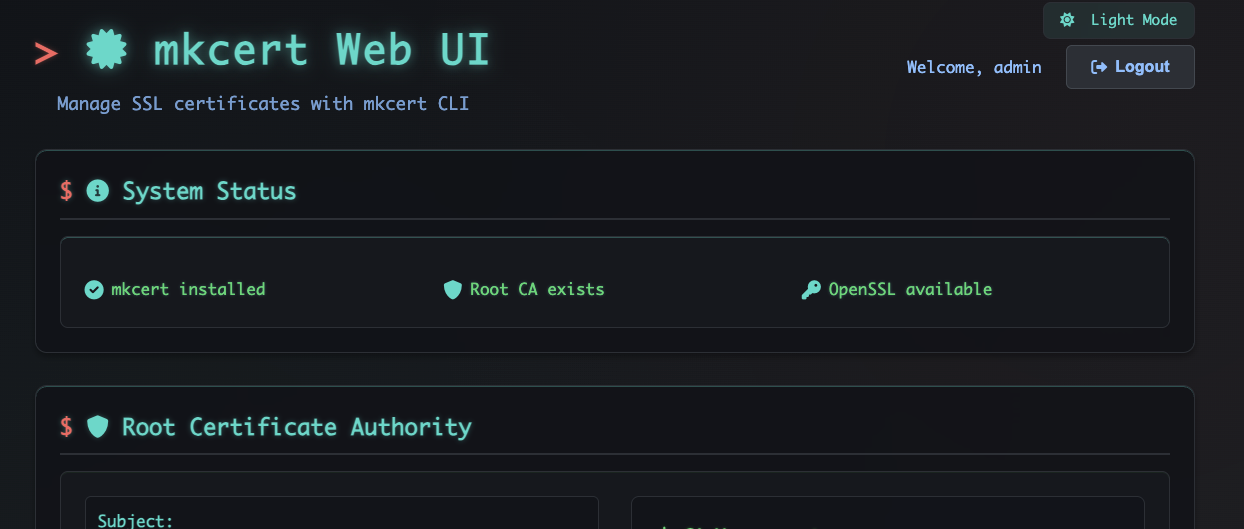
What is mkcertWeb?
mkcert Web UI is a self-hosted web application that gives developers a graphical interface for the mkcert command-line tool. It lets you create locally-trusted TLS certificates for many domains and IP addresses, exporting them in PEM, CRT, and PFX formats. A built-in SCEP server handles automatic device enrollment on iOS, macOS, and Windows. Security features include protection against command injection and path traversal, plus multi-tier rate limiting. Authentication supports username/password login and OpenID Connect single sign-on with providers such as Azure AD, Google, and Okta. Certificate expiry monitoring sends automated alerts via SMTP email, ntfy push notifications, or generic webhooks. The interface offers dark and light themes with responsive design. Deployment options include Docker Compose (recommended) or local Node.js installation with mkcert and OpenSSL as prerequisites. Licensed under GPL-3.0.
Should you self-host mkcertWeb?
mkcertWeb scores 48/100 on selfhost.directory (how scoring works) and ranks #6 of 8 in Certificate Management. It has 221 GitHub stars.
It shipped 13 stable releases in the past year. The latest, v4.4.2, came out on 15 October 2026. New versions land roughly every 10 days.
Setup is moderate: expect some configuration beyond a single command. An official Docker image is available. It is GPL-3.0-licensed and written mostly in JavaScript.
Its closest alternative on selfhost.directory is Certimate (67/100, 9 410 stars). It scores higher overall, so compare the two before you pick. See mkcertWeb vs Certimate side by side.
Features
- Basic Authentication
- Certificate Expiry Monitoring
- Certificate Generation
- Certificate Notes
- Command Injection Protection
- Email notifications
- Multiple certificate formats
- Ntfy push notifications
- OpenID Connect SSO
- Rate Limiting
- REST API
- SCEP Enrollment
- Webhook Notifications
mkcertWeb README
More in Certificate Management
 Nginx Proxy ManagerOpen-source, self-hosted Docker reverse proxy manager with a web admin UI, Let's Encrypt SSL, and SQLite, MySQL or Postgres backends.
 nginx-uiSelf-hosted, open-source web UI for managing Nginx: edit configs, deploy Let's Encrypt certs, tail logs, watch stats and manage clusters, with AI and MCP.
 traefik-certs-dumperOpen-source CLI that extracts Traefik's ACME certificates into .crt/.key files from acme.json or Consul, etcd, Zookeeper and BoltDB, with watch mode and Docker images.
 Ultimate Certificate ManagerManage your own PKI with this web-based CA: issue certificates, run ACME/SCEP/EST servers, integrate with Active Directory, and automate renewals.
 VaulTLSVaulTLS is a self-hosted, open-source web app for managing mTLS and SSH certificates with a Vue.js frontend, OIDC auth, ACME CA support, and a REST API.
 CaddyFast and extensible multi-platform HTTP/1-2-3 web server with automatic HTTPS
 Caddy UISelf-hosted Caddy control panel managing proxy hosts, redirects, certificates, and routes via web UI. Supports multi-server fleets, OIDC/SSO, dark mode, and PWA.
 certificatesOpen-source, self-hosted private CA that automates X.509/TLS and SSH certificate issuance and doubles as your own ACMEv2 server.
 CertimateSelf-hosted open-source ACME tool for SSL cert workflows: DNS-01/HTTP-01 requests, deployment to 160+ cloud and Kubernetes targets, automated renewal and monitoring.
 CertMateCertMate is a self-hosted, open-source TLS certificate manager that issues, renews, discovers, and deploys certs across 29 DNS providers with audit trail, OIDC/SSO.
 Cert WardenSelf-hosted ACME certificate manager with a web UI and API: automated Let's Encrypt renewals, DNS-01 and HTTP-01 challenges, cert delivery via scoped API keys.
 dnsboxDNSBox is a self-hosted DNS server that issues Let's Encrypt SSL certs for any public IP without a domain, enabling instant HTTPS for servers and IoT devices.
0 comments