
Self-host LetterFeed
0.5.3Email newsletter to RSS feed converter
- Stars
- 207
- Port
- 3000 (frontend web UI)
ghcr.io/leonmuscoden/letterfeed-frontend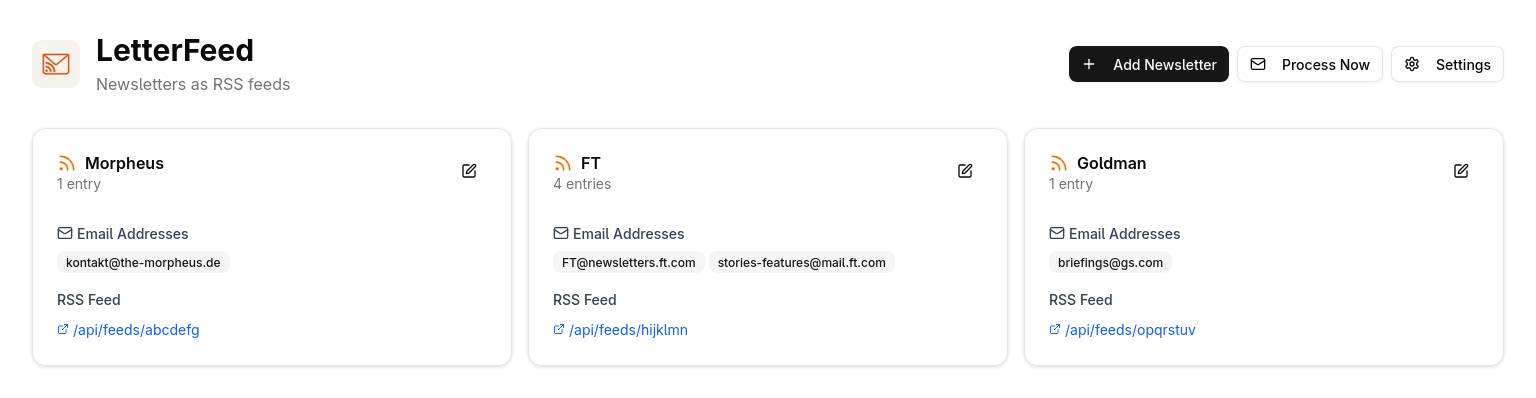
What is LetterFeed?
A self-hosted utility for newsletter-to-RSS conversion. It connects to an IMAP mailbox using SSL, periodically fetches new messages from configured senders, processes them, and publishes each as a feed entry. You run it with Docker Compose using separate frontend and backend containers, with SQLite for storage. All settings — mailbox credentials, processing rules, and login info — go in environment variables. The code is MIT-licensed and gets regular updates.
Should you self-host LetterFeed?
LetterFeed scores 41/100 on selfhost.directory (how scoring works) and ranks #63 of 85 in Feed Reader. It has 207 GitHub stars.
It shipped 1 stable release in the past year. The latest, 0.5.3, came out on 8 September 2026.
Setup is moderate: expect some configuration beyond a single command. An official Docker image is available. It is MIT-licensed and written mostly in Python.
Its closest alternative on selfhost.directory is RSSHub (85/100, 46 704 stars). It scores higher overall, so compare the two before you pick. See LetterFeed vs RSSHub side by side.
Features
- Built-in Authentication
- Configurable email processing
- Docker Compose Deployment
- Email newsletter to RSS conversion
- IMAP over SSL support
- SQLite Database
LetterFeed README
More in Feed Reader
 lurkerLurker is a self-hosted, open-source read-only Reddit client that renders well on mobile, respects system dark mode, and requires no Reddit account.
 matchaMatcha is a self-hosted, open-source CLI tool that creates daily markdown digests from RSS feeds with optional LLM summaries, weather, and Instapaper bookmarking.
 minifeed.railsMinimalist self-hosted RSS/Atom feed reader with native iOS app. Supports categories, bookmarks, OPML, multi-user, keyboard shortcuts, light/dark themes.
 MinifluxSelf-hosted, open-source RSS/Atom feed reader in Go: one static binary plus PostgreSQL, full-text search, OPML import, and privacy-focused link cleaning.
 miniflux-indexerSelf-hosted CLI tool that indexes Miniflux feed entries using sego for Chinese text segmentation, enabling better full-text search. Requires PostgreSQL 9.6+.
 miniflux-phpMiniflux is a minimalist, self-hosted, open-source RSS reader with a clean web interface, multiple user support, themes, and API access for mobile apps.
 mkfdSelf-hosted, open-source tool that builds RSS feeds from websites, email inboxes, APIs and other sources without native feeds. Runs in Docker or via Bun.
 morssMorss is a self-hosted, open-source tool that expands truncated RSS feeds by fetching full articles from source websites.
 MyTubeOpen-source and self-hosted: grab videos from yt-dlp's 1000+ sites (YouTube, Bilibili, Twitch included), build collections, watch in-browser, auto-download subscriptions.
 nebulapickerA self-hosted RSS tool that collects feeds, applies custom filters, and outputs curated feeds. Offers Wallabag connection for saving full articles.
 news2readerSelf-hosted OPDS catalog that fetches articles from Hacker News, Tildes, and Karakeep, converts them to EPUB, and serves them to e-reader software like KOReader.
 NewsBlurNewsBlur is a personal news reader that brings people together to talk about the world. A new sound of an old instrument.
0 comments