
Self-host LLMII (ImageIndexer)
Local AI image tagger writing metadata to photo files
- Stars
- 397
- CPU
- Discrete GPU recommended (Apple Metal, Nvidia CUDA, or AMD Vulkan)
- Requires
- Exiftool, Python
What is LLMII (ImageIndexer)?
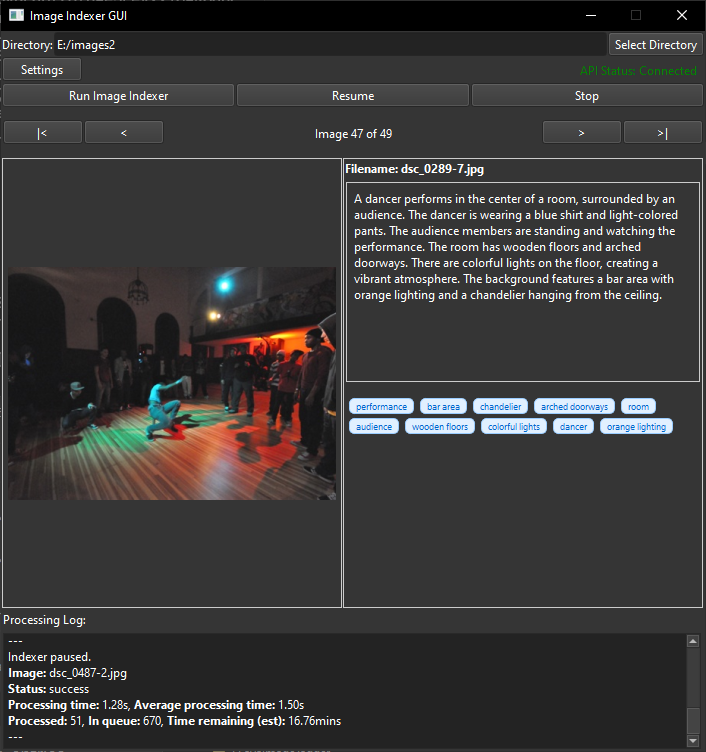
LLMII is a cross-platform desktop tool for photographers who want AI-powered image tagging without cloud uploads. It bundles KoboldCPP as a local inference backend, downloads a vision-language model on first run, and uses ExifTool to embed generated captions and keywords into each image's metadata or an XMP sidecar. The GUI lets you choose one-step or two-step processing, adjust sampler settings, skip folders, reprocess failures, and review results in an image viewer. All processing happens locally on Windows, macOS, or Linux; a discrete GPU with 8 GB VRAM is recommended for usable speed. Licensed GPL-3.0 with no paid tiers.
Should you self-host LLMII (ImageIndexer)?
LLMII (ImageIndexer) scores 43/100 on selfhost.directory (how scoring works) and ranks #35 of 41 in Photo Management. It has 397 GitHub stars.
There was no stable release in the past 12 months, so check the repository's recent activity before you rely on it.
Setup is moderate: expect some configuration beyond a single command. It is GPL-3.0-licensed and written mostly in Python.
Its closest alternative on selfhost.directory is Ente (81/100, 29 693 stars). It scores higher overall, so compare the two before you pick. See LLMII (ImageIndexer) vs Ente side by side.
Features
- Automatic model download
- Cross-platform
- Fully local processing
- GPU Acceleration
- Graphical user interface
- Highly Configurable
- Image review viewer
- Local AI image analysis
- Metadata Embedding
- Multi-format Support
- Multiple model support
- One or two-step processing
- Pretend mode
- Resume capability
- Sidecar file option
LLMII (ImageIndexer) README
More in Image Processing
 MazanokeSelf-hosted, open-source image optimizer that compresses, resizes and converts JPG, PNG, WebP, HEIC and more entirely on-device, with offline PWA use and EXIF stripping.
 moocupMoocup is a self-hosted, open-source visual editor that lets you drop a screenshot, apply styles and background gradients, and export polished mockups in seconds.
 next-image-transformationOpen-source, self-hosted image optimization service that replaces Vercel's Next.js image optimization, forwarding resize, crop and quality requests to Imgproxy.
 openinaryOpen-source, self-hosted Cloudinary alternative for on-the-fly image/video transforms, S3 storage, and edge caching — run via Docker.
 PictSharePictShare is a self-hosted, open-source media hosting service for images, GIFs, MP4s, audio, and text bins with a simple upload API and no database required.
 pi-timoloSelf-hosted Raspberry Pi security monitoring using picamera and OpenCV. Creates timelapse videos, motion tracking, and low-light night vision images with rclone sync.
 RembgOpen-source, self-hosted background remover: a Python library, CLI and HTTP server that cuts subjects out of images using switchable ONNX models.
 ReubahSelf-hosted web tool for converting documents and processing images with support for multiple formats including JPG, PNG, WebP, PDF, DOCX, and more.
 SnapOtterOpen-source, self-hosted file-processing suite with 200+ image, video, audio, PDF and document tools, local AI, a REST API and pipelines.
 social-image-serverSelf-hosted server that auto-generates unique Open Graph images for every page using headless Chrome. Supports URL capture and custom templates.
 ThumborSelf-hosted, open-source imaging server that crops, resizes and filters photos on demand with AI face-aware detection and WebP/AVIF output; runs via pip or Docker.
 unbagrndUnbagrnd - Free, Fast & Open-source AI-powered background remover for Windows, macOS, Linux and Android.
0 comments