
Self-host golembot
v0.51.1Connect coding agents to chat with any LLM provider
- Stars
- 325
- Port
- 3000 (HTTP gateway service and web dashboard)
What is golembot?
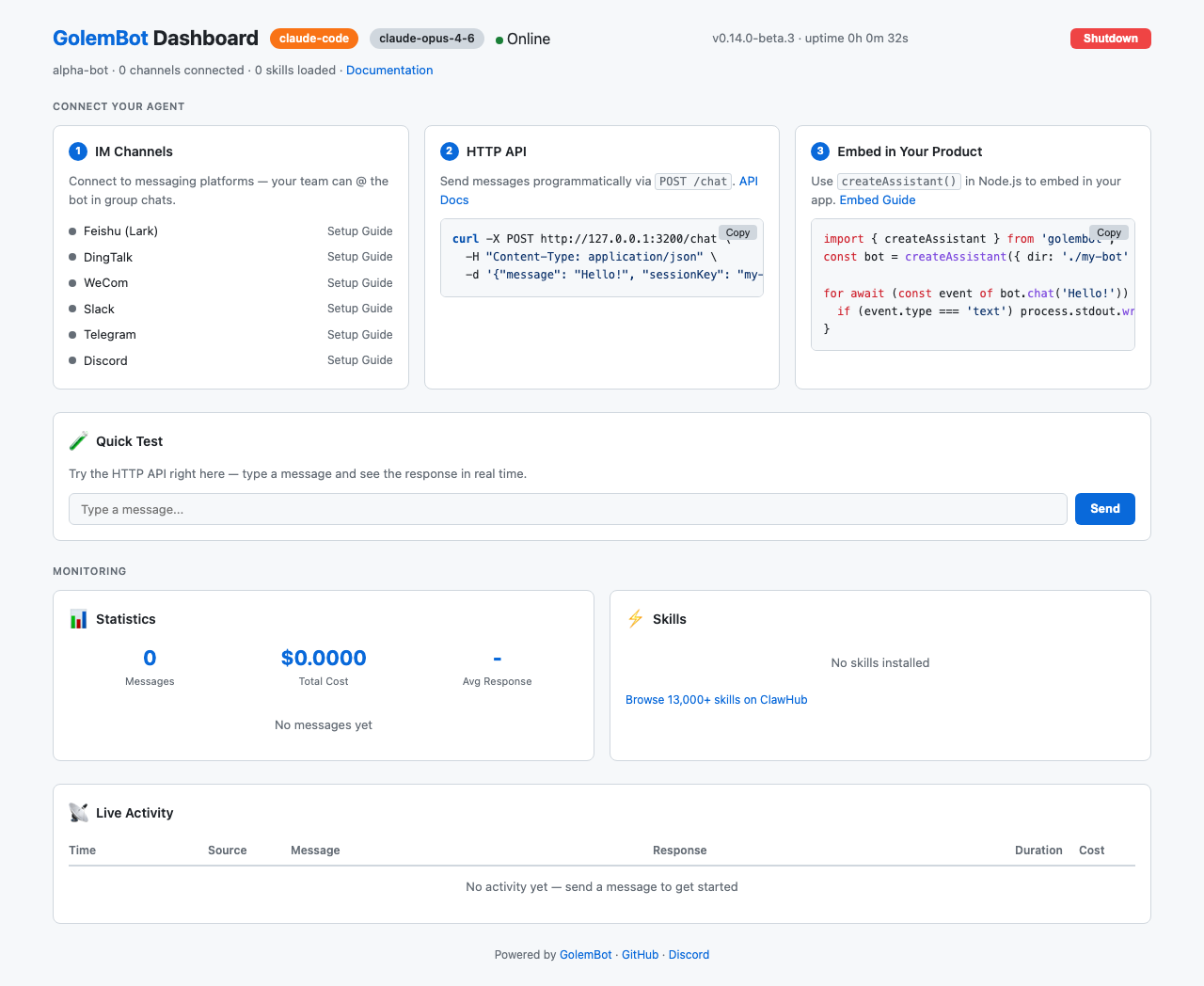
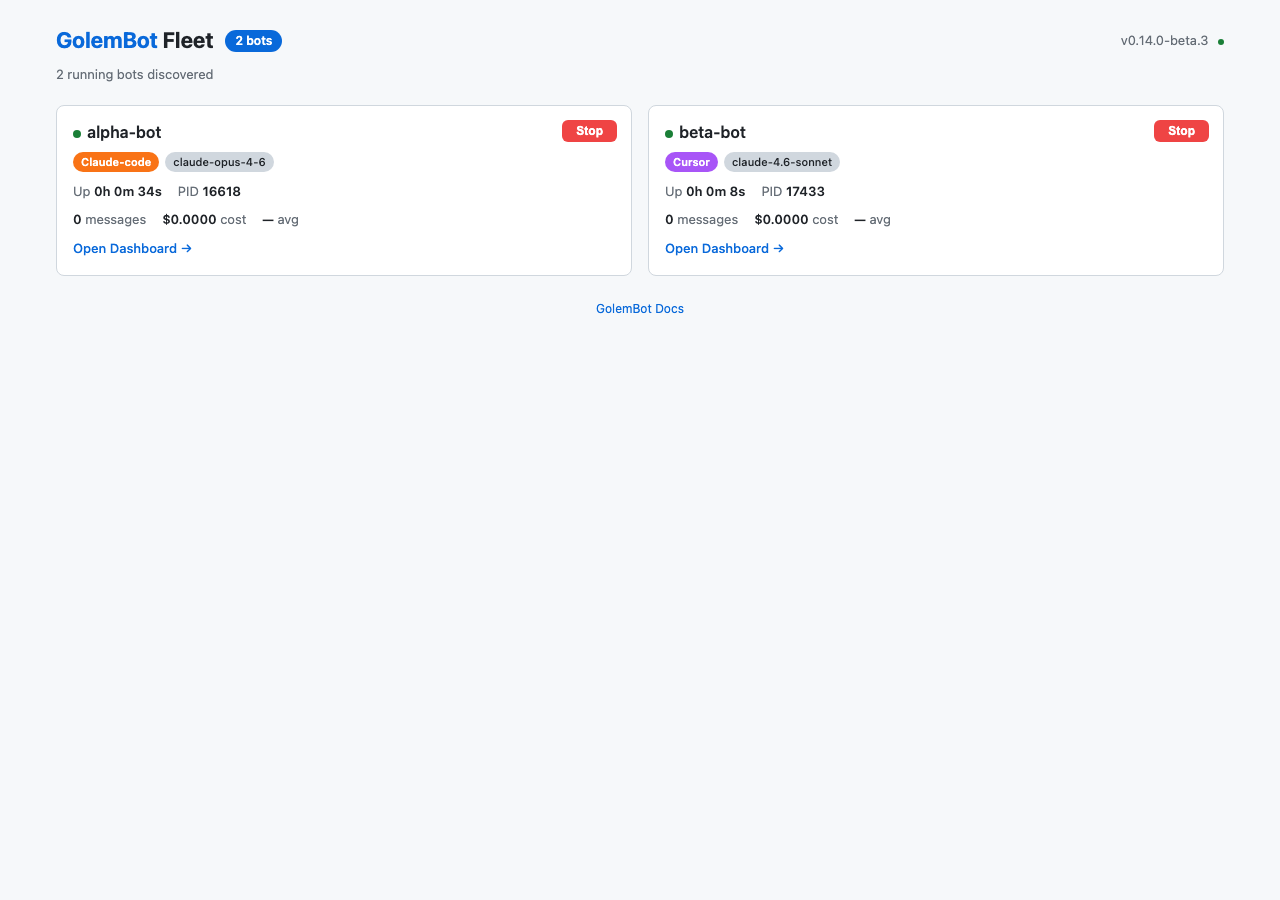
GolemBot wraps your coding agent so it can operate in team chat and HTTP endpoints. Four engines are supported and each can be routed through any compatible LLM provider with one config block. The gateway connects to seven messaging platforms without a public IP, using WebSocket or polling. A built-in web dashboard shows metrics and channel status; a fleet dashboard manages multiple bots. A modular skill system works with thousands of community skills. Scheduled tasks run on cron syntax. Persistent message queues survive crashes and catch up on missed messages. A TypeScript library lets you embed the assistant in your own Node.js apps. Configuration is a single golem.yaml file with environment variable substitution. Requires Node.js 18+ and the chosen coding agent command-line tool installed and authenticated.
Should you self-host golembot?
golembot scores 52/100 on selfhost.directory (how scoring works) and ranks #30 of 120 in AI Assistant. It has 325 GitHub stars.
It shipped 16 stable releases in the past year. The latest, v0.51.1, came out on 25 October 2026. New versions land roughly every 9 days.
Setup is moderate: expect some configuration beyond a single command. It is MIT-licensed and written mostly in Typescript.
Its closest alternative on selfhost.directory is hermes-agent (89/100, 257 957 stars). It scores higher overall, so compare the two before you pick. See golembot vs hermes-agent side by side.
Features
- Fleet dashboard
- Group Chat Support
- HTTP API with SSE
- IM platform connectors
- Library embedding
- Multi-Engine Support
- Persistent message queue
- Provider routing
- Scheduled Tasks
- Session Management
- Skill System
- Streaming message delivery
- Task cancellation
- Web Dashboard
golembot README
FAQ
Where are logs stored?
GolemBot does not maintain log files. Engine output is streamed directly. Use --verbose with golembot gateway for per-channel debug output on stderr.
How do I check if everything is set up correctly?
Run 'golembot doctor' which checks Node.js version, golem.yaml, engine binary, API keys, and skills.
Can Feishu/DingTalk/WeCom work behind NAT?
Yes. All three use outbound WebSocket connections — no public IP or port forwarding required.
Why is CLAUDE.md a symlink to AGENTS.md?
Claude Code reads CLAUDE.md for project-level instructions. GolemBot generates AGENTS.md (listing skills, conventions) and symlinks CLAUDE.md to it so both files stay in sync without maintaining two files.
How do I add a custom skill?
Create a directory under skills/ containing a SKILL.md file with YAML frontmatter (name + description). That's it.
Can I use GolemBot without the CLI?
Yes. GolemBot's core is an importable TypeScript library: import { createAssistant } from 'golembot'; const assistant = createAssistant({ dir: './my-bot' }); The CLI is just one consumer of this library.
Can multiple users share one assistant?
Yes. Use different sessionKey values for each user. Same-key calls are serialized; different-key calls run in parallel. The gateway handles this automatically for IM channels using channelType:chatId:senderId as the session key.
How does session management work?
Each sessionKey maps to an independent engine session stored in .golem/sessions.json. The default session key is 'default'. Sessions resume automatically via engine-native flags. If resume fails, a new session starts transparently. Use /reset in REPL or assistant.resetSession() to clear manually.
How do I set API keys?
Each engine uses its own environment variable: CURSOR_API_KEY for Cursor, ANTHROPIC_API_KEY for Claude Code, provider-dependent for OpenCode, and CODEX_API_KEY (or codex login) for Codex. Place them in a .env file in the assistant directory.
Which engine should I choose?
Cursor if you already use Cursor IDE; Claude Code for best overall experience with cost tracking; OpenCode for multi-provider flexibility; Codex if you prefer OpenAI models with ChatGPT OAuth or API key.
More in Chat
 gomuksSelf-hosted, open-source Matrix client in Go with split backend/frontend design for web, terminal, desktop, and Android.
 gowaOpen-source, self-hosted WhatsApp gateway in Go: a REST API plus web dashboard, multi-account support, signed webhooks, scheduled sends, and an MCP endpoint.
 gramsrvgramsrv is a self-hosted, open-source MTProto server in Go for running a Telegram-compatible backend with real clients. Supports monolith and microservice architectures.
 GrixGrix is a self-hosted messaging platform that turns AI coding agents into chat contacts for cross-device coordination with shared context and voice support.
 guptSelf-hosted, end-to-end encrypted messenger and privacy suite with no phone number or central server — runs in the browser on a decentralized Nostr relay network.
 hannaHanna is a self-hosted Go IRC bot with TLS, a token-authenticated REST API, and n8n integration for workflow automation.
 hermes-agentSelf-hosted open-source AI agent that learns from experience, creates skills, runs on Telegram, Discord, Slack, CLI — MIT licensed.
 hermes-agent-with-webuiHermes WebUI is a self-hosted, open-source web interface for the Hermes Agent with persistent memory, scheduled jobs, and multi-device access. Runs on Python 3.11+.
 hermesclawSelf-hosted Python proxy running Hermes Agent, OpenClaw, and OpenCode on one WeChat account via iLink polling, local proxies, and ACP bridge.
 hermes-uiSelf-hosted web UI for Hermes Agent AI assistant. Single HTML file with Python proxy, featuring chat, file browser, task board, skills, MCP tools, and three themes.
 HulyOpen-source all-in-one platform combining project management, chat, CRM, HR and ATS; self-hosted via the official Docker Compose stack now that hosted Huly is shut down.
 hydrogen-webA self-hosted Matrix messaging client emphasizing speed, offline access, and wide browser support. Runs as static files or in Docker.
0 comments