
Self-host FeedCraft
v3.2.0RSS middleware with AI translation and full-text extraction
- Stars
- 313
- Port
- 80 (HTTP web interface and API)
- Requires
- Redis
ghcr.io/colin-xkl/feed-craft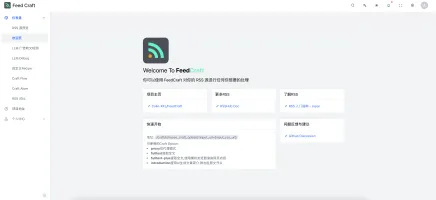
What is FeedCraft?
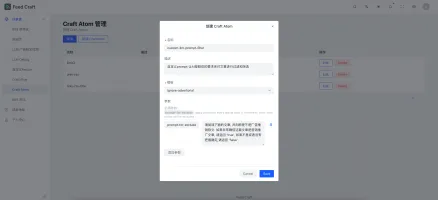
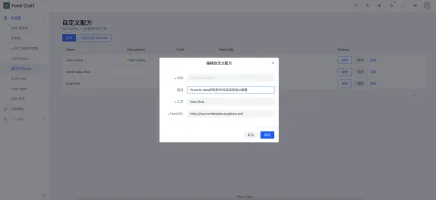
FeedCraft is a self-hosted RSS feed processing middleware that sits between your RSS sources and your reader. It extracts full article text (including JavaScript-rendered pages via a headless browser), translates titles and content using OpenAI-compatible LLMs, generates AI summaries and introductions, filters out advertorials, and limits feed length. It also includes a visual RSS generator that converts web pages, JSON APIs, or search queries into RSS feeds. You run it via Docker Compose with Redis for caching and optionally Browserless or CloakBrowser for browser-based extraction. The admin dashboard (default admin/adminadmin) lets you create custom AtomCrafts, FlowCrafts, and Recipes. The project is licensed under GPL-3.0 and actively maintained.
Should you self-host FeedCraft?
FeedCraft scores 49/100 on selfhost.directory (how scoring works) and ranks #32 of 85 in Feed Reader. It has 313 GitHub stars.
It shipped 3 stable releases in the past year. The latest, v3.2.0, came out on 30 August 2026. New versions land roughly every 4 months.
Setup is moderate: expect some configuration beyond a single command. An official Docker image is available. It is GPL-3.0-licensed and written mostly in Go.
Its closest alternative on selfhost.directory is RSSHub (85/100, 46 704 stars). It scores higher overall, so compare the two before you pick. See FeedCraft vs RSSHub side by side.
Features
- Admin DashboardDefault credentials admin/adminadmin
- AI content filtering
- AI Summarization
- AI Translation
- Custom AtomCrafts and FlowCrafts
- Dock mode (advanced)
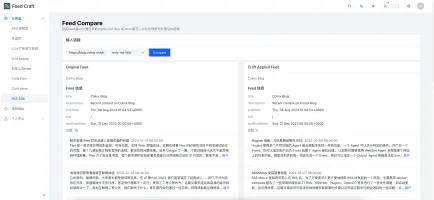
- Feed comparison tool
- Full-Text Extractionfulltext-plus requires Browserless or CloakBrowser
- HTML/JSON/Search to RSS generator
- Multi-model LLM support
- Portable mode
- Recipe system
- RSS feed middleware
- RSS viewer and debug tools
FeedCraft README
More in RSS
 feedlynxFeedlynx is a self-hosted, open-source read-later service generating an Atom feed for RSS readers. Runs as a lightweight Rust binary with Docker support.
 FeedMeSelf-hosted RSS reader that aggregates feeds from multiple sources and uses LLMs to generate article summaries, deployable via Docker, GitHub Pages, or Vercel.
 FeedReaderA self-hosted RSS and ATOM feed aggregator with a minimal web UI, Fever API compatibility for mainstream RSS clients, and OPML import/export.
 FlexGetSelf-hosted, open-source media automation tool that reads RSS, HTML and CSV sources to fetch series, movies and podcasts for torrent and NZB clients.
 FreshRSSOpen-source, self-hosted feed reader: multi-user RSS/Atom aggregation with WebSub push, XPath scraping of pages without feeds, OPML import/export and mobile app APIs.
 html2rssSelf-hosted web app turning webpages into RSS/JSON feeds. Paste a URL, get a feed instantly with a JS scraper. Includes Feed Directory and custom YAML support.
 kindly-rss-readerSelf-hosted RSS/Atom feed aggregator for e-ink devices like Kindle, optimized for low-end hardware. Runs via Docker with dark/light themes.
 liuliSelf-hosted, open-source reading pipeline that collects WeChat accounts, novels and blogs, then pushes cleaned articles to DingTalk, WeCom, Telegram, Bark or RSS.
 MinifluxSelf-hosted, open-source RSS/Atom feed reader in Go: one static binary plus PostgreSQL, full-text search, OPML import, and privacy-focused link cleaning.
 miniflux-phpMiniflux is a minimalist, self-hosted, open-source RSS reader with a clean web interface, multiple user support, themes, and API access for mobile apps.
 mkfdSelf-hosted, open-source tool that builds RSS feeds from websites, email inboxes, APIs and other sources without native feeds. Runs in Docker or via Bun.
 monitorss-botOpen-source Discord bot delivering RSS, YouTube, and Reddit feeds to channels with filtering and custom formats. Self-hosted via Docker Compose with unlimited feeds.
0 comments