
Self-host ExerciseDiary
0.1.9Workout tracker with GitHub-style activity heatmap
- Stars
- 472
- Port
- 8851 (Web GUI)
aceberg/exercisediary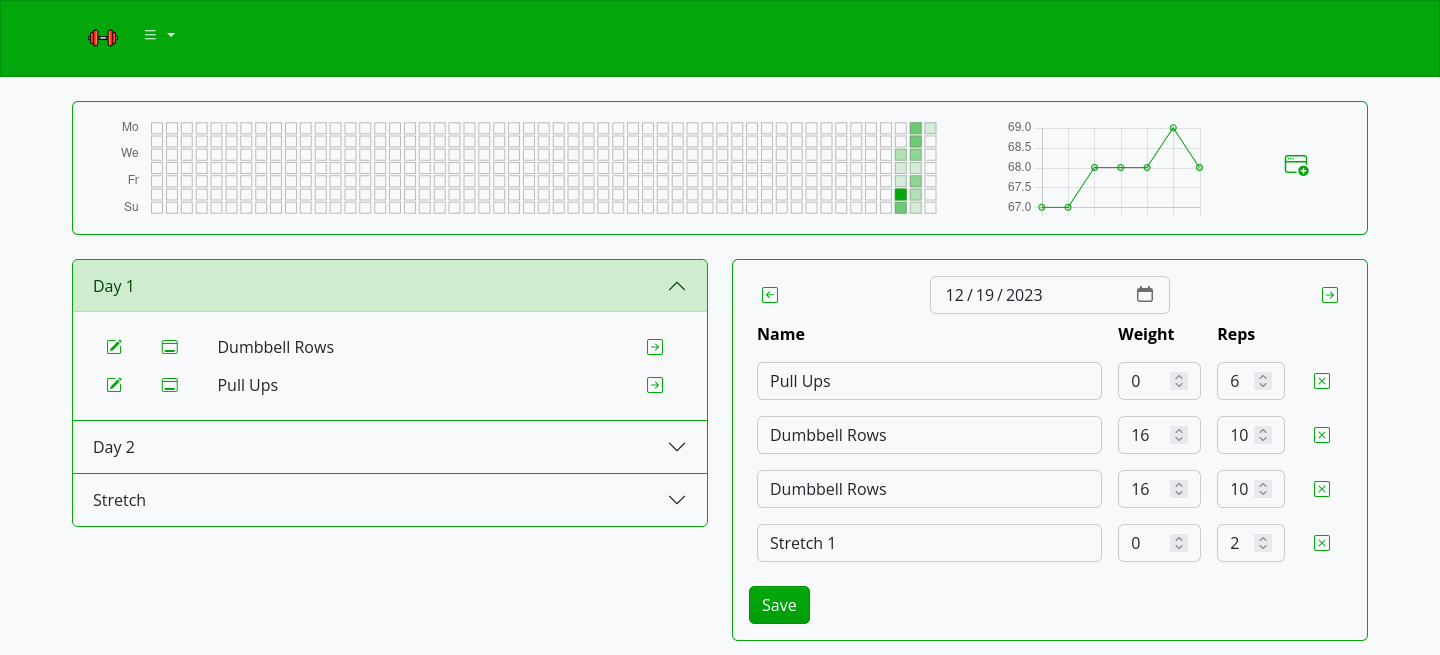
What is ExerciseDiary?
Exercise Diary is a self-hosted workout tracking application that visualizes your exercise history in a GitHub-style contribution heatmap. It supports logging workouts with categories, tracking body weight over time with charts, and viewing statistics. The web interface offers multiple Bootswatch themes and a configurable light/dark color mode. Authentication is optional via session cookies with bcrypt password hashing. It runs as a single Go binary, available as a Docker image (aceberg/exercisediary) or downloadable binaries (including a .deb package via PPA). Configuration uses environment variables or a config.yaml file. The project is pre-1.0 (version 0.1.9) with a roadmap showing core features complete and PostgreSQL support planned.
Should you self-host ExerciseDiary?
ExerciseDiary scores 46/100 on selfhost.directory (how scoring works) and ranks #10 of 11 in Fitness Tracker. It has 472 GitHub stars.
There was no stable release in the past 12 months, so check the repository's recent activity before you rely on it.
Setup is easy: most people get it running in one sitting. An official Docker image is available. It is MIT-licensed and written mostly in Go.
Its closest alternative on selfhost.directory is openGym (81/100, 16 965 stars). It scores higher overall, so compare the two before you pick. See ExerciseDiary vs openGym side by side.
Features
- Activity Heatmap
- Authentication
- Body-weight tracking
- Local network mode
- Statistics Page
- Workout Logging
ExerciseDiary README
More in Fitness Tracker
 OpenAthleteOpenAthlete is a self-hosted, open-source endurance training platform tracking workouts, CTL/ATL/TSB metrics, syncing with Strava, Garmin, Polar, Suunto.
 openGymOpen-source, self-hosted gym and body-weight tracker: plan weekly routines, log guided workouts over 5,600 exercises, sync devices via passkeys, one docker compose up.
 ryotRoll your own tracker!
 SparkyFitnessSelf-hosted, privacy-first fitness tracking platform with nutrition, exercise, sleep, and cycle tracking plus AI coaching. Alternative to MyFitnessPal.
 tempoSelf-hosted running tracker importing GPX, FIT, CSV from Garmin, Apple Watch, Strava. Workout analytics, maps, heart rate zones, shoe tracking, local data.
 wgerSelf-hosted, open-source web app for workout routines, diet plans and weight tracking, with an exercise wiki, REST API and Android/iOS apps syncing via PowerSync.
 WingfitSelf-hosted fitness app to plan workouts, track personal records, and integrate Whoop/Apple Watch data with OIDC auth and privacy-first approach.
 Workout.coolSelf-hosted, open-source fitness coaching platform to build workout plans, log progress and browse a video exercise database, deployed with Docker Compose and PostgreSQL.
 workout.lolSelf-hosted web app to create personalized workout routines by selecting available equipment and target muscles. Open-source, uses Next.js and MongoDB.
 workout-trackerA self-hosted, open-source workout tracker for running and other GPX-based activities: upload GPX/TCX/FIT files, maps, stats, heatmap, multi-user.
 EndurainSelf-hosted, open-source training log for workouts, equipment and wellness data; a privacy-focused Strava alternative with Garmin sync, GPX/TCX/FIT imports, MFA and SSO.
0 comments