
Self-host DumbKan
Lightweight Kanban board with drag-and-drop and dark mode
- Stars
- 181
- Port
- 3000 (HTTP server)
dumbwareio/dumbkan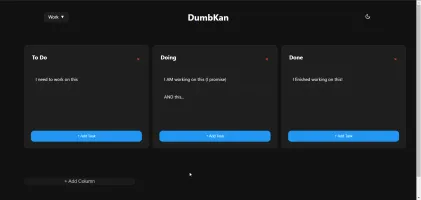
What is DumbKan?
DumbKan is a simple, self-hosted Kanban board application. It lets users create multiple boards, each with customizable columns, and manage tasks through drag-and-drop on desktop or touch gestures on mobile. The UI supports light and dark modes with system theme detection and persists the choice across sessions. Data is stored in a local JSON file, so no database is required. Optional PIN protection (4–10 digits) can restrict access. The project provides a Docker image (dumbwareio/dumbkan) and a local npm install method. It is licensed under GPL-3.0 and has no formal releases yet; the latest code was pushed in June 2025.
Should you self-host DumbKan?
DumbKan scores 41/100 on selfhost.directory (how scoring works) and ranks #27 of 34 in Task Management. It has 181 GitHub stars.
There was no stable release in the past 12 months, so check the repository's recent activity before you rely on it.
Setup is easy: most people get it running in one sitting. An official Docker image is available. It is GPL-3.0-licensed and written mostly in JavaScript.
Its closest alternative on selfhost.directory is Super Productivity (83/100, 23 213 stars). It scores higher overall, so compare the two before you pick. See DumbKan vs Super Productivity side by side.
Features
- Custom Columns
- File-based persistence
- Multiple boards
- PIN protection
- Task Management
DumbKan README
More in Project Management
 EGroupwareEGroupware is a self-hosted open-source collaboration suite from Germany with email, calendar, contacts, tasks, projects, CRM, chat, and documents. Free CE or paid EPL.
 eigenfocusEigenfocus is a self-hosted project management tool with boards, timeline, grid, list views and time tracking — alternative to Jira and Trello without per-user fees.
 erxesSelf-hosted, open-source Experience Operating System unifying marketing, sales, support and operations with plugins and federated GraphQL.
 Ever GauzySelf-hosted open-source ERP/CRM/HRM/ATS/PM platform with time tracking, invoicing, project management, employee monitoring, and desktop apps for Windows, Mac, and Linux.
 ever-teamsSelf-hosted, open-source work and project management platform with time tracking, productivity metrics, team management, and integrations for GitHub, GitLab, Jira.
 fizzyA kanban tool for tracking issues and ideas from 37signals — entirely free hosted, or self-hosted via the ONCE installer, a Docker image, or Kamal.
 FocalboardOpen-source, self-hosted kanban and project boards with table, calendar and gallery views for Trello or Notion users; the standalone repo is now unmaintained.
- FossilFossil SCM is a simple, high-reliability, distributed version control system with built-in wiki, bug tracking, forum, chat, and project management. It is a single self-contained executable, easy to install and self-host.
 GiteaGitea is a self-hosted, open-source Git platform with code hosting, CI/CD, package registries, issues, and project management — a lightweight GitHub alternative.
 GitLab-CESelf-hosted, open-source DevOps platform for Git repositories, merge requests, CI/CD pipelines, issue boards and wikis, with free CE and paid Premium/Ultimate tiers.
 HulyOpen-source all-in-one platform combining project management, chat, CRM, HR and ATS; self-hosted via the official Docker Compose stack now that hosted Huly is shut down.
 IdeonIdeon is a self-hosted, open-source visual workspace where notes, links, files and Git repos share one infinite canvas, with real-time multiplayer and Git sync.
0 comments