
Self-host PairDrop
v1.11.2AirDrop-style browser file transfer over LAN or internet
docker run -d --restart=unless-stopped --name=pairdrop -p 127.0.0.1:3000:3000 lscr.io/linuxserver/pairdrop- Stars
- 11 767
- Port
- 3000 (PairDrop web UI / Node.js server)
ghcr.io/schlagmichdoch/pairdrop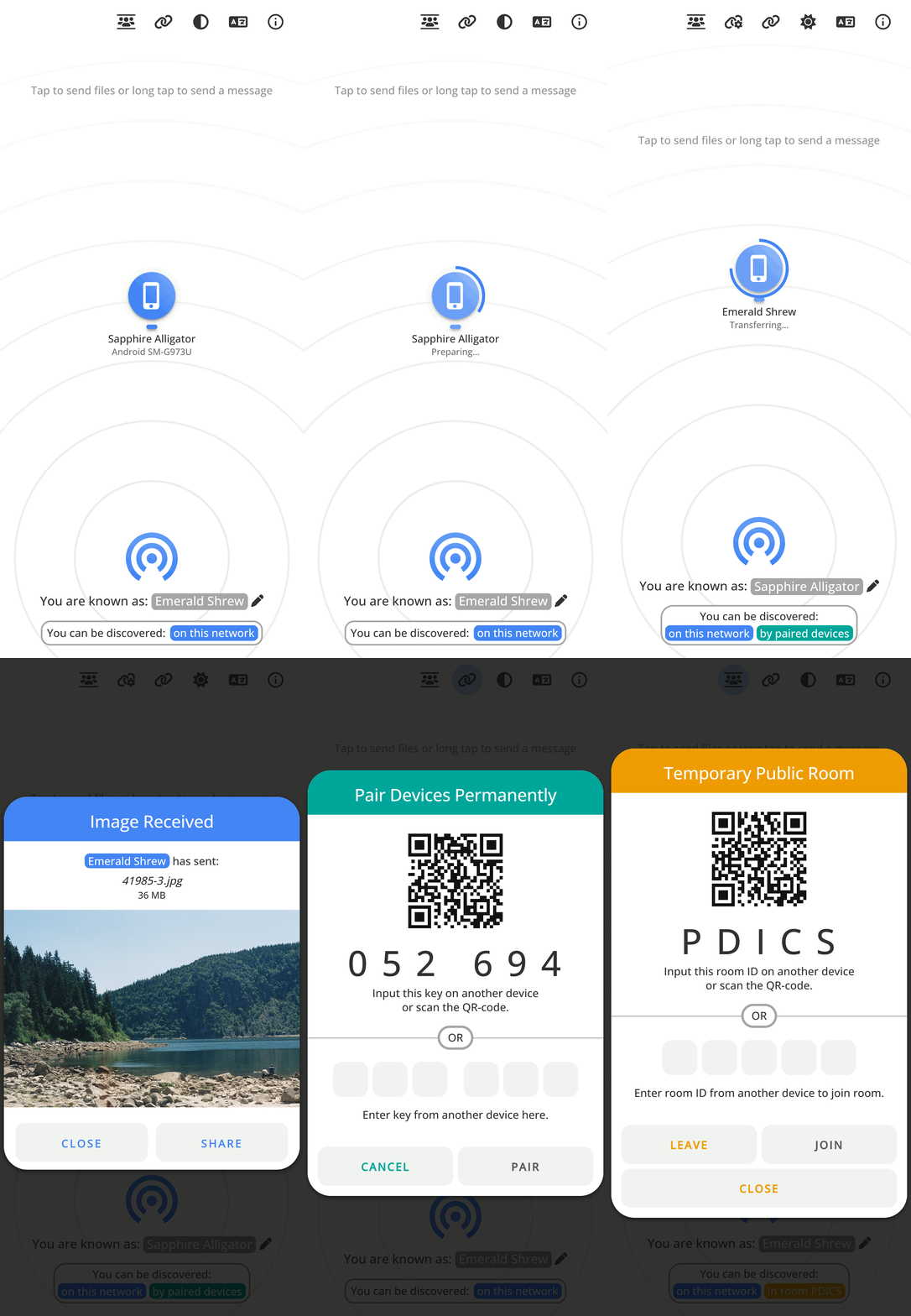
What is PairDrop?
PairDrop is a libre file-sharing web app inspired by Apple's AirDrop and maintained as a fork of Snapdrop. Opening the web app shows the other machines on your own network, and images, documents or plain text then travel straight between them over a WebRTC peer connection, with no accounts and nothing to install. Beyond the LAN it adds persistent device pairing through a six-digit code or QR code and temporary public rooms reached by a five-letter code, so devices behind different NATs can still exchange files, using a TURN server for relaying. The receive flow auto-downloads accepted files, bundles several of them into one ZIP, and offers share, save-to-gallery and media-preview options; it also hooks into the Android/iOS share sheet, the Windows and Ubuntu context menu, and a small command-line helper. There is no login system and the server stores no files and runs without a database. Self-hosting is documented as a Docker or ghcr.io container, a Docker Compose example, or a plain Node.js install listening on port 3000 behind a proxy that sets the X-Forwarded-For header; an optional coturn TURN service can be deployed alongside for internet transfers, and HTTPS is needed for PWA install and pairing.
PairDrop alternatives
 quickdropQuickDrop is an open-source, self-hosted file sharing app with pastebin and URL shortener. Chunked uploads, per-file encryption, expiring share links.Comparequickdrop with PairDrop
 DashBeamOpen-source P2P file transfer tool with self-hosted relay and discovery servers; direct device-to-device over QUIC + TLS 1.3, on desktop, Android, CLI and web.CompareDashBeam with PairDrop
 DropgateSelf-hosted file sharing with hosted uploads, P2P transfers, E2EE, web UI, desktop client, and TypeScript library.CompareDropgate with PairDrop
 Transfer.zipTransfer.zip is a self-hosted, open-source WeTransfer alternative with end-to-end encrypted P2P transfers, no size limits, and resumable stored transfers via tus.CompareTransfer.zip with PairDrop
 AirpipeSelf-hosted, open-source file transfer tool that streams files directly between devices using a shared passphrase with end-to-end encryption.CompareAirpipe with PairDrop
 PlikShareOpen-source self-hosted file sharing with unlimited users, multiple storage backends, three encryption modes, OIDC SSO, TOTP 2FA, sharing boxes, and MCP for AI agents.ComparePlikShare with PairDrop
 pingvin-share-xOpen-source self-hosted file sharing platform and WeTransfer alternative with link sharing, expiration, passwords, ClamAV scanning, S3 support, and OIDC/LDAP auth.Comparepingvin-share-x with PairDrop
 airdcpp-webclientSelf-hosted P2P file sharing via Advanced Direct Connect with a responsive web UI for NAS and servers.Compareairdcpp-webclient with PairDrop
All self-hosted alternatives to Apple Airdrop → All self-hosted alternatives to Snapdrop →
Should you self-host PairDrop?
PairDrop scores 74/100 on selfhost.directory (how scoring works) and ranks #2 of 90 in File Sharing. It has 11 767 GitHub stars, +246 in the last 30 days.
There was no stable release in the past 12 months, so check the repository's recent activity before you rely on it.
Setup is easy: most people get it running in one sitting. An official Docker image is available. It is GPL-3.0-licensed and written mostly in JavaScript.
Its closest alternative on selfhost.directory is copyparty (82/100, 47 274 stars). It scores higher overall, so compare the two before you pick. See PairDrop vs copyparty side by side.
Features
- Command-line sending
- Custom display name
- Internet transfers via TURNSelf-hosters must run their own TURN server to enable transfers between different networks.
- Local network device auto-discovery
- Multi-file ZIP download
- Multiple browser tabs
- No-account browser sharing
- No server-side storage
- Paste then choose recipient
- Peer-to-peer file transfer
- Persistent device pairing
- Temporary public rooms
- Video and audio preview
PairDrop README

Send it, with PairDrop
Local file sharing in your web browser.
Inspired by Apple's AirDrop.
Fork of Snapdrop.
Report a bug
Request feature
File sharing on your local network that works on all platforms.
- A multi-platform AirDrop-like solution that works.
- Send images, documents or text via peer-to-peer connection to devices on the same local network.
- Internet transfers
- Join temporary public rooms to transfer files easily over the Internet.
- Web-app
- Works on all devices with a modern web-browser.
FAQ
How does it work?
The technical documentation in the repository describes the implementation.
PairDrop is awesome. How can I support it?
Donate via Buy Me a Coffee to cover the domain and server, file bugs and issues, open pull requests, share it, or join the GitHub discussions.
Why don't you implement feature xyz?
The project focuses on radical simplicity and a single use case, instant file transfer, so feature requests may be declined.
Transferring many files with paired devices takes too long
Relaying through the TURN server slows transfers; opening a hotspot on one device bridges the connection so data goes directly between devices.
What about security? Are my files encrypted while sent between the computers?
Yes, WebRTC encrypts the transfer in transit, but you still have to trust the PairDrop server; making it zero-trust is a plan, not a shipped feature.
What about privacy? Will files be saved on third-party servers?
No. Files are sent directly between peers and PairDrop uses no database; on the same network nothing is ever sent to a server, though paired NAT-hidden devices route through the TURN server.
What about the connection? Is it a P2P connection directly from device to device or is there any third-party-server?
Files travel over a WebRTC peer-to-peer connection; the server is only used for signaling. Paired devices behind NAT are relayed by the TURN server.
Are there any third-party Apps?
A Snapdrop Android app and a Snapdrop Firefox add-on are listed as compatible with PairDrop.
Is it possible to send files or text directly from the "Context" or "Share" menu?
Yes, with documented setup for the Windows context menu, the iOS share menu and the Android share menu.
How to save images directly to the gallery on iOS?
This was an iOS bug that is fixed in recent iOS versions, so images can simply be saved with Save Image; a shortcut exists for older affected versions.
Shortcuts?
CTRL + ENTER sends a message, Esc closes the send/pair dialogs, CTRL/⌘ + C copies a received message, Enter accepts a file request and Esc declines it.
More in File Sharing
 Palmr🌴 Palmr. is an open-source file-sharing platform focused on privacy and security. It enables users to upload, manage, and share files with features like password protection, custom links, and access control without tracking or limitations. Designed for seamless and secure sharing, Palmr. is completely free.
 Password Pusher🔐 Securely share sensitive information with automatic expiration & deletion after a set number of views or duration. Track who, what and when with full audit logs.
 pasteA self-hosted, open-source pastebin for anonymous multi-file pastes with syntax highlighting, visibility levels, expiry and a stable REST API.
 PatchySelf-hosted, open-source temporary file uploader written in Crystal that replaces Uguu, with expiring links, per-IP rate limits and an admin API.
 PicoShareA minimalist, easy-to-host service for sharing images and other files
 PicsurPicsur is a self-hosted, open-source image sharing service in the spirit of Imgur, with format conversion, image editing, expiring uploads and a ShareX endpoint.
 PictSharePictShare is a self-hosted, open-source media hosting service for images, GIFs, MP4s, audio, and text bins with a simple upload API and no database required.
- PlikShareOpen-source self-hosted file sharing with unlimited users, multiple storage backends, three encryption modes, OIDC SSO, TOTP 2FA, sharing boxes, and MCP for AI agents.
 privtrackerPrivTracker is a self-hosted private BitTorrent tracker. Open-source AGPL-3.0 software enabling isolated peer groups with custom announce URLs for secure file sharing.
 PrivyDropPrivyDrop is a self-hosted, open-source P2P file and clipboard sharing tool using WebRTC — no server relay, no accounts, no size limits, with resumable transfers.
 ProjectSendSelf-hosted, open-source client file sharing: each client gets a private portal, with expiring links, quotas, LDAP/2FA sign-in, S3 storage and a REST API.
 PsiTransferOpen-source, self-hosted file sharing: send big files with resumable uploads, no accounts, one-time links and password-protected download lists.
0 comments