
Self-host docker-controller-bot
v5.3.2Telegram bot to manage Docker containers from chat
docker compose up -d- Stars
- 261
dgongut/docker-controller-bot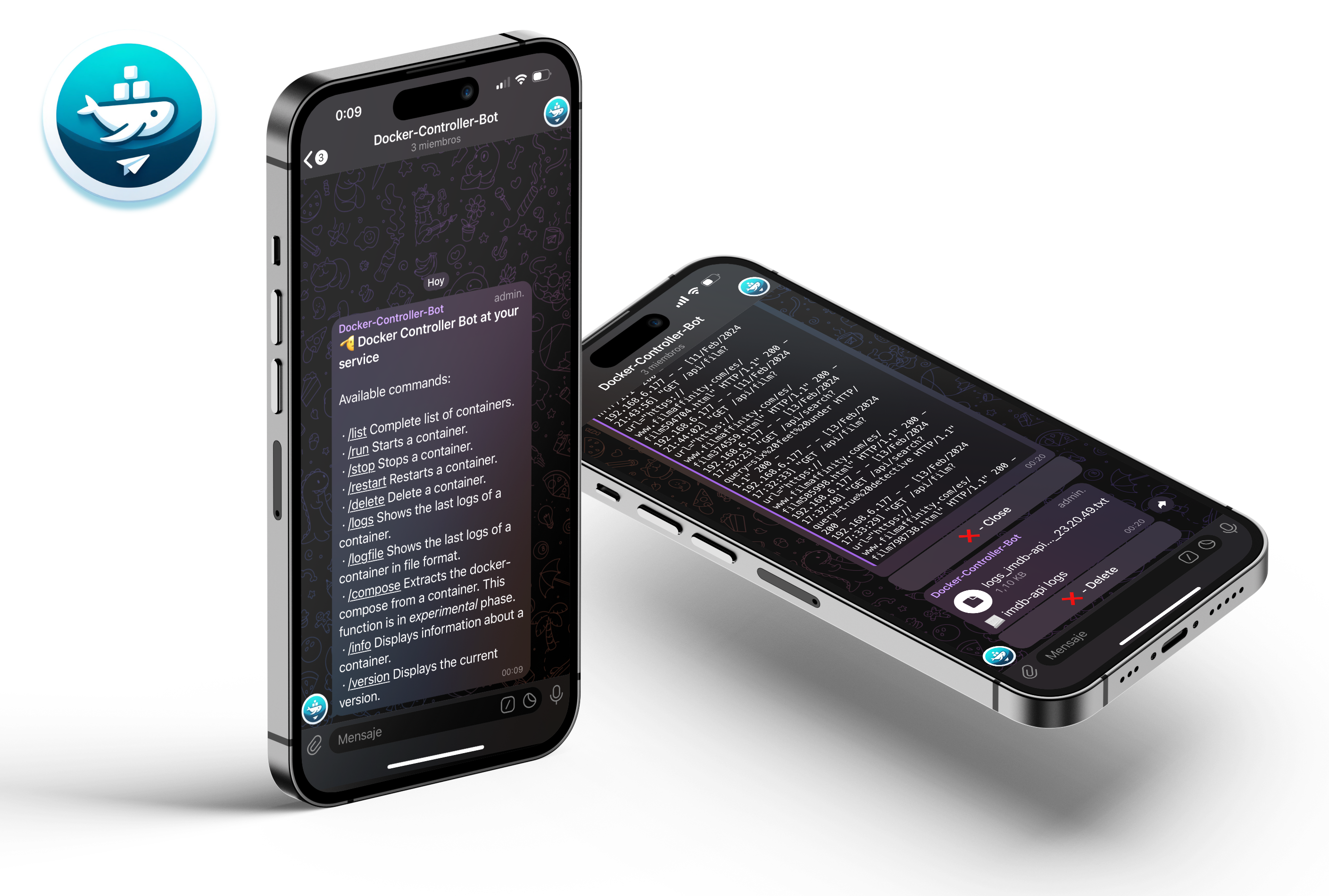
What is docker-controller-bot?
Docker-Controller-Bot is a Telegram bot you run on your own server to manage Docker containers and Docker Compose projects without leaving the chat. After creating a bot via BotFather and providing its token and your admin chat ID, you deploy the bot as a container with access to the Docker socket. It then presents an interactive button menu (/start) and commands like /list, /run, /stop, /restart, /delete, /logs, /exec, /checkupdate, /updateall, /changetag, /compose, /info, /ports, /prune, /mute, /schedule, and /settings. It automatically groups containers by Compose project, supports multiple remote Docker hosts over SSH or TCP, lets you schedule cron jobs for common actions, and stores all settings in a mapped volume so they persist across updates. The bot is multi-architecture (amd64, arm64, armv7) and available in eight languages. It sends optional anonymous usage statistics once daily, which can be disabled via TELEMETRY=false or from /settings.
Should you self-host docker-controller-bot?
docker-controller-bot scores 52/100 on selfhost.directory (how scoring works) and ranks #19 of 44 in Container Management. It has 261 GitHub stars.
It shipped 15 stable releases in the past year. The latest, v5.3.2, came out on 26 October 2026. New versions land roughly every 9 days.
Setup is moderate: expect some configuration beyond a single command. An official Docker image is available. It is GPL-3.0-licensed and written mostly in Python.
Its closest alternative on selfhost.directory is Portainer (77/100, 38 737 stars). It scores higher overall, so compare the two before you pick. See docker-controller-bot vs Portainer side by side.
Features
- Anonymous usage statisticsOptional, enabled by default
- Container diagnostics
- Container labels for update control
- Container Management
- Docker Compose project support
- In-chat settings
- Multi-host Docker management
- Multi-language Support
- Notification channel
- Port Management
- Scheduled Tasks
- Self-identification
- System cleanup
- Update notifications and management
docker-controller-bot README
FAQ
¿Cómo actualizo el propio bot?
Like any other container: via /checkupdate docker-controller-bot or /updateall. The bot launches an auxiliary updater container to avoid being left without a process mid-update. You can also enable auto-update for the bot itself via its /info or the DCB-Auto-Update label.
¿Desde dónde puedo manejar el bot?
From the private chat with the bot and from the group (or supergroup topic) configured in TELEGRAM_GROUP and TELEGRAM_THREAD. The bot always replies where you wrote to it. Any other chat is ignored even if the user is an admin.
Quiero usar tcp:// pero cifrado con TLS, ¿se puede?
Yes, but it's advanced and not considered necessary. It requires generating CA and certificates, configuring the Docker daemon with TLS, mapping certs to the bot container, and manually adding the host to settings.json with TLS config (requires container restart). SSH or a private mesh like Tailscale/WireGuard is recommended instead.
Un host aparece en 🔴 rojo, ¿qué hago?
Go to /settings → 🖥️ Hosts de Docker and click the host: it shows the exact failure reason and has a retry button. A down host doesn't break the rest — /list still works and shows responding hosts. Run 'ssh usuario@maquina docker version' from the bot machine to diagnose.
Tengo varios hosts, ¿cómo sé en qué máquina está cada contenedor?
With a single host, the host level doesn't appear anywhere. With two or more hosts, /list groups containers by machine with a header, each action message says which host it's from, and menus ask for the host first (unless only one has something to offer).
Si configuro el canal de notificaciones, ¿se duplican las notificaciones?
No. When a notification channel is set, container state change notifications (start, stop, crash, auto-updates) go only to that channel. Other messages like command results, menus, and update alerts with buttons always go to the chat where you invoked the command.
He creado mis contenedores con docker-compose y aparecen agrupados, ¿puedo gestionar uno solo?
Yes, when you enter a project you can see each container separately with its state and act on it individually. Global actions (start, stop, restart, delete the whole project) are also available as an extra button in the project menu.
He visto que se pueden añadir labels para controlar ciertas cosas de los contenedores, ¿cómo lo hago?
Two labels are supported: DCB-Ignore-Check-Updates to skip update checks for a container, and DCB-Auto-Update to make a container update automatically. These can be added in docker-compose.yml under the labels key, or configured via the bot's /info or /settings.
¿Puede el bot decirme de qué versión a qué versión se actualiza una imagen?
Yes, the bot shows version changes (e.g., 1.43.3 → 1.43.4) when the image provides version metadata via org.opencontainers.image.version label or environment variables like NGINX_VERSION, PG_VERSION. If the image doesn't declare its version, the update is still detected but shows date and digest instead.
More in Container Management
 DockerDiscordControlA self-hosted open-source Discord bot and web dashboard for managing Docker containers remotely — control, monitor, and automate from chat.
 Docker EngineMoby is an open-source framework from Docker providing a modular toolkit for building specialized container systems.
 docker-registry-uiSelf-hosted web UI for Docker registries with Trivy scanning, bulk cleanup, and multi-registry management.
 Docker-SentinelSelf-hosted, open-source container update orchestrator in Go replacing Watchtower with per-container policies, snapshots, rollback, and 11 notification providers.
 docker-socket-proxyHAProxy-based Docker Socket proxy that restricts service API access via environment variables, blocking dangerous operations and allowing essential endpoints by default.
 dockhandDockhand is a self-hosted Docker management platform with real-time container monitoring, Compose orchestration, Git deployments, and SSO. Free for homelabs under BSL 1.1
 Docking StationSelf-hosted web app for managing/updating Docker containers. Built with Next.js/FastAPI, discovers Compose stacks via labels, pulls updates with maturity period.
 DockmanA Docker management tool for homelabs providing direct access to Docker Compose files via web UI. Self-hostable open-source alternative to commercial container managers.
 DockpeekAn open-source, self-hosted Docker dashboard that opens container web UIs, streams logs, shows published ports, and checks image updates across multiple hosts and Swarm.
 dockserverDockServer is a self-hosted, open-source Docker management system that automates Traefik, Authelia, and 100+ apps via a menu-driven CLI on Ubuntu with Cloudflare.
 dockterminalSelf-hosted Docker dashboard with CRT aesthetic: compose stack management, live stats, browser shell, compose editor, AI diagnostics, streaming logs via Docker CLI.
 dockwatchSelf-hosted Docker container manager with web UI for updates, notifications (Notifiarr, Telegram, Mattermost), multi-host control, auto-restart, and orphan cleanup.
0 comments