
Self-host Calibre Web
0.6.27Web app for ebook libraries stored in a Calibre database
pip install calibreweb- Stars
- 18 559
- Port
- 8083 (HTTP port the Calibre-Web web UI and OPDS catalog (/opds) are served on; changeable in the admin Server Port setting.)
- Requires
- ImageMagick
janeczku/calibre-web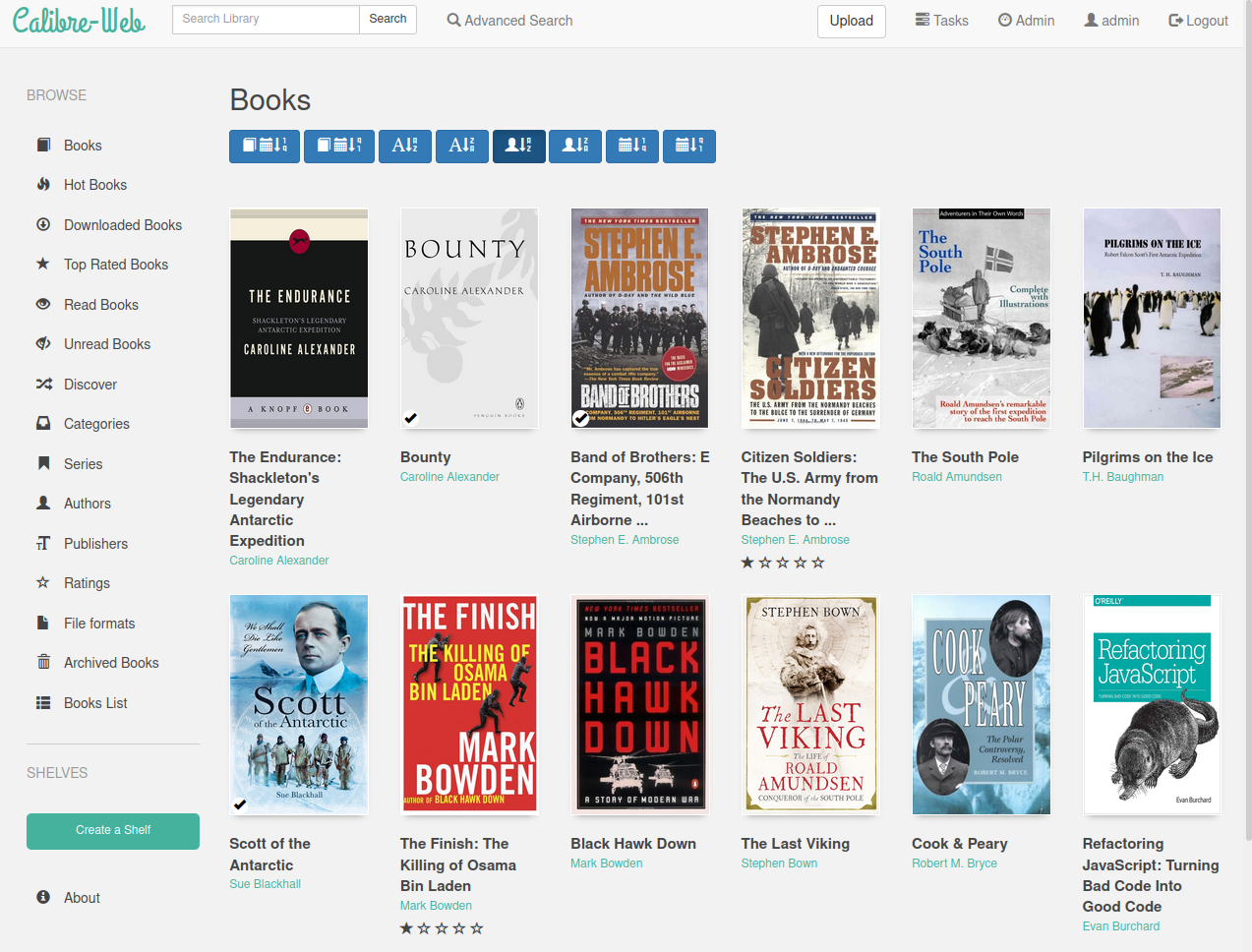
What is Calibre Web?
Calibre-Web is a Python web application that puts a browser interface on top of an existing Calibre library (metadata.db), so a collection can be browsed, read, downloaded and managed online. It offers in-browser reading of several formats, uploads in many formats including audiobooks, metadata editing and metadata fetching from online sources, and format conversion through the Calibre binaries. E-readers reach the collection through an OPDS catalog, with one-click sending to a device, Kobo device sync, and a "magic link" login for hardware where typing is awkward. Several people can share one instance: rights are set per user, public registration and anonymous browsing are optional, and books can be hidden from particular users via Calibre custom columns or tags. Login can also come from LDAP, Google or GitHub OAuth, or from an authenticating reverse proxy. Nearly everything is configured in the admin panel, from the library path to themes, logging and external binary locations. Self-hosting is simple: a pip install inside a virtual environment (Python 3.7 or newer, plus ImageMagick for cover extraction) or the published LinuxServer container listening on port 8083. The project is GPL v3 licensed, actively released, and grew out of an older Calibre web front-end.
Calibre Web alternatives
 KoShelfSelf-hosted web dashboard combining KOReader notes, highlights, and reading statistics with library browsing, in-app reader, calendar, and optional auth.CompareKoShelf with Calibre Web
 BookHavenBookHaven is a self-hosted, open-source EPUB reader that scans your local ebook library for reading and management in a responsive web UI with OPDS support.CompareBookHaven with Calibre Web
 grimmoryOpen-source self-hosted digital library for ebooks, comics, and audiobooks with a built-in browser reader, OPDS, Kobo and KOReader sync, and automatic metadata fetching.Comparegrimmory with Calibre Web
 bragibooksSelf-hosted web app for cleaning up and organizing audiobook libraries, with file merging, format conversion, and metadata fetching from Audible.Comparebragibooks with Calibre Web
 KavitaSelf-hosted, open-source reading server that organizes and serves your comics, manga, ebook and PDF collection with built-in readers, OPDS and OIDC multi-user logins.CompareKavita with Calibre Web
 BookLoreBookLore is a self-hosted, open-source digital library for EPUBs, PDFs and comics, offering smart shelves, automatic metadata, OPDS, Kobo sync, and a built-in reader.CompareBookLore with Calibre Web
 koodo-readerOpen-source, cross-platform ebook manager and reader you can self-host with Docker; reads EPUB, PDF, MOBI and CBZ, with notes, OPDS and cloud sync.Comparekoodo-reader with Calibre Web
 AudiobookshelfOpen-source, self-hosted media server for audiobooks and podcasts with on-the-fly audio streaming, progress syncing and podcast auto-downloads.CompareAudiobookshelf with Calibre Web
Should you self-host Calibre Web?
Calibre Web scores 77/100 on selfhost.directory (how scoring works) and ranks #2 of 9 in E-book Management. It has 18 559 GitHub stars, +202 in the last 30 days.
It shipped 2 stable releases in the past year. The latest, 0.6.27, came out on 8 August 2026. New versions land roughly every 6 months.
Setup is easy: most people get it running in one sitting. An official Docker image is available. It is GPL-3.0-licensed and written mostly in Fluent.
Its closest alternative on selfhost.directory is koodo-reader (78/100, 28 830 stars). It scores higher overall, so compare the two before you pick. See Calibre Web vs koodo-reader side by side.
Features
- Book Upload
- Content visibility restrictions
- eBook format conversionRequires the optional Calibre binaries / docker mod layer.
- In-browser eBook reader
- Kobo device sync
- Metadata Editing
- Metadata fetching from online sources
- Multilingual interface
- OPDS Catalog
- Public registration and anonymous browsing
- Search and filtering
- Self-update
- Send books to e-readers
- User management with per-user permissions
Calibre Web README
FAQ
Which picture formats are supported in the comic reader?
The comic reader handles jpg, jpeg, png, gif (non-animated) and svg images.
How to access a opds link for a given shelf
A shelf can be opened directly as an OPDS library at /opds/shelf/{shelf_id}, without a trailing slash.
How to handle Multiple Calibre Libraries?
The recommended approach is running one Calibre-Web instance per library, each with its own app.db and port, started with the -p command-line parameter.
What to do if cover pictures are not extracted from PDF files?
ImageMagick blocks PDF processing by default; change the PDF policy line in its policy.xml from rights="none" to rights="read" and restart Calibre-Web.
Can Calibre-Web execute malicious code in an epub?
Merely organizing epubs touches nothing; the built-in epub reader unpacks the file and serves its HTML/JavaScript to the browser, so hostile code inside an epub could be executed there.
What is the maximum file-size which can be uploaded through Calibre-Web?
The default embedded server caps uploads at 200 MB; the optional Gevent server has no hardcoded limit.
Why don't you support Calibre's virtual Libs?
Virtual libraries are Calibre search-language queries, and supporting them would mean reimplementing Calibre's search, which is outside the project's scope.
Which OPDS-Readers work with Calibre-Web?
The FAQ lists a number of tested OPDS readers on iOS, Android, Kobo, Kindle, desktop and Linux; some only show covers or allow downloads when anonymous browsing is enabled.
How to Backup Calibre-Web Settings?
All settings live in app.db in the project root; with Google Drive storage also back up gdrive.db, settings.yaml and gdrive_credentials.
What do I do if I lose my "Admin" password?
Another admin can generate a new password, or you can stop Calibre-Web and restart it with the command-line option -s [username]:[newpassword].
What to do with problems during installation with error message "Import-Error"?
A required Python module is missing; install it with `pip[3] --target vendor install [module-name]` (pip3 for Python 3.x).
More in E-book Management
 docker-calibre-webSelf-hosted web application for managing and reading eBooks through a clean browser interface. Works with Calibre databases and supports Google Drive integration.
 DVinylDVinyl is a modern, self-hostable collection manager designed for physical media enthusiasts. From Vinyls and CDs to Books, Movies & Video games catalog, value and organize your entire physical library through a single, customizable interface.
 ebook2audiobook---LegacySelf-hosted, open-source converter that turns ebooks and PDFs into audiobooks using multiple TTS engines, voice cloning, OCR and 1158 languages.
- KavitaSelf-hosted, open-source reading server that organizes and serves your comics, manga, ebook and PDF collection with built-in readers, OPDS and OIDC multi-user logins.
 Kindle Comic ConverterOpen-source, self-hosted comic and manga converter turning CBZ, PDF or image folders into margin-free MOBI, EPUB, KEPUB or PDF for Kindle, Kobo and reMarkable readers.
- koodo-readerOpen-source, cross-platform ebook manager and reader you can self-host with Docker; reads EPUB, PDF, MOBI and CBZ, with notes, OPDS and cloud sync.
 LANraragiWeb application for archival and reading of manga/doujinshi. Lightweight and Docker-ready for NAS/servers.
 LibratoryLibratory turns PDFs into M4B audiobooks with chapter markers, read-along highlighting, and bilingual editions. Self-hosted with offline-first TTS and AI.
 LibrumA cross-platform, open-source e-book reader and library manager that syncs your books across devices and can be self-hosted with your own Librum-Server backend.
 openbooksSelf-hosted eBook downloader for IRC Highway. Web server mode and CLI mode. Deploy via Docker or binaries.
 rememberRemember is an open-source, self-hosted Rails app that imports Calibre highlights and uses spaced repetition to help retain knowledge from books and articles.
 StorytellerOpen-source, self-hosted platform that aligns DRM-free ebooks with their audiobooks into read-along books, with a server, web reader, mobile apps and OPDS feeds.
0 comments