
Self-host who-dat
v2.0.0WHOIS and RDAP domain lookup API with normalized JSON output
- Stars
- 323
- Port
- 8080 (HTTP API and web interface)
lissy93/who-dat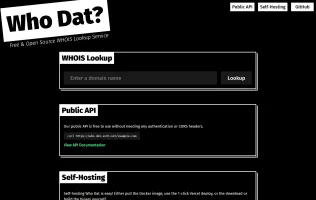
What is who-dat?
who-dat is a free and open-source domain lookup service that queries RDAP first and falls back to WHOIS, returning normalized JSON for any domain. It discovers the correct RDAP server per TLD via IANA bootstrap, parses nested jCard contact data, and provides a single consistent API response. The service includes a lightweight web interface built with Alpine.js, API documentation, health check endpoint, in-memory caching, optional rate limiting, and optional API key authentication. It can be self-hosted via Docker (lissy93/who-dat), pre-built binaries for multiple architectures, 1-click Vercel deployment, or built from source with Go. The public demo runs at who-dat.as93.net.
Should you self-host who-dat?
who-dat scores 53/100 on selfhost.directory (how scoring works) and ranks #19 of 41 in DNS. It has 323 GitHub stars.
There was no stable release in the past 12 months, so check the repository's recent activity before you rely on it.
Setup is easy: most people get it running in one sitting. An official Docker image is available. It is MIT-licensed and written mostly in Go.
Its closest alternative on selfhost.directory is Pi-hole (87/100, 61 522 stars). It scores higher overall, so compare the two before you pick. See who-dat vs Pi-hole side by side.
Features
- API Key Authentication
- Bulk Domain Lookup
- DNSSEC Information
- Health check endpoint
- IANA Bootstrap Discovery
- In-memory caching
- jCard Contact Parsing
- No CORS Restrictions
- Normalized JSON Output
- Rate Limiting
- Raw Response Option
- RDAP Lookup
- Web Interface
- Whois Lookup
who-dat README
More in DNS
 adguard-buddySelf-hosted dashboard for monitoring and synchronizing multiple AdGuard Home servers with merged query logs, statistics, and drift detection.
 AdGuard HomeSelf-hosted open-source DNS server blocking ads/trackers network-wide. Supports encrypted DNS, parental controls, safe search, per-client config, DHCP.
 AdGuardHome-SyncSelf-hosted AdGuard Home config synchronizer: mirrors filters, DNS rewrites, DHCP, clients and settings to replicas, with a web dashboard, API and Prometheus metrics.
 autoxposeSelf-hosted open-source tool that auto-creates DNS records and configures reverse proxies with SSL for Docker containers using labels.
 blockyFast and lightweight DNS proxy as ad-blocker for local network with many features
 blocky-lists-updaterSelf-hosted companion for blocky DNS that downloads, merges, and serves blocklists via static file server, then triggers blocky to refresh without restart.
 cloudflare-ddnsSelf-hosted Dynamic DNS client that updates Cloudflare DNS records with your public IP for custom domain access without a static IP.
 cloudflare-dns-failoverSelf-hosted Go daemon that monitors server health and updates Cloudflare DNS A records to the first responsive IP for high availability.
 cloudflare-verified-ddnsSelf-hosted Cloudflare DDNS updater verifying DNS via DoH, adaptive polling, detailed telemetry. Python 3.13+, minimal Docker image.
 cobblerCobbler is an open-source, self-hosted Linux provisioning server for PXE network installs that can also manage DHCP, DNS, TFTP boot files and yum repo mirroring.
 corednsSelf-hosted, open-source DNS server and forwarder built from chained plugins: DoT/DoH/DoQ, DNSSEC, caching, and Kubernetes or etcd service discovery.
 d2c.shd2c.sh is a self-hosted, open-source Bash script that keeps Cloudflare A and AAAA records in sync with your public IP, with optional Gotify and Telegram notifications.
0 comments