
Self-host pneumaticworkflow
v7.3.2AI-powered workflow automation with human-in-the-loop
- Stars
- 319
- RAM
- 8GB (recommended 16GB)
- Storage
- 50GB (recommended 100GB)
- Ports
- 80 (HTTP frontend via nginx), 443 (HTTPS frontend via nginx), 8001 (Backend API (also proxied via nginx))
- Requires
- PostgreSQL, RabbitMQ, Redis
pneumaticworkflow/pneumatic-backend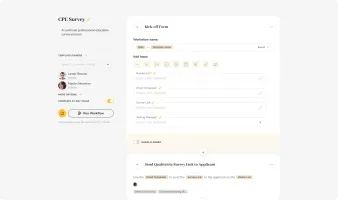
What is pneumaticworkflow?
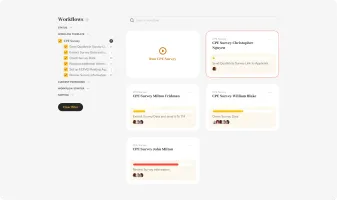
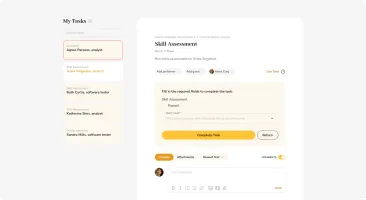
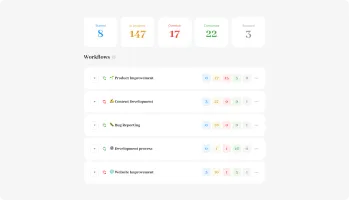
Pneumatic is a workflow management system that lets teams design, run, and optimize business processes through reusable templates. Users create workflow templates defining steps, assignees, deadlines, and conditional logic, then launch multiple workflow instances from each template. Each team member gets a personal task bucket to work through efficiently. The platform includes an AI-powered workflow builder that generates templates from natural language descriptions, shareable kick-off forms for external participants, guest performer access, urgent prioritization, workflow variables for data passing, video embeds in tasks, activity highlights, dashboards, comments with mentions, and a WYSIWYG editor. It runs via Docker Compose with PostgreSQL, Redis, RabbitMQ, and nginx, exposing ports 80, 443, and 8001. The self-hosted edition supports SSO via Okta or Auth0, OAuth via Google and Microsoft, and configurable email providers. A free cloud tier offers unlimited users and workflows; enterprise engagements add on-premise deployment, custom integrations, SLAs, private code branches, and dedicated support. Licensed Apache 2.0.
Should you self-host pneumaticworkflow?
pneumaticworkflow scores 48/100 on selfhost.directory (how scoring works) and ranks #19 of 32 in Workflow Automation. It has 319 GitHub stars.
It shipped 18 stable releases in the past year. The latest, v7.3.2, came out on 1 October 2026. New versions land roughly every 7 days.
Setup is advanced: plan for several services and some ongoing maintenance. An official Docker image is available. It is Apache-2.0-licensed and written mostly in Python.
Its closest alternative on selfhost.directory is Leantime (74/100, 11 917 stars). It scores higher overall, so compare the two before you pick. See pneumaticworkflow vs Leantime side by side.
Features
- Activity Highlights
- AI-Powered Workflow Builder
- Automated Workflow Tracking
- Comments and mentions
- Conditional Workflow Logic
- Dashboards
- Guest Performers
- Multi-Workflow Management
- Shareable Kick-off Forms
- Task Buckets
- Urgent Prioritization
- Video Embeds in Tasks
- Workflow Templates
- Workflow Variables
- WYSIWYG Editor
pneumaticworkflow README
FAQ
How does human-in-the-loop work?
Workflows alternate between AI tasks (processing data, generating summaries, making recommendations) and human tasks (review, approve, escalate). Each step has full audit trail and conditional logic.
What AI models do you support?
Pneumatic integrates with any OpenAI-compatible API including local LLM deployments, Azure OpenAI, Anthropic, and other providers. Custom ML pipelines and internal AI services are also supported.
Do you support on-premise deployment?
Yes, Pneumatic can be deployed on your own servers, private cloud, or any infrastructure. The core engine is open source (Apache 2.0) so your team can audit the code before deployment.
Can I start with Free and upgrade to Enterprise later?
Yes, many customers start with Free to explore the platform, then engage the Enterprise team when ready for custom AI workflows or on-premise deployment. Data and workflows transfer seamlessly.
What's included in the Enterprise engagement?
A dedicated implementation team handles process discovery, workflow design, custom integrations, LLM connectivity, on-premise deployment, team training, and ongoing support. Typical go-live in 4-8 weeks.
Is the Free plan really free forever?
Yes, the Free plan has no time limits, no credit card required, and no per-user charges. Unlimited users and workflows on the managed cloud.
More in AI Automation
 Postiz📨 The ultimate agentic social media scheduling tool 🤖
 QuickVoiceQuickVoice is an open-source, self-hostable platform for building AI phone agents with LiveKit, Twilio, and Telnyx integrations.
 reflyThe first open-source agent skills builder. Define skills by vibe workflow, run on Claude Code, Cursor, Codex & more. Build Clawdbot 🦞· APIs for Lovable · Bots for Slack & Lark/Feishu · Skills are infrastructure, not prompts.
 rivetRivet is an open-source, self-hostable orchestrator for AI agents, workflows, and sandboxes as lightweight Actors with SQLite and realtime.
 rocketplaneIOSelf-hosted AI SRE for Kubernetes: eBPF zero-instrumentation traces, logs, metrics, live service map, plus MCP for AI agents to safely remediate.
 runeRune is a self-hosted, open-source workflow automation platform with a visual drag-and-drop interface, AI assistants, secure credentials, and team collaboration.
 rustyhandOpen-source Agent OS in Rust running autonomous agents on schedules with 72 tools, 26 LLM providers, and Telegram/Discord/Slack channels. Single ~32MB binary.
 Self-Hosted AI StackOpen-source Docker Compose project running local AI models, chat, documents, voice, and MCP tools on your server with optional HTTPS and GPU acceleration.
 SpacebotSpacebot is a self-hosted AI agent system for teams. Its multi-threaded architecture handles concurrent conversations across Discord, Slack, Telegram without blocking.
 Superior Trade Trading TerminalAI-powered trading terminal for Hyperliquid where you sketch on charts and an agent creates validated Freqtrade strategies. Open-source under Apache-2.0.
 superlogSuperlog is a self-hosted, open-core observability platform using AI agents to triage alerts, investigate incidents, and automate engineering tasks.
 superplaneAn open-source AI software factory that turns routine backlog items into review-ready pull requests. Self-host with Docker on a VM, or Terraform on Kubernetes.
0 comments