
Self-host NetsGo
v0.1.17Intranet tunneling platform with built-in web console
- Stars
- 245
- Port
- 9527 (Web console, API, client control channel, and data channel)
zsio/netsgo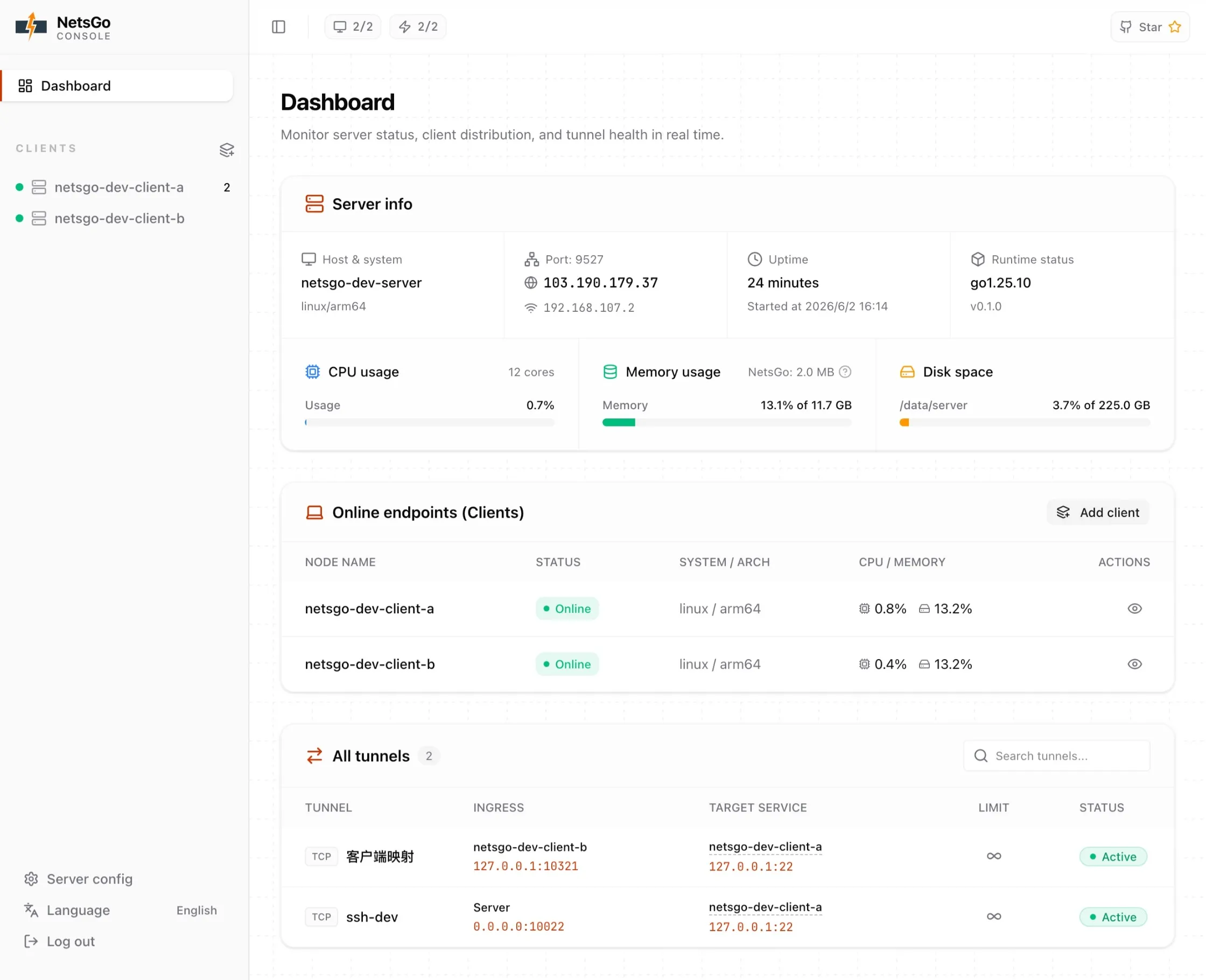
What is NetsGo?
NetsGo packages a web dashboard, REST API, client access, and network tunnels into one executable. It lets you publish private web services, remote shell access, databases, game servers, and additional TCP or UDP services from behind NAT or firewalls. The server runs on a public host while clients connect from internal networks using a generated key. Tunnels are created and managed through the web console, supporting HTTP with custom domains, TCP, UDP, and client-to-client topologies. Deployment options include Docker Compose, a Linux systemd service via an install script, or running the binary directly. The default console port is 9527, with additional ports mapped for TCP and UDP tunnels as needed. Authentication uses an admin username and password for the console plus client keys for node connections. The project is licensed under Apache-2.0 and written in Go with a React frontend.
Should you self-host NetsGo?
NetsGo scores 46/100 on selfhost.directory (how scoring works) and ranks #23 of 31 in Networking. It has 245 GitHub stars.
It shipped 2 stable releases in the past year. The latest, v0.1.17, came out on 7 September 2026. New versions land roughly every 3 weeks.
Setup is moderate: expect some configuration beyond a single command. An official Docker image is available. It is Apache-2.0-licensed and written mostly in Go.
Its closest alternative on selfhost.directory is Webhook.site (66/100, 6 786 stars). It scores higher overall, so compare the two before you pick. See NetsGo vs Webhook.site side by side.
Features
- Activity timelineAdded in v0.1.16
- Auto Reconnect
- Client Management
- Client-to-Client Tunnels
- HTTP Tunnels
- Multi-user supportAdded in v0.1.16
- Rate Limiting
- REST API
- Single Port Access
- TCP Tunnels
- Traffic statistics
- Tunnel CRUD via Web/API
- UDP Tunnels
- Web Console
NetsGo README
More in Proxy
 nginx-proxySelf-hosted Nginx reverse proxy for Docker: this open-source container writes vhost configs from running containers and reloads them, with HTTPS and load balancing.
 Nova ServerSelf-hosted proxy running Xray, sing-box, AmneziaWG behind one port with trilingual admin panel, multi-user management, Iran bridge tunnels, Telegram bot.
 npsSelf-hosted, open-source Go NAT-traversal proxy: pair the nps server with npc clients to expose tcp, udp, domain, socks5 and p2p services behind private networks.
 OlahA self-hosted lightweight Hugging Face mirror service that caches models, datasets, and spaces at the file block level to speed up downloads and save bandwidth.
 ollaSelf-hosted LLM proxy that routes requests across inference backends with model discovery, failover, and production reliability.
 PasteGuardSelf-hosted privacy proxy that masks personal data and secrets before requests reach AI providers like OpenAI and Anthropic.
 PgDogSelf-hosted, open-source PostgreSQL proxy written in Rust: transaction-mode connection pooling, read/write load balancing with health checks, and automatic sharding.
 pia-tunSelf-hosted Docker container for PIA WireGuard VPN with strict killswitch, port forwarding, SOCKS5/HTTP proxies, and port syncing for torrent clients.
 PipeGatePipeGate is an open-source, self-hosted HTTP tunneling proxy that exposes local servers via WebSocket — a lightweight ngrok alternative with no cloud dependencies.
- PrivoxyPrivoxy is a non-caching web proxy with advanced filtering capabilities for enhancing privacy, modifying web page data and HTTP headers, controlling access, and removing ads and other obnoxious Internet content.
 s3-encryption-gatewaySelf-hosted transparent HTTP proxy adding client-side encryption to any S3-compatible storage without code changes, with envelope encryption via local or external KMS.
 ShadowsocksOpen-source, self-hosted Shadowsocks proxy in pure C (the renamed shadowsocks-libev) with AEAD and SIP003 obfuscation, static builds and Docker images.
0 comments