
Self-host MooshieUI
v2.3.26Beginner-friendly ComfyUI front-end for images, video, music
- Stars
- 220
- Storage
- 5–10 GB for the runtime, plus space for model downloads
- Port
- 3200 (MooshieUI web UI)
ghcr.io/mooshieblob1/mooshieui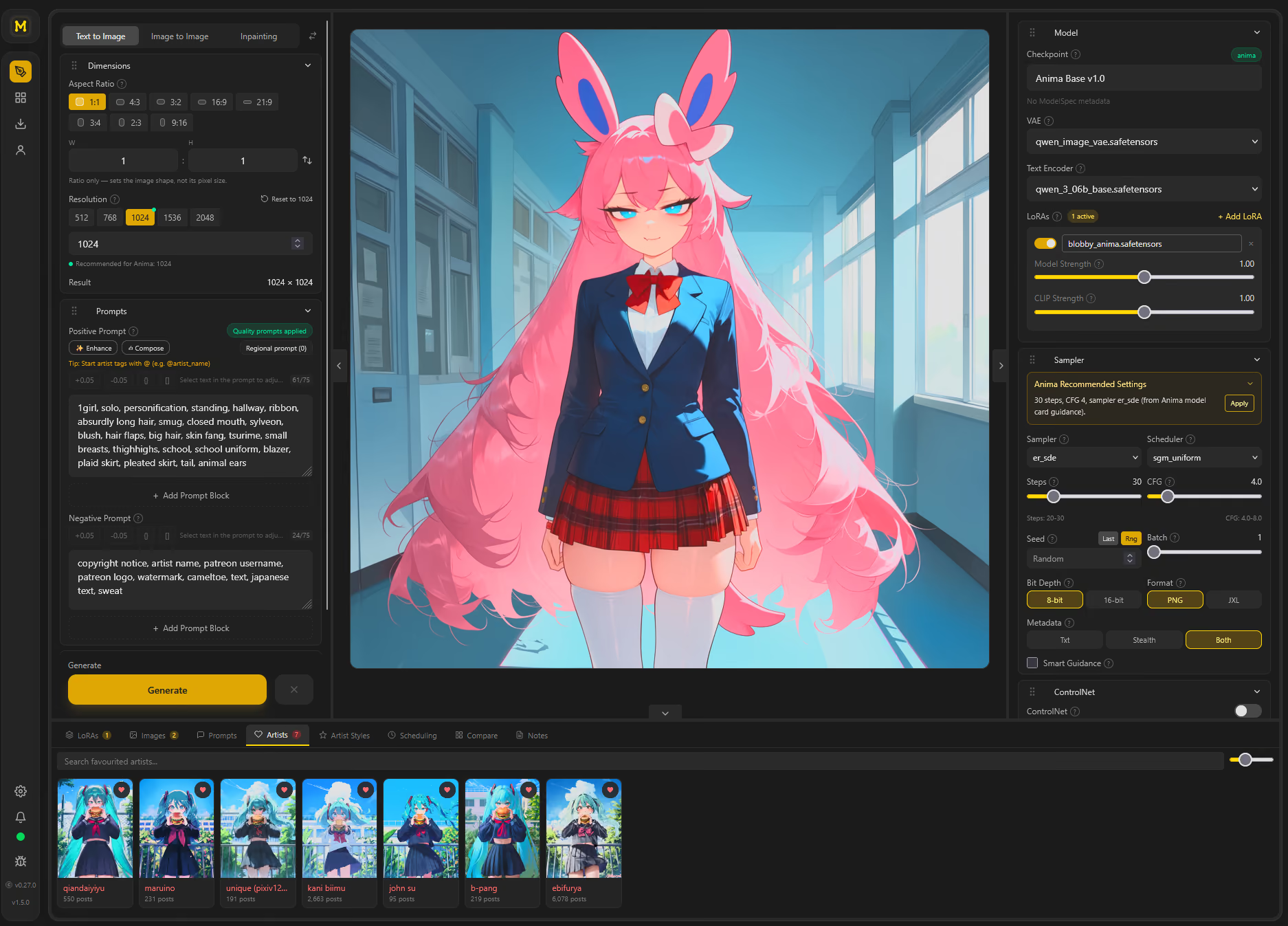
What is MooshieUI?
MooshieUI provides a guided interface for ComfyUI, letting users create images, videos, and music without working with node graphs. It runs as a native desktop application on major desktop platforms, or as a headless web server reachable from any device on the local network — including phones via a dedicated mobile layout. The desktop installer automatically fetches ComfyUI, Python, and PyTorch. Capabilities cover text-to-image, image-to-image, inpainting with a built-in mask editor, video generation using MiniMax H3, music creation with YuE2, and optional NovelAI API support. Additional features include pause-and-continue sampling, automatic model detection and download, LoRA stacking with per-LoRA strength controls, artist style presets, tiled diffusion upscaling, face correction, ControlNet and IP-Adapter style transfer, XYZ comparison grids, a persistent gallery with metadata handling, multi-user roles with isolated galleries, and 12 interface languages. The software connects to ComfyUI (local or remote), NovelAI, CivitAI, Hugging Face, Danbooru/Gelbooru tag databases, Animadex, and embeds the Photopea editor. Authentication uses Argon2id password hashing and bearer tokens for API access. Licensed under AGPL-3.0.
Should you self-host MooshieUI?
MooshieUI scores 50/100 on selfhost.directory (how scoring works) and ranks #50 of 125 in AI. It has 220 GitHub stars.
It shipped 9 stable releases in the past year. The latest, v2.3.26, came out on 21 October 2026. New versions land roughly every 2 days.
Setup is moderate: expect some configuration beyond a single command. An official Docker image is available. It is AGPL-3.0-licensed and written mostly in Typescript.
Its closest alternative on selfhost.directory is ComfyUI (93/100, 143 752 stars). It scores higher overall, so compare the two before you pick. See MooshieUI vs ComfyUI side by side.
Features
- Artist styles and prompt chunks
- Compare Grid (XYZ parameter sweeps)
- ControlNet and style transfer
- Face fix and detailing
- Image-to-image generation
- Inpainting with canvas editor
- LoRA stacking with independent strengths
- Model auto-detection and download
- Multi-user roles and per-user galleries
- Music Generation
- Pause and continue sampling
- Persistent gallery with metadata
- Text-to-image generation
- Tiled diffusion upscaling
- Video Generation
MooshieUI README
FAQ
Where are the contributor/build docs?
In the repo: README.md, push-instructions.md, and CHANGELOG.md.
How do I report a bug?
Click the bug icon in the left sidebar to open 'Report a problem', add a note and submit — your app version, OS, and recent logs are bundled and filed as a GitHub issue automatically, no GitHub account required.
Why did an image or video disappear from the gallery?
Check Manual save mode and the gallery retention setting. Manual mode requires Save to Gallery; otherwise the result is only held for review. User/moderator gallery items expire after seven days by default unless Never auto-delete is enabled; admin/root-gallery files are exempt.
Can I pause a generation and change its ending?
Yes, for ComfyUI Text to Image. Set Pause at step, inspect the preview, adjust supported controls or paint a masked correction, then continue. Pauses are session state and do not apply to NovelAI.
Can I use NovelAI on a shared server?
Yes. Regular users and moderators add their own key in Settings > NovelAI. Their requests never fall back to the host's key. Admin accounts use the owner's key.
Generation fails with a quantization format error. What now?
Check both the ComfyUI version and the loader. Update ComfyUI to the app's pinned version. Supported W8A8/ConvRot models need the optional INT8-Fast loader enabled and installed; GGUF models use their own loader.
A model is not detected correctly. Why?
Detection combines hashes, sidecar/model metadata, safetensors or GGUF structure, and filename hints. Check the supported families, companion encoders/VAEs, and the family override in the model picker.
ComfyUI is on a cloud GPU. Can I still use the desktop app?
Yes, as a thin client against a remote ComfyUI. See the remote/cloud section of the Installation guide.
Can I run this on my phone?
Yes. Run MooshieUI in server mode and open it in your phone's browser; there is a dedicated mobile layout.
How do I queue many variations at once?
Use a Wildcard (in order) preset (the Generate button can queue the whole ordered run), or use the Compare Grid for explicit per-cell parameter sweeps.
How do I recover the prompt/settings from an image I made earlier?
Drag or paste the PNG back into MooshieUI — it reads embedded metadata and fills in your settings. If the image has no embedded metadata, use image interrogation to reverse-engineer tags.
Where do I put wildcards and what is the prompt syntax?
Use {red|blue|green} for inline choices with weights and nesting supported. For reusable lists, use Prompt Chunks (Prompt Presets) — create a chunk with each choice on its own line, then activate with Wildcard (random) or Wildcard (in order) mode, or drop @[Chunk Name] in your prompt.
More in AI
 MovieClawMovieClaw is a self-hosted AI media server that consolidates the *arr stack and media playback into one container with native apps and an AI agent.
 multicaSelf-hosted platform that makes coding agents work like teammates — assign issues, track progress, reuse skills, and monitor runtimes in one workspace.
 MxPageSelf-hosted AI workspace for e-commerce product images and Xiaohongshu posts. Runs locally on Windows/macOS via Electron or from source with your own AI API keys.
 my-virtual-officeSelf-hosted 2D workspace visualizing AI agents in a retro office. Integrates OpenClaw, Hermes, Codex, Claude Code. Free demo, $9.99 license for premium.
 NadirClawOpen-source LLM router & AI cost optimizer. Routes simple prompts to cheap/local models, complex ones to premium — automatically. Drop-in OpenAI-compatible proxy for Claude Code, Codex, Cursor, OpenClaw. Saves 40-70% on AI API costs. Self-hosted, no middleman.
 NewsPrismSelf-hosted open-source news tool collecting from 46 sources in 12 languages, grouping by event with LLM clustering, producing daily Chinese digests.
 next-ai-draw-ioOpen-source, self-hosted draw.io canvas where an AI turns chat prompts into diagrams you can edit, version and export, across 25 model providers.
 NextChat✨ Zero-config AI chat assistant. No API key needed — sign up and instantly chat with GPT-5, Claude 4, Gemini 2.5, DeepSeek & 100+ top models. Pay-as-you-go saves you more. Available on Web, iOS, macOS, Android, Linux, Windows.
 nexusSelf-hosted AI router unifying MCP servers and LLM providers (OpenAI, Anthropic, Google, Bedrock) with OAuth2, rate limiting, and OpenTelemetry.
 NightingaleSelf-hosted karaoke software that converts your music collection into sing-along tracks using neural networks for vocal removal, lyric sync, and real-time pitch grading.
 NoobotRun your own AI agent workspace with private user spaces, tool calling, MCP, model routing, sandboxed code execution, multi-agent workflows, and 3D character animation.
 NornicDBSelf-hosted, open-source graph database speaking Neo4j Bolt/Cypher and Qdrant-style gRPC, uniting HNSW vector search, hybrid retrieval, and MVCC historical reads.
0 comments