
Self-host MoodleBox
v4.12.0Offline Moodle server and Wi-Fi hotspot on Raspberry Pi
- Stars
- 144
- CPU
- Raspberry Pi Zero 2 W, 3A+, 3B, 3B+, 4B, 400 or 5
- Storage
- microSD card 32 GB or more recommended
What is MoodleBox?
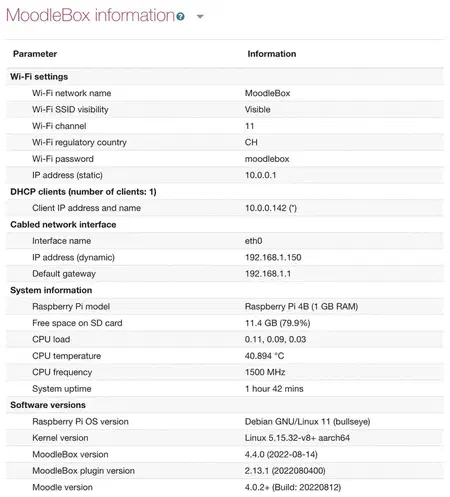
MoodleBox packages a full Moodle learning management system with a wireless access point into a Raspberry Pi disk image. It targets educators and trainers who need a portable, offline-capable learning platform for classrooms, workshops, or areas with poor connectivity. The system creates its own Wi-Fi network (supporting up to 20 concurrent devices) and serves Moodle at http://moodlebox.home. Users install it by flashing the official image via Raspberry Pi Imager, or advanced users can build a custom image using the provided Ansible playbooks. MoodleBox includes a web-based dashboard for administration (changing passwords, Wi-Fi settings, system updates) and supports installing additional Moodle themes and plugins. The project is licensed under AGPL-3.0 and maintained by Nicolas Martignoni in Switzerland.
Should you self-host MoodleBox?
MoodleBox scores 50/100 on selfhost.directory (how scoring works) and ranks #11 of 14 in Learning Management System. It has 144 GitHub stars.
It shipped 4 stable releases in the past year. The latest, v4.12.0, came out on 3 October 2026.
Setup is moderate: expect some configuration beyond a single command. It is AGPL-3.0-licensed and written mostly in Jinja.
Its closest alternative on selfhost.directory is Moodle (71/100). It scores higher overall, so compare the two before you pick. See MoodleBox vs Moodle side by side.
Features
- Customizable Image Build
- Internet Sharing
- Moodle Plugin Support
- Multi-language Support
- Offline Moodle LMS
- Web Administration Dashboard
- Wi-Fi Access Point
MoodleBox README
FAQ
Which organization manages the MoodleBox project?
MoodleBox is a volunteer, non-profit project led by Nicolas Martignoni in his spare time.
Some users cannot access MoodleBox while others can. What can be done?
This occurs on some smartphones when mobile data is enabled. Disable mobile data on the device to fix it.
How do I reset MoodleBox's main password?
Log into Moodle as admin, go to Site Administration > Server > MoodleBox, and change the main password there.
I connected a keyboard and monitor but see no graphical interface. What's happening?
MoodleBox is a headless server. Access it by connecting a device to its Wi-Fi and opening http://moodlebox.home in a browser.
How much data can I store on a MoodleBox?
Storage depends on the SD card size. A 32 GB or larger card is recommended, though smaller cards work. There is no maximum limit.
How many Wi-Fi devices can MoodleBox handle at the same time?
MoodleBox supports up to 20 simultaneous Wi-Fi connections. More devices may cause instability.
What Raspberry Pi models are supported?
MoodleBox works with Raspberry Pi Zero 2 W, 3A+, 3B, 3B+, 4B, 400, and 5.
Where can I buy a MoodleBox?
MoodleBox does not sell hardware. The required Raspberry Pi and accessories can be purchased from any electronics retailer.
More in Learning Management System
 openeclassOpen eClass is a self-hosted, open-source LMS by GUnet for distance education. Supports SCORM 1.2, LTI 1.1/1.3, LDAP, and native iOS/Android apps.
 OpenOLATSelf-hosted, open-source LMS for universities, schools and companies: course authoring, e-testing, learning paths, scheduling and web conferencing as a Tomcat app.
 OpenTutorOpenTutor is a self-hosted, open-source AI learning platform turning uploaded materials into notes, flashcards, quizzes, and an adaptive tutor with 10+ LLM providers.
 RELATERELATE is a self-hosted, open-source LMS built on Django for programming courses with automatic code grading, git-backed content versioning, and flexible access rules.
 SkillGoblinSelf-hosted video course platform in one Docker container with SQLite. Add video folders, track progress, no cloud. AGPL-3.0.
 BloomSelf-hosted AI tutor creating personalized syllabi and adaptive lessons from your highlights and feedback — based on Bloom's 2-Sigma tutoring research.
 Canvas LMSSelf-hosted, open-source learning management system from Instructure, used by colleges, universities and K-12 schools; AGPLv3, run on Rails with PostgreSQL and Redis.
 Chamilo LMSChamilo LMS is a self-hosted, open-source e-learning platform for 41M+ learners with course management, SCORM/LTI/xAPI, AI grading, and Symfony/VueJS architecture.
 classroomioSelf-hosted, open-source LMS for SaaS companies to create courses, manage cohorts, issue certificates, and run branded academies with AI course creation and an AI tutor.
 CohortHarborCohortHarbor is a self-hosted, open-source employee onboarding platform with policy management, online learning, exams, and email automation. Built with Next.js & SQLite.
 courselitA self-hosted LMS and course platform: open-source tooling to author lessons, sell digital downloads, run communities and publish blogs via a no-code builder.
 DigistepsSelf-hosted, open-source (AGPLv3) PHP app for building step-by-step learning paths: locked steps, learner file/audio submissions, star rubric grading.
0 comments