
Self-host EverShelf
v1.16.16Smart pantry manager with AI-powered expiry tracking
- Stars
- 148
- RAM
- 256 MB
- Port
- 80 (HTTP web server inside container)
- Requires
- PHP, SQLite, Web server (Apache/Nginx)
ghcr.io/dadaloop82/evershelf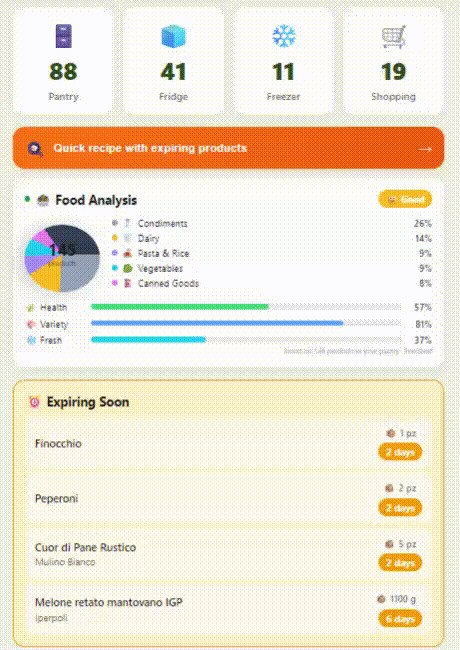
What is EverShelf?
EverShelf is a self-hosted pantry management application designed for home users who want to reduce food waste and organize their kitchen inventory. It runs as a PHP web application with a SQLite database, accessible via any browser and installable as a Progressive Web App (PWA) on mobile devices. Core capabilities include barcode scanning via camera, AI-powered product identification and expiry OCR using Gemini, OpenAI, or local Llama models, smart shopping lists with anti-waste quantity suggestions and optional Bring! sync, a cooking mode with step-by-step instructions and text-to-speech, calendar feeds (ICS/WebCal) for expiry alerts, and push notifications via ntfy, webhook, or Home Assistant. The Android Kiosk companion app turns a tablet into a dedicated kitchen display with scale integration for hands-free quantity entry. Installation is simplest via Docker Compose (pre-built multi-arch images on GHCR), with a Community Applications template for Unraid and a manual bare-metal option. The project is MIT-licensed, free forever with an optional one-time donation dialog, and has no paywalled features.
Should you self-host EverShelf?
EverShelf scores 50/100 on selfhost.directory (how scoring works) and ranks #6 of 11 in Food & Agriculture. It has 148 GitHub stars.
It shipped 10 stable releases in the past year. The latest, v1.16.16, came out on 25 October 2026.
Setup is moderate: expect some configuration beyond a single command. An official Docker image is available. It is MIT-licensed and written mostly in PHP.
Its closest alternative on selfhost.directory is Open Food Facts (65/100, 1 195 stars). It scores higher overall, so compare the two before you pick. See EverShelf vs Open Food Facts side by side.
Features
- AI product identification
- Android Kiosk mode
- Automated daily backups
- Calendar feed (ICS/WebCal)
- Cooking Mode
- Custom product tags
- Inventory Management
- Multi-language Support
- Product variants (parent/child)
- Progressive Web App (PWA)
- Push Notifications
- Quick stocktake / audit mode
- Receipt OCR
- REST API with pairing authentication
- Smart shopping lists
EverShelf README
FAQ
App is stuck in kiosk mode after a crash
Restart the device. Screen pinning is released on reboot.
Exit button (✕) is not visible in kiosk mode
Three buttons (exit, refresh, settings) are always in the kiosk header overlay. If page failed to load, tap refresh first. If nothing visible, restart the device.
Kiosk app update fails
Enable "Install from unknown sources" for EverShelf Kiosk in Android Settings. CI must publish with stable KIOSK_KEYSTORE_* secrets. Force-stop app, clear data, relaunch update flow if persistent. Free up storage if needed.
Setup wizard can't find my server
Ensure tablet and server are on the same Wi-Fi. Try entering the URL manually. Check server responds on expected port (80/443/8080/8443).
Bluetooth scale not appearing in the gateway app
Wake up the scale (step on it or press its button). Ensure Bluetooth and Location permissions are granted to the gateway app (Location required by Android for BLE scanning). Restart the gateway app.
Scale shows weight but form doesn't auto-fill
Auto-fill only triggers for products with unit g or ml. Tap "⚖️ Read Scale" first to activate the scale modal. Weight must stabilize (within 10g) for the countdown to start.
Scale readings don't appear in EverShelf
Confirm the gateway app is running and shows the WebSocket URL. Ensure the Gateway URL in EverShelf Settings matches exactly. Both devices must be on the same network.
Items aren't syncing to Bring!
Verify credentials at getbring.com and check PHP error log for Bring! API rate-limit errors.
The app asks for an API token / a pairing code
On first run with API_TOKEN set, the UI shows a one-time pairing code. Find it in Settings → System → Security on a paired device, or in server logs (grep -i "pairing code" logs/evershelf_*.log).
"Permission denied" error for the data directory
Ensure the data/ directory is writable by the web server user (www-data for Apache, nginx for Nginx). Run chmod 755 data/ and chown -R www-data:www-data data/ if needed.
Camera doesn't work / barcode scanner won't open
Camera access requires HTTPS on modern browsers. Use a valid TLS certificate or configure a self-signed certificate and install the CA on client devices.
More in Food & Agriculture
 farmOSSelf-hosted, open-source farm record keeping web app built on Drupal: map fields, track assets and logs, collect sensor data, and use a JSON:API.
 FoodCoopShopFoodCoopShop is a self-hosted, open-source web app for food co-ops to manage orders, products, and cashless payments with CakePHP/MySQL.
 FoodsoftOpen-source web app for food co-ops: manage products, orders, finances, and work shifts — run it yourself with Docker or Rails.
 fork.recipesSelf-hosted Django recipe manager with AI tools for scraping, generating, translating, and narrating recipes.
 groceriesOpen-source self-hosted grocery list app with reliable real-time sync, offline support, multiple lists, store aisle sorting, and Tandoor recipe import.
 HortusFoxSelf-hosted, open-source plant manager with tasks, inventory, calendar, weather forecasts, and collaborative chat for houseplant enthusiasts.
 KoffanFree self-hosted shopping list for families. Runs in ~2.5 MB RAM, offline PWA, real-time sync, multi-household support.
 OpenEatsOpenEats is a self-hosted, open-source recipe manager for personal collections with grocery lists, search, and serving adjustments.
 Open Food FactsSelf-hosted, open-source food product database with REST API, barcode scanning, Nutri-Score, NOVA, Eco-Score, Green-Score. Runs via Docker Compose.
 OpenOlitorOpenOlitor is a self-hosted, open-source platform for CSA groups to manage members, deliveries, invoicing, and a member portal under AGPL-3.0.
 openolitor-serverOpenOlitor Server is the self-hosted backend for the OpenOlitor CSA platform, providing multi-tenant REST APIs for members, deliveries, and invoicing.
 pantry-hostPantry Host is a self-hosted, open-source PWA for recipes, pantry, cookware, and grocery lists — runs on your hardware with offline support.
0 comments